
1. تعارف
The NIIMBOT D11H is a compact, portable, and inkless thermal label printer designed for various labeling needs. It connects wirelessly via Bluetooth to your smartphone, allowing for easy creation and printing of high-resolution labels. This manual provides essential information for setting up, operating, and maintaining your device.
2. پیکیج کے مشمولات
تصدیق کریں کہ نیچے دی گئی تمام اشیاء آپ کے پیکیج میں شامل ہیں:
- 1x NIIMBOT D11H Label Printer
- 1x Label Roll (pre-installed or included)
- 1x USB Type-C چارجنگ کیبل
- 1x User Manual (Japanese)

3. سیٹ اپ
3.1. لیبل پیپر لوڈ ہو رہا ہے۔
- Slide the cover button on the side of the printer to open the paper compartment.
- Insert the label roll into the compartment with the labels facing upwards, ensuring it is correctly aligned.
- Pull a small portion of the label paper out through the printer's exit slot.
- کور کو محفوظ طریقے سے بند کریں۔

3.2. پاورنگ آن۔
Press and hold the power button located on the front of the printer for 3 seconds until the indicator light turns green, indicating the device is powered on.
3.3. ایپ ڈاؤن لوڈ اور بلوٹوتھ کنکشن
- Download the "NIIMBOT" app from the App Store (iOS) or Google Play Store (Android).
- اپنے اسمارٹ فون پر بلوٹوتھ کو فعال کریں۔
- Open the NIIMBOT app and tap on the "Connect" or "Printer Connection" option. The app will automatically scan for nearby devices.
- Select your NIIMBOT D11H printer from the list of available devices to establish a Bluetooth connection.

4. آپریٹنگ ہدایات
4.1 لیبلز بنانا
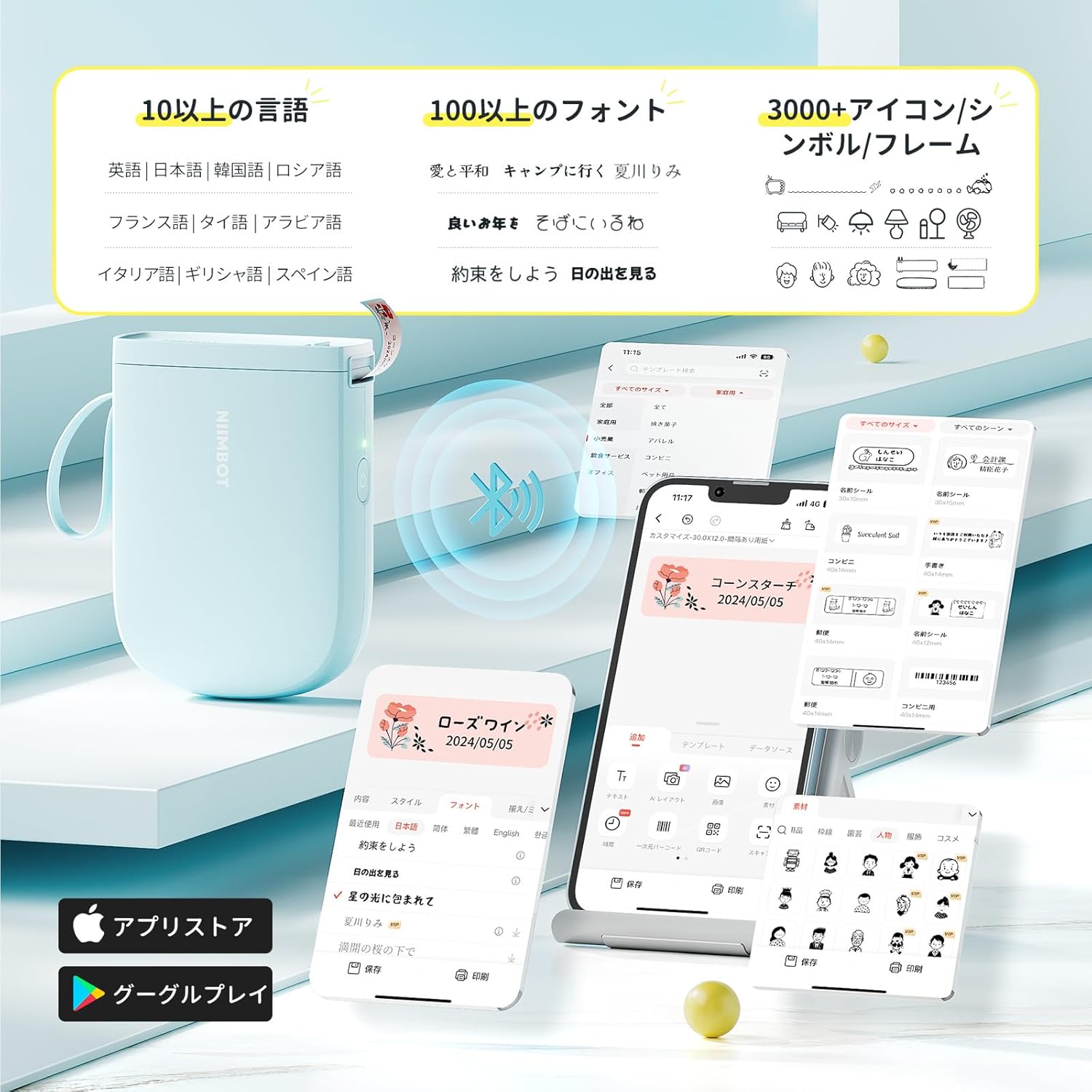
The NIIMBOT app offers a wide range of features for label creation:
- متن ان پٹ: Easily type and customize text with over 20 fonts and various styles.
- ٹیمپلیٹس: Utilize automatic template matching and thousands of image elements for quick design.
- Image Recognition: Import images for printing.
- Barcode/QR Code: Generate and print barcodes and QR codes.
- بیچ پرنٹنگ: متعدد لیبلز کو مؤثر طریقے سے پرنٹ کریں۔

4.2. پرنٹنگ لیبلز
Once your label design is complete in the app, tap the "Print" button. You can adjust the number of copies and print density before confirming. The printer will automatically feed and cut the labels.
4.3. ورسٹائل ایپلی کیشنز
The NIIMBOT D11H is suitable for a wide range of uses, including organizing documents, creating name tags, price tags, date reminders for food, and labeling items in the kitchen, office, or warehouse.


5 دیکھ بھال
To ensure optimal performance and longevity of your NIIMBOT D11H label printer, follow these maintenance guidelines:
- صفائی: Regularly clean the print head with a soft, lint-free cloth moistened with alcohol. Ensure the printer is off before cleaning.
- ذخیرہ: پرنٹر کو کسی ٹھنڈی، خشک جگہ پر براہ راست سورج کی روشنی اور انتہائی درجہ حرارت سے دور رکھیں۔
- بیٹری: بیٹری کی صحت کو برقرار رکھنے کے لیے پرنٹر کو باقاعدگی سے چارج کریں، چاہے اکثر استعمال میں نہ ہوں۔
6 خرابیوں کا سراغ لگانا
If you encounter issues with your NIIMBOT D11H, refer to the following common troubleshooting steps:
- پرنٹر منسلک نہیں ہو رہا ہے: Ensure Bluetooth is enabled on your smartphone and the printer is powered on. Try restarting both devices and reconnecting through the app.
- ناقص پرنٹ کوالٹی: Check if the label paper is loaded correctly and is a genuine NIIMBOT thermal label. Clean the print head if necessary. Adjust print density in the app settings.
- کاغذ جام: Open the paper compartment, carefully remove any jammed paper, and reload the label roll correctly.
- پرنٹر جواب نہیں دے رہا ہے: Ensure the battery is charged. If the device is unresponsive, try resetting it by holding the power button for an extended period (e.g., 10-15 seconds).
7. وضاحتیں
| فیچر | تفصیلات |
|---|---|
| برانڈ | NIIMBOT |
| ماڈل کا نام | D11H |
| کنیکٹوٹی ٹیکنالوجی | بلوٹوتھ |
| پرنٹنگ ٹیکنالوجی | تھرمل |
| زیادہ سے زیادہ پرنٹ ریزولوشن (مونوکروم) | 300 ڈی پی آئی |
| زیادہ سے زیادہ پرنٹ کی رفتار (مونوکروم) | 40.0 ملی میٹر فی سیکنڈ |
| زیادہ سے زیادہ میڈیا (کاغذ) کا سائز | 15 ملی میٹر (چوڑائی) |
| مصنوعات کے طول و عرض | 11 x 3 x 7 سینٹی میٹر |
| شے کا وزن | 360 گرام |
| ہم آہنگ آلات | Smartphones (Android & iOS) |
| رنگ | نیلا |
8. وارنٹی اور سپورٹ
For warranty information or technical support, please refer to the official NIIMBOT webسائٹ یا اپنے خوردہ فروش سے رابطہ کریں۔ خریداری کے ثبوت کے طور پر اپنی خریداری کی رسید اپنے پاس رکھیں۔