
1. تعارف
This manual provides essential information for setting up, operating, and maintaining your UMIDIGI G6 5G smartphone. Please read it carefully to ensure optimal performance and longevity of your device.
2. پیکیج کے مشمولات
Upon unboxing your UMIDIGI G6 5G, please verify that all the following items are included:
- UMIDIGI G6 5G اسمارٹ فون
- پاور اڈاپٹر
- USB ٹائپ سی کیبل
- سم ٹرے ایجیکٹر ٹول
- حفاظتی کیس (علاقے کے لحاظ سے مختلف ہو سکتا ہے)
- Pre-applied Screen Protector (may vary by region)
3. آلہ ختمview
The UMIDIGI G6 5G is a feature-rich smartphone designed for modern communication and entertainment. Key components and features are highlighted below.

Image: UMIDIGI G6 5G smartphone highlighting key features.
3.1 جسمانی اجزاء
- ڈسپلے: 6.57-inch 90Hz Eye-Care Large Display with 1616x720 resolution.
- کیمرے: 50MP Ultra-Clear Main Camera, 8MP Front Camera, 5MP Infrared Night Vision Camera.
- بندرگاہیں: USB Type-C for charging and data transfer, 3.5mm headphone jack.
- بٹن: Power button, Volume buttons, Express Key.
- سم ٹرے: Supports Dual SIM cards.

Image: Back of the UMIDIGI G6 5G phone with camera and labels.
3.2. Internal Specifications
- پروسیسر: MediaTek Dimensity 6100+ Octa-core processor (TSMC 6nm process).
- یادداشت: 12 جی بی ریم (6 جی بی فزیکل + 6 جی بی ورچوئل) اور 128 جی بی انٹرنل اسٹوریج، مائیکرو ایس ڈی کارڈ کے ذریعے 1 ٹی بی تک قابل توسیع۔
- بیٹری: 5000mAh Lithium Polymer battery with 10W charging.
- آپریٹنگ سسٹم: اینڈرائیڈ 13.0۔
- کنیکٹوٹی: 5G, 4G, 3G, 2G, Bluetooth 5.3, Wi-Fi, NFC.
- نیویگیشن: GPS, Glonass, Beidou, Galileo.

Image: MediaTek Dimensity 6100+ processor and memory configuration.
4. سیٹ اپ
4.1. سم کارڈز اور مائیکرو ایس ڈی کارڈ داخل کرنا
- اپنے فون کے سائیڈ پر سم کارڈ کی ٹرے تلاش کریں۔
- سم ٹرے ایجیکٹر ٹول کو ٹرے کے آگے چھوٹے سوراخ میں داخل کریں اور ٹرے کے باہر آنے تک آہستہ سے دھکیلیں۔
- اپنے نینو سم کارڈ (ز) اور/یا مائیکرو ایس ڈی کارڈ کو ٹرے پر مقرر کردہ سلاٹس میں رکھیں۔ یقینی بنائیں کہ سونے کے رابطے نیچے کی طرف ہوں۔
- فون میں ٹرے کو احتیاط سے دوبارہ داخل کریں جب تک کہ یہ جگہ پر کلک نہ کر دے۔
نوٹ: If you experience network connectivity issues after inserting the SIM card, navigate to your phone's settings, disable the SIM card slot, and then re-enable it. This may be required after each phone reboot for some carriers.
4.2 ابتدائی پاور آن اور سیٹ اپ
- UMIDIGI لوگو ظاہر ہونے تک پاور بٹن کو دبائے رکھیں۔
- اپنی زبان منتخب کرنے، وائی فائی سے جڑنے، اور اپنا گوگل اکاؤنٹ ترتیب دینے کے لیے آن اسکرین پرامپٹس پر عمل کریں۔
- You can also set up biometric security features like Face Recognition during this process.
5. ڈیوائس کو چلانا
5.1. بنیادی نیویگیشن
The UMIDIGI G6 5G runs on Android 13.0, offering an intuitive user experience. Use gestures or on-screen navigation buttons to move between apps, access settings, and manage notifications.

Image: Android 13 interface on UMIDIGI G6 5G.
5.2. حفاظتی خصوصیات
- چہرے کی پہچان: Unlock your phone using your face. Set this up in سیٹنگز > سیکیورٹی > فیس انلاک.
- Dual Unlock: Refers to multiple unlocking methods available, including face recognition and potentially a fingerprint sensor (if available on your model).
5.3. Express Key
The Express Key is a customizable physical button that can be assigned to quickly launch an app or function. Configure its action in Settings > Smart Assistant > Express Key.
5.4. NFC فعالیت
The UMIDIGI G6 5G supports NFC (Near Field Communication) for contactless payments and quick data sharing. Ensure NFC is enabled in سیٹنگز > منسلک آلات > کنکشن کی ترجیحات > NFC. Hold your phone near a compatible NFC reader to initiate transactions or data transfer.
5.5 GPS نیویگیشن
Utilize the built-in GPS, Glonass, Beidou, and Galileo systems for accurate location tracking and navigation with compatible map applications.
6. کیمرے کی خصوصیات
The UMIDIGI G6 5G is equipped with a versatile camera system to capture your moments.
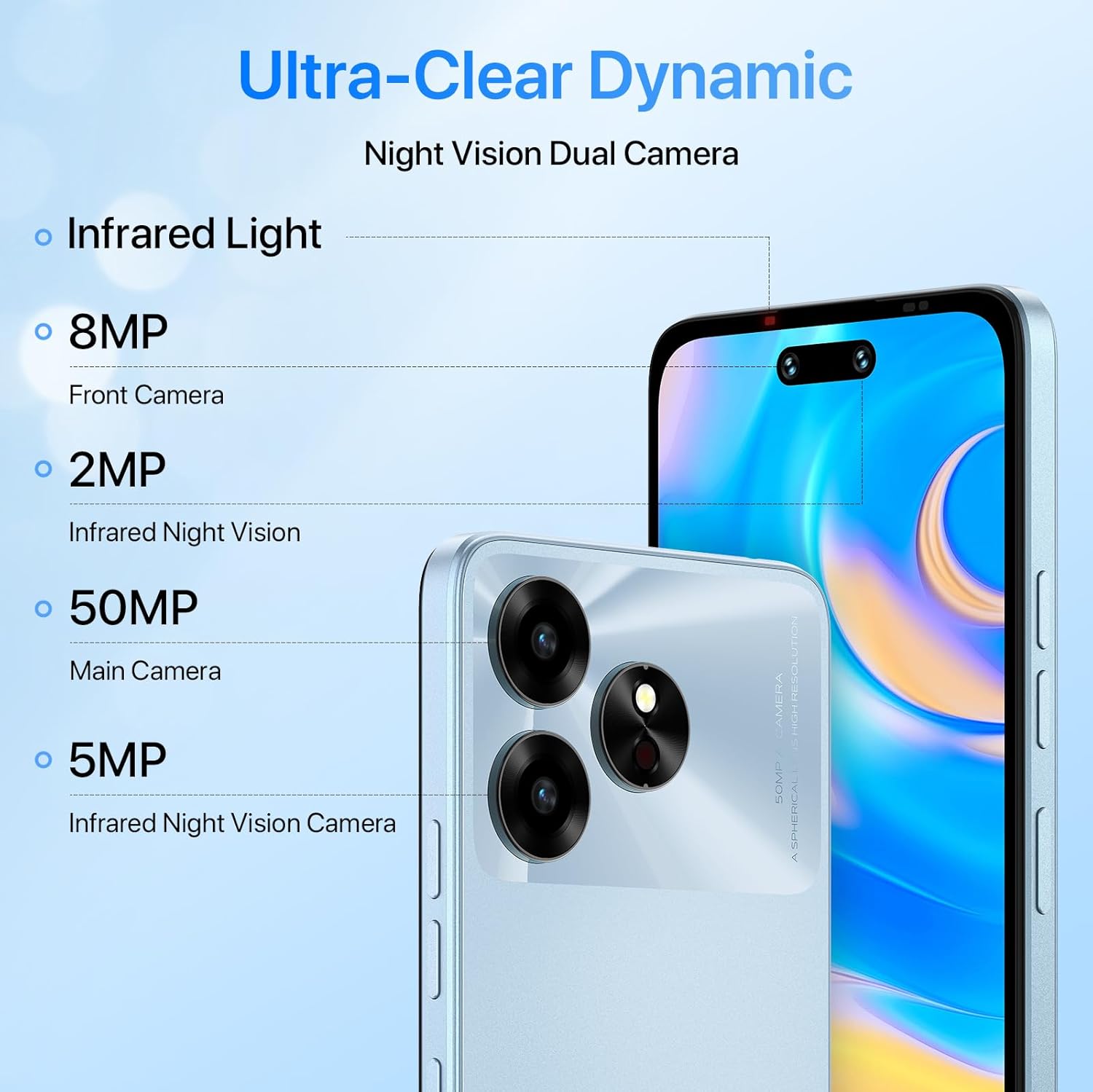
Image: UMIDIGI G6 5G camera specifications.
6.1 کیمرے کی تفصیلات
- مین کیمرہ: 50 Megapixels (MP) Ultra-Clear.
- فرنٹ کیمرہ: 8 Megapixels (MP).
- Infrared Night Vision Camera: 5 Megapixels (MP).
6.2. شوٹنگ کے طریقے
The camera application offers various modes to enhance your photography:
- ایچ ڈی موڈ: For high-definition photos.
- ویڈیو موڈ: For recording videos up to 1080p at 30fps.
- ٹائم لیپس موڈ: To capture sequences over time.
- سپر نائٹ موڈ: بہتر کم روشنی والی فوٹو گرافی کے لیے۔

Image: Camera modes available on the UMIDIGI G6 5G.
7. بیٹری کا انتظام
The UMIDIGI G6 5G is equipped with a 5000mAh battery for extended usage.

Image: UMIDIGI G6 5G 5000mAh battery.
- چارج کرنا: Use the provided 10W power adapter and USB Type-C cable for charging.
- بیٹری کی زندگی: The 5000mAh battery provides up to 20 hours of talk time. Actual battery life may vary based on usage patterns and network conditions.
- اصلاح: To extend battery life, reduce screen brightness, close unused applications, and limit background data usage.
8. کنیکٹیویٹی
Your UMIDIGI G6 5G supports a wide range of connectivity options.

Image: UMIDIGI G6 5G Dual 5G & Global Bands support.
- سیلولر نیٹ ورکس: Supports 2G GSM, 3G WCDMA, 4G LTE (TDD & FDD), and 5G SA/NSA across various global bands.
- وائی فائی: انٹرنیٹ تک رسائی کے لیے وائرلیس نیٹ ورکس سے جڑیں۔
- بلوٹوتھ 5.3: وائرلیس لوازمات جیسے ہیڈ فون اور اسپیکر کو جوڑنے کے لیے۔
- این ایف سی: کنٹیکٹ لیس ادائیگیوں اور ڈیٹا کے تبادلے کے لیے۔
- 3.5 ملی میٹر آڈیو جیک: وائرڈ ہیڈ فونز کے لیے۔
9 دیکھ بھال
9.1۔ اپنے آلے کو صاف کرنا
اپنے فون کی سکرین اور باڈی کو صاف کرنے کے لیے نرم، لنٹ سے پاک کپڑا استعمال کریں۔ سخت کیمیکلز یا کھرچنے والے مواد کے استعمال سے پرہیز کریں۔
9.2. پانی کی مزاحمت
The UMIDIGI G6 5G is rated as waterproof. However, to ensure optimal performance and durability, avoid prolonged immersion in seawater or exposure to high-pressure water jets.
9.3. سافٹ ویئر اپڈیٹس
Regularly check for and install software updates to ensure your device has the latest features, security patches, and performance improvements. You can find updates in ترتیبات > سسٹم > سسٹم اپ ڈیٹ.
10 خرابیوں کا سراغ لگانا
If you encounter issues with your UMIDIGI G6 5G, refer to the following common solutions:
- کوئی نیٹ ورک کنکشن نہیں: If your SIM card is not detected or you cannot connect to the network, try disabling and re-enabling the SIM card in سیٹنگز > نیٹ ورک اور انٹرنیٹ > سم کارڈز. Ensure your SIM card is correctly inserted.
- MMS Sending/Receiving Issues: Verify your APN settings are correct for your carrier. These can usually be found on your carrier's support webسائٹ
- ڈیوائس منجمد/غیر جوابدہ: زبردستی دوبارہ شروع کرنے کے لیے پاور بٹن کو تقریباً 10-15 سیکنڈ تک دبائے رکھیں۔
- خراب بیٹری لائف: Review Section 7 for battery optimization tips.
- عمومی کارکردگی کے مسائل: Clear cache of problematic apps, restart your device, or consider a factory reset (ترتیبات > سسٹم > ری سیٹ کے اختیارات > تمام ڈیٹا مٹائیں (فیکٹری ری سیٹ)) as a last resort. نوٹ: A factory reset will erase all data on your phone. Back up important information before proceeding.
11. وضاحتیں
Detailed technical specifications for the UMIDIGI G6 5G:
| فیچر | تفصیلات |
|---|---|
| ماڈل کا نام | UMIDIGI G6 5G |
| آپریٹنگ سسٹم | اینڈرائیڈ 13.0 |
| پروسیسر | MediaTek Dimensity 6100+ (Octa-core) |
| میموری (RAM) | 12 جی بی (6 جی بی فزیکل + 6 جی بی ورچوئل) |
| ذخیرہ (ROM) | 128 جی بی (1 ٹی بی تک قابل توسیع) |
| اسکرین کا سائز | 6.57 انچ |
| ڈسپلے ریزولوشن | 1616 x 720 (HD+) |
| ریفریش ریٹ | 90 Hz |
| مین کیمرہ | 50 MP |
| سامنے والا کیمرہ | 8 MP |
| اورکت نائٹ ویژن کیمرا | 5 MP |
| بیٹری کی صلاحیت | 5000 ایم اے ایچ |
| چارج ہو رہا ہے۔ | 10W Type-C USB |
| کنیکٹوٹی | 5G, 4G, 3G, 2G, Bluetooth 5.3, Wi-Fi, NFC |
| نیویگیشن | GPS، Glonass، Beidou، Galileo |
| طول و عرض | 16 x 7 x 0.8 سینٹی میٹر |
| وزن | 200 گرام |
| سم کارڈ سلاٹ کاؤنٹ | Dual SIM (Nano) |
| ہیڈ فون جیک | 3.5 ملی میٹر |
| بائیو میٹرک سیکیورٹی | چہرے کی شناخت |
| پانی کی مزاحمت کی سطح | واٹر پروف |
12. وارنٹی اور سپورٹ
For warranty information and customer support, please refer to the warranty card included in your product packaging or visit the official UMIDIGI website. You can also contact UMIDIGI customer service for assistance with any issues not covered in this manual.
UMIDIGI آفیشل Webسائٹ: www.umidigi.com۔