
Ninkear A15
Ninkear A15 Laptop User Manual
ماڈل: A15
1. تعارف
Welcome to the Ninkear A15 Laptop user manual. This guide provides essential information for setting up, operating, maintaining, and troubleshooting your new Ninkear A15 laptop. Please read this manual thoroughly to ensure proper use and to maximize the performance and longevity of your device.
The Ninkear A15 is a high-performance laptop featuring an AMD Ryzen 5 5500U Hexa-core Processor, 16GB RAM, and a 512GB PCIe SSD, designed for a variety of computing tasks from daily productivity to graphic design and entertainment.
2. باکس میں کیا ہے۔
Upon opening your Ninkear A15 Laptop package, please verify that all the following items are included:
- A15 laptop x 1
- ماؤس ایکس 1۔
- ماؤس پیڈ ایکس 1
- چارجر ایکس 1
3. پروڈکٹ ختمview
The Ninkear A15 laptop is engineered for efficiency and user comfort. Below are key features and components:
3.1 کلیدی خصوصیات
- طاقتور پروسیسر: Equipped with an AMD Ryzen 5 5500U processor, AMD Radeon graphics, 6 cores and 12 threads, with a frequency up to 4.0Ghz, suitable for various applications.
- عمیق ڈسپلے: Features a 15.6-inch FHD IPS display with 1920x1080 resolution, offering a 90.3% screen-to-body ratio and a 180-degree viewing angle for clear and natural picture quality.
- توسیعی بیٹری کی زندگی: A 4350mAh battery provides up to 6 hours of daily use, making it ideal for mobile work. It supports full-function Type-C charging.
- Ampذخیرہ اور یادداشت: Comes with 16GB DDR4 RAM (3200Mhz) and a 512GB PCIe SSD, ensuring fast performance for professional software and multitasking.
- صارف دوست ڈیزائن: Includes a full digital backlit keyboard with three adjustable monochrome backlight levels (FN+F9) and a 0.5-second fingerprint unlocking feature for enhanced security and convenience.
3.2 بصری اوورview

سامنے والا view of the Ninkear A15 Laptop, showcasing اس کا چیکنا ڈیزائن اور ڈسپلے۔

ایک اوورview of the Ninkear A15 Laptop highlighting key specifications like 15.6" IPS FHD display, AMD Ryzen 5 5500U processor, 16GB DDR4 RAM, 512GB PCIe SSD, 4350mAh battery, backlit keyboard, and Type-C full function port.

تفصیلی view of the AMD Ryzen 5 5500U processor, emphasizing its 6 cores, 12 threads, 7nm process, and 4.0GHz max turbo frequency.
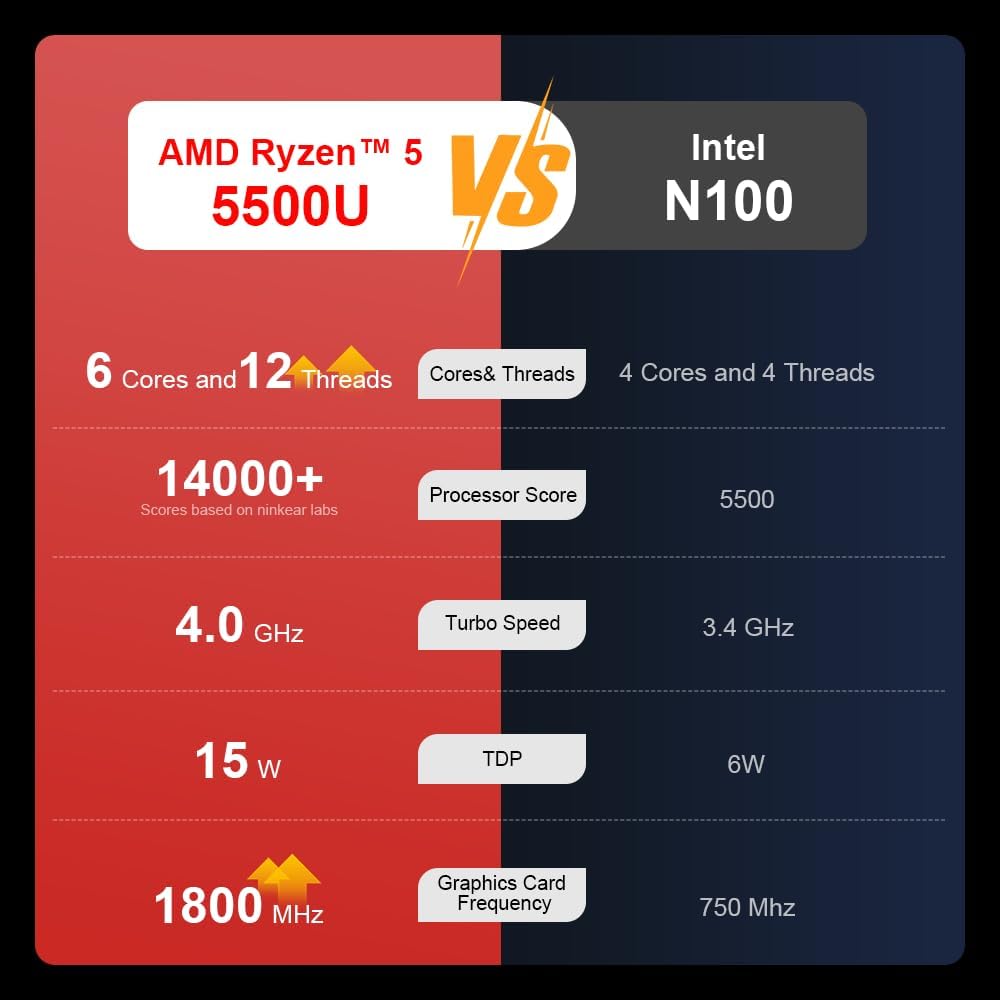
A comparison chart illustrating the performance differences between the AMD Ryzen 5 5500U and Intel N100 processors, including core/thread count, processor score, turbo speed, TDP, and graphics card frequency.

Image showing the 512GB M.2 PCIe SSD and highlighting the 3200MHz DDR4 running frequency, indicating a 20% speed improvement over 2666MHz DDR4.

The 15.6-inch IPS FHD screen of the A15, designed to deliver vibrant and accurate colors while reducing eye strain during long work hours.

Illustration of the A15 laptop's suitability for various 'recreational office' tasks, including graphic design (Ae, Ps, Ai) and gaming/entertainment.

Information about the laptop's 50.5WH high-capacity lithium-ion battery, providing up to 8 hours of local video playback and 72 hours of standby time.

A visual guide to the rich interfaces of the Ninkear A15 Laptop, including USB 3.0, USB 2.0, Headphone Jack, Charging Port, HDMI, and full-function Type-C ports.
3.3 پروڈکٹ ویڈیو
سرکاری پروڈکٹ ویڈیو شوasing the Ninkear A15 Laptop's features, including its design, display, backlit keyboard, and various ports. This video provides a dynamic overview of the laptop's capabilities and physical attributes.
4. سیٹ اپ
Follow these steps to set up your Ninkear A15 Laptop for the first time:
- لیپ ٹاپ کھولیں: پیکیجنگ سے لیپ ٹاپ اور تمام لوازمات کو احتیاط سے ہٹا دیں۔
- پاور سے رابطہ کریں: Plug the charger into the laptop's charging port (DC-in or Type-C) and then into a power outlet.
- ابتدائی بوٹ: Open the laptop lid and press the power button (integrated with fingerprint sensor). The laptop will power on and begin the initial Windows 11 setup process.
- ونڈوز 11 سیٹ اپ: Follow the on-screen instructions to complete the Windows 11 setup, including selecting your region, language, connecting to Wi-Fi, and creating a user account.
- فنگر پرنٹ سیٹ اپ: During or after Windows setup, you can configure the fingerprint reader for quick and secure login.
5. آپریٹنگ ہدایات
This section covers basic operation of your Ninkear A15 Laptop.
5.1 پاور آن/آف اور سلیپ
- پاور آن: پاور بٹن دبائیں۔
- بجلی بند: ونڈوز میں اسٹارٹ بٹن پر کلک کریں، پھر پاور> شٹ ڈاؤن کو منتخب کریں۔
- نیند موڈ: ڑککن بند کریں یا اسٹارٹ بٹن پر کلک کریں، پھر پاور > سلیپ کو منتخب کریں۔
5.2 کی بورڈ اور ٹچ پیڈ
- بیک لِٹ کی بورڈ: دبائیں Fn + F9 to cycle through the three levels of monochrome backlight brightness or turn it off.
- ٹچ پیڈ: کرسر کنٹرول اور اشاروں کے لیے مربوط ٹچ پیڈ استعمال کریں۔ ٹچ پیڈ حسب ضرورت کے لیے ونڈوز سیٹنگز سے رجوع کریں۔
- عددی کی پیڈ: The laptop features a full digital numeric keypad for convenient data entry.
5.3 کنیکٹنگ پیری فیرلز
Utilize the various ports for external devices:
- USB پورٹس: Connect USB devices like external hard drives, mice, or keyboards to the USB 2.0 or USB 3.0 ports.
- HDMI: Connect to external monitors or projectors using the HDMI port.
- قسم-سی: The full-function Type-C port supports data transfer, video output, and power delivery.
- آڈیو جیک: ہیڈ فون یا بیرونی اسپیکرز کو 3.5 ملی میٹر آڈیو جیک سے جوڑیں۔
5.4 ڈسپلے کی ترتیبات
Adjust display settings via Windows Settings > System > Display to optimize resolution, scaling, and multiple monitor setups.
6 دیکھ بھال
Proper maintenance ensures the longevity and optimal performance of your Ninkear A15 Laptop.
- صفائی: اسکرین اور چیسس کو صاف کرنے کے لیے نرم، لنٹ فری کپڑا استعمال کریں۔ ضدی نشانات کے لیے، تھوڑا سا ڈیampپانی یا سکرین کلینر کے ساتھ کپڑے. سخت کیمیکلز سے پرہیز کریں۔
- سافٹ ویئر اپ ڈیٹس: Regularly update Windows and device drivers to ensure system stability, security, and performance.
- بیٹری کی دیکھ بھال: To prolong battery life, avoid fully discharging the battery frequently. Store the laptop in a cool, dry place when not in use for extended periods.
- وینٹیلیشن: یقینی بنائیں کہ لیپ ٹاپ کے وینٹ زیادہ گرم ہونے سے روکنے کے لیے رکاوٹ نہیں ہیں۔ لیپ ٹاپ کو سخت، چپٹی سطح پر استعمال کریں۔
- ڈیٹا بیک اپ: ڈیٹا ضائع ہونے سے بچنے کے لیے اپنے اہم ڈیٹا کا باقاعدگی سے بیرونی ڈرائیو یا کلاؤڈ اسٹوریج میں بیک اپ لیں۔
7 خرابیوں کا سراغ لگانا
This section addresses common issues you might encounter with your Ninkear A15 Laptop.
| مسئلہ | ممکنہ وجہ | حل |
|---|---|---|
| لیپ ٹاپ آن نہیں ہوتا | Low battery or power adapter issue | Ensure the charger is properly connected and the power outlet is working. Allow the laptop to charge for at least 30 minutes before attempting to power on again. |
| اسکرین خالی یا سیاہ ہے۔ | Display driver issue, external display connected, or sleep mode | Press any key or move the mouse to wake from sleep. Disconnect any external monitors. Try pressing Fn + F7 (or the key with a display icon) to switch display modes. If still blank, force shut down by holding the power button for 10 seconds, then restart. |
| Wi-Fi منسلک نہیں ہو رہا ہے۔ | Wi-Fi adapter off, incorrect password, or router issue | Check if Wi-Fi is enabled in Windows settings. Verify the Wi-Fi password. Restart your router and modem. Update Wi-Fi drivers if necessary. |
| کی بورڈ بیک لائٹ کام نہیں کر رہی ہے۔ | Backlight turned off or low brightness setting | دبائیں Fn + F9 repeatedly to adjust brightness or turn on the backlight. |
| سست کارکردگی | Too many programs running, low disk space, or outdated drivers | Close unnecessary applications. Free up disk space. Run Windows Update and update drivers. Consider running a virus scan. |
8. وضاحتیں
Detailed technical specifications for the Ninkear A15 Laptop:
| فیچر | تفصیلات |
|---|---|
| برانڈ | ننکیر |
| ماڈل کا نام | A15 |
| اسکرین کا سائز | 15.6 انچ |
| اسکرین ریزولوشن | 1920 x 1080 پکسلز (FHD IPS) |
| پروسیسر | AMD Ryzen 5 5500U (2.1 GHz, 6 Cores, 12 Threads) |
| رام | 16 GB DDR4 (3200 MHz) |
| ہارڈ ڈرائیو | 512 GB PCIe SSD |
| گرافکس کارڈ | انٹیگریٹڈ AMD Radeon گرافکس |
| آپریٹنگ سسٹم | ونڈوز 11 |
| رنگ | چاندی |
| شے کا وزن | 5 پاؤنڈ |
| مصنوعات کے طول و عرض | 14 x 9 x 0.15 انچ |
| USB 3.0 پورٹس | 2 |
| بیٹری کی اوسط زندگی | Up to 6-8 hours (daily use) |
| خصوصی خصوصیات | Backlit Keyboard, Numeric Keypad, Fingerprint Unlock, Full-function Type-C |
9. وارنٹی اور سپورٹ
Ninkear provides a standard warranty for the A15 Laptop. Please refer to the warranty card included in your product packaging for specific terms and conditions, including warranty duration and coverage details.
For technical support, troubleshooting assistance, or warranty claims, please contact Ninkear customer service through the official website or the contact information provided with your purchase. Ensure you have your product model (A15) and purchase details ready when contacting support.
You can also visit the official Ninkear store on Amazon for additional product information and support resources: Ninkear Amazon Store
Ask a question about this manual
Ask about setup, troubleshooting, compatibility, parts, safety, or missing instructions. Manuals+ will review the question and use this page’s manual context to help answer it.