
MESWAO MES-B3
MESWAO 15.6 Inch Android 14 Tablet MES-B3 User Manual
سیٹ اپ، آپریشن، اور دیکھ بھال کے لیے جامع ہدایات۔
1. تعارف
This manual provides detailed instructions for the MESWAO 15.6 Inch Android 14 Tablet, model MES-B3. It covers essential information regarding product features, setup, operation, maintenance, and troubleshooting to ensure optimal performance and user experience. Please read this manual thoroughly before using your device.
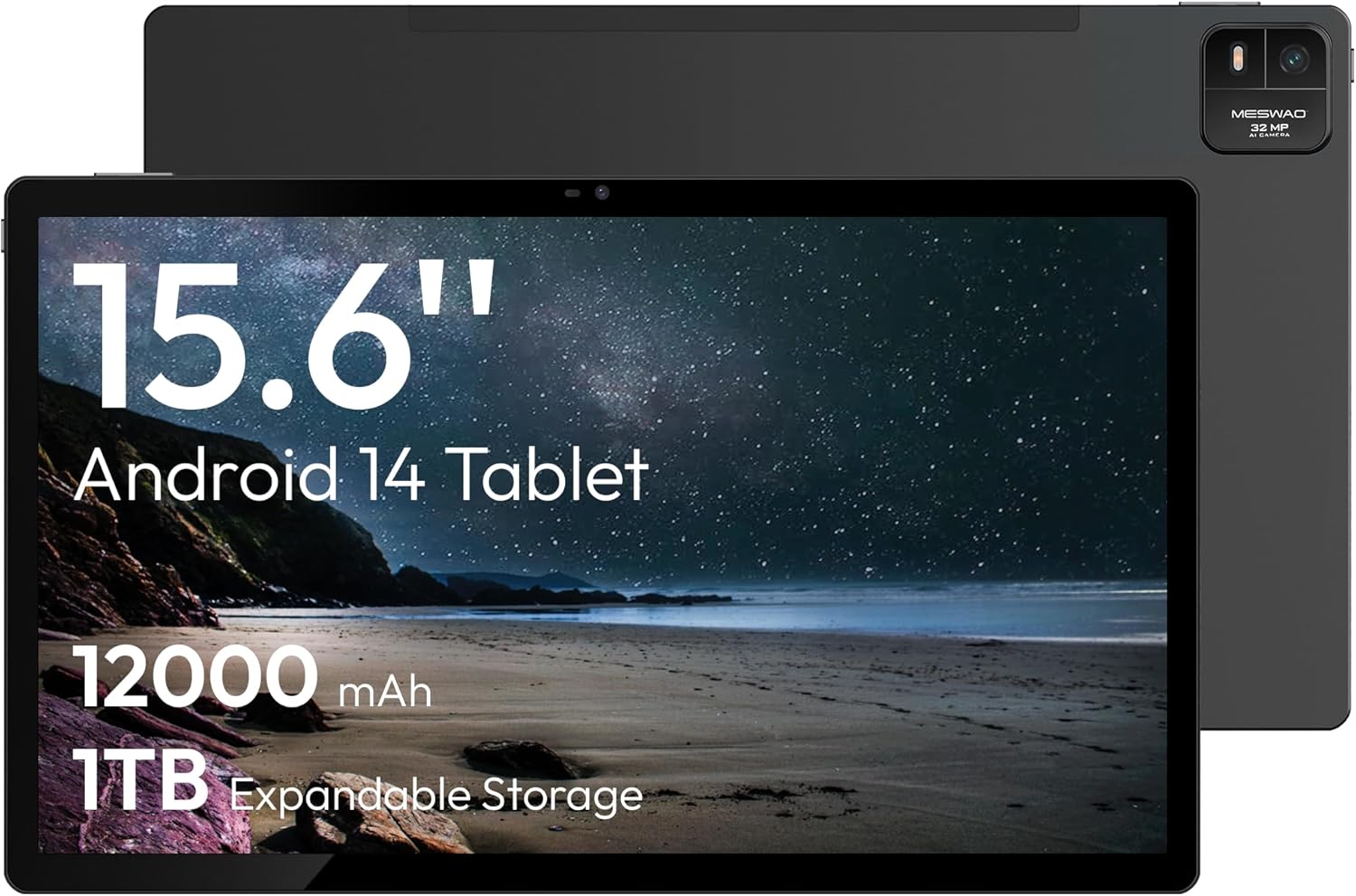
Figure 1.1: MESWAO 15.6 Inch Android 14 Tablet. This image displays the front and back view of the tablet, highlighting its large screen and rear camera module.
2. حفاظتی معلومات
To prevent damage to your device or injury to yourself or others, please observe the following precautions:
- گولی کو انتہائی درجہ حرارت، براہ راست سورج کی روشنی، یا زیادہ نمی کے سامنے نہ رکھیں۔
- گولی کو شدید اثر کے لیے گرانے یا اس کے تابع کرنے سے گریز کریں۔
- صرف منظور شدہ چارجرز اور لوازمات استعمال کریں۔
- گولی کو خود سے جدا کرنے یا مرمت کرنے کی کوشش نہ کریں۔
- گولی کو پانی اور دیگر مائعات سے دور رکھیں۔
- Observe all local regulations regarding the use of electronic devices.
3. پیکیج کے مشمولات
تصدیق کریں کہ تمام اشیاء پیکیج میں موجود ہیں:
- 15.6-inch Tablet x1
- 15W چارجر x1
- Type-C to 3.5mm Adapter x1
- USB-A to Type-C Adapter x1
- Stuck Pin x1 (for SIM/TF card tray)
4. آلہ ختمview
Familiarize yourself with the physical components of your MESWAO tablet.
4.1. جسمانی خصوصیات
- فرنٹ کیمرہ: Located at the top center of the screen when held horizontally.
- فلیش کے ساتھ پیچھے کیمرہ: Located on the back, typically in a corner.
- پاور بٹن: Usually on the side, used to power on/off or wake/sleep the device.
- والیوم بٹن: آڈیو کی سطح کو ایڈجسٹ کریں۔
- USB-C پورٹ: چارج کرنے اور ڈیٹا کی منتقلی کے لیے۔
- TF کارڈ سلاٹ: قابل توسیع اسٹوریج کے لیے۔
- مقررین: Quad speakers with 8 sound chambers for audio output.

شکل 4.1: ختمview of MESWAO Tablet's physical features. This image illustrates the location of stereo speakers, power and volume buttons, front camera, rear camera with flashlight, Type-C port, and TF card slot.
5. سیٹ اپ
5.1. ابتدائی چارجنگ
Before first use, fully charge the tablet using the provided 15W charger and USB-C cable. Connect the charger to the USB-C port on the tablet and plug it into a power outlet. The battery indicator on the screen will show charging progress.

Figure 5.1: Tablet charging illustration. This image shows the tablet connected to a charger, displaying a charging icon and indicating 100% charge in 3.5 hours.
5.2. پر / آف پاور
- پاور آن کرنے کے لیے: Press and hold the Power button until the MESWAO logo appears.
- پاور آف کرنا: پاور بٹن کو دبائے رکھیں جب تک کہ پاور آپشنز مینو ظاہر نہ ہو، پھر "پاور آف" کو منتخب کریں۔
- سونا/جاگنا: مختصر طور پر پاور بٹن دبائیں۔
5.3. ابتدائی ترتیب
پہلی بار پاور آن ہونے پر، اپنے ٹیبلیٹ کو ترتیب دینے کے لیے آن اسکرین پرامپٹس پر عمل کریں:
- اپنی پسند کی زبان منتخب کریں۔
- Wi-Fi نیٹ ورک سے جڑیں۔
- اپنے Google اکاؤنٹ کے ساتھ سائن ان کریں یا ایک نیا بنائیں۔
- Review اور شرائط و ضوابط کو قبول کریں۔
- اسکرین لاک سیٹ اپ کریں (پن، پیٹرن، یا پاس ورڈ)۔
5.4. TF کارڈ داخل کرنا
To expand storage, insert a TF (microSD) card:
- Locate the TF card slot on the side of the tablet.
- Use the provided stuck pin to gently eject the card tray.
- Place the TF card into the tray with the gold contacts facing down.
- ٹرے کو احتیاط سے گولی میں دوبارہ داخل کریں۔

Figure 5.2: Tablet storage capabilities. This image highlights the 128GB ROM and support for up to 1TB expandable storage via TF card.
6. آپریٹنگ ہدایات
6.1. بنیادی نیویگیشن
The MESWAO tablet uses Android 14, offering intuitive touch-based navigation:
- تھپتھپائیں: کوئی آئٹم منتخب کریں یا ایپلیکیشن کھولیں۔
- سوائپ: اسکرینوں یا فہرستوں کے ذریعے سکرول کریں۔
- چوٹکی سے زوم: اسکرین پر مواد کو بڑا یا کم کریں۔
- لانگ پریس: سیاق و سباق کے مینو تک رسائی حاصل کریں یا آئیکنز کو منتقل کریں۔

Figure 6.1: Android 14 operating system interface. This image displays various application icons and highlights features like smooth multitasking, parental control, and enhanced privacy.
6.2. وائی فائی سے جڑنا
- پر جائیں۔ ترتیبات > نیٹ ورک اور انٹرنیٹ > وائی فائی.
- Wi-Fi ٹوگل کریں۔ On.
- فہرست سے اپنا مطلوبہ نیٹ ورک منتخب کریں۔
- اگر اشارہ کیا جائے تو پاس ورڈ درج کریں، پھر ٹیپ کریں۔ جڑیں۔.
6.3 ایپلی کیشنز کا انتظام
- ایپس انسٹال کریں: Download from the Google Play Store.
- ایپس کو ان انسٹال کریں: Long-press an app icon, then drag it to "Uninstall" or go to ترتیبات > ایپس.
- ایپس بند کریں: Swipe up from the bottom of the screen and swipe away the app card.
6.4. کیمرے کا استعمال
The tablet features a 32MP rear camera with flash and a 5MP front camera.
- کھولیں۔ کیمرہ درخواست
- تصویر لینے کے لیے شٹر بٹن کو تھپتھپائیں۔
- کیمرہ سوئچ آئیکن کا استعمال کرتے ہوئے سامنے اور پیچھے والے کیمروں کے درمیان سوئچ کریں۔
- Access settings for flash, modes, and other options.
6.5. بیٹری کا انتظام
12000mAh بیٹری توسیعی استعمال فراہم کرتی ہے۔ بیٹری کی زندگی کو بہتر بنانے کے لیے:
- اسکرین کی چمک کو ایڈجسٹ کریں۔
- غیر استعمال شدہ ایپلی کیشنز کو بند کریں۔
- میں بیٹری سیور موڈ کو فعال کریں۔ ترتیبات > بیٹری.
6.6. کنیکٹیویٹی
- بلوٹوتھ: Pair with wireless headphones, speakers, or other devices via ترتیبات > منسلک آلات > بلوٹوتھ.
- USB-C: کے لیے کمپیوٹر سے جڑیں۔ file transfer or use with compatible USB-C accessories.
- وائرلیس اسکرین کاسٹنگ: Share your tablet's screen to a compatible smart TV or monitor. Access this feature from the Quick Settings panel or ترتیبات > منسلک آلات > کاسٹ.
6.7. آواز کی ترتیبات
Adjust volume and audio output options:
- Use the physical volume buttons on the side of the tablet.
- Access detailed settings in ترتیبات > آواز اور کمپن.
- The tablet supports multiple audio options, including USB-C audio and 3.5mm via the provided adapter.
7 دیکھ بھال
7.1 اپنے ٹیبلٹ کی صفائی
ٹیبلٹ کو صاف کرنے کے لیے، نرم، لنٹ سے پاک کپڑا استعمال کریں۔ ضدی smudges کے لئے، تھوڑا سا dampur پانی کے ساتھ کپڑا یا الیکٹرانکس کے لیے ڈیزائن کیا گیا سکرین کلینر۔ سخت کیمیکلز یا کھرچنے والے مواد سے پرہیز کریں۔
7.2. سافٹ ویئر اپڈیٹس
بہترین کارکردگی، سیکورٹی، اور نئی خصوصیات تک رسائی کو یقینی بنانے کے لیے باقاعدگی سے سافٹ ویئر اپ ڈیٹس کو چیک کریں اور انسٹال کریں۔ پر جائیں۔ ترتیبات > سسٹم > سسٹم اپ ڈیٹ.
7.3. سٹوریج کا انتظام
To maintain performance, periodically manage your tablet's storage:
- غیر ضروری ایپس کو حذف کریں۔ files.
- بڑی حرکت کریں۔ files to the TF card or cloud storage.
- میں ایپس کے لیے کیش ڈیٹا صاف کریں۔ ترتیبات > ایپس > [ایپ کا نام] > ذخیرہ اور کیش.
8 خرابیوں کا سراغ لگانا
درج ذیل عام مسائل اور حل کی طرف رجوع کریں:
| مسئلہ | حل |
|---|---|
| ٹیبلٹ آن نہیں ہوتا ہے۔ | یقینی بنائیں کہ بیٹری چارج ہے۔ چارجر کو جوڑیں اور دوبارہ پاور آن کرنے کی کوشش کرنے سے پہلے چند منٹ انتظار کریں۔ |
| Wi-Fi سے منسلک نہیں ہو سکتا۔ | Check if Wi-Fi is enabled. Verify the Wi-Fi password. Restart your router and the tablet. |
| ایپس کریش ہو رہی ہیں یا منجمد ہو رہی ہیں۔ | Close background apps. Clear the app's cache. Restart the tablet. Ensure the app is updated. |
| سست کارکردگی۔ | Free up storage space. Close unused apps. Restart the tablet. |
| بیٹری تیزی سے ختم ہو جاتی ہے۔ | Reduce screen brightness. Disable unused features like Bluetooth or GPS. Close background apps. Check battery usage in settings. |
9. وضاحتیں
Key technical specifications for the MESWAO 15.6 Inch Android 14 Tablet (MES-B3):
| فیچر | تفصیل |
|---|---|
| برانڈ | میسواو |
| ماڈل کا نام | MES-B3 |
| آپریٹنگ سسٹم | اینڈرائیڈ 14 |
| اسکرین کا سائز | 15.6 انچ |
| اسکرین ریزولوشن | 1920 x 1080 Pixels (IPS HD) |
| پروسیسر | Octa-Core (MediaTek Helio G99, up to 2.2 GHz) |
| گرافکس کا پروسیسر | مالی جی 57 |
| RAM (Memory Storage Capacity) | 6GB (DDR3 SDRAM) |
| Internal Storage (Flash Memory Size) | 128 جی بی |
| قابل توسیع اسٹوریج | TF کارڈ کے ذریعے 1TB تک |
| پیچھے کیمرے کی قرارداد | 32 MP |
| فرنٹ کیمرہ ریزولوشن | 5 MP |
| بیٹری کی صلاحیت | 12000mAh |
| بیٹری کی اوسط زندگی | 12 گھنٹے |
| وائرلیس قسم | 802.11a/b/g/n/ac (Wi-Fi 5) |
| رنگ | گرے |
| شے کا وزن | 2.35 پاؤنڈ |
| پروڈکٹ کے طول و عرض (LxWxH) | 14.53 x 8.78 x 0.43 انچ |

Figure 9.1: Processor and performance details. This image highlights the Helio G99 Octa-Core chipset, 6nm process, 950MHz GPU, and smooth gaming/streaming capabilities.
10. وارنٹی اور سپورٹ
10.1. وارنٹی کی معلومات
The MESWAO 15.6 Inch Android 14 Tablet comes with a 12 ماہ کی وارنٹی مینوفیکچرنگ نقائص کا احاطہ. وارنٹی کے دعووں کے لیے براہ کرم اپنی خریداری کا ثبوت اپنے پاس رکھیں۔
10.2. کسٹمر سپورٹ
For technical assistance, troubleshooting, or warranty inquiries, please contact MESWAO customer support. They offer 24 گھنٹے کسٹمر سپورٹ اور ہے local service centers in the US, EU, and Japan.
- رابطہ کا طریقہ: Refer to the contact information provided with your product packaging or visit the official MESWAO webسائٹ
- مسئلہ کا حل: Issues reported are typically responded to within 24 hours, with problems resolved or replaced according to policy.

Figure 10.1: MESWAO customer support and warranty details. This image highlights the 12-month warranty, 24-hour customer support, local after-sales centers, and quick response flow.
Ask a question about this manual
Ask about setup, troubleshooting, compatibility, parts, safety, or missing instructions. Manuals+ will review the question and use this page’s manual context to help answer it.