
1. تعارف
This manual provides detailed instructions for the installation, operation, and maintenance of your Reobiux D20-1P 2K Outdoor Surveillance Camera. Please read this manual thoroughly before using the product to ensure proper functionality and safety.
2. پیکیج کے مشمولات
تصدیق کریں کہ نیچے دی گئی تمام اشیاء آپ کے پیکج میں شامل ہیں۔ اگر کوئی اشیاء غائب یا خراب ہیں، تو براہ کرم کسٹمر سپورٹ سے رابطہ کریں۔
- 1x Reobiux D20-1P Solar PTZ Camera
- 1x Solar Collector
- 1x صارف دستی
- 1x ماؤنٹنگ بیس
- 1x Power Supply (for initial charging)
- 1x Screws Bag (for installation)
- 1x Type-C Charging Line
3. پروڈکٹ ختمview
The Reobiux D20-1P is a 2K outdoor surveillance camera designed for comprehensive home security. It features dual lenses, 360° Pan-Tilt-Zoom (PTZ) capabilities, and operates wirelessly via Wi-Fi. Key features include PIR motion detection, color night vision, two-way audio, and an IP66 weatherproof rating, powered by a solar panel and rechargeable battery.
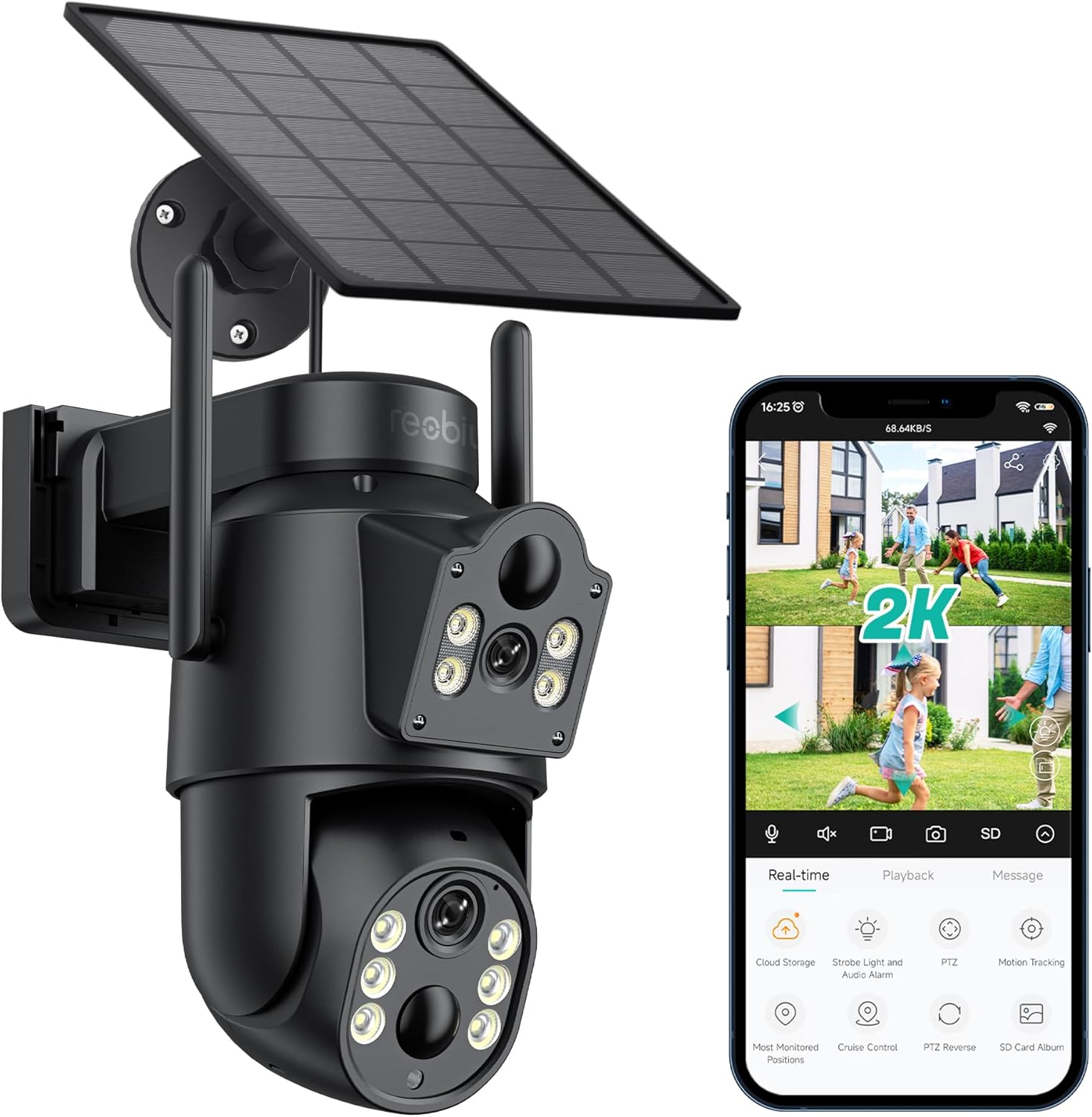
تصویر 3.1: Reobiux D20-1P Solar PTZ Camera and its mobile application interface showing real-time monitoring, playback, and various control options.
اہم خصوصیات:
- 2K QHD High Resolution: واضح اور تفصیلی ویڈیو foo فراہم کرتا ہے۔tage.
- دوہری لینس ڈیزائن: Combines a fixed lens with a rotating lens for comprehensive coverage.
- 360° PTZ Functionality: Allows remote control of pan, tilt, and zoom for flexible viewزاویہ
- Solar Powered with Rechargeable Battery: Ensures continuous operation with minimal manual charging.
- پیر تحریک کا پتہ لگانے: Intelligently detects human movement to reduce false alarms.
- کلر نائٹ ویژن: Offers full-color video even in low-light conditions, alongside infrared night vision.
- دو طرفہ آڈیو: Enables communication with visitors or deterrence of intruders.
- IP66 ویدر پروف: مختلف بیرونی موسمی حالات کا مقابلہ کرنے کے لیے ڈیزائن کیا گیا ہے۔
- Wireless Wi-Fi Connectivity: Easy setup and remote access via smartphone.
4. سیٹ اپ گائیڈ
4.1 ابتدائی چارجنگ
Before first use, fully charge the camera's internal battery using the provided Type-C charging line and power supply. This ensures the camera has sufficient power for initial setup and operation, especially if solar charging conditions are not optimal immediately after installation.
4.2 ایپ انسٹال کرنا اور اکاؤنٹ بنانا
- ڈاؤن لوڈ کریں۔ آئی سی سی app from your smartphone's app store (iOS App Store or Google Play Store).
- ایپ انسٹال کریں اور اسے کھولیں۔
- نیا اکاؤنٹ بنانے کے لیے اسکرین پر دی گئی ہدایات پر عمل کریں یا اگر آپ کے پاس پہلے سے اکاؤنٹ ہے تو لاگ ان کریں۔
4.3 Camera Connection to Wi-Fi
- یقینی بنائیں کہ آپ کا کیمرہ آن ہے۔
- In the iCSee app, tap the "+" icon to add a new device.
- Select the option for "Wi-Fi Camera" or "Add Device by AP Hotspot" (refer to app for exact wording).
- Follow the app's instructions to connect the camera to your 2.4GHz Wi-Fi network. You may need to scan a QR code displayed on your phone with the camera, or listen for a sound prompt.
- Once connected, you can name your camera and begin monitoring.
4.4 کیمرہ لگانا
Choose a location that provides optimal surveillance coverage and receives direct sunlight for the solar panel. Ensure the camera is within range of your Wi-Fi network.
- مقام منتخب کریں: Identify a suitable wall or surface for mounting. Consider the camera's viewing angle (355° pan, 90° tilt) and the solar panel's exposure to sunlight.
- نشان ڈرلنگ پوائنٹس: Use the mounting base as a template to mark the screw holes on the wall.
- سوراخ ڈرل: Drill pilot holes at the marked positions. Insert wall anchors if necessary.
- ماؤنٹنگ بیس منسلک کریں: فراہم کردہ پیچ کا استعمال کرتے ہوئے دیوار پر چڑھنے والے بیس کو محفوظ کریں۔
- کیمرہ منسلک کریں: Mount the camera onto the secured base.
- شمسی پینل کو ایڈجسٹ کریں: Position the solar panel to maximize sunlight exposure throughout the day.

تصویر 4.1: Illustration of the camera mounted with its solar panel, highlighting the fixed and rotating lenses and the benefit of continuous solar power.
5. آپریٹنگ ہدایات
5.1 لائیو View اور پلے بیک
Open the iCSee app and select your camera to access the live view. From here, you can:
- ریئل ٹائم مانیٹرنگ: View live video feed.
- پی ٹی زیڈ کنٹرول: Use the on-screen joystick to pan (355°) and tilt (90°) the camera.
- ڈیجیٹل زوم: Pinch to zoom on the live feed.
- پلے بیک: ریکارڈ شدہ foo تک رسائی حاصل کریں۔tage stored on the SD card or cloud storage.

تصویر 5.1: Demonstrates the superior clarity of 2K QHD resolution compared to 1080P, providing more details for monitoring.
5.2 حرکت کا پتہ لگانا اور الرٹس
The camera utilizes PIR (Passive Infrared) intelligent detection to identify human movement, minimizing false alarms from pets or swaying branches.
- فعال/غیر فعال کریں: Activate or deactivate motion detection in the app settings.
- حساسیت ایڈجسٹمنٹ: Adjust the PIR sensor's sensitivity to suit your environment.
- الارم کی اطلاعات: حرکت کا پتہ چلنے پر اپنے اسمارٹ فون پر فوری پش اطلاعات موصول کریں۔
- آواز اور روشنی کا الارم: Configure the camera to trigger a strobe light and audible alarm upon detection.

تصویر 5.2: The camera's PIR intelligent detection distinguishes human movement from other objects, reducing unnecessary alerts.

تصویر 5.3: When motion is detected, the camera can send real-time push notifications and activate a sound and light alarm to deter intruders.
5.3 نائٹ ویژن موڈز
The camera offers two night vision modes for clear visibility in the dark:
- Spotlight Full Color Night Vision: Utilizes built-in spotlights to provide full-color video in low-light conditions.
- Spotlight Infrared Night Vision: Uses infrared LEDs for black-and-white video in complete darkness, with a range of up to 30 meters.
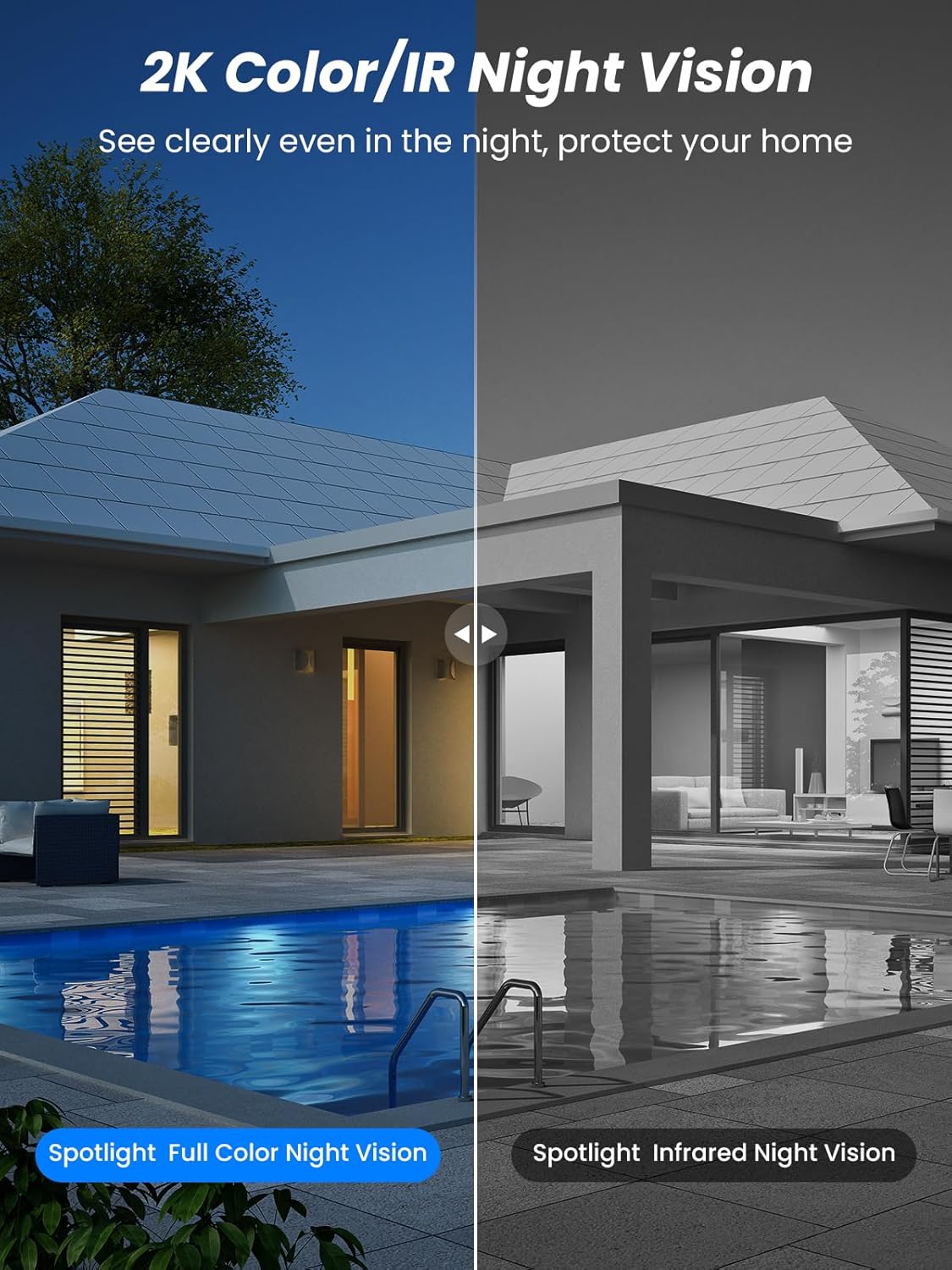
تصویر 5.4: Illustrates the difference between full-color night vision, enabled by spotlights, and traditional infrared night vision.
5.4 دو طرفہ آڈیو
The integrated microphone and speaker allow for two-way communication.
- بولیں: کیمرے کے اسپیکر کے ذریعے بولنے کے لیے ایپ میں موجود مائیکروفون آئیکن کو تھپتھپائیں۔
- سنو: The camera's microphone captures audio from its surroundings.

تصویر 5.5: The two-way audio function allows for direct communication through the camera, useful for interacting with visitors or delivery personnel.
6 دیکھ بھال
- صفائی: وقتاً فوقتاً کیمرے کے لینس اور سولر پینل کو نرم، ڈی سے صاف کریں۔amp بہترین کارکردگی اور واضح تصویر کے معیار کو یقینی بنانے کے لیے کپڑا۔ کھرچنے والے کلینر سے پرہیز کریں۔
- بیٹری کی صحت: While solar-powered, extreme weather or prolonged periods of low sunlight may require manual charging. Monitor battery levels via the app.
- فرم ویئر اپ ڈیٹس: Check the iCSee app regularly for available firmware updates to ensure your camera has the latest features and security enhancements.
- موسم کی حفاظت: The camera is IP66 weatherproof, designed to withstand rain, snow, and sun. However, ensure all connections are secure to maintain water resistance.

تصویر 6.1: The IP66 rating ensures the camera's durability and functionality in various outdoor weather conditions, including snow, rain, and direct sunlight.
7 خرابیوں کا سراغ لگانا
- کیمرہ وائی فائی سے منسلک نہیں ہے:
- Ensure the camera is within range of your 2.4GHz Wi-Fi network. 5GHz networks are not supported.
- تصدیق کریں کہ آپ کا Wi-Fi پاس ورڈ درست ہے۔
- اپنا راؤٹر اور کیمرہ دوبارہ شروع کریں۔
- If issues persist, try resetting the camera (refer to app or product for reset button location).
- Battery not charging or draining quickly:
- Ensure the solar panel is clean and receives direct sunlight for several hours daily.
- سولر پینل اور کیمرہ کے درمیان کنکشن چیک کریں۔
- If in a low-light environment, manually charge the camera using the Type-C cable.
- بار بار حرکت کا پتہ لگانے والے واقعات یا لائیو view streaming can consume battery faster. Adjust settings if needed.
- False motion detection alarms:
- Adjust the PIR motion detection sensitivity in the iCSee app.
- اس بات کو یقینی بنائیں کہ کیمرہ مسلسل نقل و حرکت والے علاقوں کی طرف اشارہ نہیں کرتا ہے (مثلاً، مصروف سڑکیں، جھومتے ہوئے درخت) اگر نگرانی کے لیے نہیں ہے۔
- خراب تصویر کا معیار:
- کیمرے کے لینس کو صاف کریں۔
- زیادہ سے زیادہ تصویر کی گرفت کے لیے کافی روشنی کو یقینی بنائیں، خاص طور پر رات کے وقت۔
- Check your Wi-Fi signal strength; a weak signal can affect video streaming quality.
8. وضاحتیں
| فیچر | تفصیل |
|---|---|
| ماڈل کا نام | D20-1P |
| ویڈیو کیپچر ریزولوشن | 2.5K |
| مؤثر ویڈیو ریزولوشن | 2K QHD |
| وائرلیس کمیونیکیشن ٹیکنالوجی | Wi-Fi (2.4GHz) |
| فارم فیکٹر | گنبد |
| Viewآئی اینگل | 355 ڈگری (پین)، 90 ڈگری (جھکاؤ) |
| تنصیب کی قسم | وال ماونٹڈ |
| نائٹ ویژن رینج۔ | 30 میٹر |
| فریم ریٹ | 25 ایف پی ایس |
| مواد | پلاسٹک |
| والیومtage | 12 وولٹ (DC) |
| واٹtage | 5 واٹ |
| طاقت کا منبع | بیٹری سے چلنے والی، شمسی توانائی سے چلنے والی |
| بیٹریاں | 3 لتیم آئن بیٹریاں (شامل) |
| کنیکٹیویٹی پروٹوکول | وائی فائی |
| کنٹرولر کی قسم | iCSee ایپ |
| خصوصی خصوصیات | Night Vision (Color/IR), PIR Motion Detection, Two-Way Audio, IP66 Weatherproof |
| شے کا وزن | 1.06 کلوگرام |
| پارسل کے طول و عرض | 21.7 x 19.5 x 13.8 سینٹی میٹر |
9. وارنٹی اور سپورٹ
Reobiux offers a 1 سال کی وارنٹی for this product. For any issues or inquiries, please do not hesitate to reach out to our customer service. We provide 20 hours of online service to assist you.
For support, please refer to the contact information provided with your purchase or within the iCSee application.