
1. تعارف
This manual provides essential information for the safe and effective use of your ARROWMAX SGS MINI PLUS Electric Engraving Pen. This cordless rotary tool is designed for light-duty tasks such as engraving, polishing, carving, and sanding on various materials including metal, wood, glass, and plastic. Please read these instructions thoroughly before operation and retain for future reference.
2. پیکیج کے مشمولات
تصدیق کریں کہ نیچے دی گئی تمام اشیاء آپ کے پیکیج میں شامل ہیں:
- 1 x ARROWMAX SGS MINI PLUS Engraving Pen
- 24 x Engraving Bits
- 12 x Polishing Bits
- 1 ایکس اسٹوریج بیگ
- 1 ایکس چارجنگ بیس
- 1 ایکس USB چارجنگ کیبل
- 1 ایکس یوزر مینوئل (یہ دستاویز)

The image above displays the engraving pen, various bits, the charging base, USB cable, and storage bag, illustrating the comprehensive kit provided.
3. پروڈکٹ ختمview
Familiarize yourself with the main components of the ARROWMAX SGS MINI PLUS Engraving Pen:

- مقناطیسی چارجنگ پورٹ: Located at the top, this port facilitates easy charging with the magnetic charging base.
- ورکنگ اسٹیٹس انڈیکیٹر: Displays battery level and rotation direction.
- پاور بٹن: آلہ کو آن اور آف کرنے کے لیے استعمال کیا جاتا ہے۔
- ایلومینیم کھوٹ باڈی: Provides durability and a comfortable grip.
- چک: The mechanism at the tip for securely holding engraving and polishing bits.
4. سیٹ اپ
4.1 ڈیوائس کو چارج کرنا
Before first use, fully charge the engraving pen. The device is powered by a 5V rechargeable battery, offering up to 90 minutes of runtime on a full charge.
- Connect the USB charging cable to the charging base and a suitable USB power source.
- Place the engraving pen onto the magnetic charging base. The working status indicator lights will show charging progress.
- A full charge is indicated when all four indicator lights are solid.

The magnetic charging base allows for convenient and secure charging of the pen.
4.2 بٹس منسلک کرنا
The kit includes 24 engraving bits and 12 polishing bits for various applications.
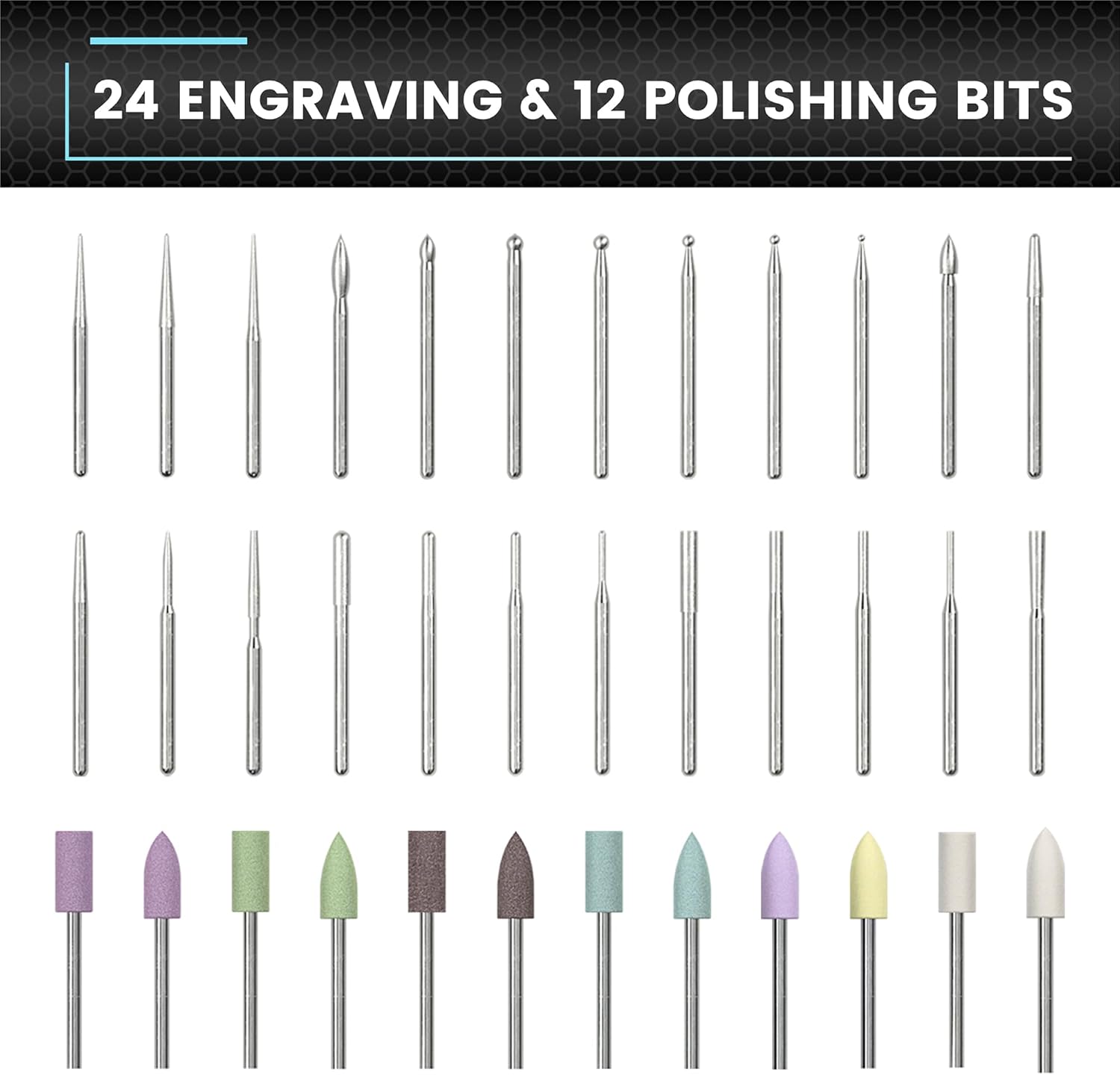
This image displays the variety of bits available for different tasks.
- Ensure the engraving pen is turned off.
- Gently insert the desired bit into the chuck until it is firmly seated. Do not force the bit.
- ہٹانے کے لیے، بٹ کو سیدھا چک سے باہر نکالیں۔
4.3 ایپ کنکشن (اختیاری)
For enhanced control, the engraving pen can be connected to a smartphone app (compatible with Android and iOS).
- Download the ARROWMAX app from your device's app store.
- اپنے اسمارٹ فون پر بلوٹوتھ کو فعال کریں۔
- Open the ARROWMAX app and follow the on-screen instructions to pair with your SGS MINI PLUS.
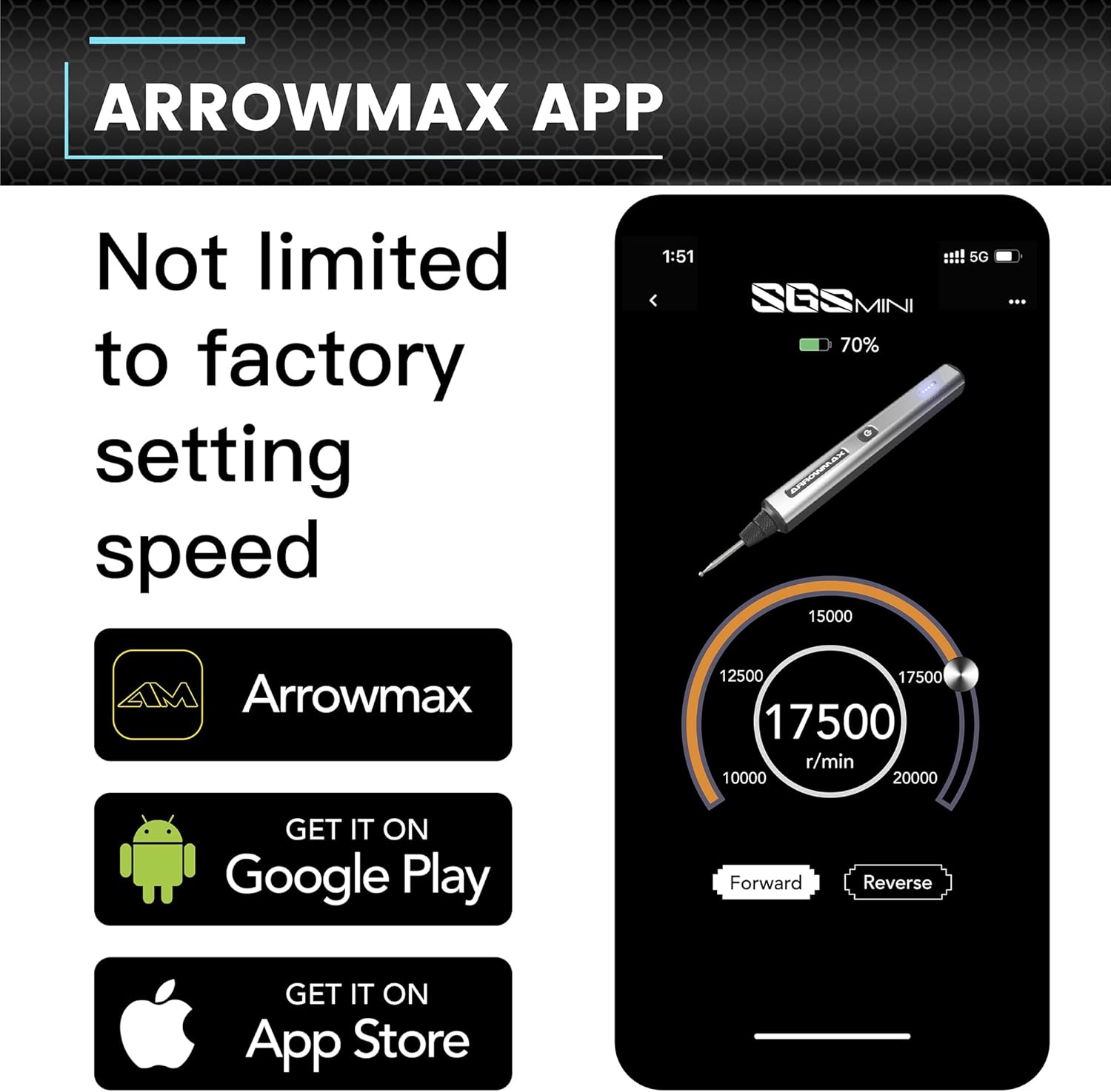
The app provides precise control over speed and rotation direction.
5. آپریٹنگ ہدایات
5.1 پاور آن/آف
Press the Power Button once to turn the device on. Press it again to turn it off.
5.2 Speed Control and Rotation Direction
The engraving pen offers adjustable speeds from 10,000 RPM to 20,000 RPM. You can also toggle between forward and reverse modes.
- ایپ کا استعمال کرتے ہوئے: Connect the pen to the ARROWMAX app. Use the app interface to precisely adjust the speed in increments of 1000 RPM and change the rotation direction.
- دستی کنٹرول: (If applicable, refer to specific model features for manual speed adjustment if not using the app.)
5.3 عام استعمال
The SGS MINI PLUS is suitable for various crafting and detailing tasks.

This image demonstrates the pen's versatility across different materials.
- کندہ کاری: Use appropriate engraving bits for detailed work on metal, wood, glass, or plastic.
- پالش کرنا: Attach polishing bits for smoothing surfaces or adding a finish.
- Sanding/Grinding: Select suitable bits for light sanding or grinding tasks.
Always wear appropriate safety gear, such as eye protection, when operating the tool.
Video 5.1: Demonstration of the ARROWMAX SGS MINI electric cordless engraving pen in use for model making and grinding. This short clip illustrates the tool's application in fine detail work.
ویڈیو 5.2: ختمview of the ARROWMAX SGS MINI mini electric engraving pen. This video provides a general demonstration of the pen's features and operation.
6 دیکھ بھال
6.1 صفائی
Regular cleaning ensures optimal performance and longevity of your tool.
- After each use, wipe the pen body with a soft, dry cloth.
- Carefully remove any dust or debris from the chuck area using a small brush or compressed air.
- Ensure the charging contacts on both the pen and the base are clean.
6.2 بٹ اسٹوریج
Store bits in the provided storage bag or a suitable container to prevent damage and loss.
7 خرابیوں کا سراغ لگانا
- آلہ آن نہیں ہوتا ہے: Ensure the battery is fully charged. Connect to the charging base and check the indicator lights.
- کم کارکردگی/رفتار: Check battery level. Ensure the bit is securely inserted and not worn out. Clean the chuck area to remove any obstructions. If using the app, verify speed settings.
- Bits not effective on material: Ensure you are using the correct type of bit for the material (e.g., engraving bits for hard surfaces, polishing bits for finishing). Some materials may require specific bit types not included in this kit.
- ایپ کنیکٹیویٹی کے مسائل: Ensure Bluetooth is enabled on your smartphone and the pen is within range. Try restarting both the app and the engraving pen.
8. وضاحتیں
| فیچر | تفصیل |
|---|---|
| برانڈ | ARROWMAX |
| ماڈل | SGS MINI PLUS |
| طاقت کا منبع | بیٹری سے چلنے والا |
| تجویز کردہ استعمال | Engraving, Sanding, Grinding, Polishing |
| رنگ | گرے |
| خصوصی خصوصیات | Cordless, Rechargeable, Magnetic USB Charging, App Control (Optional) |
| شامل اجزاء | 1 engraving pen, 24 engraving bits, 12 polish bits, 1 storage bag, 1 manual, 1 charging base, 1 USB charging cable |
| زیادہ سے زیادہ گردشی رفتار | 20000 RPM |
| بیٹری کی قسم | 1 لتیم پولیمر بیٹری (شامل) |
| شے کا وزن | 1.28 پاؤنڈ |
| پیکیج کے طول و عرض | 10.71 x 5.67 x 2.01 انچ |
9. وارنٹی اور سپورٹ
For warranty information or technical support, please refer to the contact details provided with your product packaging or visit the official ARROWMAX webسائٹ خریداری کے ثبوت کے طور پر اپنی خریداری کی رسید اپنے پاس رکھیں۔