
1. تعارف
Thank you for choosing the Hama DR2002BT Digital Radio. This device offers a comprehensive audio experience with FM, DAB/DAB+ digital radio reception, and Bluetooth connectivity. Its user-friendly design, featuring large buttons and a clear 4.3-inch TFT color display, makes it suitable for all users. This manual will guide you through the setup, operation, and maintenance of your new digital radio.
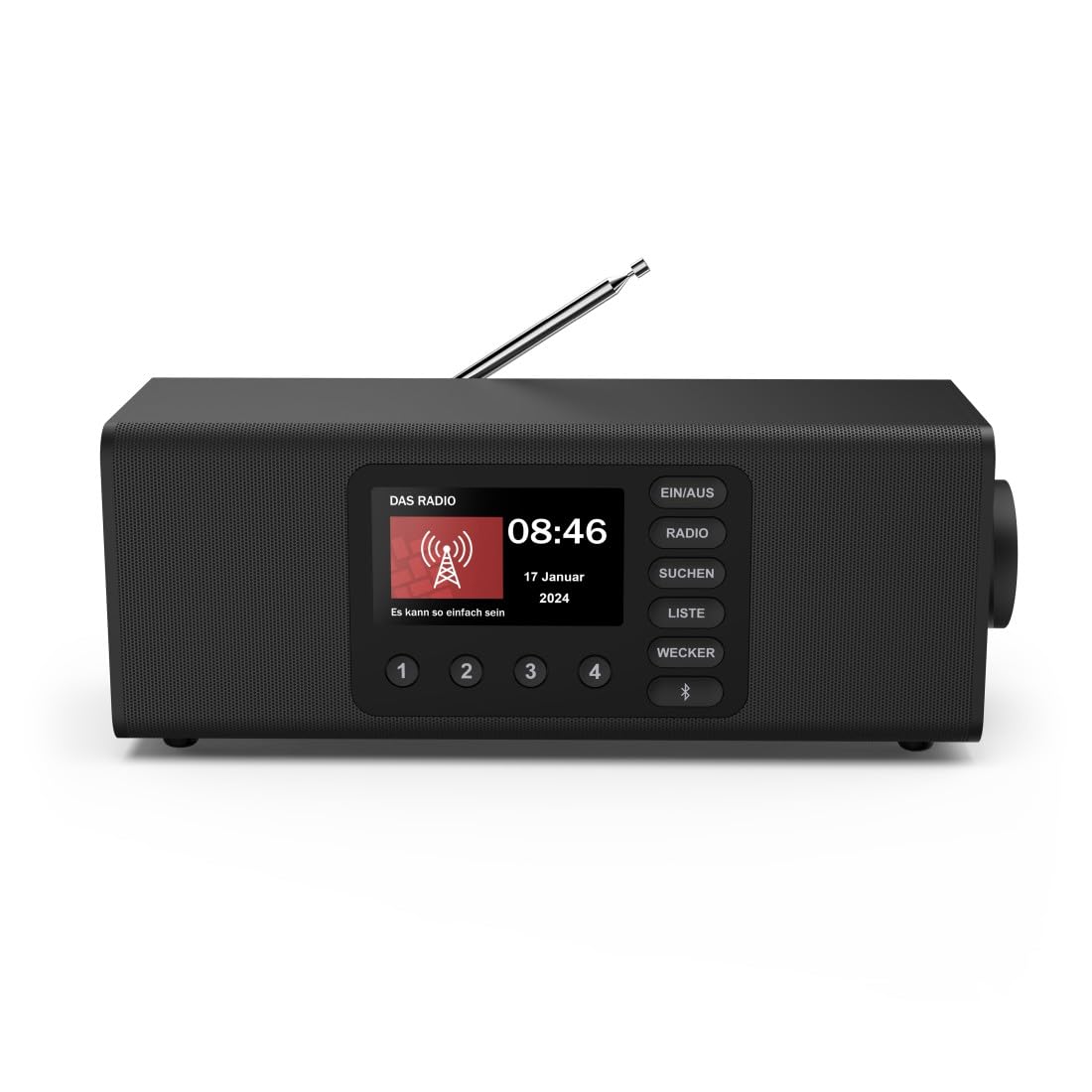
تصویر: سامنے view of the Hama DR2002BT Digital Radio, showcasing اس کے ڈسپلے اور کنٹرول بٹن۔
2. حفاظتی معلومات
براہ کرم آلہ استعمال کرنے سے پہلے ان حفاظتی ہدایات کو بغور پڑھیں۔ اس دستی کو مستقبل کے حوالے کے لیے رکھیں۔
- آلے کو نمی، بارش، یا انتہائی درجہ حرارت کے سامنے نہ رکھیں۔
- آلہ کو گرمی کے ذرائع کے قریب یا براہ راست سورج کی روشنی میں رکھنے سے گریز کریں۔
- آلہ نہ کھولیں casing. Repairs should only be performed by qualified personnel.
- صرف فراہم کردہ پاور اڈاپٹر استعمال کریں۔
- ڈیوائس کے ارد گرد مناسب وینٹیلیشن کو یقینی بنائیں۔
3. پیکیج کے مشمولات
تصدیق کریں کہ پیک کھولنے پر تمام اشیاء موجود ہیں:
- Hama DR2002BT Digital Radio
- پاور اڈاپٹر
- صارف دستی
4. پروڈکٹ ختمview
4.1 فرنٹ پینل کنٹرولز اور ڈسپلے

Image: Front panel of the radio highlighting the display and control buttons, with icons for Bluetooth, DAB+, and Alarm functions.
The front panel features a 4.3-inch TFT color display, large control buttons, and a rotary knob for easy navigation and selection. Key buttons include:
- EIN/AUS (ON/OFF): ڈیوائس کو آن یا آف کرتا ہے۔
- ریڈیو: Switches between FM and DAB/DAB+ modes.
- SUCHEN (SEARCH): Initiates station scanning.
- LISTE (LIST): Accesses the list of available stations.
- WECKER (ALARM): Configures alarm settings.
- بلوٹوتھ بٹن: بلوٹوتھ پیئرنگ موڈ کو فعال کرتا ہے۔
- پیش سیٹ بٹن (1-4): ذخیرہ شدہ پسندیدہ اسٹیشنوں تک فوری رسائی۔
- Rotary Knob (LAUTSTÄRKE/NAVIGIEREN): Controls volume and navigates menus.
4.2 ریئر پینل کنکشنز
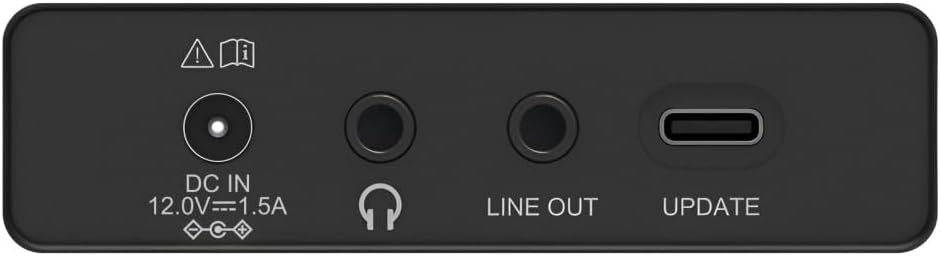
Image: Close-up of the rear panel showing the DC IN, Headphone, Line Out, and UPDATE (USB-C) ports.
پیچھے والا پینل کنیکٹیویٹی کے ضروری اختیارات فراہم کرتا ہے:
- DC IN 12.0V --- 1.5A: Power input for the external adapter.
- ہیڈ فون جیک (3.5 ملی میٹر): نجی سننے کے لیے۔
- باہر قطار: Audio output for connecting to external ampلائفائر یا اسپیکر۔
- UPDATE (USB-C): فرم ویئر اپ ڈیٹس کے لیے۔
- دوربین اینٹینا: FM اور DAB/DAB+ استقبالیہ کے لیے۔

تصویر: پیچھے view of the Hama DR2002BT Digital Radio with its telescopic antenna extended for optimal signal reception.
5. سیٹ اپ
5.1 پاور کنکشن
- فراہم کردہ پاور اڈاپٹر سے جڑیں۔ ڈی سی IN port on the rear of the radio.
- پاور اڈاپٹر کو مناسب پاور آؤٹ لیٹ میں لگائیں۔
- ریڈیو خود بخود آن ہو جائے گا یا سٹینڈ بائی موڈ میں داخل ہو جائے گا۔
5.2 Antenna Positioning
For optimal FM and DAB/DAB+ reception, fully extend the telescopic antenna. Position the radio near a window if reception is poor.
5.3 ابتدائی سیٹ اپ (پہلا استعمال)
Upon first power-on, the radio may guide you through an initial setup process, including language selection and an automatic DAB station scan. Follow the on-screen prompts.
6. آپریٹنگ ہدایات
6.1 پاور آن/آف
دبائیں EIN/AUS ریڈیو کو آن یا آف کرنے کے لیے بٹن۔
6.2 DAB/DAB+ ریڈیو موڈ
- دبائیں ریڈیو DAB موڈ کو منتخب کرنے کے لیے بٹن۔
- If this is the first time in DAB mode or if you want to rescan, press SUCHEN to perform a full scan for available stations.
- Use the rotary knob to navigate through the station list. Press the knob to select a station.
- کو view the station list, press the فہرست بٹن
6.3 ایف ایم ریڈیو موڈ
- دبائیں ریڈیو ایف ایم موڈ کو منتخب کرنے کے لیے بٹن۔
- دبائیں SUCHEN to automatically scan for the next available FM station.
- Alternatively, use the rotary knob to manually tune to a frequency.
6.4 پیش سیٹ کو ذخیرہ کرنا اور یاد کرنا
The radio allows you to store up to 4 favorite stations using the dedicated preset buttons (1-4).
- Tune to the desired station (DAB or FM).
- Press and hold one of the preset buttons (1-4) until the display confirms the station has been saved.
- To recall a preset station, simply press the corresponding preset button (1-4).
6.5 بلوٹوتھ آپریشن

تصویر: سامنے view of the radio with Bluetooth and stereo speaker icons, indicating its wireless audio streaming capability.
The Hama DR2002BT can stream audio from your smartphone, tablet, or laptop via Bluetooth 5.0.
- Press the Bluetooth button on the front panel to enter Bluetooth pairing mode. The display will show a pairing indicator.
- On your external device (smartphone, tablet), enable Bluetooth and search for available devices.
- Select "Hama DR2002BT" from the list of devices to pair.
- Once paired, you can play audio from your device, and it will be output through the radio's speakers.
6.6 الارم کلاک فنکشن

Image: A person waking up with the Hama DR2002BT Digital Radio placed on a bedside table, illustrating its alarm clock functionality.
The radio features two independent alarm settings.
- دبائیں ویکر button to access alarm settings.
- Use the rotary knob to select Alarm 1 or Alarm 2.
- Configure the alarm time, source (buzzer or radio station), and repetition (once, daily, weekdays, weekends, or specific days).
- Press the rotary knob to confirm each setting.
- To quickly activate/deactivate an alarm, press the ویکر button and use the rotary knob to toggle the alarm status.

Image: A person interacting with the Hama DR2002BT Digital Radio, demonstrating its ease of use for setting functions like alarms or tuning stations.
7 دیکھ بھال
To ensure the longevity and optimal performance of your Hama DR2002BT Digital Radio, follow these maintenance guidelines:
- صفائی: Use a soft, dry, lint-free cloth to clean the exterior of the radio. Do not use abrasive cleaners, waxes, or solvents.
- دھول: Regularly dust the device to prevent accumulation in vents and ports.
- ذخیرہ: If storing the radio for an extended period, disconnect it from the power supply and store it in a cool, dry place.
- اینٹینا: Handle the telescopic antenna carefully to avoid bending or breaking.
8 خرابیوں کا سراغ لگانا
If you encounter issues with your radio, refer to the following common problems and solutions:
| مسئلہ | ممکنہ وجہ | حل |
|---|---|---|
| کوئی طاقت نہیں۔ | پاور اڈاپٹر منسلک نہیں ہے؛ پاور آؤٹ لیٹ ناقص | Check power adapter connection; Try a different power outlet. |
| ناقص ریڈیو ریسپشن (DAB/FM) | اینٹینا بڑھا نہیں؛ کمزور سگنل ایریا؛ مداخلت | Fully extend the telescopic antenna; Reposition the radio (e.g., near a window); Perform a new station scan. |
| بلوٹوتھ جوڑا ناکام ہو جاتا ہے۔ | Bluetooth not enabled on external device; Radio not in pairing mode; Device too far | Ensure Bluetooth is on and visible on your device; Press the Bluetooth button on the radio; Move devices closer (within 10m). |
| کوئی آواز نہیں۔ | حجم بہت کم؛ خاموش کر دیا گیا غلط ذریعہ منتخب کیا گیا۔ | Increase volume using the rotary knob; Check if mute is active; Ensure the correct mode (DAB, FM, Bluetooth) is selected. |
| الارم نہیں بجتا ہے۔ | Alarm not activated; Incorrect alarm time/day set | Verify alarm is enabled in settings; Check alarm time and repetition settings. |
9. وضاحتیں

Image: Diagram showing the dimensions of the Hama DR2002BT Digital Radio: 35 cm (width), 12.5 cm (depth), and 13 cm (height).
| فیچر | تفصیل |
|---|---|
| ماڈل نمبر | DR2002BT (00054298) |
| استقبالیہ | DAB، DAB+، FM |
| بلوٹوتھ ورژن | 5.0 |
| آؤٹ پٹ پاور (RMS) | 10 W (Stereo) |
| ڈسپلے | 4.3" TFT Color Display |
| کنکشنز | 3.5mm Jack (Headphone), USB-C (Update), Line Out, DC IN |
| بجلی کی فراہمی | بیرونی طاقت اڈاپٹر |
| طول و عرض (W x D x H) | 35 x 12.5 x 13 سینٹی میٹر |
| وزن | 1788 گرام |
| مواد | پلاسٹک |
| رنگ | سیاہ |
| اضافی خصوصیات | Alarm Function (2 alarms), Direct Selection Keys |
10. وارنٹی اور سپورٹ
Hama GmbH & Co KG provides a warranty for this product. Please refer to the warranty card included in your package or visit the official Hama webتفصیلی وارنٹی شرائط و ضوابط کے لیے سائٹ۔
For technical support, troubleshooting assistance, or spare parts, please contact Hama customer service or visit their website. The availability of spare parts in the EU is guaranteed for 7 years.
- مینوفیکچرر: ہما جی ایم بی ایچ اینڈ کمپنی کے جی
- اصل ملک: جرمنی
- EU Spare Parts Availability: 7 سال