
1. پروڈکٹ ختمview
The Raddy AG7 is a comprehensive wireless weather station designed to provide accurate monitoring of various environmental conditions. It features a 7.4-inch digital display for clear readability and includes an atomic clock for precise timekeeping. The system monitors indoor and outdoor temperature, humidity, wind speed and direction, and precipitation. It also offers 12-hour weather forecasts and displays barometric pressure.
- پیشہ ورانہ نگرانی: Tracks temperature, humidity, wind, and precipitation.
- قابل توسیع نظام: Supports up to three additional R5 sensors for monitoring up to five zones.
- Precise Outdoor Sensor: Equipped with a rain funnel, wind vane, anemometer, thermo-hygrometer with anti-radiation shield, and a solar panel. Offers a range of up to 100 meters.
- بڑا ڈسپلے: 7.4-inch screen shows indoor/outdoor temperature/humidity, precipitation, atmospheric pressure, wind speed/direction, dew point, felt temperature, 12-hour forecast, and daily max/min values.
- آسان تنصیب: Clear instructions and diagrams facilitate quick setup.
2. اجزاء
The Raddy AG7 weather station includes the main display console and a multi-sensor outdoor unit. The outdoor unit integrates several instruments for comprehensive weather data collection.
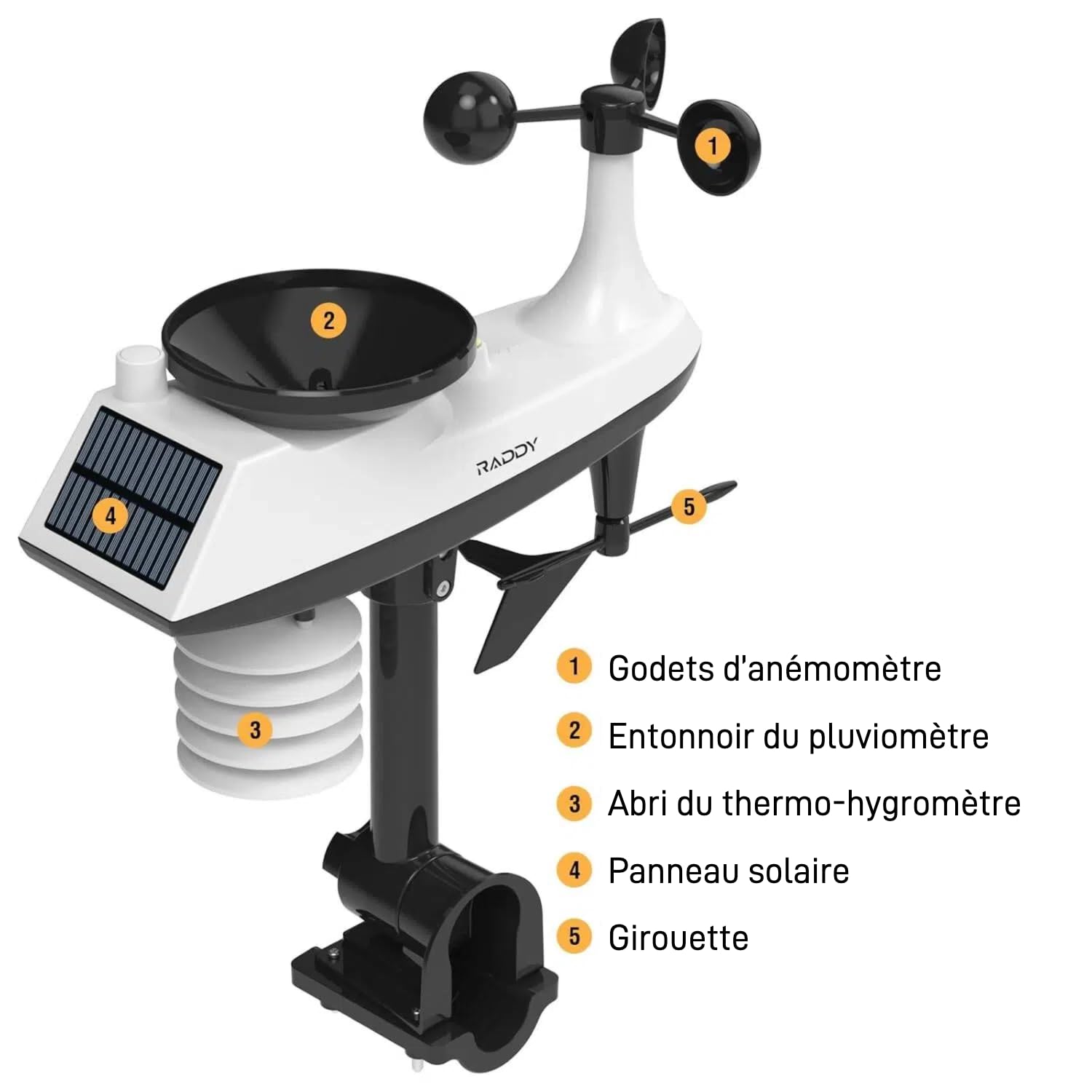
تصویر: تفصیلی view of the Raddy AG7 outdoor sensor unit, highlighting its key components.
- 1. Anemometer Cups: Measure wind speed.
- 2. Rain Gauge Funnel: Collects precipitation for measurement.
- 3. Thermo-Hygrometer Shield: Protects temperature and humidity sensors from direct sunlight and radiation.
- 4. سولر پینل: Powers the outdoor sensor and charges its internal battery.
- 5. Wind Vane: ہوا کی سمت کا تعین کرتا ہے۔
3. سیٹ اپ اور انسٹالیشن
3.1. آؤٹ ڈور سینسر کی تنصیب
Proper placement of the outdoor sensor is crucial for accurate readings. Choose an open location away from obstructions like buildings or trees that could interfere with wind or rain measurements. Ensure the solar panel receives adequate sunlight.

تصویر: Diagram illustrating various mounting options for the outdoor sensor, including top and side pole mounting. This image also shows the battery compartment and reset button for the sensor.
- ماؤنٹنگ کے اختیارات: The sensor can be mounted on top of a pole or to the side of a pole using the provided hardware.
- قطب قطر: For pole installation, it is recommended that the pole has a minimum diameter of 2.4 cm (0.9 inches).
- واقفیت: Ensure the wind vane is oriented correctly (usually pointing North) for accurate wind direction readings.
3.2. Display Console Setup
The display console can be placed on a table or mounted on a wall.

تصویر: The display console shown on a table stand and mounted on a wall, demonstrating flexible placement.
- طاقت کا منبع: The console can be powered by AAA batteries for economy mode or an adapter for continuous display.
- ابتدائی پاور اپ: Insert batteries or connect the power adapter. The console will automatically search for the outdoor sensor.
- Atomic Clock Synchronization: The atomic clock feature (DCF) will attempt to synchronize automatically. Ensure the console is placed in a location where it can receive the signal.
4. آپریٹنگ ہدایات
4.1. معلومات ڈسپلے کریں۔
The 7.4-inch display provides a wealth of information at a glance.

تصویر: The Raddy AG7 display showing various weather parameters and time, illustrating its multifunctionality.
- اندرونی/بیرونی درجہ حرارت اور نمی: Current readings for both environments.
- Precipitation: Displays rainfall data.
- موسم کا حال: 12-hour forecast icons.
- وقت اور کیلنڈر: Atomic clock synchronized time and date.
- Wind Direction & Speed: Current wind conditions.
- Dew Point & Felt Temperature: Additional comfort indicators.
- فضایء دباؤ: Current barometric pressure.
- زیادہ سے زیادہ/کم سے کم درجہ حرارت: Daily maximum and minimum temperature records.
4.2. بیک لائٹ ایڈجسٹمنٹ
The display features 4 adjustable backlight levels for optimal viewروشنی کے مختلف حالات میں۔

تصویر: چار سابقamples of the display with different backlight levels (LV0 to LV3), demonstrating the adjustability.
Refer to the specific buttons on your console (usually labeled "LIGHT" or similar) to cycle through the backlight levels.
4.3 الارم کی ترتیبات
The AG7 allows setting high/low alerts for various parameters and dual alarms for weekdays and weekends. Consult the detailed instructions in the included manual for specific button functions and navigation to set these alarms.
4.4. Multi-Zone Monitoring
The system can connect with up to three additional R5 sensors (sold separately) to monitor up to five distinct zones (one outdoor, one indoor from main console, and three additional indoor/outdoor zones).
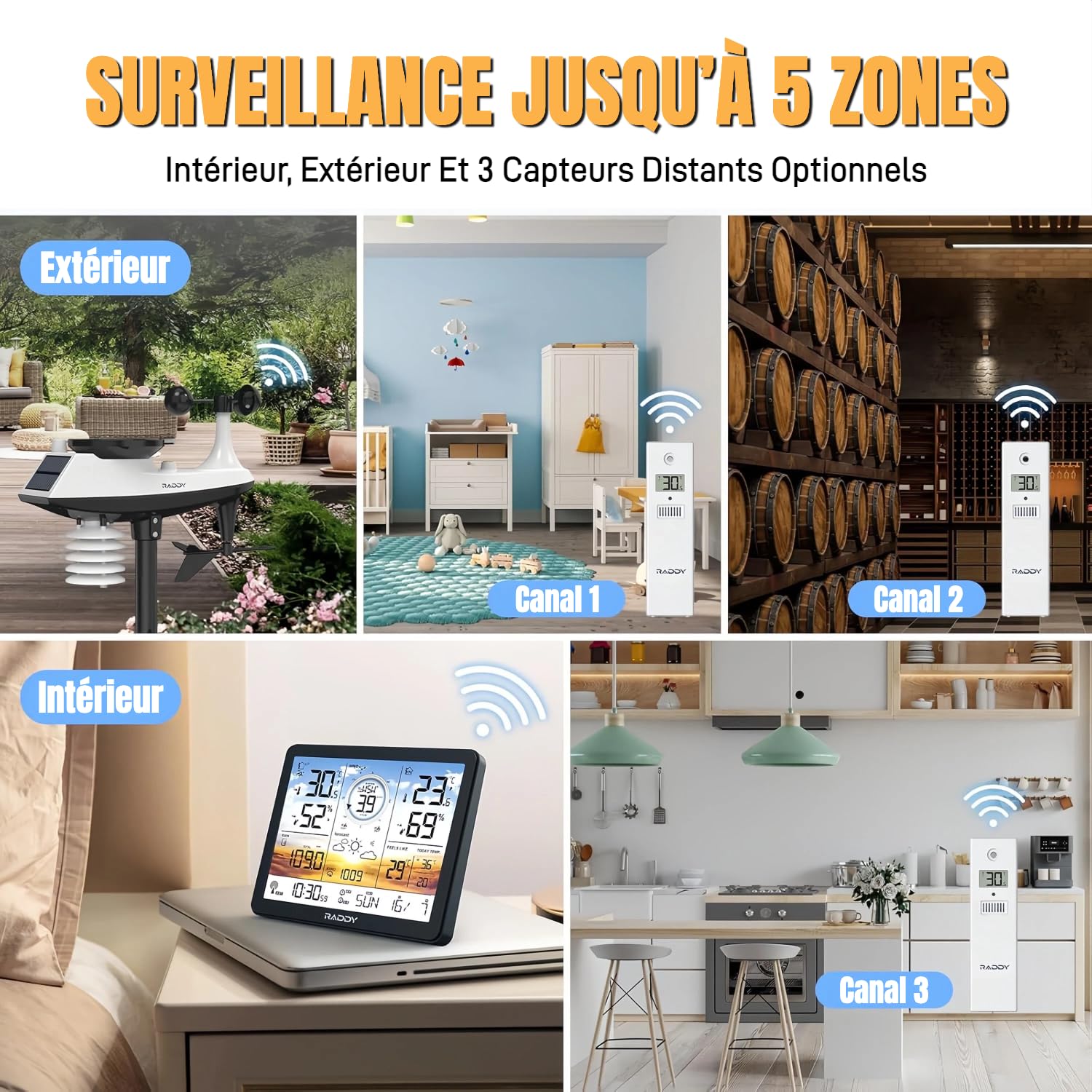
تصویر: Visual representation of the weather station monitoring multiple zones, including outdoor, indoor, and three additional channels with R5 sensors.
To add R5 sensors, follow the pairing instructions provided with the R5 sensors and the main AG7 manual. Each R5 sensor will transmit data to a specific channel on your main display.
5 دیکھ بھال
5.1 بیٹری کی تبدیلی
The display console uses AAA batteries (not included). The outdoor sensor is solar-powered with a backup battery. Replace batteries when the low battery indicator appears on the display.
تصویر: ایک مفصل view of the outdoor sensor's underside, showing the battery compartment (labeled 4) and reset button (labeled 1).
- آؤٹ ڈور سینسر: Access the battery compartment on the underside of the sensor. Ensure proper polarity when inserting new batteries.
- ڈسپلے کنسول: The battery compartment is typically on the back of the unit.
5.2. صفائی
- آؤٹ ڈور سینسر: Periodically clean the rain gauge funnel and anemometer cups to ensure accurate readings. Remove any debris or insects.
- ڈسپلے کنسول: Wipe the screen and casing ایک نرم، خشک کپڑے کے ساتھ. کھرچنے والے کلینر سے پرہیز کریں۔
6 خرابیوں کا سراغ لگانا
- No Outdoor Sensor Data / Loss of Radio Contact:
- Ensure the outdoor sensor is within the 100-meter transmission range of the display console.
- Check for obstructions (thick walls, metal structures, large appliances) between the sensor and console.
- Replace batteries in both the outdoor sensor and display console with fresh ones.
- Perform a reset: Press the reset button on the outdoor sensor (often a small pinhole, labeled 1 in the sensor detail image) and then on the display console (refer to your manual for console reset location). Re-pair the units if necessary.
- Avoid placing the console near electronic devices that may cause interference.
- Inaccurate Readings (Wind/Rain):
- Verify the outdoor sensor is installed in an open area, free from obstructions.
- Clean the rain gauge funnel and anemometer cups to remove any debris.
- Ensure the wind vane is correctly oriented.
- Display Not Visible / Dim:
- بیٹری کی سطح چیک کریں اور اگر ضروری ہو تو تبدیل کریں۔
- If using an adapter, ensure it is properly connected and functioning.
- Adjust the backlight level (refer to section 4.2).
- Atomic Clock Not Synchronizing:
- Ensure the console is placed near a window or in an area with good signal reception.
- Avoid placing it near large metal objects or electronic devices that can block the signal.
- Allow sufficient time (up to 24 hours) for initial synchronization.
7. وضاحتیں
| فیچر | تفصیل |
|---|---|
| برانڈ | ریڈی |
| ماڈل | AG7 |
| کنیکٹوٹی ٹیکنالوجی | 433 میگاہرٹز وائرلیس |
| ڈسپلے کی قسم | LCD |
| پاور سورس (کنسول) | Battery (AAA, not included) or Power Adapter |
| پاور سورس (بیرونی سینسر) | بیٹری بیک اپ کے ساتھ شمسی توانائی سے چلنے والا |
| درجہ حرارت کی درستگی | ±0.5 °C |
| زیادہ سے زیادہ آپریٹنگ درجہ حرارت | 60 °C |
| خصوصی خصوصیات | Alarm, Atomic Clock (DCF), 4-level Backlight |
| آؤٹ ڈور سینسر رینج | 100 میٹر (330 فٹ) تک |
8. وارنٹی اور سپورٹ
Raddy provides lifetime technical support for the AG7 weather station. If you encounter any issues or have questions regarding the product, please contact Raddy customer service for assistance.
For contact information, please refer to the packaging or the official Raddy webسائٹ