
1. تعارف
Welcome to the user manual for your Orbic JOURNEY Pro 4G flip phone. This device is designed for essential communication with the added benefits of 4G connectivity and smart features powered by KaiOS 3.1. This manual will guide you through the setup, operation, maintenance, and troubleshooting of your new phone, ensuring you can utilize all its functionalities effectively.
2. پیکیج کے مشمولات
Please check that all the following items are included in your product package:
- Orbic JOURNEY Pro 4G Main Unit
- AC اڈاپٹر
- USB کیبل (Type-C)
- بیٹری
- کوئیک اسٹارٹ گائیڈ
3. آلہ ختمview
The Orbic JOURNEY Pro 4G features a classic flip phone design with a physical keypad and two displays for convenience.


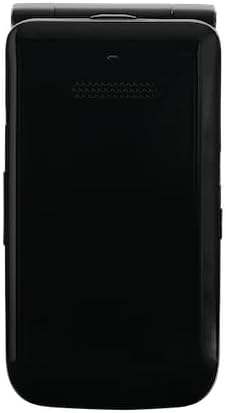
کلیدی اجزاء:
- مین ڈسپلے: The internal 3.2-inch TFT LCD screen for primary interaction.
- بیرونی ڈسپلے: A 1.77-inch external display for time, notifications, and caller ID when the phone is closed.
- کیپیڈ: Alphanumeric keys and navigation buttons for easy input and menu navigation.
- کیمرہ: A 5-megapixel rear camera with flash for capturing photos.
- USB ٹائپ سی پورٹ: چارج کرنے اور ڈیٹا کی منتقلی کے لیے۔
- 3.5 ملی میٹر ہیڈسیٹ جیک: وائرڈ ہیڈ فون کو جوڑنے کے لیے۔
4. ابتدائی سیٹ اپ
4.1. Installing the Battery and SIM Card
- فون کا پچھلا کور ہٹا دیں۔
- Insert the nanoSIM card into the designated SIM slot. Ensure the gold contacts face downwards and the card is correctly oriented.
- Insert the 1850mAh removable battery into its compartment, aligning the contacts.
- پچھلے کور کو تبدیل کریں، اس بات کو یقینی بناتے ہوئے کہ یہ محفوظ طریقے سے جگہ پر کلک کرتا ہے۔
4.2. ڈیوائس کو چارج کرنا
- USB Type-C کیبل کو فون کے چارجنگ پورٹ سے جوڑیں۔
- Connect the other end of the USB cable to the provided AC adapter.
- AC اڈاپٹر کو پاور آؤٹ لیٹ میں لگائیں۔
- The phone will indicate that it is charging. Allow the battery to fully charge before initial use.
4.3. پر / آف پاور
- پاور آن کرنے کے لیے: پاور/اینڈ کال بٹن کو دبائے رکھیں جب تک کہ اسکرین روشن نہ ہو۔
- پاور آف کرنا: پاور/اینڈ کال کے بٹن کو دبائیں اور تھامیں، پھر اسکرین پر موجود اختیارات میں سے 'پاور آف' کو منتخب کریں۔
5. بنیادی آپریشن
5.1. کال کرنا اور وصول کرنا
- کال کرنے کے لیے: Open the phone, enter the phone number using the keypad, and press the Green Call button.
- کال کا جواب دینے کے لیے: When the phone rings, press the Green Call button. You can answer with the phone closed by pressing the Green Call button, or open the phone to answer.
- کال ختم کرنے کے لیے: ریڈ اینڈ کال بٹن کو دبائیں۔
5.2. پیغامات بھیجنا اور وصول کرنا
- مین مینو سے 'پیغامات' ایپلیکیشن پر جائیں۔
- Select 'New Message' to compose a new text message.
- Enter the recipient's number or select from contacts, then type your message using the keypad.
- Press 'Send' to transmit the message.
5.3. Navigation and Smart Features
The Orbic JOURNEY Pro 4G runs on KaiOS 3.1, offering access to various smart applications:
- Web براؤزر: Access the internet to browse webسائٹس
- گوگل میپس: Use for navigation and location services.
- YouTube: Watch videos directly on your device.
- Wi-Fi Hotspot (Tethering): Share your phone's 4G internet connection with up to 8 other devices simultaneously. Access this feature through the phone's settings menu.
6. دیکھ بھال اور دیکھ بھال
- صفائی: فون کے بیرونی حصے کو صاف کرنے کے لیے نرم، خشک کپڑا استعمال کریں۔ سخت کیمیکلز یا کھرچنے والے مواد کے استعمال سے پرہیز کریں۔
- بیٹری کی دیکھ بھال: To prolong battery life, avoid exposing the phone to extreme temperatures. Do not leave the battery fully discharged for extended periods.
- پانی اور دھول: This device is not rated for water or dust resistance. Avoid exposure to liquids and dusty environments.
- ہینڈلنگ: Handle the phone with care. Avoid dropping it or subjecting it to strong impacts.
7 خرابیوں کا سراغ لگانا
If you encounter issues with your Orbic JOURNEY Pro 4G, please refer to the following common solutions:
| مسئلہ | حل |
|---|---|
| فون آن نہیں ہوتا | یقینی بنائیں کہ بیٹری درست طریقے سے انسٹال اور چارج ہوئی ہے۔ چارجر کو جوڑیں اور دوبارہ کوشش کریں۔ |
| کالز نہیں کر سکتے یا وصول نہیں کر سکتے | Check if the SIM card is properly inserted and activated. Verify network signal strength. Contact your service provider if the issue persists. |
| انٹرنیٹ کنکشن نہیں ہے۔ | Ensure mobile data is enabled in settings. Check Wi-Fi connection if using Wi-Fi. Verify your data plan with your service provider. |
| بیٹری تیزی سے ختم ہو جاتی ہے۔ | Reduce screen brightness, close unused applications, and disable Wi-Fi/Bluetooth when not in use. Avoid extreme temperatures. |
| فون غیر جوابدہ ہے۔ | نرم ری سیٹ کرنے کے لیے بیٹری کو ہٹائیں اور دوبارہ لگائیں۔ |
8. وضاحتیں
| فیچر | تفصیلات |
|---|---|
| پروڈکٹ کا نام | Orbic JOURNEY Pro 4G |
| ماڈل نمبر | O4F231JP |
| رنگ | جیٹ بلیک |
| آپریٹنگ سسٹم | KaiOS® 3.1 |
| پروسیسر | Qualcomm® QM215 Quad-Core (4x 1.3 GHz-ARM Cortex A53) |
| رام | 1 جی بی |
| اندرونی اسٹوریج | 8 جی بی |
| قابل توسیع اسٹوریج | Supports up to 128GB Micro SD |
| سینسر | Magnetic Sensor, Barometric Sensor |
| فنگر پرنٹ کی توثیق | تعاون یافتہ نہیں۔ |
| بیٹری کی صلاحیت | 1,850mAh (ہٹنے والا) |
| چارجر | 5W (Type C 2.0) Charger |
| فاسٹ چارجنگ | تعاون یافتہ نہیں۔ |
| وائرلیس چارجنگ | تعاون یافتہ نہیں۔ |
| مسلسل ٹاک ٹائم | زیادہ سے زیادہ 5.6 گھنٹے |
| مسلسل اسٹینڈ بائی ٹائم | زیادہ سے زیادہ 150 گھنٹے |
| مین ڈسپلے سائز | 3.2 انچ TFT LCD |
| مین ڈسپلے ریزولوشن | 240x320 (125ppi) |
| بیرونی ڈسپلے سائز | 1.77 انچ TFT LCD |
| بیرونی ڈسپلے ریزولوشن | 128x160 (116ppi) |
| طول و عرض (H x W x D) | تقریبا 115.3 x 60.9 x 19.8 ملی میٹر |
| وزن | تقریبا 148 گرام |
| جسمانی مواد | رال |
| کنیکٹر | USB Type-C 2.0 |
| پانی/دھول کی مزاحمت | قابل اطلاق نہیں۔ |
| پائیداری | قابل اطلاق نہیں۔ |
| مقررین | 2 |
| مائکروفونز | 2 |
| 3.5mm ہیڈسیٹ جیک۔ | جی ہاں |
| پیچھے والا کیمرہ | 5 Megapixels (f/2.2) with Flash |
| سامنے والا کیمرہ | تعاون یافتہ نہیں۔ |
| 2 جی بینڈ | GSM: 850/900/1800/1900MHz |
| 3 جی بینڈ | UMTS: B1/B5/B6/B8/B19 |
| 4 جی بینڈ | LTE: B1/B3/B5/B7/B8/B18/B19/B20/B26/B28/B38/B40/B41 |
| 5 جی بینڈ | تعاون یافتہ نہیں۔ |
| سم کی قسم | nanoSIM/4EF |
| Wi-Fi® کنیکٹیویٹی | 802.11 b/g/n 2.4GHz |
| ٹیچرنگ | Supported (up to 8 devices simultaneously) |
| بلوٹوت® | 4.2 |
| این ایف سی | تعاون یافتہ نہیں۔ |
| FeliCa | تعاون یافتہ نہیں۔ |
| لوکیشن سسٹم | GPS/AGPS/GLONASS |
9. وارنٹی اور سپورٹ
9.1. وارنٹی کی معلومات
The Orbic JOURNEY Pro 4G comes with a 1 سال کی محدود وارنٹی خریداری کی تاریخ سے. یہ وارنٹی عام استعمال کے تحت مینوفیکچرنگ نقائص کا احاطہ کرتی ہے۔ وارنٹی کے دعووں کے لیے براہ کرم اپنی خریداری کا ثبوت اپنے پاس رکھیں۔
وارنٹی اخراج:
- Damage caused by misuse, alteration, or unauthorized repair.
- Damage due to fire, earthquake, water damage, lightning, or other natural disasters.
- Damage or injury resulting from operations or usage methods contrary to the warnings and instructions in this manual.
- Loss of personal data or property damage incurred from the use or malfunction of this product.
- Products imported privately or parallel imports from overseas businesses are not covered by the product warranty.
9.2. کسٹمر سپورٹ
For further assistance, technical support, or warranty inquiries, please refer to the contact information provided in your Quick Start Guide or visit the official Orbic webآپ کے علاقے کے لیے سائٹ۔