
1. تعارف
The Nexxt Solutions Smart Wi-Fi Indoor Pan and Tilt Camera (NHC-P710) provides advanced home security and monitoring capabilities. Featuring 2K HD resolution, motion detection, night vision, and two-way audio, this camera allows for comprehensive surveillance and remote interaction. Its 355-degree rotatable design ensures wide coverage, making it an ideal solution for monitoring your home, pets, or loved ones.
This manual provides detailed instructions for setting up, operating, and maintaining your camera to ensure optimal performance and security.

Figure 1.1: Nexxt Solutions Smart Wi-Fi Indoor Pan and Tilt Camera (NHC-P710) and packaging.
2. باکس میں کیا ہے۔
Please verify that all components are present and in good condition upon opening the package:
- Indoor PTZ Wi-Fi camera
- پاور اڈاپٹر
- USB قسم-C کیبل
- 1 بڑھتے ہوئے بریکٹ
- 2 پیچ
- 2 کنکریٹ اینکرز
- فوری سیٹ اپ گائیڈ
3. سیٹ اپ گائیڈ
3.1. تنصیب کی تیاری
- یقینی بنائیں کہ آپ کا Wi-Fi نیٹ ورک 2.4GHz ہے۔ یہ کیمرہ 5GHz Wi-Fi کو سپورٹ نہیں کرتا ہے۔
- کیمرے کو اپنے Wi-Fi راؤٹر کی حد میں رکھیں۔
- Download the Nexxt Home app from the App Store (iOS) or Google Play Store (Android).
3.2. کیمرہ آن کرنا
- Connect the USB Type-C cable to the camera's power port.
- پاور اڈاپٹر کو معیاری الیکٹریکل آؤٹ لیٹ میں لگائیں۔
- Wait for the camera's indicator light to flash, indicating it's ready for pairing.
3.3. Adding the Camera to the Nexxt Home App
- Open the Nexxt Home app and log in or create a new account.
- نیا آلہ شامل کرنے کے لیے اوپری دائیں کونے میں "+" آئیکن کو تھپتھپائیں۔
- Select "Security Camera" or search for the NHC-P710 model.
- Follow the on-screen instructions to connect the camera to your Wi-Fi network. This typically involves scanning a QR code generated by the app with the camera's lens.
- Once connected, you can name your camera and assign it to a specific room.

Figure 3.1: Simple setup process for the 2K HD Smart Wi-Fi Indoor Camera.
3.4. کیمرہ لگانا (اختیاری)
The camera can be placed on a flat surface or mounted to a wall or ceiling using the included mounting bracket.
- Choose a suitable location for mounting, ensuring a clear view اور پاور آؤٹ لیٹ تک رسائی۔
- Attach the mounting bracket to the desired surface using the provided screws and anchors.
- Securely attach the camera to the mounting bracket by twisting it into place.
4. آپریٹنگ ہدایات
4.1. لائیو View اور ریموٹ رسائی
Once connected, you can access the live video feed from your camera anytime, anywhere, using the Nexxt Home app on your smartphone.
- Open the Nexxt Home app and select your camera from the device list.
- The live feed will appear. You can switch between standard and HD resolution.
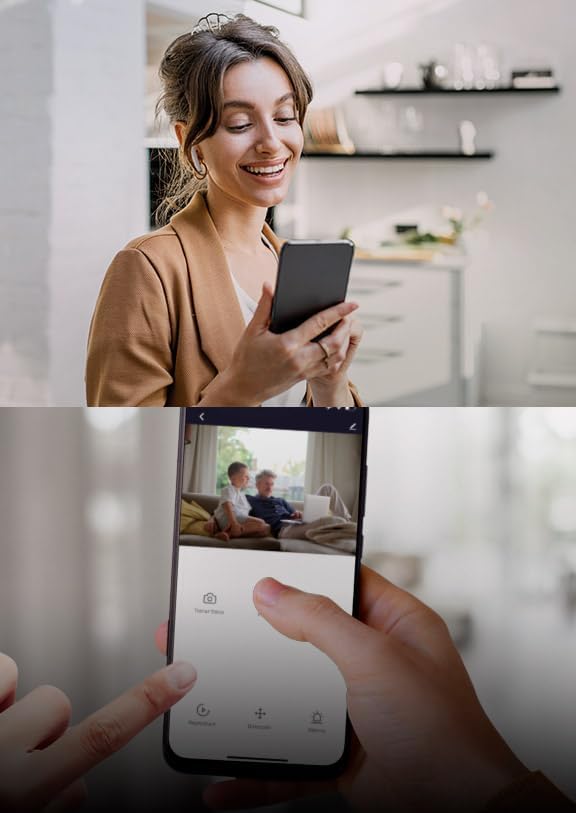
شکل 4.1: ریموٹ viewing of the camera feed via the Nexxt Home app.
4.2. پین اور جھکاؤ کنٹرول
The camera features a 355-degree rotatable design, allowing you to adjust its viewزاویہ دور سے.
- لائیو میں view interface of the app, use the directional controls (usually a joystick or arrow buttons) to pan (move horizontally) and tilt (move vertically) the camera lens.

Figure 4.2: The camera's 355-degree rotatable design for comprehensive coverage.
4.3. دو طرفہ آڈیو
The built-in microphone and speaker enable two-way communication.
- ایپ کے لائیو میں مائیکروفون آئیکن کو تھپتھپائیں۔ view کیمرے کے ذریعے بات کرنے کے لیے۔
- کیمرے کے ارد گرد سے آڈیو سننے کے لیے اسپیکر کے آئیکن کو تھپتھپائیں۔

Figure 4.3: Two-way communication feature.
4.4. حرکت کا پتہ لگانے اور انتباہات
The camera can detect motion and send instant alerts to your smartphone.
- Enable motion detection in the camera settings within the Nexxt Home app.
- Adjust sensitivity levels and set detection zones as needed.
- Receive push notifications on your phone when motion is detected.

Figure 4.4: Advanced motion detection with an effective range of up to 32 feet.
4.5. نائٹ ویژن
Integrated IR LEDs provide clear night vision, even in low light or complete darkness.
- کم روشنی والے حالات میں نائٹ ویژن خود بخود متحرک ہو جاتا ہے۔
- You can manually toggle night vision on/off in the app settings if desired.

Figure 4.5: Integrated IR LEDs allow clear night vision monitoring.
4.6. مقامی اسٹوریج (مائیکرو ایس ڈی کارڈ)
The camera supports local storage via a microSD card (up to 128GB, not included).
- Insert a formatted microSD card into the camera's slot.
- Configure recording settings (continuous, event-triggered) in the Nexxt Home app.
- Review ریکارڈ شدہ footage براہ راست ایپ سے۔
5. خصوصیات ختمview
The Nexxt Solutions Smart Wi-Fi Indoor Pan and Tilt Camera is equipped with a range of features designed for enhanced security and convenience:
- Full 2K HD Resolution: Provides sharp live streaming and video playback for clear monitoring.
- اعلی درجے کی حرکت کا پتہ لگانا: Detects movement up to 32 feet with smart human body detection to minimize false alerts.
- 355-Degree Rotatable Design: Offers comprehensive activity monitoring with wide room coverage.
- کلیئر نائٹ ویژن: چوڑا viewing angle and IR LEDs ensure clear visibility in low-light conditions.
- دو طرفہ آڈیو: Communicate directly through the camera using the built-in microphone and speaker.
- مقامی اسٹوریج سپورٹ: Supports microSD cards up to 128GB for continuous or event-triggered recording.
- ریموٹ رسائی: View live feeds and manage settings from anywhere via the free Nexxt Home app on iOS or Android devices.
- اسمارٹ ہوم مطابقت: Works with Amazon Alexa and Google Home for voice control and integration into your smart home ecosystem.

Figure 5.1: Key features of the Nexxt Solutions Smart Wi-Fi Camera.
6 دیکھ بھال
مناسب دیکھ بھال آپ کے کیمرے کی لمبی عمر اور بہترین کارکردگی کو یقینی بناتی ہے۔
- صفائی: کیمرے کے لینس اور جسم کو صاف کرنے کے لیے نرم، خشک کپڑا استعمال کریں۔ سخت کیمیکلز یا کھرچنے والے کلینر کے استعمال سے پرہیز کریں۔
- سافٹ ویئر اپ ڈیٹس: فرم ویئر اپ ڈیٹس کے لیے Nexxt Home ایپ کو باقاعدگی سے چیک کریں۔ اپنے کیمرے کے سافٹ ویئر کو اپ ٹو ڈیٹ رکھنا یقینی بناتا ہے کہ آپ کے پاس تازہ ترین خصوصیات اور سیکیورٹی میں اضافہ ہے۔
- پاور سائیکل: If the camera experiences minor issues, try unplugging it from the power source for 10 seconds and then plugging it back in.
- مائیکرو ایس ڈی کارڈ: If using a microSD card, periodically check its status in the app and consider formatting it every few months to maintain performance.
7 خرابیوں کا سراغ لگانا
| مسئلہ | ممکنہ وجہ | حل |
|---|---|---|
| کیمرہ آف لائن | No power; Wi-Fi signal weak or disconnected; Router issues. | Check power connection; Move camera closer to router; Restart router; Re-add camera in app. |
| Wi-Fi سے منسلک نہیں ہو سکتا | Incorrect Wi-Fi password; 5GHz network used; Too far from router. | Verify password; Ensure 2.4GHz network; Relocate camera. |
| خراب تصویر کا معیار | گندی لینس؛ ناکافی روشنی؛ نیٹ ورک بینڈوتھ کے مسائل۔ | Clean lens; Ensure adequate lighting; Check internet speed. |
| موشن الرٹس موصول نہیں ہوئے۔ | حرکت کا پتہ لگانا غیر فعال ایپ کی اطلاعات بند؛ غلط حساسیت۔ | Enable motion detection in app; Check phone notification settings; Adjust sensitivity. |
| دو طرفہ آڈیو مسائل | ایپ میں مائیکروفون/اسپیکر خاموش؛ نیٹ ورک میں تاخیر۔ | Unmute audio in app; Check network connection. |
8. وضاحتیں
| فیچر | تفصیل |
|---|---|
| ماڈل کا نام | Smart Wi-Fi camera (NHC-P710) |
| انڈور / آؤٹ ڈور استعمال | انڈور |
| ویڈیو کیپچر ریزولوشن | 2K HD |
| کنیکٹیویٹی پروٹوکول | Wi-Fi (2.4GHz) |
| طاقت کا منبع | کورڈڈ الیکٹرک |
| نائٹ ویژن رینج۔ | 32 فٹ |
| کنٹرول کا طریقہ | Voice (Amazon Alexa, Google Home), App |
| چڑھنے کی قسم | وال ماؤنٹ (اختیاری) |
| ذخیرہ | مائیکرو ایس ڈی کارڈ (128 جی بی تک) |
| مصنوعات کے طول و عرض | 2.7 x 2.7 x 4.3 انچ |
| شے کا وزن | 13.1 اونس |
9. وارنٹی اور سپورٹ
وارنٹی کی معلومات اور تکنیکی مدد کے لیے، براہ کرم آفیشل Nexxt سلوشنز سے رجوع کریں۔ webسائٹ یا ان کی کسٹمر سروس سے براہ راست رابطہ کریں۔ کسی بھی وارنٹی دعووں کے لیے خریداری کے ثبوت کے طور پر اپنی خریداری کی رسید رکھیں۔
مینوفیکچرر: نیکسٹ حل
مزید مدد کے لیے، ملاحظہ کریں۔ ایمیزون پر نیکسٹ حل اسٹور.