
ABIR VC205 Cordless Vacuum Cleaner User Manual
ماڈل: وی سی 205
1. تعارف
This manual provides essential instructions for the safe and efficient use of your ABIR VC205 Cordless Vacuum Cleaner. Please read this manual thoroughly before operating the appliance and retain it for future reference. Proper use and maintenance will ensure optimal performance and extend the lifespan of your vacuum cleaner.
2. پروڈکٹ ختمview
2.1 اجزاء
The ABIR VC205 Cordless Vacuum Cleaner comes with the following components:

تصویر: پھٹا view of the ABIR VC205 Cordless Vacuum Cleaner showing its main body, extension wand, floor brush, and various accessories.
- Main Vacuum Unit (with dustbin and motor)
- ایل ای ڈی فلور برش
- توسیع وانڈ
- Mite Removal Brush
- کریائس نوزل
- 2-in-1 Soft Brush
- چارجنگ اڈاپٹر
- صارف دستی (یہ دستاویز)
2.2 کلیدی خصوصیات
- Precision Cleaning: Infra-red dust sensing technology automatically adjusts motor speed based on dust detection.
- Intelligent Efficiency: Built-in processor optimizes power usage for extended service life.
- طاقتور سکشن: Provides a maximum of 27,000Pa suction power.
- اسمارٹ ٹچ کنٹرول: Ultra-large touch screen for mode switching, speed monitoring, and battery level display.
- Visual Cleaning Feedback: LED display ring light transitions from red (dust detected) to blue (clean).
- بیٹری مینجمنٹ: Digital battery energy display assists in effective charging management.
- اعلی درجے کی فلٹریشن: Cyclonic technology and multi-stage E13-grade HEPA filter capture 99.97% of tiny dust particles. The HEPA filter is washable.
- Versatile and Lightweight: Weighs 1.1 kg, with a detachable wind tube for portable cleaning of car seats and sofas.
- بہتر مرئیت: LED floor brush illuminates dark areas to reveal hidden dirt.
- ایرگونومک ڈیزائن: Slim handle and balanced weight distribution for comfortable handling.
- کم شور آپریشن: New cyclone design minimizes windflow noise to below 70dB.
3. سیٹ اپ
3.1 اسمبلی
- توسیع کی چھڑی منسلک کریں: ایکسٹینشن کی چھڑی کو مین ویکیوم یونٹ میں داخل کریں جب تک کہ یہ محفوظ طریقے سے اپنی جگہ پر کلک نہ کرے۔
- فرش برش منسلک کریں: Connect the LED floor brush to the other end of the extension wand, ensuring it locks firmly.
- لوازمات انسٹال کریں: For specific cleaning tasks, detach the extension wand and directly attach the mite removal brush, crevice nozzle, or 2-in-1 soft brush to the main vacuum unit.
3.2 ابتدائی چارجنگ
Before first use, fully charge the vacuum cleaner. Connect the charging adapter to the charging port on the main vacuum unit and plug it into a power outlet. The digital display will indicate the charging status. A full charge typically takes approximately 4-5 hours.
4. آپریٹنگ ہدایات
4.1 پاور آن/آف۔
ویکیوم کلینر کو آن یا آف کرنے کے لیے ہینڈل پر پاور بٹن دبائیں۔
4.2 Smart Touch Screen Control
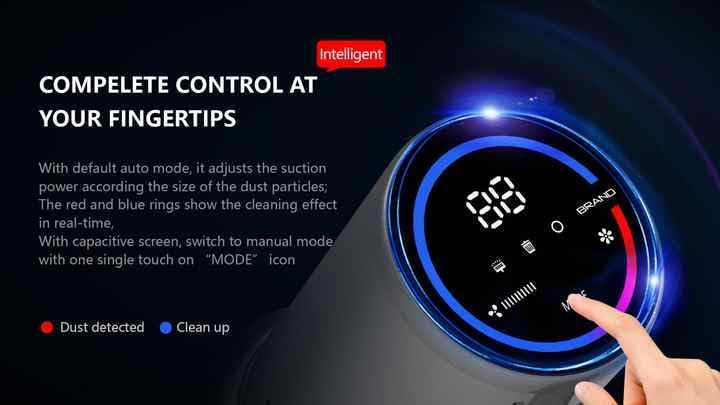
Image: The vacuum's digital touch screen displaying battery level, suction mode, and dust detection feedback.
The ultra-large smart touch screen allows you to:
- سوئچ موڈز: Tap the 'MODE' icon to cycle through different suction modes (e.g., Auto, Manual).
- بیٹری کی سطح کی نگرانی کریں: The digital display shows the remaining battery percentage.
- View سکشن کی رفتار: Observe the current suction power setting.
- Visual Cleaning Feedback: The LED ring light around the screen indicates cleaning progress. A red light signifies dust detection, while a blue light indicates the area is clean.
4.3 Dust Sensing Technology
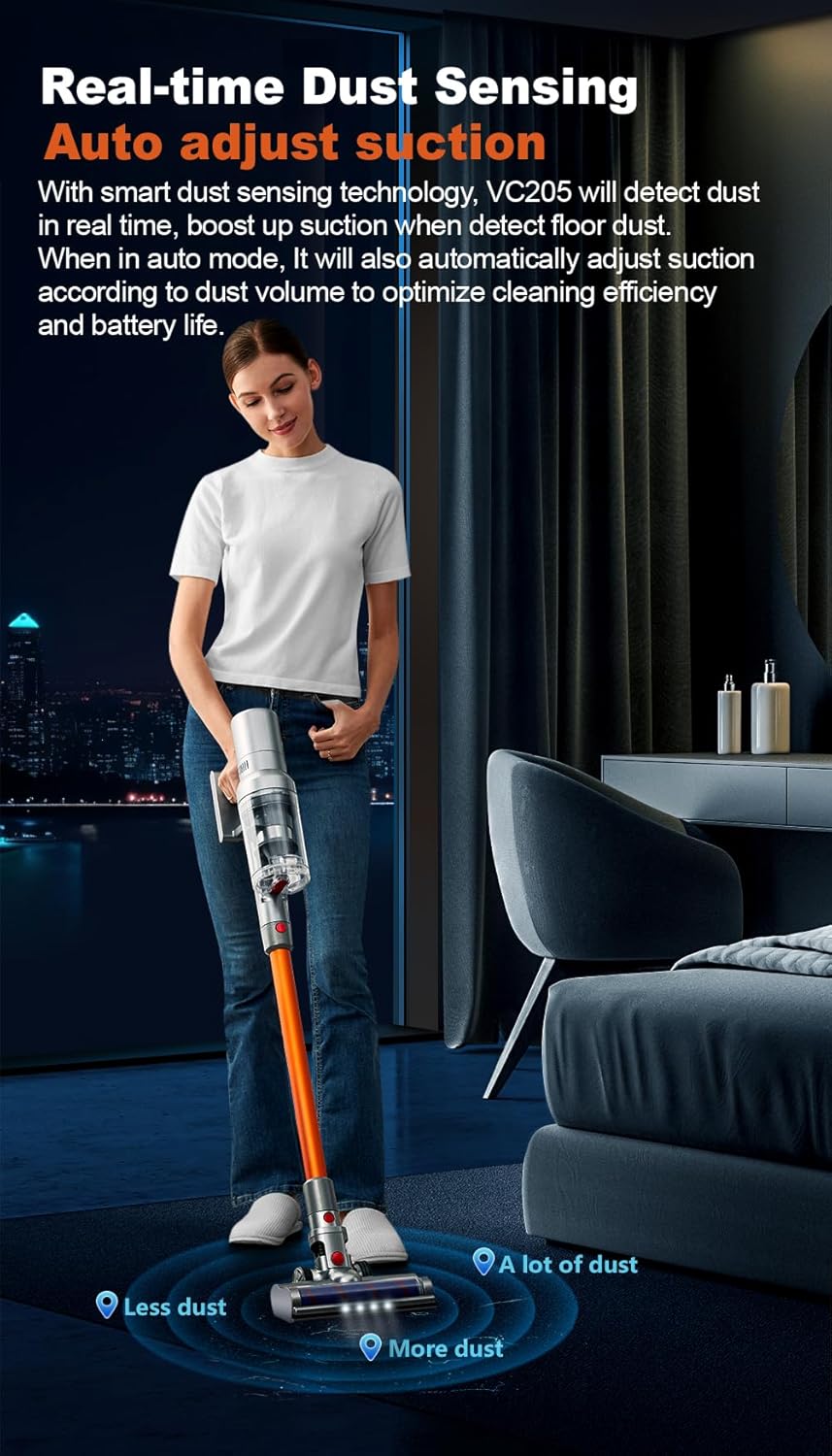
Image: Illustration of the vacuum's real-time dust sensing capability, adjusting suction based on dust volume.
In Auto mode, the vacuum cleaner utilizes infra-red dust sensing technology to detect dust particles. It automatically boosts motor speed when higher dust concentrations are detected, ensuring thorough cleaning and optimizing power consumption.
4.4 Using the LED Floor Brush

Image: The LED floor brush lights up the area in front of the vacuum, making dirt visible in dark spaces.
The integrated LED lights on the floor brush illuminate dark areas under furniture or in dimly lit rooms, making hidden dirt and debris visible for comprehensive cleaning.
4.5 منسلکات کا استعمال

Image: Demonstrates the versatility of the vacuum with different attachments for whole-house cleaning.
- Mite Removal Brush: Ideal for cleaning mattresses, upholstery, and pet beds to remove dust mites and allergens.
- کرائیس نوزل: Perfect for reaching narrow gaps, corners, and tight spaces in your home or car.
- 2-in-1 Soft Brush: Suitable for delicate surfaces, curtains, keyboards, and other areas requiring gentle cleaning.
- پورٹیبل استعمال: Detach the extension wand to use the main unit with attachments for handheld cleaning.
5 دیکھ بھال
5.1 کوڑے دان کو خالی کرنا
Regularly empty the 0.8-liter dustbin to maintain optimal suction power. Press the dustbin release button and empty the contents into a waste bin. Close the dustbin securely after emptying.
5.2 صفائی کے فلٹرز
The ABIR VC205 features a multi-stage filtration system with an E13-grade HEPA filter. For best performance, clean the filters regularly:
- Remove the dustbin and locate the filters.
- HEPA فلٹر اور دیگر فلٹر اجزاء کو الگ کریں۔
- فلٹرز سے ڈھیلی گندگی کو تھپتھپائیں۔
- HEPA فلٹر اور دیگر دھونے کے قابل اجزاء کو بہتے ٹھنڈے پانی کے نیچے اس وقت تک دھوئیں جب تک کہ پانی صاف نہ ہو جائے۔
- تمام فلٹر اجزاء کو دوبارہ جوڑنے سے پہلے کم از کم 24 گھنٹے تک مکمل طور پر خشک ہونے دیں۔ ڈرائر یا براہ راست گرمی کا استعمال نہ کریں۔
- Reassemble the filters and dustbin into the main unit.
5.3 برش رول کی صفائی
The LED floor brush features an anti-hair wrap design, but occasional cleaning of the brush roll may be necessary, especially after vacuuming pet hair.
- ویکیوم کلینر کو بند کر دیں اور اسے کسی بھی پاور سورس سے منقطع کر دیں۔
- Detach the floor brush from the extension wand.
- Locate the brush roll access cover (refer to the product diagram if needed).
- کینچی یا صفائی کے آلے کا استعمال کرتے ہوئے برش رول سے الجھے ہوئے بال یا ملبہ ہٹا دیں۔
- Reinstall the brush roll and secure the access cover.
6 خرابیوں کا سراغ لگانا
If you encounter issues with your ABIR VC205, please refer to the following common problems and solutions:
| مسئلہ | ممکنہ وجہ | حل |
|---|---|---|
| ویکیوم آن نہیں ہوتا ہے۔ | بیٹری ختم ہو گئی ہے۔ | ویکیوم کلینر کو پوری طرح سے چارج کریں۔ |
| کم سکشن پاور۔ | Dustbin is full; Filters are clogged; Brush roll is obstructed. | Empty the dustbin; Clean or replace filters; Remove obstructions from the brush roll. |
| مختصر رن ٹائم۔ | Battery not fully charged; Operating in high power mode. | Ensure battery is fully charged; Use Auto or lower power modes for longer runtime. |
| LED floor brush not lighting up. | Connection issue; LED malfunction. | Ensure the floor brush is securely attached; Contact customer support if issue persists. |
7. وضاحتیں
| فیچر | تفصیلات |
|---|---|
| برانڈ | ABIR |
| ماڈل | VC205 |
| رنگ | گرے |
| مصنوعات کے طول و عرض | 24 x 13 x 67 سینٹی میٹر |
| شے کا وزن | 2 کلوگرام |
| کوڑے دان کی گنجائش | 0.8 لیٹر |
| پاور / واٹtage | 250 واٹ |
| والیومtage | 240V |
| شور کی سطح | 50 ڈیسیبل |
| رن ٹائم | 40 منٹ تک |
| خصوصی خصوصیات | Anti Hair Wrap, Cordless, Flexible, LED Lights, Lightweight, Smart Touch Screen, Dust Sensing |
| فلٹر کی قسم | Cyclone, E13-grade HEPA (washable) |
| سطح کی سفارش | Carpet, Car, Hard Floor, Soft Floor, Wooden Floor, Pet Hair Pickup |
| طاقت کا منبع | بیٹری سے چلنے والا |
8. وارنٹی اور سپورٹ
Your ABIR VC205 Cordless Vacuum Cleaner is covered by a manufacturer's warranty. For specific warranty details, please refer to the warranty card included in your product packaging or contact ABIR customer support. If you require assistance with troubleshooting, parts, or general inquiries, please reach out to our customer service team through the contact information provided on the official ABIR webسائٹ یا آپ کی خریداری کی دستاویزات۔