
1. پروڈکٹ ختمview
The GUOANVISION S100 is an advanced outdoor PTZ (Pan-Tilt-Zoom) security camera featuring a unique dual-lens system. It combines a fixed wide-angle lens with a rotatable tracking lens to provide comprehensive surveillance without blind spots. Equipped with 6MP resolution, AI human detection, automatic tracking, two-way audio, and IP66 waterproofing, this camera is designed for robust outdoor monitoring.

Figure 1: GUOANVISION S100 Dual Lens Outdoor PTZ Security Camera
2. پیکیج کے مشمولات
تنصیب کے ساتھ آگے بڑھنے سے پہلے، براہ کرم تصدیق کریں کہ آپ کے پیکیج میں تمام اجزاء موجود ہیں:
- GUOANVISION S100 Outdoor PTZ Camera
- بڑھتے ہوئے بریکٹ
- پاور اڈاپٹر (کورڈ الیکٹرک)
- بڑھتے ہوئے پیچ اور وال پلگ
- Waterproof Caps for Connectors
- صارف دستی
Video 1: Unboxing and Package Contents of the GUOANVISION S100 Camera.
3. سیٹ اپ گائیڈ
3.1 جسمانی تنصیب
The GUOANVISION S100 camera supports both wall and ceiling mounting. Choose a location that provides optimal coverage and a stable Wi-Fi signal.
- ماؤنٹنگ بریکٹ منسلک کریں: Secure the mounting bracket to the camera using the provided screws.
- نشان ڈرلنگ پوائنٹس: Hold the camera with the attached bracket against the desired installation surface. Mark the drilling points.
- سوراخ ڈرل: Drill holes at the marked positions and insert the wall plugs.
- ماؤنٹ کیمرہ: Align the bracket with the drilled holes and secure the camera using the mounting screws.
- پاور سے رابطہ کریں: Connect the power adapter to the camera and plug it into a power outlet. Ensure the connection is secure and protected from weather using the waterproof caps.

Figure 2: Illustration of wall and ceiling mounting options.
3.2 ایپ انسٹال کرنا اور جوڑا بنانا
To control and monitor your camera, download the iCSee app from your smartphone's app store (available for Android and iOS).
- اپلی کیشن ڈاؤن لوڈ کریں: Scan the QR code in the included user manual or search for 'iCSee' in your app store.
- اکاؤنٹ رجسٹر کریں: Open the iCSee app and follow the on-screen instructions to register a new account or log in if you already have one.
- Enable Bluetooth & Wi-Fi: Ensure your smartphone's Bluetooth and 2.4GHz Wi-Fi are enabled.
- ڈیوائس شامل کریں: In the app, tap the '+' icon to add a new device. The app should automatically detect the camera via Bluetooth. Confirm the device.
- Wi-Fi سے جڑیں: Select your 2.4GHz Wi-Fi network and enter the password. The camera will connect to your network.
- مائیکرو ایس ڈی کارڈ داخل کریں (اختیاری): For local recording, insert a MicroSD card (up to 128GB) into the designated slot on the camera.

Figure 3: Visual guide for iCSee app installation and device pairing.
Video 2: Detailed steps for connecting the camera to the iCSee app.
4. آپریٹنگ ہدایات
4.1 لائیو View and Dual Screen Monitoring
Access the live feed from your camera through the iCSee app. The S100 features a dual-screen display, allowing you to view both the fixed wide-angle lens and the rotatable PTZ lens simultaneously.

Figure 4: Simultaneous display of both camera lenses in the iCSee app.
4.2 PTZ کنٹرول
The lower lens of the camera can be controlled remotely via the app, offering a horizontal pan of 350° and a vertical tilt of 90°.
- پین/جھکاؤ: Use the directional controls in the app to adjust the camera's viewING زاویہ
- پیشگی پوزیشنیں: Save frequently monitored areas as preset positions for quick navigation.

Figure 5: Diagram illustrating the 350° pan and 90° tilt functionality.
4.3 AI Human Detection & Auto-Tracking
The camera utilizes AI to accurately detect human movement and automatically track the subject within its field of view. This minimizes false alarms from animals or environmental factors.
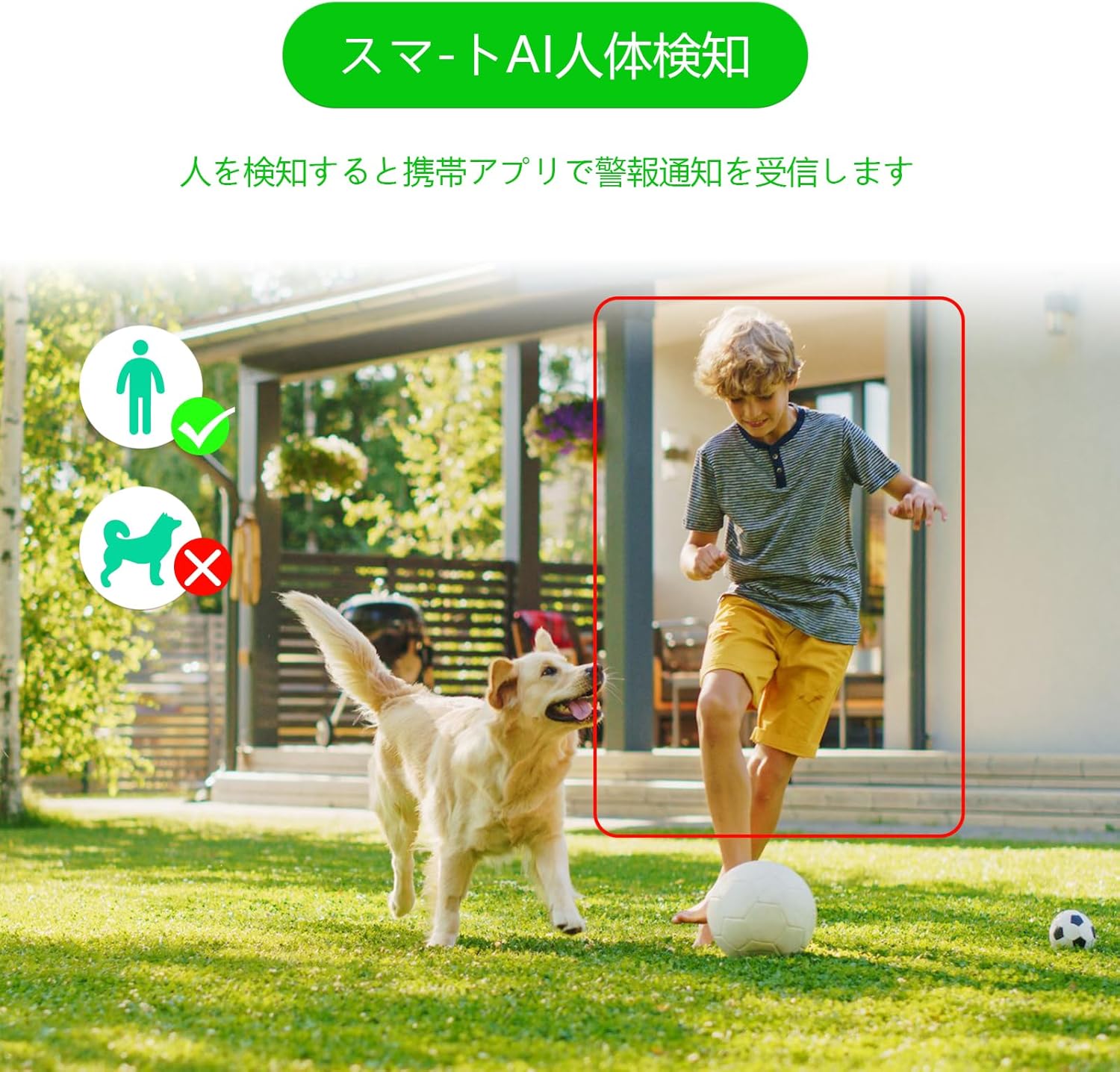
Figure 6: AI human detection feature, focusing on human figures.
Video 3: Demonstration of the camera's automatic motion tracking feature.
4.4 نائٹ ویژن موڈز
The S100 offers multiple night vision modes to suit different lighting conditions:
- اورکت وضع: معیاری سیاہ اور سفید نائٹ ویژن۔
- مکمل رنگ موڈ: Utilizes built-in lights to provide color images even in low light.
- اسمارٹ موڈ: پتہ چلنے والی حرکت کی بنیاد پر اورکت اور کلر نائٹ ویژن کے درمیان خودکار طور پر سوئچ ہوجاتا ہے۔

Figure 7: Comparison of infrared, smart, and full-color night vision modes.
Video 4: Demonstration of the camera's night vision capabilities in various settings.
4.5 Two-Way Audio & Alarm Functions
Communicate with visitors or deter intruders using the built-in microphone and speaker. The camera also features a light and sound alarm that can be triggered upon detection of suspicious activity.
- دو طرفہ گفتگو: Use the app to speak through the camera's speaker and listen through its microphone.
- Light & Sound Alarm: Configure the camera to activate flashing blue/red lights and an audible siren when human motion is detected at night.

Figure 8: Illustrates the two-way audio feature for remote communication.
5 دیکھ بھال
Regular maintenance ensures optimal performance and longevity of your GUOANVISION S100 camera.
- صفائی: وقتاً فوقتاً کیمرے کے لینس اور جسم کو نرم سے صاف کریں، ڈیamp دھول اور گندگی کو دور کرنے کے لئے کپڑا. کھرچنے والے کلینر سے پرہیز کریں۔
- فرم ویئر اپ ڈیٹس: Check the iCSee app regularly for available firmware updates. Keeping the firmware updated ensures you have the latest features and security enhancements.
- کنکشن چیک: Periodically verify the power and network connections to ensure they are secure and free from damage.
- ایسڈی کارڈ مینجمنٹ: If using a MicroSD card, ensure it is functioning correctly and has sufficient storage space. Format the card through the app if necessary.
6 خرابیوں کا سراغ لگانا
اگر آپ کو اپنے کیمرے کے ساتھ مسائل کا سامنا کرنا پڑتا ہے، تو درج ذیل عام مسائل اور حل دیکھیں:
- کیمرہ آف لائن:
- Check power supply: Ensure the camera is properly connected to power.
- Check Wi-Fi connection: Verify your Wi-Fi network is active and the camera is within range. Re-pair the camera if necessary.
- Router settings: Ensure your router is broadcasting a 2.4GHz Wi-Fi signal.
- No Recording/SD Card Not Detected:
- Ensure MicroSD card is correctly inserted.
- Check if the MicroSD card is damaged or full. Format it via the app or replace it.
- Verify recording settings in the iCSee app.
- خراب تصویری معیار:
- کیمرے کے لینس کو صاف کریں۔
- Ensure adequate lighting, especially for color night vision.
- Check network stability; a weak Wi-Fi signal can affect streaming quality.
- غلط الارم:
- Adjust AI human detection sensitivity in the app.
- Ensure the camera is positioned to minimize detection of non-human movement (e.g., swaying branches).
7. وضاحتیں
| فیچر | تفصیل |
|---|---|
| برانڈ | GUOANVISION |
| ماڈل کا نام | S100 |
| تجویز کردہ استعمال | Baby Monitor, Pet Monitor, Indoor Security, Outdoor Security |
| کنیکٹوٹی | Wired, Wi-Fi (2.4GHz) |
| خصوصیات | HD Resolution, Dual Lens, PTZ, AI Human Detection, Auto-Tracking, Two-Way Audio, Light/Sound Alarm |
| انڈور / آؤٹ ڈور استعمال | انڈور، آؤٹ ڈور |
| ہم آہنگ آلات | اسمارٹ فون (iOS، Android) |
| طاقت کا منبع | کورڈڈ الیکٹرک |
| کنیکشن پروٹوکول | ONVIF |
| چڑھنے کی قسم | Wall Mount, Ceiling Mount (Screw-in) |
| Product Exterior Material | پلاسٹک |
| واٹر پروف ریٹنگ | آئی پی 66 |
| الارم کی قسم | Audio & Motion (Light & Sound) |
| موثر پھر بھی قرارداد | 6 MP (2x 3MP lenses) |
| انتظام کا طریقہ | App (iCSee) |
| بیٹریاں درکار ہیں۔ | نہیں |
| ویڈیو انکوڈنگ فارمیٹ | MPEG-4 |
| ویڈیو کیپچر فارمیٹ | MP4 |
| نائٹ ویژن رینج۔ | 15 میٹر |
| نائٹ ویژن | Color Night Vision, Infrared, Smart Mode |
| IR ایل ای ڈی | 8 |
| پروڈکٹ کا سائز | 22.9 x 12.7 x 22.9 سینٹی میٹر |
| Max Flash Memory Support | 128 جی بی (مائیکرو ایس ڈی) |
8. وارنٹی اور سپورٹ
GUOANVISION is committed to providing high-quality products and excellent customer service. If you have any questions, concerns, or encounter product defects during the warranty period, please do not hesitate to contact us.
8.1 رابطہ کی معلومات
- ای میل سپورٹ: support@guoanvision.net (24 گھنٹے جواب)
- ایمیزون کسٹمر سروس: Navigate to 'Customer Service' > 'Your Orders' > 'Sold by' > 'Ask a question' for assistance with your purchase.
We will respond promptly to provide warranty service and support.