
1. تعارف
Thank you for choosing the Pomya Mechanical Gaming Keyboard. This 68-key wired keyboard is designed for a comfortable and responsive typing experience, suitable for both gaming and office use. It features an ergonomic design, ice blue backlighting with multiple modes, a detachable cable, and hot-swappable switches for customization.
This manual provides essential information for the proper installation, operation, and maintenance of your keyboard. Please read it thoroughly before use.

Image: The Pomya Mechanical Gaming Keyboard, featuring its compact 68-key layout, ice blue backlighting, and a close-up of a blue mechanical switch.
2. پیکیج کے مشمولات
براہ کرم پیکیج کے مواد کو چیک کریں تاکہ یہ یقینی بنایا جا سکے کہ تمام اشیاء موجود ہیں اور اچھی حالت میں ہیں:
- 1 x 68-Key Mechanical Keyboard
- 1 ایکس کی کیپ پلر
- 1 x Data Cable (USB-A to USB-C, 5.7ft)
- 1 ایکس یوزر مینوئل (یہ دستاویز)
- 3 x Blue Switches (spare)

Image: All items included in the product package: the keyboard, detachable USB cable, keycap puller, and three spare blue switches.
3. سیٹ اپ
- کی بورڈ کھولیں: کی بورڈ اور تمام لوازمات کو احتیاط سے پیکیجنگ سے ہٹا دیں۔
- Connect the Data Cable:
- Locate the USB-C port on the back or side of the keyboard.
- Insert the USB-C end of the provided data cable into the keyboard's port.
- Insert the USB-A end of the data cable into an available USB port on your computer (desktop PC, laptop, etc.).
- سسٹم کی شناخت: آپ کے کمپیوٹر کو خود بخود کی بورڈ کے لیے ضروری ڈرائیوروں کا پتہ لگانا اور انسٹال کرنا چاہیے۔ عام طور پر کسی اضافی سافٹ ویئر کی تنصیب کی ضرورت نہیں ہے۔
- جگہ کا تعین: Position the keyboard on a stable, flat surface. Adjust the kickstands on the bottom of the keyboard for your preferred typing angle, if available.

Image: Detail of the USB-C port on the keyboard, illustrating where the detachable cable connects.
4. آپریٹنگ ہدایات
4.1 کی بورڈ کے بنیادی افعال
The keyboard functions as a standard 68-key layout. All keys are anti-ghosting, ensuring accurate input even during rapid key presses.
4.2 Backlight Control (Ice Blue)
The keyboard features an ice blue backlight with over 19 different lighting modes. Use the following key combinations to control the backlight:
- Fn + \ |: Cycle through the 19+ different backlight modes.
- Fn + ↑: بیک لائٹ کی چمک میں اضافہ کریں۔
- Fn + ↓: بیک لائٹ کی چمک کو کم کریں۔
- Fn + ←: Decrease backlight speed (for dynamic modes).
- Fn + →: Increase backlight speed (for dynamic modes).

تصویر: اوور ہیڈ view of the keyboard, showing the key layout and compact design.
4.3 ملٹی میڈیا اور فنکشن کیز
Many keys have secondary functions accessible via the Fn key. Refer to the keycaps for specific icons indicating these functions (e.g., F1-F12, media controls).
| امتزاج | فنکشن |
|---|---|
| Fn + F1-F12۔ | Standard F-key functions (e.g., F1 for Help, F5 for Refresh). |
| Fn + Q/W/E/R/T/Y | Specific multimedia controls (check keycap legends). |
| Fn + جیت | ونڈوز کی کو لاک/انلاک کریں۔ |
4.4 گرم تبدیل کرنے کے قابل سوئچز
This keyboard features hot-swappable switches, allowing you to change the mechanical switches without soldering. This enables customization of typing feel and sound.
- کی کیپ کو ہٹا دیں: مطلوبہ کی کیپ کو آہستہ سے ہٹانے کے لیے فراہم کردہ کی کیپ پلر کا استعمال کریں۔
- سوئچ ہٹائیں: Use a switch puller (not included, but often comes with spare switches or can be purchased separately) to carefully pull the switch straight up from the PCB.
- نیا سوئچ داخل کریں: پی سی بی کے سوراخوں کے ساتھ نئے سوئچ کے پنوں کو سیدھ میں رکھیں۔ سوئچ کو مضبوطی سے دبائیں جب تک کہ یہ اپنی جگہ پر کلک نہ کرے۔ اس بات کو یقینی بنائیں کہ پن نہیں جھکے ہوئے ہیں۔
- کی کیپ کو تبدیل کریں: کی کیپ کو واپس نئے سوئچ پر رکھیں۔
نوٹ: The keyboard comes with blue switches installed and three spare blue switches. Ensure replacement switches are compatible with the keyboard's PCB (typically 3-pin or 5-pin MX-style switches).
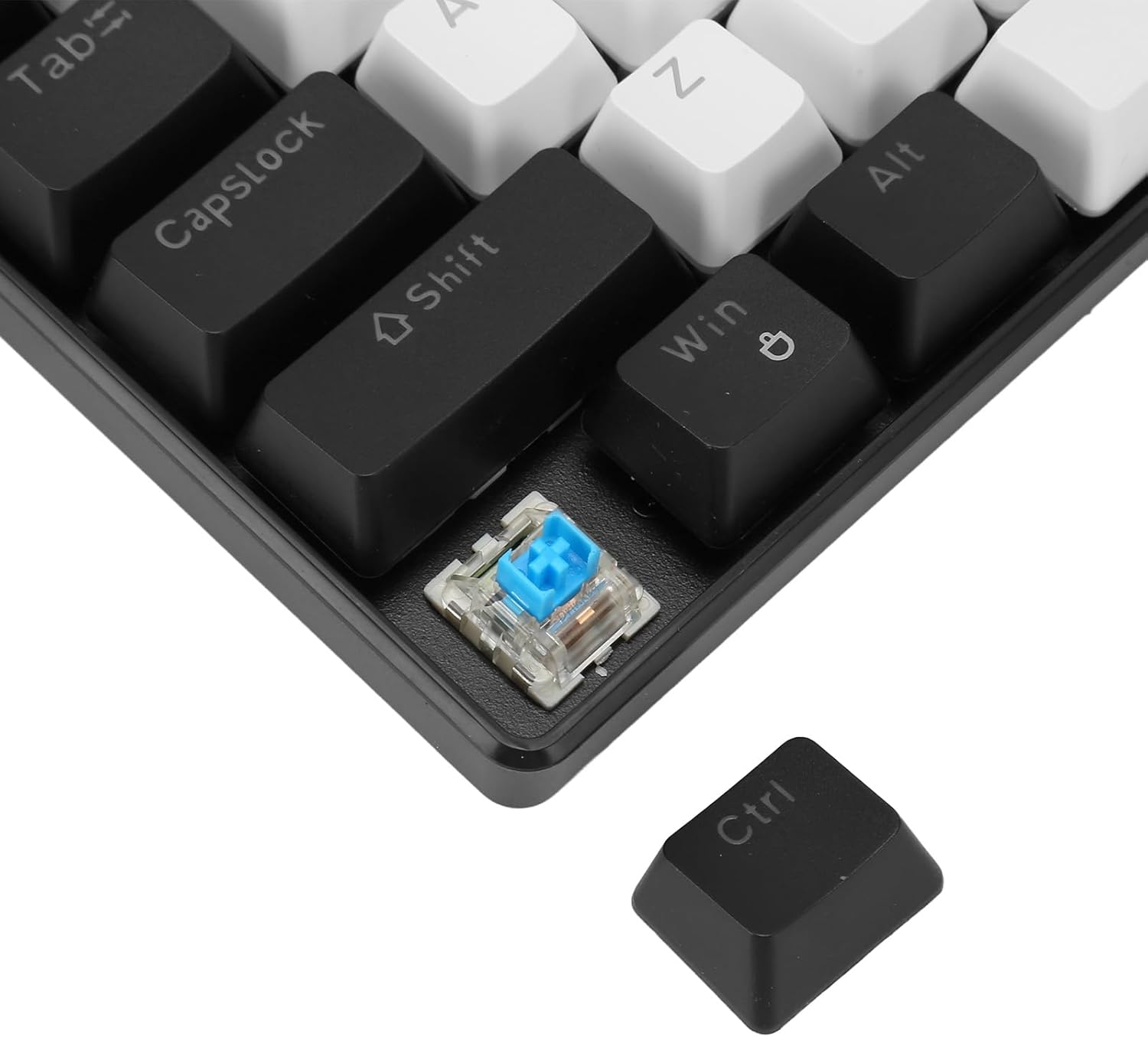
تصویر: ایک تفصیلی view showing a mechanical switch detached from the keyboard, alongside a keycap, illustrating the hot-swappable design.
5 دیکھ بھال
- صفائی:
- صاف کرنے سے پہلے کی بورڈ کو اپنے کمپیوٹر سے منقطع کریں۔
- کی بورڈ کی سطح کو صاف کرنے کے لیے نرم، خشک کپڑا استعمال کریں۔
- For deeper cleaning, use a keycap puller to remove keycaps and compressed air to clear dust and debris from between the switches.
- Keycaps can be cleaned with mild soap and water, then thoroughly dried before reattaching.
- کیبل کی دیکھ بھال: The detachable cable should be handled with care. Avoid sharp bends or excessive pulling to prevent damage.
- ذخیرہ: Store the keyboard in a clean, dry environment away from extreme temperatures and direct sunlight when not in use for extended periods.
6 خرابیوں کا سراغ لگانا
| مسئلہ | حل |
|---|---|
| کی بورڈ جواب نہیں دے رہا ہے۔ |
|
| بیک لائٹ کام نہیں کر رہی یا پھنس گئی۔ |
|
| Certain keys not registering input. |
|
7. وضاحتیں
| فیچر | تفصیل |
|---|---|
| ماڈل نمبر | Pomya0f5gohme46-11 |
| برانڈ | پومیا |
| کنکشن کی قسم | Wired (USB-C detachable cable) |
| چابیاں کی تعداد | 68 Keys (Full Anti-Ghosting) |
| سوئچ کی قسم | Blue Mechanical Switches (Hot-swappable) |
| کی اسٹروک لائف | 50 Million keystrokes |
| بیک لائٹ | Ice Blue (19+ modes) |
| Keycap Process | Double Color Injection Molding |
| کیبل کی لمبائی | 5.7 فٹ (تقریباً 1.74 میٹر) |
| مواد | ABS (Acrylonitrile Butadiene Styrene) |
| مطابقت | ونڈوز، او ایس ایکس، لینکس |
| طول و عرض (پیکیج) | 13.39 x 5.12 x 1.97 انچ |
| شے کا وزن | 1.52 پاؤنڈ |

تصویر: اوپر اور نیچے views of the keyboard, detailing its design and the information label on the base.
8. وارنٹی اور سپورٹ
For warranty information and technical support, please refer to the documentation provided with your purchase or contact Pomya customer service through the retailer where the product was purchased. Keep your proof of purchase for warranty claims.
آن لائن مدد: Visit the official Pomya store page on Amazon for additional product information and support resources: Pomya Amazon Store