
1. پروڈکٹ ختمview
The Riokko YM119 OBD2 Scanner is a diagnostic tool designed for car owners to easily read and clear engine fault codes. It provides real-time data, freeze frame information, and supports various diagnostic functions for OBDII/EOBD compliant vehicles manufactured since 1996. Its intuitive interface and compact design make it suitable for both professional technicians and home users.

Figure 1.1: Riokko YM119 OBD2 Scanner. This image shows the main diagnostic tool with its color screen, control buttons, and the attached OBDII connector cable.
2. سیٹ اپ اور ابتدائی استعمال
2.1 پیکیج کے مشمولات
- Riokko YM119 OBD2 Scanner Unit
- صارف دستی (یہ دستاویز)
2.2 سکینر کو جوڑنا
- گاڑی کا ڈیٹا لنک کنیکٹر (DLC) تلاش کریں۔ یہ عام طور پر ڈرائیور کی طرف ڈیش بورڈ کے نیچے واقع ہوتا ہے۔
- Ensure the vehicle's ignition is turned ON (engine can be off or running, depending on the test).
- Plug the OBDII connector of the YM119 scanner firmly into the vehicle's DLC. The scanner will power on automatically.
2.3 زبان کا انتخاب
The YM119 supports 13 national languages. To change the language:
- From the main menu, navigate to "Setting" using the arrow keys.
- دبائیں OK button to enter the Setting menu.
- Select "Language" and choose your preferred language from the list.
- دبائیں OK اپنے انتخاب کی تصدیق کرنے کے لیے۔
3. سکینر چلانا
3.1 نیویگیشن بٹن
- باہر نکلیں: Returns to the previous screen or main menu.
- اوپر/نیچے تیر: مینو کے اختیارات کے ذریعے تشریف لے جائیں۔
- LEFT/RIGHT Arrows: Navigate through data screens or adjust settings.
- ٹھیک ہے: انتخاب کی تصدیق کرتا ہے یا ذیلی مینیو میں داخل ہوتا ہے۔
- BAT: Initiates the battery voltagای ٹیسٹ

Figure 3.1: Main Menu and Professional Functions. This image illustrates the scanner's main menu interface and highlights its key diagnostic capabilities such as Engine Fault Diagnostics, Quick Clear Fault Code, Real-time Data Stream, and Battery Life Test.
3.2 تشخیصی افعال
From the main menu, select "Diagnosis" to access the primary diagnostic functions.

Figure 3.2: OBD II Diagnostic Test Items. This image shows the comprehensive list of diagnostic tests available on the scanner, from reading and erasing codes to advanced sensor and component tests.
3.2.1 کوڈ پڑھیں
یہ فنکشن گاڑی کے کمپیوٹر سے ڈائیگنوسٹک ٹربل کوڈز (DTCs) بازیافت کرتا ہے۔ یہ کوڈ گاڑی کے آن بورڈ تشخیصی نظام کے ذریعے پائے جانے والے مخصوص مسائل کی نشاندہی کرتے ہیں۔
- Select "Read Codes" from the Diagnosis menu.
- The scanner will display any stored, pending, or permanent DTCs.
- استعمال کریں۔ اوپر/نیچے arrows to scroll through the codes.
- For detailed information on a specific code, use the "DTC Lib" function or refer to a reliable automotive repair database.
3.2.2 کوڈز صاف کریں۔
This function erases DTCs from the vehicle's computer and turns off the Malfunction Indicator Lamp (MIL), also known as the Check Engine Light. Note: Clearing codes does not fix the underlying problem. The MIL will illuminate again if the fault persists.

Figure 3.3: Check and Turn Off Engine Light. This image demonstrates the scanner's ability to diagnose and clear engine fault codes, effectively turning off the Check Engine Light on the vehicle's dashboard.
- Select "Erase Codes" from the Diagnosis menu.
- اشارہ کرنے پر کارروائی کی تصدیق کریں۔
- The MIL should turn off.
3.2.3 Real-time Data (Live Data Stream)
View real-time sensor data from the vehicle's engine control unit (ECU). This data can be displayed in text or graphical format, allowing for dynamic monitoring of vehicle performance.
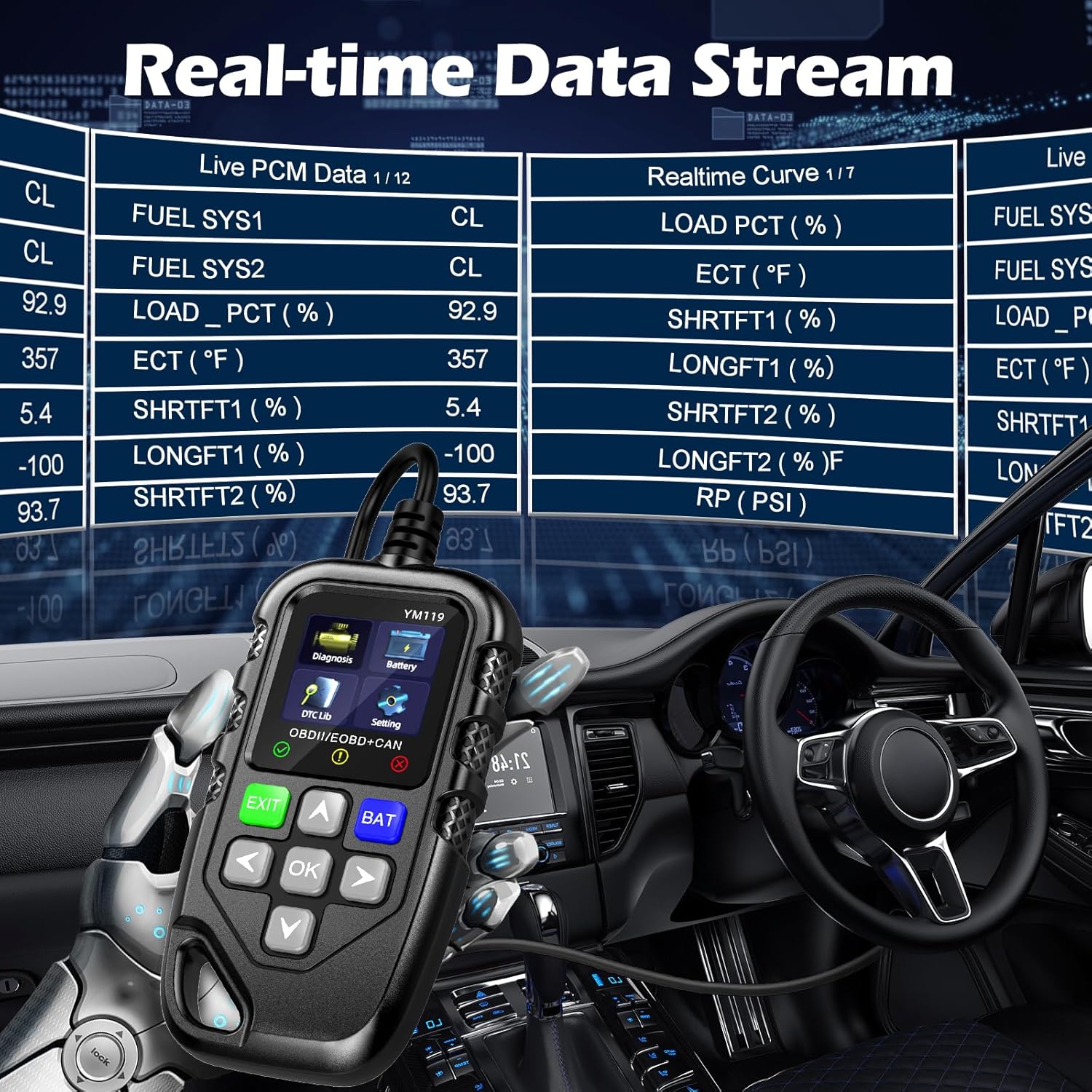
Figure 3.4: Real-time Data Stream. This image shows the scanner's capability to display live engine data, including various sensor readings and their corresponding real-time curves, aiding in dynamic vehicle diagnostics.
- Select "Live Data" or "Realtime Curve" from the Diagnosis menu.
- استعمال کریں۔ اوپر/نیچے arrows to scroll through different data parameters.
- استعمال کریں۔ بائیں/دائیں arrows to switch between text and graph views (if available for the parameter).
3.2.4 Freeze Frame Data
When an emission-related fault occurs, the vehicle's computer records a snapshot of operating conditions at the time of the fault. This "freeze frame" data helps in diagnosing intermittent problems.
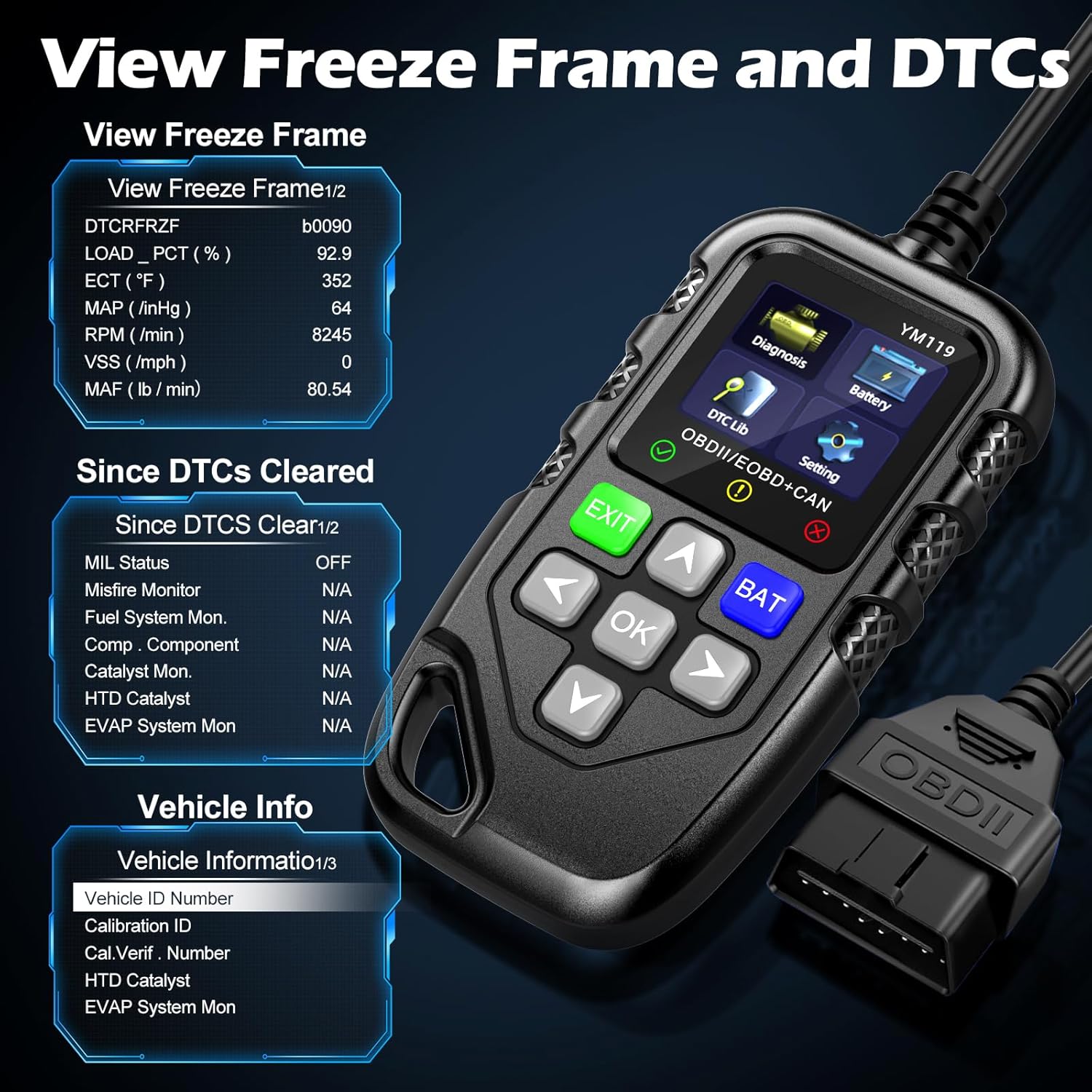
تصویر 3.5: View Freeze Frame and DTCs. This image displays the scanner's ability to capture and show freeze frame data, which provides a snapshot of engine conditions at the moment a fault code was set, aiding in diagnosis.
- منتخب کریں "View Freeze Frame" from the Diagnosis menu.
- Review the recorded parameters.
3.2.5 DTC Query (DTC Lib)
The built-in DTC Library allows you to look up definitions for generic (P0, P2, P34, B0, C0, U0) and manufacturer-specific (P1, P30-P33, B1, C1, U1) codes.
- From the main menu, select "DTC Lib".
- Enter the DTC code using the arrow keys and OK بٹن
- The scanner will display the definition of the code.
3.2.6 I / M تیاری
This function checks the readiness of the emission-related monitoring systems on the vehicle. It's useful for determining if the vehicle is ready for an emissions test.
- Select "I/M Readiness" from the Diagnosis menu.
- The scanner will display the status of various monitors (e.g., Misfire Monitor, Fuel System Monitor). "OK" indicates the monitor has completed its test, "INC" indicates incomplete, and "N/A" indicates not applicable.
3.2.7 بیٹری والیومtagای ٹیسٹ
The YM119 can perform a basic battery voltage test to assess the vehicle's battery health.

Figure 3.6: Estimate Battery Life Test. This image shows the scanner's dedicated function for monitoring and assessing the vehicle's battery voltage and overall health.
- From the main menu, select "Battery" or press the بی اے ٹی بٹن
- اسکینر موجودہ بیٹری والیوم کو ظاہر کرے گا۔tage.
3.2.8 گاڑیوں کی معلومات
This function retrieves the Vehicle Identification Number (VIN), Calibration ID (CALID), and Calibration Verification Number (CVN) of the vehicle.
- Select "Vehicle Info" from the Diagnosis menu.
- The scanner will display the available vehicle information.
4 دیکھ بھال
4.1 ڈیوائس کی صفائی
To maintain the scanner's performance and appearance:
- یونٹ کو ایک نرم کے ساتھ مسح کریں، ڈیamp کپڑا
- کھرچنے والے کلینر یا سالوینٹس کا استعمال نہ کریں۔
- Ensure the device is dry before storage.
4.2 اسٹوریج
Store the scanner in a clean, dry environment away from extreme temperatures and direct sunlight. Keep the OBDII connector free from dust and debris.
5 خرابیوں کا سراغ لگانا
| مسئلہ | ممکنہ وجہ | حل |
|---|---|---|
| سکینر آن نہیں ہوتا ہے۔ |
|
|
| "لنک کی خرابی" یا "مواصلاتی خرابی" کا پیغام۔ |
|
|
| Engine light reappears after clearing codes. | Underlying fault has not been repaired. | Clearing codes only turns off the light; it does not fix the problem. Diagnose and repair the underlying issue before clearing codes again. |
| Inaccurate or missing data readings. |
|
|
6. وضاحتیں
| فیچر | تفصیل |
|---|---|
| ماڈل نمبر | AE0004L (YM119) |
| برانڈ | Riokko |
| اسکرین کا سائز | 2.8 انچ |
| تعاون یافتہ پروٹوکول | Nine standard OBDII/EOBD protocols |
| تائید شدہ زبانیں | 13 قومی زبانیں۔ |
| شے کا وزن | 7.8 اونس (تقریباً 221 گرام) |
| پیکیج کے طول و عرض | 8.11 x 5.35 x 1.14 انچ (تقریباً 20.6 x 13.6 x 2.9 سینٹی میٹر) |
| پہلی دستیاب تاریخ | 16 اکتوبر 2024 |
7. وارنٹی اور سپورٹ
7.1 وارنٹی کی معلومات
The Riokko YM119 OBD2 Scanner comes with a 3 سال کی وارنٹی خریداری کی تاریخ سے. یہ وارنٹی عام استعمال کے تحت مواد اور کاریگری میں نقائص کا احاطہ کرتی ہے۔
7.2 واپسی کی پالیسی
A 30 دن کی بغیر سوال پوچھے گئے واپسی کی پالیسی is offered for your purchase. Please refer to your retailer's specific return instructions.
7.3 کسٹمر سپورٹ
For technical assistance, warranty claims, or any other inquiries, please contact Riokko customer service. 24/7 کسٹمر سروس is available to assist you.
Please visit the official Riokko webموجودہ رابطے کی معلومات کے لیے سائٹ یا اپنی مصنوعات کی پیکیجنگ کا حوالہ دیں۔