
1. تعارف
This instruction manual provides essential information for the safe and effective use of your GT POWER AC Adapter, model 602. This power supply is designed to be compatible with the Verizon WNC-CR200A Gateway Router. Please read this manual thoroughly before use and retain it for future reference.
2. حفاظتی معلومات
انتباہ: برقی جھٹکا، آگ، یا چوٹ کے خطرے کو کم کرنے کے لیے، درج ذیل حفاظتی احتیاطی تدابیر پر عمل کریں:
- Ensure the power adapter is used with devices that match its voltagای اور موجودہ وضاحتیں.
- Do not expose the adapter to water, rain, or excessive moisture.
- Do not disassemble or modify the adapter. Refer all servicing to qualified personnel.
- Avoid placing the adapter in areas with poor ventilation or near heat sources.
- Inspect the adapter and cable for damage before each use. Do not use if damaged.
- بچوں کی پہنچ سے دور رکھیں۔
- اڈاپٹر کو پاور آؤٹ لیٹ سے ان پلگ کریں جب توسیعی مدت تک استعمال نہ ہو۔
اس اڈاپٹر کی خصوصیات والیوم سے زیادہtage Protection (OVP), Over Current Protection (OCP), and Short Circuit Protection (SCP) to ensure safe operation.
3. پیکیج کے مشمولات
- 1 x GT POWER AC Adapter (Model 602)
4. پروڈکٹ ختمview
The GT POWER AC Adapter is a compact and reliable power supply designed for specific networking equipment. It converts standard AC wall power to the DC power required by your device.

تصویر 4.1: سامنے والا view of the GT POWER AC Adapter, showing the power prongs and the output cable.

تصویر 4.2: طرف view of the GT POWER AC Adapter, highlighting the barrel connector at the end of the output cable.
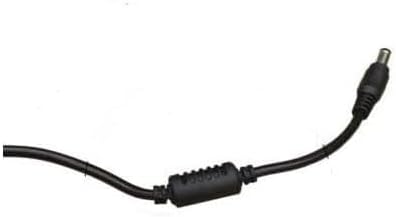
تصویر 4.3: کلوز اپ view of the barrel connector, which plugs into the compatible device.
5. سیٹ اپ
Follow these steps to properly connect your GT POWER AC Adapter to your Verizon WNC-CR200A Gateway Router.
- ڈیوائس کی مطابقت کی تصدیق کریں: Before connecting, ensure your device is a Verizon WNC-CR200A Gateway Router. The adapter is specifically designed for this model. You can often find the model number on a label at the bottom or back of your router.

تصویر 5.1: Example of a Verizon WNC-CR200A Gateway Router's bottom label, indicating the model number for compatibility verification.
- ڈیوائس سے جڑیں: Insert the barrel connector of the GT POWER AC Adapter firmly into the power input port of your Verizon WNC-CR200A Gateway Router.
- پاور آؤٹ لیٹ سے جڑیں: اڈاپٹر کے AC پرونگ کو معیاری 100-240V AC وال آؤٹ لیٹ میں لگائیں۔
- پاور آن: Once connected, your Verizon WNC-CR200A Gateway Router should power on automatically or can be turned on using its power button, if available.
6. آپریٹنگ
The GT POWER AC Adapter operates automatically once connected. It provides a stable power supply to your compatible device. No user interaction is required for its operation beyond initial connection.
- Ensure the adapter is always connected to a functioning power outlet.
- Avoid disconnecting the adapter during critical operations of your router to prevent data loss or system instability.
7 دیکھ بھال
Proper maintenance ensures the longevity and safe operation of your AC adapter.
- صفائی: Disconnect the adapter from the power outlet and the device before cleaning. Use a soft, dry cloth to wipe the exterior. Do not use liquid cleaners or solvents.
- ذخیرہ: When not in use, store the adapter in a cool, dry place, away from direct sunlight and extreme temperatures. Avoid tightly coiling the cable to prevent damage.
- کیبل کی دیکھ بھال: کیبل کو ضرورت سے زیادہ نہ موڑیں، نہ موڑیں اور نہ ہی کھینچیں۔ کیبل پر بھاری اشیاء رکھنے سے گریز کریں۔
8 خرابیوں کا سراغ لگانا
If you encounter issues with your GT POWER AC Adapter, refer to the following common problems and solutions:
| مسئلہ | ممکنہ وجہ | حل |
|---|---|---|
| ڈیوائس آن نہیں ہو رہی ہے۔ |
|
|
| اڈاپٹر غیر معمولی طور پر گرم محسوس ہوتا ہے۔ |
|
|
9. وضاحتیں
| فیچر | تفصیل |
|---|---|
| ماڈل نمبر | 602 |
| برانڈ | جی ٹی پاور |
| ان پٹ جلدtage | AC 100-240V (50/60Hz) |
| آؤٹ پٹ والیمtage | ڈی سی 12V |
| آؤٹ پٹ کرنٹ | 3A |
| واٹtage | 36 واٹ |
| کنیکٹر کی قسم | بیرل |
| کیبل کی لمبائی | 59 inches (approx. 1.5 meters) |
| تحفظ کی خصوصیات | OVP (اوور والیومtage Protection), OCP (Over Current Protection), SCP (Short Circuit Protection) |
| ہم آہنگ آلات | Verizon WNC-CR200A Gateway Router CR200A WiFi6 NKR-LV65C-T3 |
10. وارنٹی اور سپورٹ
This GT POWER AC Adapter comes with a ایک سال کی وارنٹی خریداری کی تاریخ سے. اس کے علاوہ، اے 30 دن کی منی بیک گارنٹی پیش کیا جاتا ہے.
For technical support, warranty claims, or further assistance, please contact your retailer or the manufacturer directly. Please have your purchase information and product model number (602) available when contacting support.
For more information, you may refer to the seller's contact details provided at the point of purchase.