
1. تعارف
Thank you for choosing the INJORA DG-JP08 Dual Motor Metal Simulated Winch. This product is designed to enhance the off-road capabilities of your 1/10 scale RC crawler, providing realistic recovery functions and improved traction. This manual provides essential information for the correct installation, operation, and maintenance of your winch. Please read it thoroughly before use to ensure optimal performance and longevity of the product.
2. حفاظتی معلومات
Observe the following safety precautions to prevent damage to the product or injury:
- Always disconnect power to your RC vehicle before installing or performing maintenance on the winch.
- Ensure all wiring connections are secure and correctly polarized to avoid short circuits.
- Do not exceed the specified operating voltage (6V-12.6V) to prevent motor damage.
- Avoid applying excessive force or attempting to lift loads beyond the winch's rated capacity (3kg / 6.61lb dead lift).
- Keep fingers and loose clothing away from moving parts during operation.
- This product is intended for adult use or under adult supervision due to small parts and electrical components.
3. پیکیج کے مشمولات
تصدیق کریں کہ ذیل میں درج تمام اجزاء آپ کے پیکیج میں شامل ہیں:
- 1x INJORA Dual Motor Metal Simulated Winch
- 1x CH3 Control Line
- 1x Manual Switch
- Mounting Hardware (screws, nuts)

4. وضاحتیں
| فیچر | تفصیلات |
|---|---|
| ماڈل نمبر | DG-JP08 |
| Winch Material | دھات |
| Rope Material | نائلون |
| رسی کی لمبائی | 105 سینٹی میٹر (41.33 انچ) |
| آپریٹنگ والیومtage | 6V-12.6V |
| Load Limits (Dead Lift) | 3 کلوگرام (6.61 پونڈ) |
| وزن | 67 گرام (0.15 پونڈ) |
| طول و عرض (L x W x H) | تقریبا. 78.5mm x 30mm x 33.4mm |
| مطابقت | 1/10 Scale RC Crawlers |

5. سیٹ اپ اور انسٹالیشن
Follow these steps to install the winch on your RC crawler:
5.1 ونچ کو چڑھانا
- Identify a suitable mounting location on the front bumper or chassis of your 1/10 scale RC crawler. Ensure the location allows for free operation of the winch rope and does not obstruct other components.
- Align the winch base with the mounting holes on your RC vehicle. Use the provided screws and nuts to securely fasten the winch. Refer to Image 4.1 for mounting hole dimensions.
- Ensure the winch is mounted firmly and does not wobble, as this can affect performance and durability.
5.2 وائرنگ رابطے
The INJORA DG-JP08 winch can be controlled via a CH3 channel on your RC receiver or a manual switch.

Option A: CH3 Receiver Control
- Connect the 3-pin connector of the CH3 control line to an available CH3 port on your RC receiver.
- Connect the power input (red and black wires with JST connector) from the winch to a suitable power source (e.g., battery or BEC) within the 6V-12.6V range. Ensure correct polarity (red to positive, black to negative).
- The winch will now be controllable via the CH3 switch or knob on your RC transmitter.
Option B: Manual Switch Control
- Connect the manual switch's 3-pin connector to the winch's control input.
- Connect the power input (red and black wires with JST connector) from the winch to a suitable power source (e.g., battery or BEC) within the 6V-12.6V range. Ensure correct polarity.
- Mount the manual switch in an accessible location on your RC vehicle.
Note: Do not connect both the CH3 control line and the manual switch simultaneously to control the winch. Choose one method of control.
6. آپریٹنگ ہدایات
Once installed and wired, the winch is ready for operation.
6.1 Using the CH3 Control
If you have connected the winch to your RC receiver's CH3 channel:
- Turn on your RC transmitter and receiver.
- Use the assigned switch or knob on your transmitter for the CH3 channel to control the winch. Typically, one position will extend the rope, another will retract it, and a center position will stop it.
- Practice operating the winch in a safe area to familiarize yourself with its response.
6.2 Using the Manual Switch
If you have connected the manual switch:
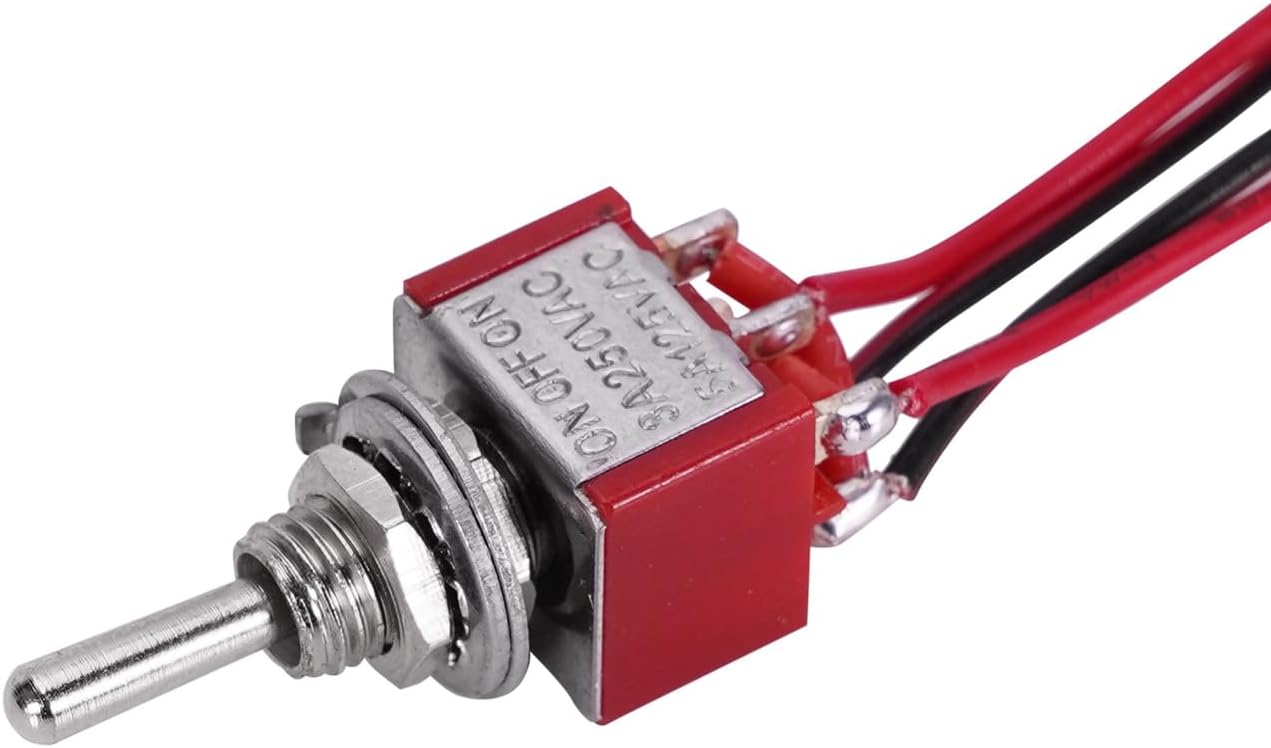
- Ensure your RC vehicle's power is on.
- Toggle the manual switch to one 'ON' position to extend the winch rope.
- Toggle the switch to the other 'ON' position to retract the winch rope.
- Move the switch to the 'OFF' (center) position to stop the winch.
6.3 Winch Operation Tips

- Always ensure the winch rope is properly spooled and not tangled before and after use.
- When recovering your RC vehicle, apply steady and controlled power. Avoid sudden jerks.
- Do not allow the winch motor to stall under heavy load for extended periods, as this can cause overheating and damage.
- If the rope becomes frayed or damaged, replace it immediately to maintain safe operation.
7 دیکھ بھال
Regular maintenance ensures the longevity and reliable performance of your INJORA winch:
- صفائی: After use, especially in dirty or wet conditions, clean the winch body and rope with a soft brush or cloth to remove dirt and debris. Avoid using harsh chemicals.
- رسی کا معائنہ: Periodically inspect the nylon rope for signs of wear, fraying, or damage. Replace the rope if any damage is observed.
- چکنا: The internal gears are pre-lubricated. Avoid disassembling the winch unless necessary. If disassembly is required for repair, apply a small amount of RC-safe grease to the gears upon reassembly.
- ذخیرہ: Store the winch in a dry, cool place away from direct sunlight and extreme temperatures when not in use.
8 خرابیوں کا سراغ لگانا
If you encounter issues with your winch, refer to the following common problems and solutions:
| مسئلہ | ممکنہ وجہ | حل |
|---|---|---|
| ونچ کام نہیں کرتی ہے۔ | بجلی کی فراہمی نہیں ہے۔ غلط وائرنگ Faulty switch/receiver channel | بیٹری کنکشن اور چارج لیول چیک کریں۔ Verify all wiring connections are secure and correct polarity. Test the manual switch or try a different CH3 channel on your receiver. |
| ونچ آہستہ یا کمزور کام کرتی ہے۔ | کم بیٹری والیومtage ضرورت سے زیادہ بوجھ Friction/obstruction | Ensure battery is fully charged and providing adequate voltage. Reduce the load on the winch; do not exceed 3kg dead lift. Check for any obstructions preventing smooth rope movement. |
| Rope gets tangled or jams | Improper spooling Damaged rope | Ensure the rope is spooled evenly and tightly on the drum. Inspect the rope for damage and replace if necessary. |
| Winch motor overheats | Continuous heavy load Stalled motor | Avoid prolonged operation under maximum load. Allow the motor to cool down. Do not let the motor stall; reduce load or stop operation if resistance is too high. |
9. وارنٹی اور سپورٹ
INJORA products are manufactured to high-quality standards. For specific warranty information, please refer to the documentation provided at the time of purchase or contact your retailer. If you require technical assistance or have questions regarding your INJORA DG-JP08 winch, please contact INJORA customer support through their official channels or the retailer from whom you purchased the product.