
1. تعارف
The Redragon K707 PRO SE is an 80% TKL wireless gasket RGB gaming keyboard designed for optimal performance and user experience. Featuring 3-mode connectivity (USB-C wired, BT 3.0/5.0, & 2.4Ghz wireless), hot-swap sockets for custom linear switches, and 5-layer noise dampening, this mechanical keyboard delivers a crisp, clean, and softer typing feel. It comes with durable dye-sub PBT keycaps and supports professional software for extensive customization.
تصویر 1.1: ختمview of Redragon K707 PRO SE features including 4000mAh battery, hot-swap socket, Dye-Sub PBT keycaps, 3-mode tech, gasket design, 87 keys layout, 5-layer dampening, and custom Mambo switches.
2. پیکیج کے مشمولات
Your Redragon K707 PRO SE keyboard package includes the following items:
- Redragon K707 PRO SE 80% Wireless Gasket RGB Gaming Keyboard
- USB-C to USB-A/USB-C cable (for wired connection and charging)
- کی کیپ/سوئچ پلر ٹول
- Spare Custom Linear Switches
- 2.4Ghz Wireless Dongle (stored in the keyboard)
- صارف دستی (یہ دستاویز)
ویڈیو 2.1: ان باکسنگ اور ابتدائی اوورview of the Redragon K707 Pro Anime keyboard, showcasing the keyboard, USB-C cable, switch puller, and extra switches.
3. سیٹ اپ
3.1 کنکشن موڈز
The K707 PRO SE supports three connection modes:
- USB-C وائرڈ: For a direct and stable connection.
- 2.4Ghz Wireless: Uses the included USB dongle for low-latency wireless connectivity.
- Bluetooth (BT 3.0/5.0): متعدد آلات سے وائرلیس کنکشن کے لیے۔
A selector switch on the side of the keyboard allows you to choose between 2.4G, OFF (wired mode), and BT (Bluetooth).
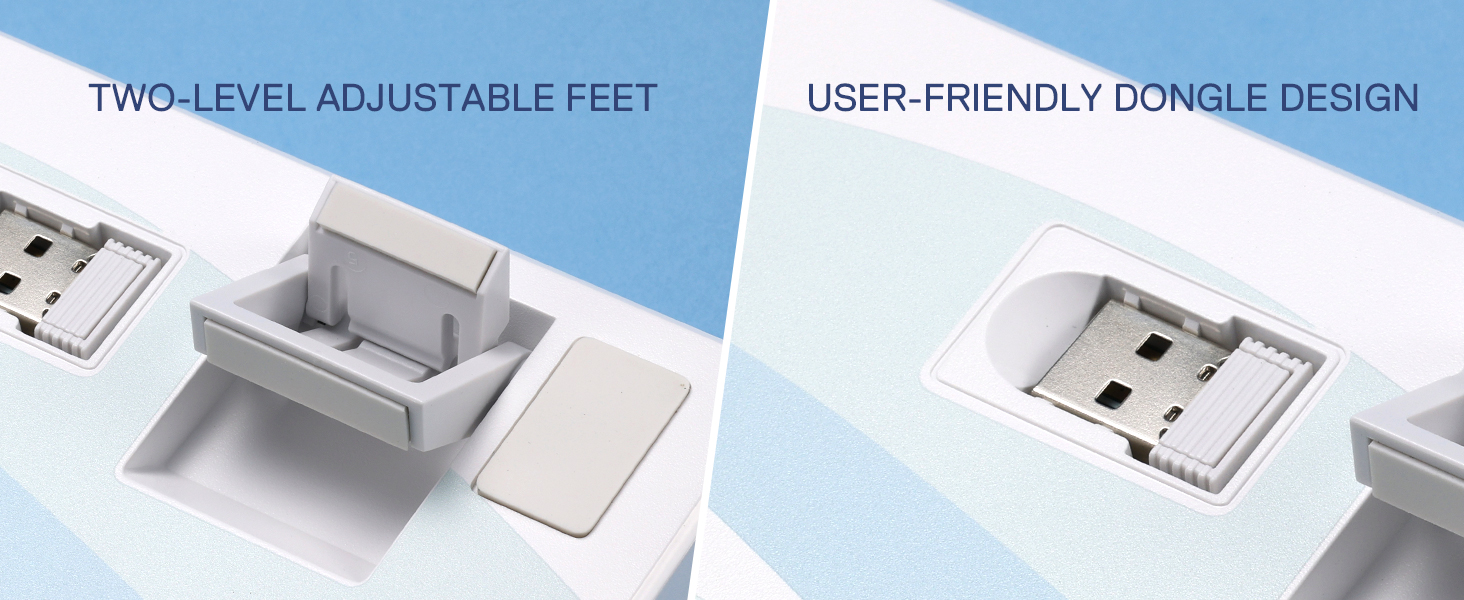
Image 3.1: The Redragon K707 PRO SE keyboard demonstrating its 3-mode connection capabilities with a laptop, tablet, and smartphone.
3.2 Adjustable Feet and Dongle Storage
The keyboard features two-level adjustable feet with rubber pads for stability. The 2.4Ghz wireless dongle is conveniently stored in a dedicated slot on the side of the keyboard.

Image 3.2: Close-up of the Redragon K707 PRO SE's two-level adjustable feet and the user-friendly dongle storage design.
3.3 Hot-Swap Sockets and Keycap/Switch Removal
The K707 PRO SE features hot-swap sockets compatible with 3/5-pin switches, allowing for easy customization and replacement. A keycap/switch puller tool is included for this purpose.

تصویر 3.3: تفصیلی view of the hot-swap sockets on the Redragon K707 PRO SE, showing a keycap and switch removed, along with the individual components of a custom Mambo switch.
- To remove a keycap, gently place the keycap puller around the keycap and pull straight up.
- To remove a switch, use the switch puller to grip the top and bottom clips of the switch and pull upwards.
- To install a new switch, align the pins with the sockets and press down firmly until it clicks into place.
4. آپریٹنگ ہدایات
4.1 آر جی بی لائٹنگ
The keyboard features vibrant RGB backlighting with multiple modes and customization options. Use the FN key in combination with other keys to adjust settings:
- FN + Ins: Switch between 18 backlit modes.
- FN + Arrow Up/Down: Adjust 5 brightness levels.
- FN + Arrow Left/Right: Adjust 5 speed levels for dynamic modes.
- FN + بیک اسپیس: Turn off backlighting.
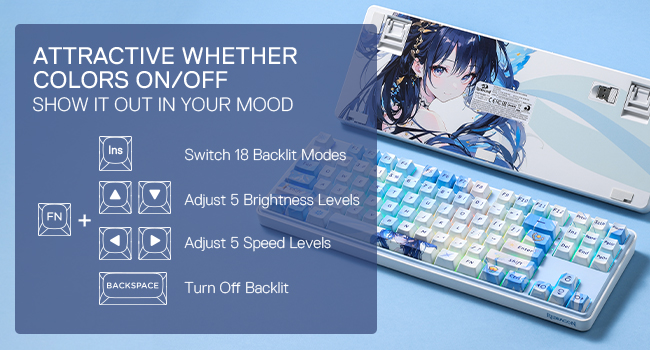
Image 4.1: Diagram illustrating the key combinations for controlling RGB backlighting modes, brightness, and speed on the Redragon K707 PRO SE.
4.2 بیٹری کی حیثیت
Check the battery level by pressing FN + Alt. The indicator lights will show the approximate charge level (30%, 50%, 100%).
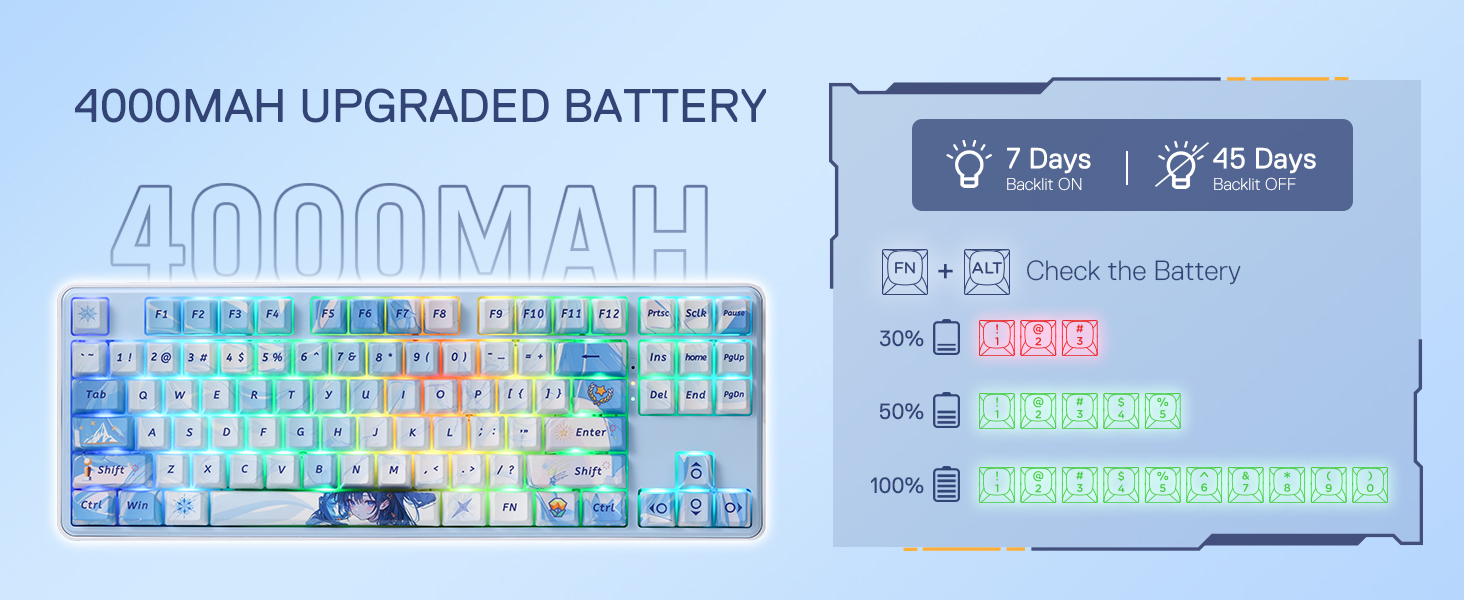
Image 4.2: Visual representation of how to check the battery status using FN + Alt, with indicators for 30%, 50%, and 100% charge.
4.3 Pro Software Support
Expand your customization options by downloading the professional software from the Redragon website. This software allows you to design new modes, effects, macros, and rebind keys for enhanced efficiency in work and gaming.

Image 4.3: Screenshot of the Redragon software interface, showing options for macro editing, RGB settings, and other customizations.
4.4 دوہری نظام کی مطابقت
The keyboard is compatible with both Windows and Mac operating systems. A switch on the top edge of the keyboard allows you to toggle between Windows and Mac modes.
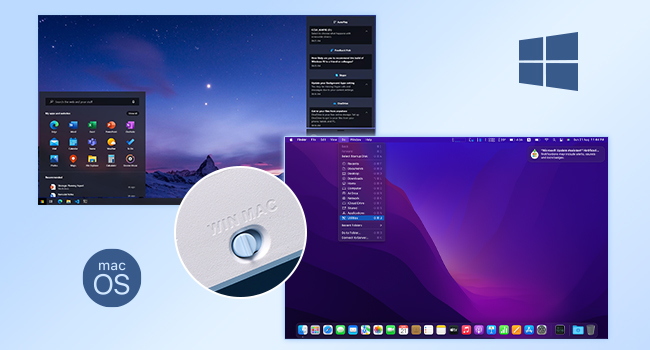
Image 4.4: Illustration showing the Redragon K707 PRO SE keyboard's compatibility with both Windows and macOS, with a close-up of the Win/Mac toggle switch.
5 دیکھ بھال
Regular cleaning and proper handling will extend the lifespan of your keyboard.
- کلیننگ کی کیپس: Use the included keycap puller to remove keycaps for cleaning. Wipe them with a soft, damp کپڑا
- صفائی کے سوئچز: If necessary, switches can be removed using the switch puller for deeper cleaning or replacement.
- عمومی صفائی: کی کیپس کے درمیان سے دھول اور ملبہ ہٹانے کے لیے نرم برش یا کمپریسڈ ہوا کا استعمال کریں۔
6 خرابیوں کا سراغ لگانا
If you encounter any issues with your Redragon K707 PRO SE keyboard, please refer to the following common solutions:
- کنکشن کے مسائل: Ensure the mode selector switch is in the correct position (2.4G, OFF for wired, or BT). For 2.4Ghz, ensure the dongle is securely plugged into your device. For Bluetooth, ensure the keyboard is paired correctly.
- وقفہ/تاخیر: For critical applications like gaming, a wired USB-C connection or 2.4Ghz wireless mode is recommended for minimal latency.
- آر جی بی لائٹس کام نہیں کر رہی ہیں: Check brightness levels (FN + Arrow Up/Down) and ensure backlighting is not turned off (FN + Backspace).
- چابیاں جواب نہیں دے رہی ہیں: Ensure the keyboard is properly connected and charged. If a specific key is not working, try removing and re-inserting its switch.
- سافٹ ویئر کے مسائل: Ensure you have the latest version of the Redragon software installed from the official webسائٹ
7. وضاحتیں
| فیچر | تفصیل |
|---|---|
| برانڈ | ریڈریگن |
| ماڈل نمبر | K707 |
| کی بورڈ کی تفصیل | 80% TKL وائرلیس گاسکیٹ گیمنگ کی بورڈ |
| چابیاں کی تعداد | 87 |
| کنیکٹوٹی ٹیکنالوجی | 2.4GHz، BT، USB-C |
| سوئچ کی قسم | Linear (Redragon Custom Switch) |
| خصوصی خصوصیات | 3-موڈ گاسکیٹ، 5-پرت شور Dampening, Custom Switch, Hot-Swap Socket, Dye-Sub PBT Keycaps |
| مواد | Plastic with flexible material for gasket |
| مصنوعات کے طول و عرض | 14.33"L x 14.33"W x 1.46"H |
| رنگ | Starlight Blue (Anime Version) |

تصویر 7.1: پھٹا view diagram of the Redragon K707 PRO SE's fully loaded gasket structure, detailing components like the top case, Mint Mambo switch, PC slotting positioning board, various foam layers, PCB board, bottom socket foam, silicone dampener, and bottom case.
8. وارنٹی اور سپورٹ
The Redragon K707 PRO SE keyboard comes with a 1 سال کی وارنٹی کارخانہ دار سے.
For further support, driver downloads, or advanced software features, please visit the official Redragon webسائٹ یا ان کی کسٹمر سروس سے رابطہ کریں۔
ویڈیو 8.1: ایک تفصیلی دوبارہview of the Redragon K707 PRO Gaming Keyboard, covering its features, connectivity options, and overall user experience.