
1. تعارف
The BOYA V35 is a compact and easy-to-use 2.4GHz wireless microphone system designed for capturing clear, high-quality audio. It is ideal for content creators, journalists, and anyone needing a reliable wireless audio solution for cameras and camcorders with a 3.5mm input. This manual provides detailed instructions for setting up, operating, and maintaining your BOYA V35 system.
2. باکس میں کیا ہے۔
تمام اشیاء کی موجودگی کو یقینی بنانے کے لیے براہ کرم پیکیج کے مواد کو چیک کریں:
- BY-V35 Transmitter (TX) x 2
- BY-V35 RX Receiver x 1
- BY-V35 Foam Windscreen x 2
- USB-C to USB-A Charging Cable x 1
- 3.5 ملی میٹر TRS سے TRS آڈیو کیبل x 1
- چارجنگ کیس x 1
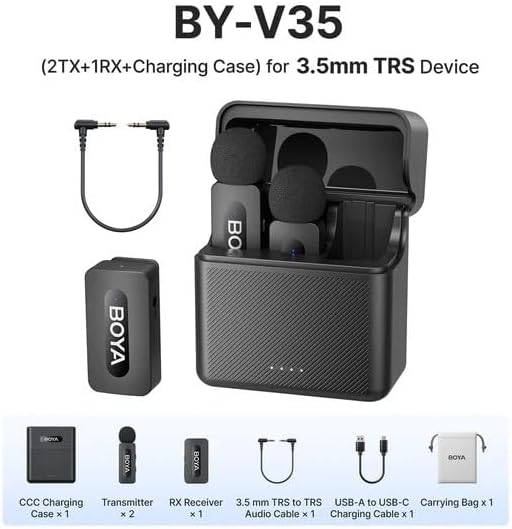
تصویر 2.1: Diagram showing all components included in the BOYA V35 package, including two transmitters, one receiver, a charging case, foam windscreens, and cables.
3. پروڈکٹ ختمview
3.1. ٹرانسمیٹر (TX)

تصویر 3.1: سامنے والا view of the BY-V35 Transmitter with the foam windscreen attached, showing the BOYA logo and indicator light.

تصویر 3.2: طرف view of the BY-V35 Transmitter, illustrating the integrated clip for attachment to clothing and the foam windscreen.
The transmitter is a compact unit with an integrated microphone and clip. It features a power button, a status indicator light, and a USB-C charging port. The omnidirectional microphone is designed to capture sound from all directions.
3.2. وصول کنندہ (RX)

تصویر 3.3: طرف view of the BY-V35 Receiver, showing the USB-C port, power button, and 3.5mm output jack.
The receiver connects to your recording device (camera, camcorder). It includes a 3.5mm TRS output jack, a power button, a status indicator light, and a USB-C charging port. The receiver is designed for easy connection and stable signal reception.
3.3. مقدمہ چارج کرنا
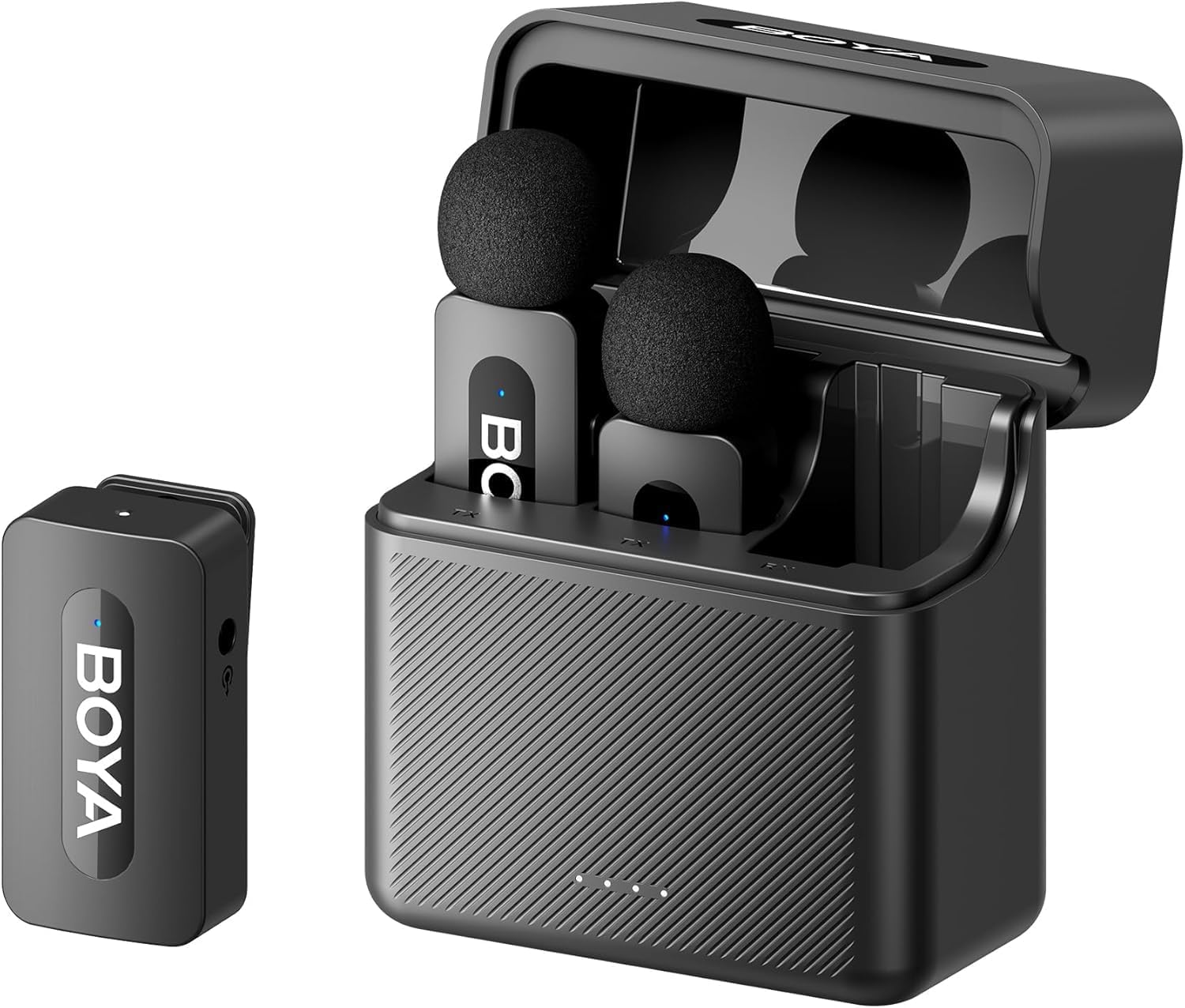
تصویر 3.4: The complete BOYA V35 system, including the charging case, two transmitters, and one receiver, ready for storage or charging.
The charging case provides convenient storage and charging for both transmitters and the receiver. It has its own USB-C charging port and LED indicators to show the charging status of the case and the devices inside.
4. سیٹ اپ گائیڈ
4.1. آلات کو چارج کرنا
- ٹرانسمیٹر اور ریسیور کو چارجنگ کیس میں رکھیں۔
- Connect the USB-C to USB-A charging cable to the charging case and a USB power adapter (not included).
- The LED indicators on the charging case will show the charging status. The device indicators will also light up during charging.
- Ensure all devices are fully charged before first use for optimal battery life.
4.2. پاور آن اور جوڑا بنانا
- Press and hold the power button on both the transmitter(s) and the receiver for a few seconds until the indicator lights turn on.
- The devices will automatically attempt to pair. A solid blue light on both the transmitter and receiver indicates a successful connection. A blinking light indicates searching for a connection.
4.3. ریکارڈنگ ڈیوائس سے جڑنا
- Connect one end of the 3.5mm TRS to TRS audio cable to the 3.5mm output jack on the BY-V35 receiver.
- Connect the other end of the 3.5mm TRS to TRS audio cable to the microphone input jack on your camera or camcorder.
- Ensure your recording device's audio input is set to external microphone if applicable.
4.4 ٹرانسمیٹر منسلک کرنا
- Attach the foam windscreen to the transmitter's microphone to reduce wind noise and plosives.
- Use the integrated clip on the back of the transmitter to securely attach it to the speaker's clothing, ideally about 6-8 inches (15-20 cm) from the mouth.
5. آپریٹنگ ہدایات
5.1. پاور آن/آف
To power on or off the transmitter or receiver, press and hold the power button for approximately 3 seconds. The indicator light will illuminate or turn off accordingly.
5.2. آڈیو ریکارڈ کرنا
- Ensure the transmitter(s) and receiver are powered on and successfully paired (solid blue indicator light).
- Start recording on your connected camera or camcorder.
- Monitor the audio levels on your recording device to ensure proper sound capture.
5.3. Status Indicator Lights
- ٹھوس نیلا: Device is powered on and successfully paired.
- چمکتا ہوا نیلا: Device is powered on and searching for a connection.
- ٹھوس سرخ: کم بیٹری۔
- Blinking Red (while charging): چارج ہو رہا ہے۔
- Solid Green (while charging): مکمل طور پر چارج کیا گیا۔
6 دیکھ بھال
6.1. صفائی
- Wipe the devices with a soft, dry cloth.
- سخت کیمیکلز یا کھرچنے والے کلینر استعمال نہ کریں۔
- Ensure the foam windscreens are clean and free of debris. Replace if damaged.
6.2. ذخیرہ
- Store the BOYA V35 system in its charging case when not in use to protect it from dust and damage.
- براہ راست سورج کی روشنی اور انتہائی درجہ حرارت سے دور، ٹھنڈی، خشک جگہ پر اسٹور کریں۔
6.3. بیٹری کی دیکھ بھال
- Charge the devices regularly, even if not used frequently, to maintain battery health.
- Avoid fully discharging the batteries for extended periods.
7 خرابیوں کا سراغ لگانا
| مسئلہ | ممکنہ وجہ | حل |
|---|---|---|
| کوئی آواز یا کم حجم نہیں | Devices not powered on; Not paired; Incorrect cable connection; Recording device volume too low. | Ensure TX and RX are on and paired. Check 3.5mm cable connection. Increase recording device's input volume. |
| خراب آواز کا معیار (جامد، ڈراپ آؤٹ) | Interference; Out of range; Low battery; Damaged windscreen. | Move closer to the receiver. Charge devices. Replace windscreen. Avoid strong electromagnetic fields. |
| آلات جوڑا نہیں بن رہے ہیں۔ | Devices too far apart; Interference; One device not powered on. | Ensure TX and RX are close to each other. Power cycle both devices. Check battery levels. |
| Charging case not charging devices | Charging case battery empty; Poor contact; Faulty cable. | Charge the charging case. Ensure devices are correctly seated. Try a different USB-C cable. |
8. وضاحتیں
| فیچر | تفصیل |
|---|---|
| برانڈ | بویا |
| ماڈل نمبر | BY-V35 |
| کنیکٹوٹی ٹیکنالوجی | وائرلیس 2.4GHz |
| کنیکٹر کی قسم | 3.5 ملی میٹر جیک |
| پولر پیٹرن | ہمہ جہتی |
| تعدد کی حد | 20Hz-16kHz |
| سگنل ٹو شور کا تناسب | 80 ڈی بی |
| طاقت کا منبع | بیٹری سے چلنے والا |
| شے کا وزن | 0.2 Kilograms (approximate, for entire kit) |
| آئٹم کے طول و عرض | 6.1 x 2.2 x 3.4 inches (approximate, for entire kit) |
| ہم آہنگ آلات | کیمکارڈر، کیمرہ |
9. وارنٹی اور سپورٹ
For warranty information and technical support, please refer to the official BOYA webسائٹ یا اپنے مقامی ڈسٹری بیوٹر سے رابطہ کریں۔ کسی بھی وارنٹی دعووں کے لیے اپنی خریداری کا ثبوت رکھیں۔