
1. تعارف
This manual provides detailed instructions for the installation, operation, and maintenance of your INQMEGA ST-598-6M-20X-WIFI-1021 Wireless Outdoor Solar Security Camera. Please read this manual thoroughly before using the product to ensure proper functionality and safety.
2. پروڈکٹ ختمview
اہم خصوصیات:
- کنیکٹوٹی: 2.4G WiFi support (5G WiFi not supported). WiFi range up to 15 meters.
- Resolution & Night Vision: 6MP HD video with three night vision modes (infrared, full color, intelligent). Effective night vision distance up to 300 feet (approx. 91 meters).
- Optical Zoom & View: 20X optical zoom for clear close-ups. Dual screens offer 355° horizontal (pan) and 90° vertical (tilt) rotation, controllable via the application.
- حرکت کا پتہ لگانا: Supports PIR human detection wake-up (Max 12M). The camera sends object movement information to your phone.
- طاقت کا منبع: Solar powered with a 6W solar board and a built-in 12000mAh battery.
- ذخیرہ: Supports Amazon Cloud storage and TF Card (MAX 128GB, not included).
- آڈیو: Features 2-Way Audio.
- استحکام: IP66 International Protection Rating, waterproof metal material.
پیکیج کا مواد:
- INQMEGA Wireless Outdoor Solar Security Camera (SOLAR CAMERA)
3. سیٹ اپ
3.1 کیمرہ لگانا
The camera is designed for outdoor wall mounting. Choose a location with optimal sunlight exposure for the solar panel and a clear view of the area you wish to monitor. Ensure the mounting surface is sturdy enough to support the camera's weight.
- کیمرہ کے بڑھتے ہوئے بریکٹ کو بطور ٹیمپلیٹ استعمال کرتے ہوئے دیوار پر ڈرلنگ پوائنٹس کو نشان زد کریں۔
- نشان زدہ جگہوں پر سوراخ کریں۔
- اگر ضروری ہو تو دیوار کے اینکرز ڈالیں۔
- فراہم کردہ پیچ کا استعمال کرتے ہوئے دیوار پر بڑھتے ہوئے بریکٹ کو محفوظ کریں۔
- کیمرہ کو بڑھتے ہوئے بریکٹ سے منسلک کریں، اس بات کو یقینی بناتے ہوئے کہ یہ مضبوطی سے جگہ پر ہے۔
3.2 پاور آن
The camera is solar-powered and includes a built-in 12000mAh battery. Ensure the solar panel is exposed to direct sunlight for optimal charging. The camera will automatically power on once sufficient charge is detected or if it has been charged via USB (if applicable, refer to product packaging for USB charging details).
3.3 وائی فائی سے جڑنا
This camera supports 2.4G WiFi networks only. It does not support 5G WiFi. The WiFi range is approximately 15 meters.
- Download the UBOX application on your smartphone (available for iOS and Android).
- ایک اکاؤنٹ رجسٹر کریں اور لاگ ان کریں۔
- اپنا کیمرہ شامل کرنے کے لیے درون ایپ ہدایات پر عمل کریں۔ اس میں عام طور پر کیمرے پر QR کوڈ اسکین کرنا یا دستی طور پر اس کی ID درج کرنا شامل ہے۔
- Connect the camera to your 2.4G WiFi network by entering your network credentials in the app.
- Once connected, the camera status indicator will confirm successful pairing.
4. کیمرہ چلانا
4.1 کثیر زاویہ View اور کنٹرول
The camera features a wide-angle lens that can be manually adjusted up to 350 degrees. Additionally, the PTZ (Pan-Tilt-Zoom) lens allows for remote control of its rotation via the UBOX application.
- Wide-angle Lens: Manual adjustment up to 350°.
- PTZ Zoom Lens: Control horizontal rotation (Pan) up to 355° and vertical rotation (Tilt) up to 90° using the application.
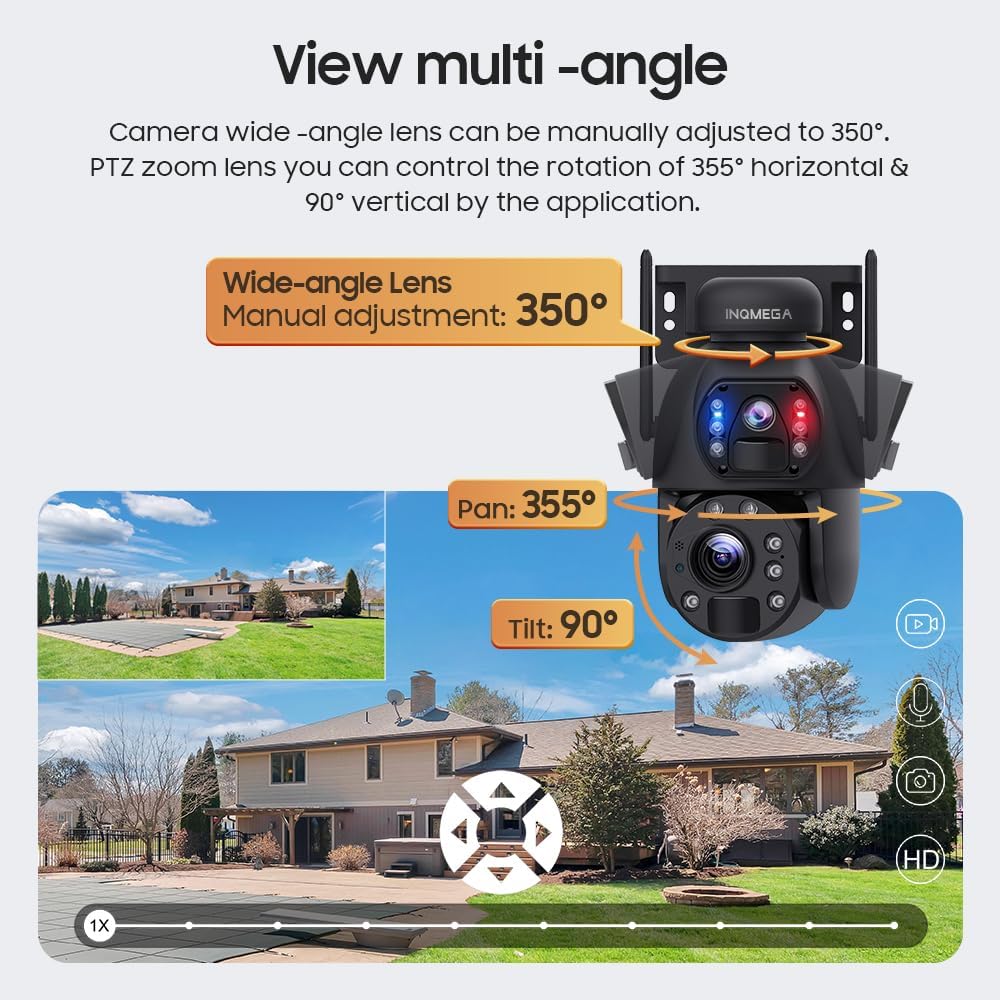
Image: Illustration of the camera's multi-angle viewing capabilities, including manual wide-angle adjustment and app-controlled pan/tilt for the PTZ lens.
4.2 نائٹ ویژن موڈز
The camera offers three night vision modes to suit different monitoring needs:
- انفراریڈ نائٹ ویژن: Provides clear black and white images in low light conditions.
- مکمل رنگین نائٹ ویژن: Utilizes built-in white lights to provide color images at night.
- ذہین نائٹ ویژن: Automatically switches between infrared and full-color modes based on detected motion or specific settings.
4.3 حرکت کا پتہ لگانا اور ریکارڈنگ
The camera supports PIR (Passive Infrared) human detection. When motion is detected, the camera will wake up, record video, take photos, and send notifications to your mobile phone via the UBOX app.
- Recording Policy: To conserve battery life, the camera does not support continuous video recording. It records only when motion is detected.
- ٹریکنگ: The camera does not support automatic tracking of moving objects. The camera angle can only be adjusted manually or through the app.
4.4 دو طرفہ آڈیو
Utilize the two-way audio feature through the UBOX app to communicate with individuals near the camera. This allows for real-time conversation.
5 دیکھ بھال
5.1 سولر پینل کی صفائی
Regularly clean the solar panel to ensure optimal charging efficiency. Dust, dirt, and debris can reduce the panel's ability to absorb sunlight. Use a soft, damp سطح کو آہستہ سے صاف کرنے کے لیے کپڑا۔
5.2 General Camera Care
- Keep the camera lenses clean for clear image quality. Use a lens cleaning cloth if necessary.
- یقینی بنائیں کہ تمام کیبلز اور کنکشن محفوظ اور نقصان سے پاک ہیں۔
- Periodically check the mounting for stability, especially after strong winds or adverse weather conditions.
6 خرابیوں کا سراغ لگانا
6.1 کیمرا آن نہیں ہو رہا ہے۔
- یقینی بنائیں کہ سولر پینل مناسب سورج کی روشنی حاصل کر رہا ہے۔
- Check if the built-in battery has sufficient charge. Allow several hours of direct sunlight for initial charging.
6.2 وائی فائی کنکشن کے مسائل
- Verify that your router is broadcasting a 2.4G WiFi signal. The camera does not support 5G WiFi.
- Ensure the camera is within the 15-meter WiFi range of your router.
- اپنا راؤٹر اور کیمرہ دوبارہ شروع کریں۔
- Double-check your WiFi password in the UBOX app.
6.3 خراب تصویری معیار
- Clean the camera lenses with a soft cloth.
- یقینی بنائیں کہ کیمرے کے فیلڈ میں کوئی رکاوٹ نہیں ہے۔ view.
- Check your internet connection speed, as a slow connection can affect streaming quality.
6.4 حرکت کا پتہ لگانا کام نہیں کر رہا ہے۔
- Verify that motion detection is enabled in the UBOX app settings.
- Adjust the sensitivity settings for PIR detection in the app.
- Ensure there are no physical obstructions blocking the PIR sensor.
7. وضاحتیں
| فیچر | تفصیل |
|---|---|
| ماڈل نمبر | ST-598-6M-20X-WIFI-1021 |
| انڈور / آؤٹ ڈور استعمال | آؤٹ ڈور |
| کنیکٹوٹی ٹیکنالوجی | Wireless (2.4G WIFI) |
| طاقت کا منبع | شمسی توانائی سے چلنے والا |
| ویڈیو کیپچر ریزولوشن | 6MP |
| آپٹیکل زوم | 20X |
| نائٹ ویژن رینج۔ | 200 فٹ تک (تقریباً 61 میٹر) |
| پین / جھکاؤ گھماؤ | پین: 355°، جھکاؤ: 90° |
| Wide-angle Lens Adjustment | دستی 350° |
| بیٹری | 12000mAh (built-in), 6 Lithium Ion batteries included |
| بیٹری پاور | 9.36 واٹ گھنٹے |
| ذخیرہ | Amazon Cloud & TF Card (Max 128GB, not included) |
| مواد | دھات |
| پانی کی مزاحمت کی سطح | واٹر پروف (IP66) |
| کنٹرول کا طریقہ | App (UBOX) |
| شے کا وزن | 0.16 اونس (تقریباً 4.5 گرام) |
8. وارنٹی کی معلومات
INQMEGA products are designed for reliability and performance. For specific warranty terms and conditions, please refer to the warranty card included with your product or contact INQMEGA customer support. Keep your purchase receipt as proof of purchase for warranty claims.
9. کسٹمر سپورٹ
If you encounter any issues or have questions regarding your INQMEGA Wireless Outdoor Solar Security Camera, please contact our customer support team. Refer to the product packaging or the INQMEGA official webرابطہ کی تفصیلات کے لیے سائٹ