
KEENSTAR ST-265TC
KEENSTAR ST-265TC Touch Screen 2-Slice Toaster
Model: ST-265TC
1. اہم حفاظتی تدابیر
برقی آلات استعمال کرتے وقت، بنیادی حفاظتی احتیاطی تدابیر پر عمل کرنا چاہیے، بشمول درج ذیل:
- ٹوسٹر چلانے سے پہلے تمام ہدایات پڑھیں۔
- گرم سطحوں کو مت چھونا۔ ہینڈل یا نوبس کا استعمال کریں۔
- بجلی کے جھٹکے سے بچانے کے لیے، ڈوری، پلگ، یا ٹوسٹر کو پانی یا دیگر مائع میں نہ ڈبویں۔
- جب کوئی بھی آلات بچوں کے ذریعہ یا اس کے قریب استعمال ہوتا ہے تو قریبی نگرانی ضروری ہے۔
- استعمال میں نہ ہونے پر اور صفائی سے پہلے آؤٹ لیٹ سے ان پلگ کریں۔ پرزے لگانے یا اتارنے سے پہلے ٹھنڈا ہونے دیں۔
- کسی بھی آلات کو خراب شدہ ڈوری یا پلگ سے، یا آلے کی خرابی کے بعد یا کسی بھی طریقے سے نقصان پہنچانے کے بعد نہ چلائیں۔
- ڈوری کو میز یا کاؤنٹر کے کنارے پر لٹکنے نہ دیں، یا گرم سطحوں کو چھونے نہ دیں۔
- گرم گیس یا الیکٹرک برنر پر یا اس کے قریب یا گرم تندور میں نہ رکھیں۔
- مطلوبہ استعمال کے علاوہ ٹوسٹر کا استعمال نہ کریں۔
- Oversize foods, metal foil packages, or utensils must not be inserted into a toaster as they may involve a risk of fire or electric shock.
- آگ لگ سکتی ہے اگر ٹوسٹرز ڈھکے ہوئے ہوں یا آتش گیر مواد کو چھو رہے ہوں، بشمول پردے، پردے، دیواریں اور اس طرح کے کام کے دوران۔
- جب ٹوسٹر پلگ ان ہو تو کھانے کو ضائع کرنے کی کوشش نہ کریں۔
- یہ آلہ صرف گھریلو استعمال کے لیے ہے۔
2. پروڈکٹ ختمview
The KEENSTAR ST-265TC is a modern 2-slice toaster featuring a touch screen interface for precise control over your toasting preferences. It includes wide slots to accommodate various bread types and a removable crumb tray for easy cleaning.
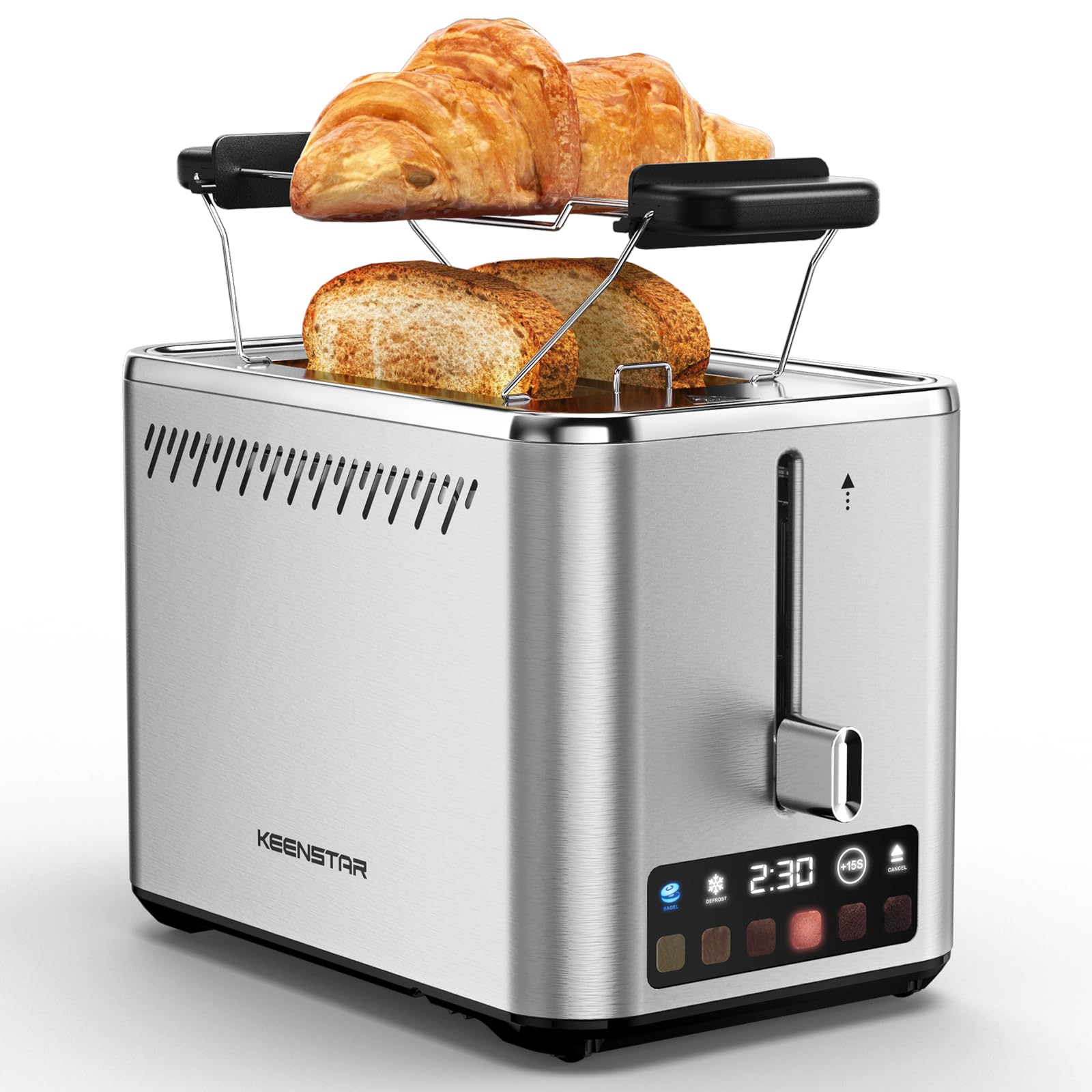
Image: KEENSTAR ST-265TC 2-Slice Toaster in silver stainless steel.
3. سیٹ اپ
پیک کھولنا
Carefully remove the toaster and all packaging materials from the box. Ensure all accessories, including the warming rack, are present.
جگہ کا تعین
ٹوسٹر کو ایک مستحکم، فلیٹ، گرمی سے بچنے والی سطح پر رکھیں، آتش گیر مواد جیسے پردے یا دیواروں سے دور رکھیں۔ آلات کے ارد گرد مناسب وینٹیلیشن کو یقینی بنائیں۔
پہلا استعمال
Before toasting food for the first time, operate the toaster without bread on the highest browning setting (level 6) to burn off any manufacturing residues. A slight odor or smoke may be present; this is normal and will dissipate.
4. آپریٹنگ ہدایات
کنٹرول پینل ختم۔view

Image: The toaster's smart touch control display showing 6 browning levels and extra functions like Bagel, Defrost, +15S, and Cancel.
بنیادی ٹوسٹنگ
- Insert up to two slices of bread into the wide 1.5-inch slots.
- Select your desired browning level (1-6) by touching the corresponding icon on the display. Level 1 is the lightest, and Level 6 is the darkest.
- Press the lever down until it locks into place. The digital display will show a countdown timer.
- The toast will automatically pop up when the cycle is complete.

Image: Visual guide showing the steps for easy toaster operation: 1. Put bread in slots, 2. Select browning level and function, 3. Press the lever down, 4. Enjoy delicious bread.
بیگل فنکشن۔
This function is designed to toast the cut side of bagels while gently warming the outer side.
- Insert bagel halves into the slots with the cut side facing outwards.
- اپنی مطلوبہ براؤننگ لیول منتخب کریں۔
- کو چھوئے۔ BAGEL button on the display. It will illuminate.
- Press the lever down until it locks.

Image: The toaster's display showing the illuminated BAGEL mode. BAGEL mode toasts one side only; place the cut side facing outward.
ڈیفروسٹ فنکشن
Use this function to toast frozen bread without pre-thawing.
- سلاٹوں میں منجمد روٹی ڈالیں۔
- اپنی مطلوبہ براؤننگ لیول منتخب کریں۔
- کو چھوئے۔ ترقی button on the display. It will illuminate.
- Press the lever down until it locks.

Image: The toaster's display showing the illuminated DEFROST mode. This mode allows you to cook frozen breads easily without guesswork.
+15S Function
If your toast is not quite browned enough after a cycle, you can add an additional 15 seconds of toasting time.
- After a toasting cycle, if more browning is desired, touch the +15S بٹن
- The toaster will initiate a 15-second toasting cycle.
فنکشن منسوخ کریں۔
To stop the toasting cycle at any time, simply touch the منسوخ کریں۔ button. The lever will automatically raise, and the heating elements will turn off.

Image: The toaster's display highlighting the +15S button to increase baking time by 15 seconds, and the Cancel button to stop heating.
وارمنگ ریک
The included warming rack can be used to warm pastries, croissants, or other items that cannot be placed directly into the toaster slots.
- Place the warming rack securely on top of the toaster, aligning it over the slots.
- Place the item to be warmed on the rack.
- Start a toasting cycle (without bread in the slots) to generate heat. The heat rising from the toaster will warm the item on the rack.
- Monitor the item closely to prevent over-warming or burning.

Image: The removable warming rack attached to the toaster, with a croissant placed on it for warming.
پروڈکٹ ویڈیوز
Video: Demonstrates the touchscreen and warming tray features of the KEENSTAR toaster.
ویڈیو: ایک تفصیلی دوبارہview of the KEENSTAR Smart 2-Slice Toaster, highlighting its touch screen and various functions.
Video: Explores the key features and functionalities of the KEENSTAR toaster.
5. دیکھ بھال اور صفائی
عمومی صفائی
Always unplug the toaster from the power outlet and allow it to cool completely before cleaning. Wipe the exterior with a soft, damp کپڑا کھرچنے والے کلینر یا دھاتی اسکورنگ پیڈز کا استعمال نہ کریں، کیونکہ یہ سٹینلیس سٹیل کی تکمیل کو کھرچ سکتے ہیں۔
کرمبی ٹرے
The removable crumb tray collects crumbs during toasting and should be emptied regularly to prevent fire hazards.
- یقینی بنائیں کہ ٹوسٹر ان پلگ اور مکمل طور پر ٹھنڈا ہے۔
- ٹوسٹر کے نچلے حصے میں واقع کرمب ٹرے کو باہر نکالیں۔
- ٹکڑوں کو ضائع کریں اور ٹرے کو اشتہار سے صاف کریں۔amp کپڑا
- کرمب ٹرے کو واپس اپنی جگہ پر سلائیڈ کریں جب تک کہ یہ محفوظ طریقے سے کلک نہ کرے۔

Image: The toaster's convenient design showing the removable crumb tray being pulled out and the cord storage area on the bottom.
ہڈی کا ذخیرہ
For neat storage, the power cord can be wrapped around the designated area on the underside of the toaster.
6 خرابیوں کا سراغ لگانا
- Toaster not turning on: Ensure the power cord is securely plugged into a working electrical outlet. Make sure the toast lever is fully pressed down.
- ناہموار ٹوسٹنگ: Ensure bread slices are centered in the slots. Try adjusting the browning level. Different types of bread may require different settings.
- سلاٹوں میں پھنسی روٹی: Unplug the toaster immediately and allow it to cool. Gently remove the bread using non-metallic tongs. Never use metal utensils.
- Smoke coming from toaster: Unplug the toaster immediately. Remove any food particles or crumbs that may be lodged inside the slots or on the heating elements. Ensure the crumb tray is clean.
7. وضاحتیں
| برانڈ | کینسٹار |
| ماڈل | ST-265TC |
| طاقت | 900 واٹ |
| والیومtage | 120 وولٹ (AC) |
| ٹکڑوں کی تعداد۔ | 2 |
| مواد | سٹینلیس سٹیل |
| پروڈکٹ کے طول و عرض (D x W x H) | 10.39" x 7.1" x 6.1" |
| سلاٹ چوڑائی | 1.5 انچ |
| خصوصی خصوصیات | Cancel Function, LED Indicator, Removable Crumb Tray, Touchscreen, Warming Rack |

Image: Diagram showing the dimensions of the KEENSTAR ST-265TC toaster: 9.4 inches (24cm) length, 6.1 inches (15.6cm) width, 7 inches (18cm) height, and 1.5 inch (3.8cm) wide slots.
8. وارنٹی اور سپورٹ
وارنٹی
This KEENSTAR toaster comes with a 2-year warranty. Please refer to the warranty card included in the product packaging for detailed terms and conditions.
کسٹمر سپورٹ
For any questions, technical assistance, or warranty claims, please contact KEENSTAR customer support. Contact information can typically be found on the warranty card or the official KEENSTAR webسائٹ
Ask a question about this manual
Ask about setup, troubleshooting, compatibility, parts, safety, or missing instructions. Manuals+ will review the question and use this page’s manual context to help answer it.