
Simrad NSS12 evo3S
سمراڈ NSS12 evo3S کومبو ملٹی فنکشن چارٹ پلاٹر/ فش فائنڈر ریڈار بنڈل HALO20+ صارف کا دستی
Model: NSS12 evo3S
برانڈ: سمراد
تعارف
This manual provides essential information for the installation, operation, and maintenance of your Simrad NSS12 evo3S Combo Multi-Function Display and HALO20+ Radar Bundle. The NSS12 evo3S is a powerful marine electronics system designed to enhance your navigation, fishfinding, and radar capabilities. It integrates advanced charting, sonar, and radar technologies into a single, intuitive unit. Please read this manual thoroughly before using the product to ensure safe and optimal performance.
پروڈکٹ ختمview

The Simrad NSS12 evo3S Multi-Function Display, showcasing its integrated sonar and radar capabilities. This unit serves as the central hub for navigation, fishfinding, and radar operations.

ایک مفصل view of the Simrad NSS12 evo3S display, illustrating a radar overlay on a chart, providing comprehensive situational awareness.

The Simrad HALO20+ Radar Dome, a key component of the bundle, providing high-resolution radar imaging for collision avoidance and weather tracking.
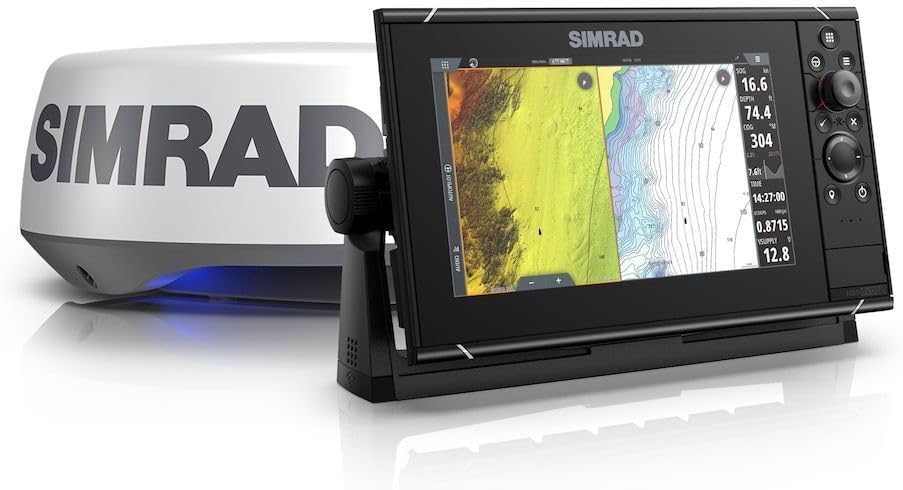
The Simrad NSS12 evo3S Multi-Function Display paired with the HALO20+ Radar Dome, demonstrating the complete system components.
سیٹ اپ
The Simrad NSS12 evo3S is designed for flush mounting. Proper installation is crucial for optimal performance and longevity. Ensure all power connections are secure and waterproof. Connect the HALO20+ radar dome to the NSS12 evo3S unit according to the provided wiring diagrams. Verify all network connections (e.g., Ethernet, NMEA 2000) are correctly established for full system integration. It is recommended to consult a qualified marine electronics technician for complex installations.
چڑھنا
- فلش ماؤنٹ: Prepare the mounting surface by cutting an opening to the specified dimensions. Secure the unit using the provided mounting hardware.
- زیادہ گرمی سے بچنے کے لیے یونٹ کے ارد گرد مناسب وینٹیلیشن کو یقینی بنائیں۔
- Route cables carefully to avoid kinks or damage, and secure them to prevent strain.
آپریٹنگ ہدایات
The NSS12 evo3S features a Color TFT display with intuitive controls. The unit is primarily powered by a 12V DC battery system. Upon powering on, the system will initiate a self-test. Navigate through the menus using the rotary dial and keypad, or via the touchscreen interface. Familiarize yourself with the various modes: Chart, Sonar (Fishfinder), and Radar.
Chartplotter Operation
- Select the 'Chart' page to view your vessel's position on electronic charts.
- Use pinch-to-zoom or the rotary dial to adjust chart scale.
- Create and manage waypoints and routes for navigation.
Fishfinder (Sonar) Operation
- Access the 'Sonar' page to view real-time underwater imagery.
- Adjust gain, range, and frequency settings to optimize sonar returns.
- Identify fish arches, bottom structure, and depth readings.
ریڈار آپریشن۔
- Select the 'Radar' page to display radar targets.
- Adjust range, gain, and sea clutter settings for clear target detection.
- Utilize features like MARPA (Mini Automatic Radar Plotting Aid) for tracking targets.
دیکھ بھال
Regular maintenance ensures the longevity and reliability of your Simrad system.
- صفائی: ڈسپلے اسکرین کو نرم سے صاف کریں، ڈیamp کپڑا کھرچنے والے کلینر یا سالوینٹس سے پرہیز کریں۔
- رابطے: Periodically check all cable connections for corrosion or looseness. Apply dielectric grease to exposed electrical connections in marine environments.
- سافٹ ویئر اپ ڈیٹس: Regularly check the Simrad website for software updates to ensure your unit has the latest features and performance enhancements.
- Radar Dome: Keep the radar dome clean and free from obstructions.
خرابی کا سراغ لگانا
یہ سیکشن عام مسائل کا حل فراہم کرتا ہے جن کا آپ کو سامنا ہو سکتا ہے۔
- کوئی طاقت نہیں: Check power connections, fuses, and battery voltage. Ensure the unit is properly connected to a 12V DC source.
- کوئی سونار تصویر نہیں: Verify the transducer is properly connected and submerged. Check sonar settings (gain, range).
- No Radar Display: Ensure the HALO20+ radar dome is powered on and connected. Check Ethernet cable integrity.
- یونٹ منجمد/غیر جوابدہ: Perform a soft reset by holding the power button until the unit restarts. If the issue persists, consult the Simrad support webسائٹ
- GPS Not Acquiring: یقینی بنائیں کہ GPS اینٹینا صاف ہے۔ view of the sky. Check antenna connections.
For more detailed troubleshooting or issues not covered here, please refer to the comprehensive support resources available on the official Simrad webسائٹ
وضاحتیں
| فیچر | تفصیلات |
|---|---|
| ماڈل کا نام | NSS12 evo3S |
| برانڈ | سمرد |
| ڈسپلے کی قسم | رنگین TFT |
| چڑھنے کی قسم | فلش ماؤنٹ |
| طاقت کا منبع | بیٹری سے چلنے والا (12V DC) |
| شے کا وزن | 35.28 پاؤنڈز (تقریباً 16 کلوگرام) |
| ASIN | B0DM3GRDGZ |
| پہلی تاریخ دستیاب ہے۔ | 9 ستمبر 2024 |
وارنٹی اور سپورٹ
Simrad products are built to high standards and come with a manufacturer's warranty. For specific warranty terms and conditions, please refer to the documentation included with your product or visit the official Simrad webسائٹ
تحفظ کے منصوبے
Extended protection plans may be available for your Simrad NSS12 evo3S system, offering additional coverage beyond the standard manufacturer's warranty. These plans typically cover repairs or replacements for a specified period. Please inquire with your retailer or check online for available options such as 2-Year or 3-Year Protection Plans.
کسٹمر سپورٹ
For technical assistance, product registration, or to find authorized service centers, please visit the official Simrad webسائٹ یا ان کے کسٹمر سپورٹ سے براہ راست رابطہ کریں۔ آپ بھی ملاحظہ کر سکتے ہیں۔ ایمیزون پر سمراد اسٹور اضافی مصنوعات کی معلومات اور وسائل کے لیے۔
Ask a question about this manual
Ask about setup, troubleshooting, compatibility, parts, safety, or missing instructions. Manuals+ will review the question and use this page’s manual context to help answer it.