
1. تعارف
Thank you for choosing the FOFUN T-Fun NC95 Hybrid Active Noise Cancelling Headphones. This manual provides essential information for the safe and efficient use of your headphones. Please read it thoroughly before use and retain it for future reference.

Image 1.1: T-Fun NC95 Hybrid Active Noise Cancelling Headphones.
2. پیکیج کے مشمولات
تصدیق کریں کہ تمام اشیاء پیکیج میں موجود ہیں:
- NC95 ANC Headphones
- 3.5 ملی میٹر آڈیو کیبل
- Type A-C Charging Cable
- PU Bag (Carrying Case)
- کوئیک اسٹارٹ گائیڈ
- Digital Manual (Downloadable)

Image 2.1: Included accessories and headphones.
3. پروڈکٹ ختمview
3.1 ہیڈ فون کے اجزاء

تصویر 3.1: ختمview of headphone ports and buttons.
3.2 Fit and Adjustability
- سایڈست ہیڈ بینڈ: The headband can be extended or retracted to fit various head sizes, ensuring a personalized and comfortable fit.
- 90° Rotatable Earcups: The earcups rotate more than 90 degrees, allowing for a comfortable fit and easy storage when not in use.
- نرم کان کے کشن: Made with quality protein memory foam for extended comfort.
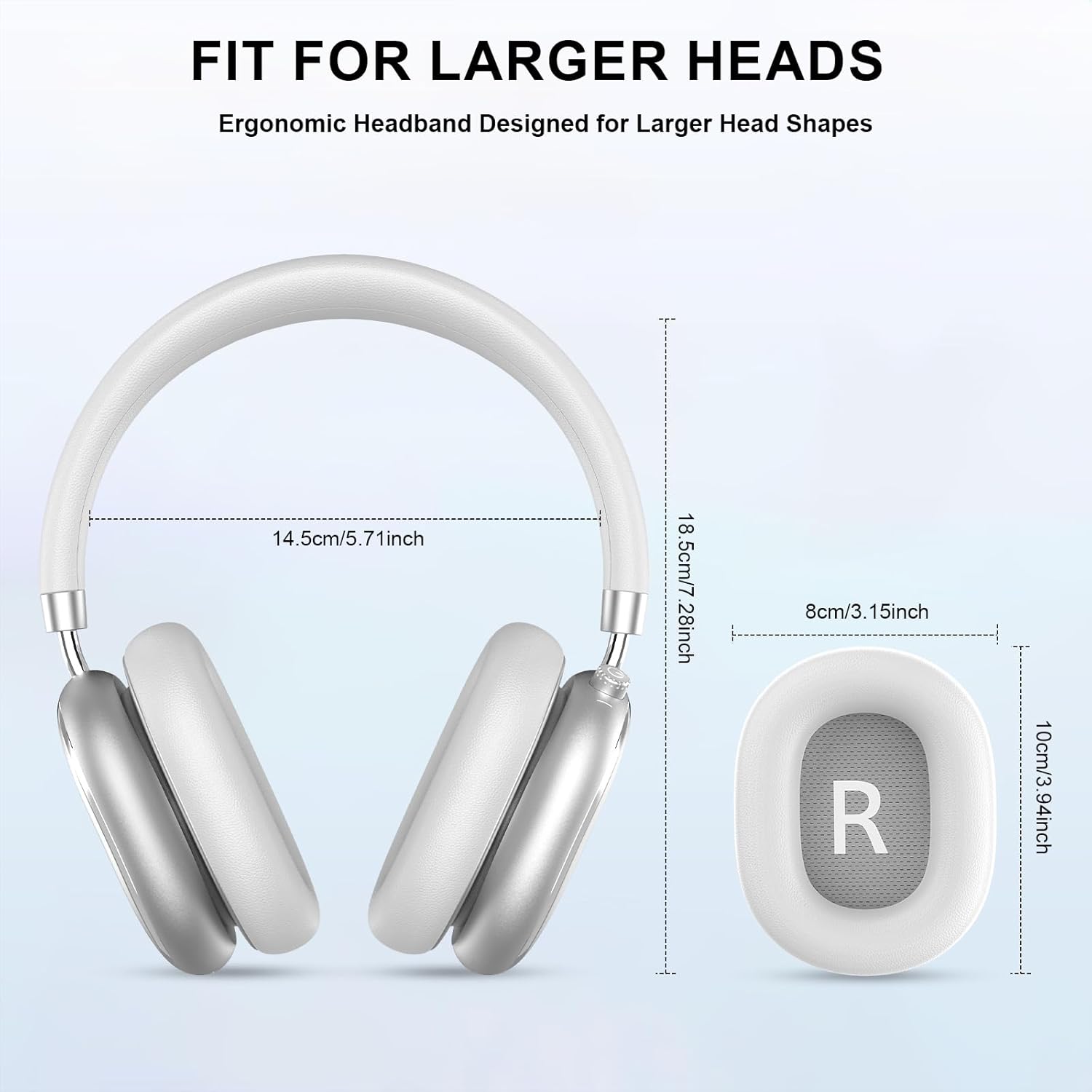
Image 3.2: Headphone dimensions for fit reference.
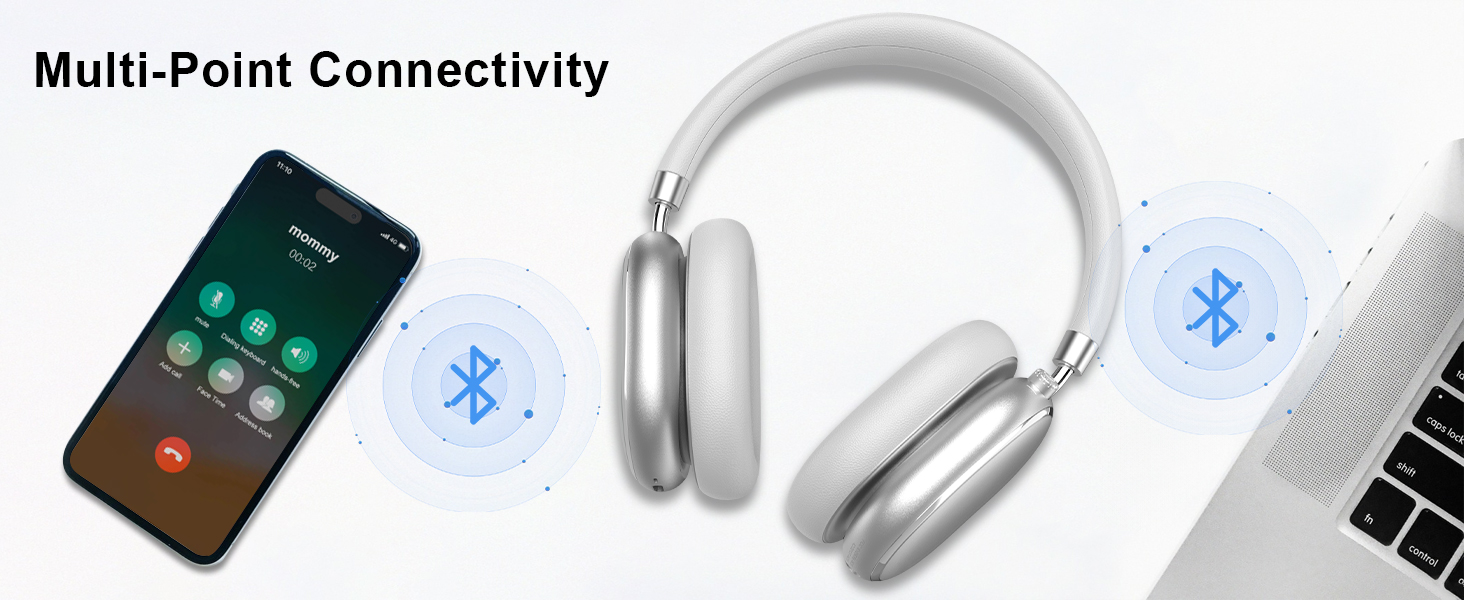
Image 3.3: Adjustable headband for personalized comfort.
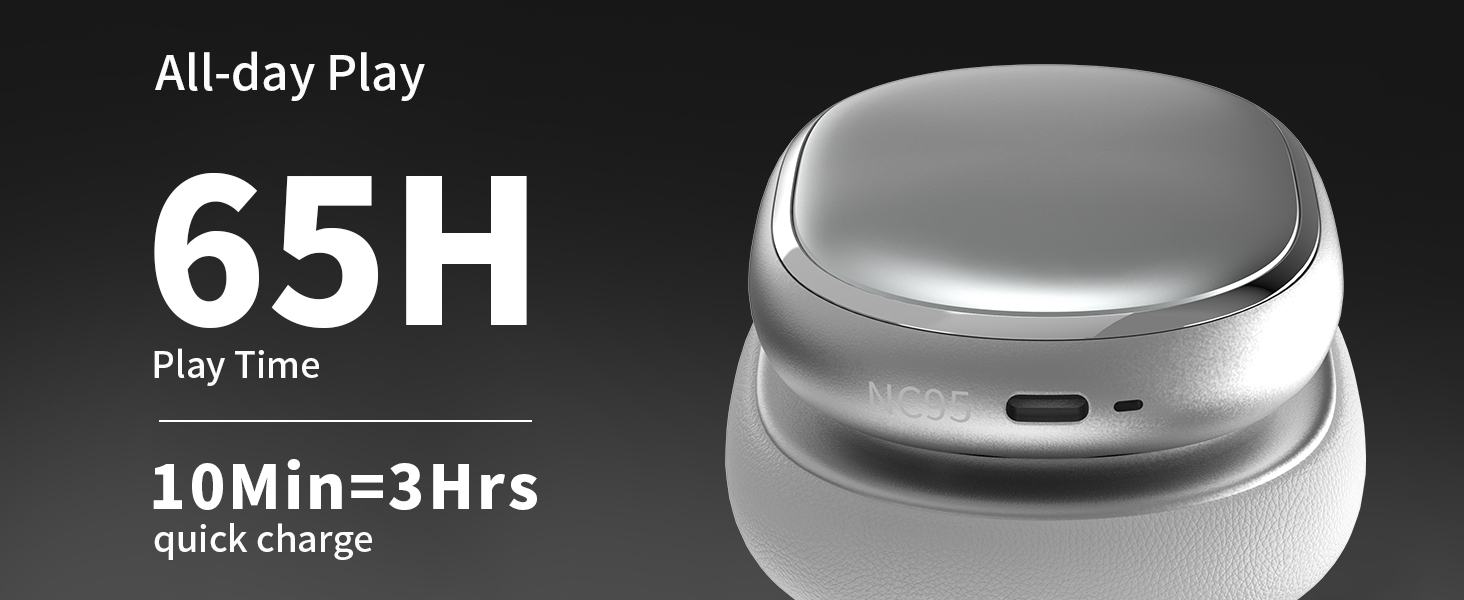
Image 3.4: Earcups rotate for comfort and storage.

Image 3.5: Ultra-soft protein leather ear cushions for comfort.
4. سیٹ اپ
4.1 ابتدائی تیاری
- Remove Protective Sticker: Before first use, gently remove the protective sticker from the sides of the headphones. You may warm the area with a hairdryer (low heat) for easier removal. Peel slowly and remove any sticky residue with warm water or rubbing alcohol.

Image 4.1: Steps for removing the protective sticker.
4.2 ہیڈ فون چارج کرنا
Before initial use, fully charge the headphones. Use the provided Type A-C charging cable.
- Connect the USB-C end of the cable to the charging port on the headphones.
- USB-A اینڈ کو ایک مطابقت پذیر USB پاور سورس (جیسے وال اڈاپٹر، کمپیوٹر USB پورٹ) سے جوڑیں۔
- ایل ای ڈی انڈیکیٹر چارجنگ سٹیٹس دکھائے گا۔ مکمل چارج ہونے میں تقریباً 2.5 گھنٹے لگتے ہیں۔
- 10 منٹ کا فوری چارج تقریباً 3 گھنٹے کا پلے بیک فراہم کرتا ہے۔

تصویر 4.2: بیٹری کی زندگی اور چارجنگ کی معلومات۔
4.3 بلوٹوتھ جوڑی
- یقینی بنائیں کہ ہیڈ فون چارج اور پاور آف ہیں۔
- Press and hold the power button (located on the knob control) for 3-5 seconds until the LED indicator flashes, indicating pairing mode.
- اپنے آلے پر (اسمارٹ فون، ٹیبلیٹ، لیپ ٹاپ)، بلوٹوتھ کو فعال کریں اور دستیاب آلات تلاش کریں۔
- Select "T-Fun NC95" from the list of devices.
- ایک بار منسلک ہونے کے بعد، LED اشارے ایک مستحکم روشنی میں تبدیل ہو جائے گا یا آہستہ آہستہ فلیش ہو جائے گا۔
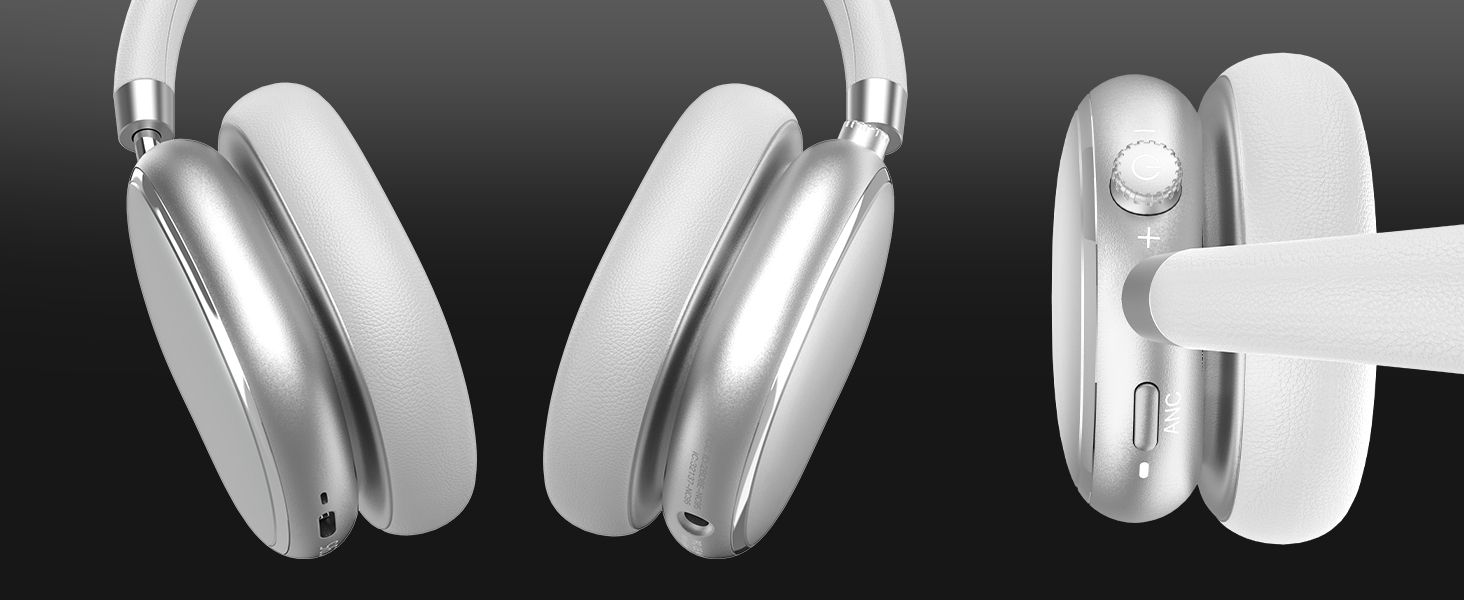
Image 4.3: Multipoint Bluetooth connectivity.
4.4 T-Fun App Installation
For enhanced control and customization, download the official "T-fun" app.
- تلاش کریں۔ "T-fun" on the Apple App Store or Google Play Store.
- ایپ ڈاؤن لوڈ اور انسٹال کریں۔
- Open the app and follow the on-screen instructions to connect your NC95 headphones.

Image 4.4: T-Fun app customization features.

Image 4.5: App download and connection process.
5. آپریٹنگ ہدایات
5.1 پاور آن/آف
- پاور آن: Press and hold the power button (on the knob) for 3-5 seconds.
- بجلی بند: Press and hold the power button (on the knob) for 3-5 seconds.
5.2 Knob Control Functions
The multi-functional knob control allows for intuitive operation:
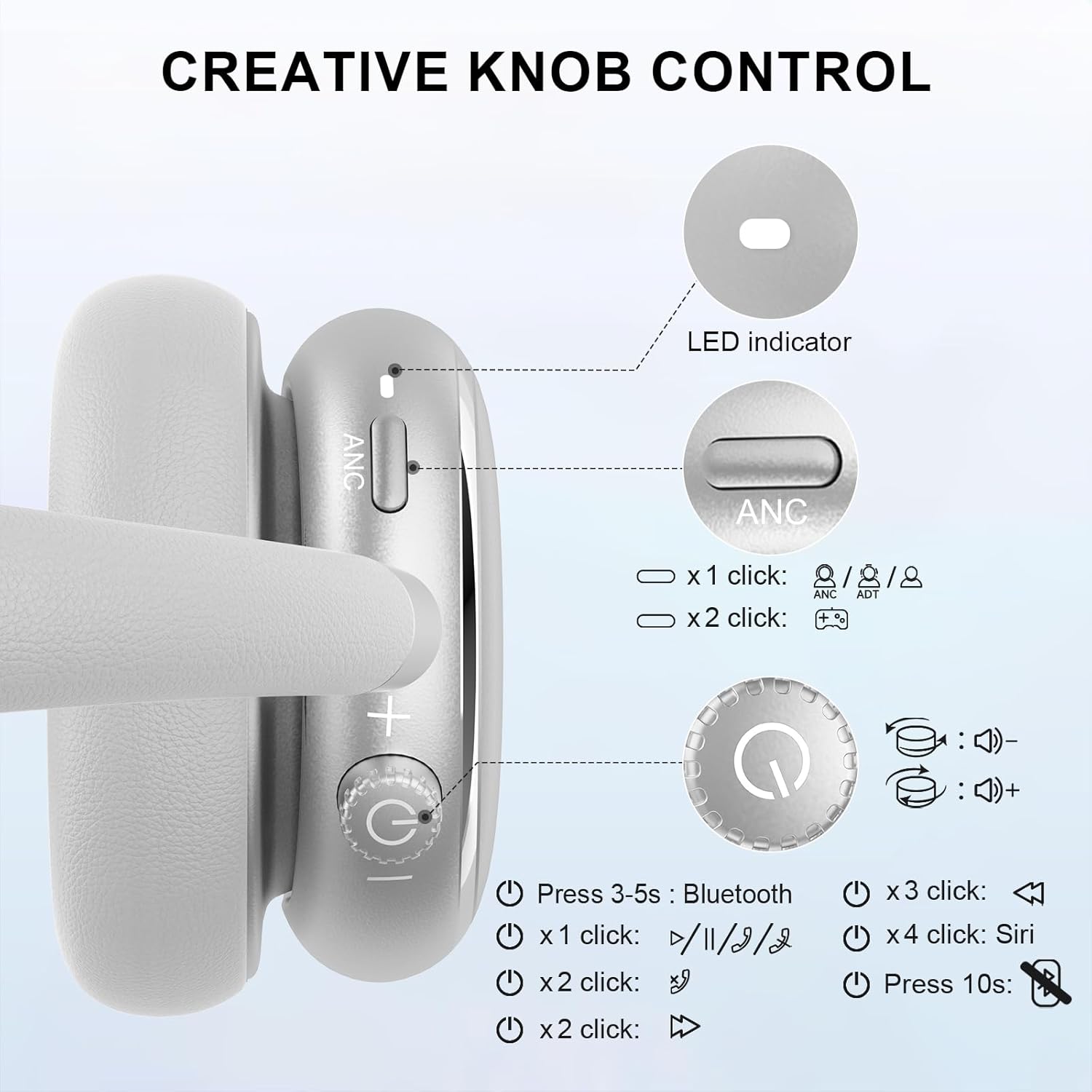
Image 5.1: Creative Knob Control functions.
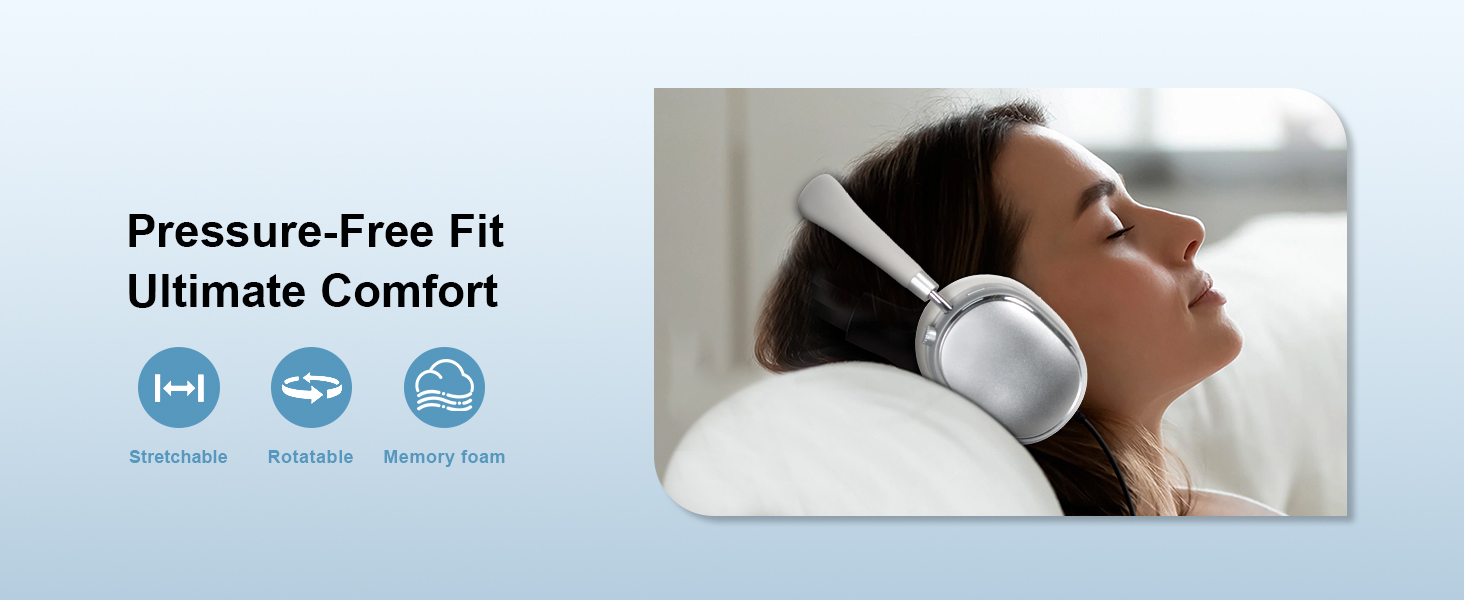
Image 5.2: Multi-functional Knob Control for volume adjustment.
- والیوم ایڈجسٹمنٹ: Rotate the knob clockwise to increase volume, counter-clockwise to decrease volume.
- چلائیں/روکیں: Press the knob once.
- جواب / کال ختم کریں: Press the knob once.
- اگلا ٹریک: نوب کو دو بار دبائیں۔
- پچھلا ٹریک: Press the knob three times.
- وائس اسسٹنٹ کو فعال کریں (Siri): Press the knob four times.
- ری سیٹ: 10 سیکنڈ تک نوب کو دبائیں اور پکڑیں۔
Note: Knob functions are only available in wireless connection mode.
5.3 فعال شور منسوخی (ANC) اور شفافیت موڈ
The NC95 headphones feature Hybrid Active Noise Cancellation and Transparency Mode, controlled by a dedicated button.
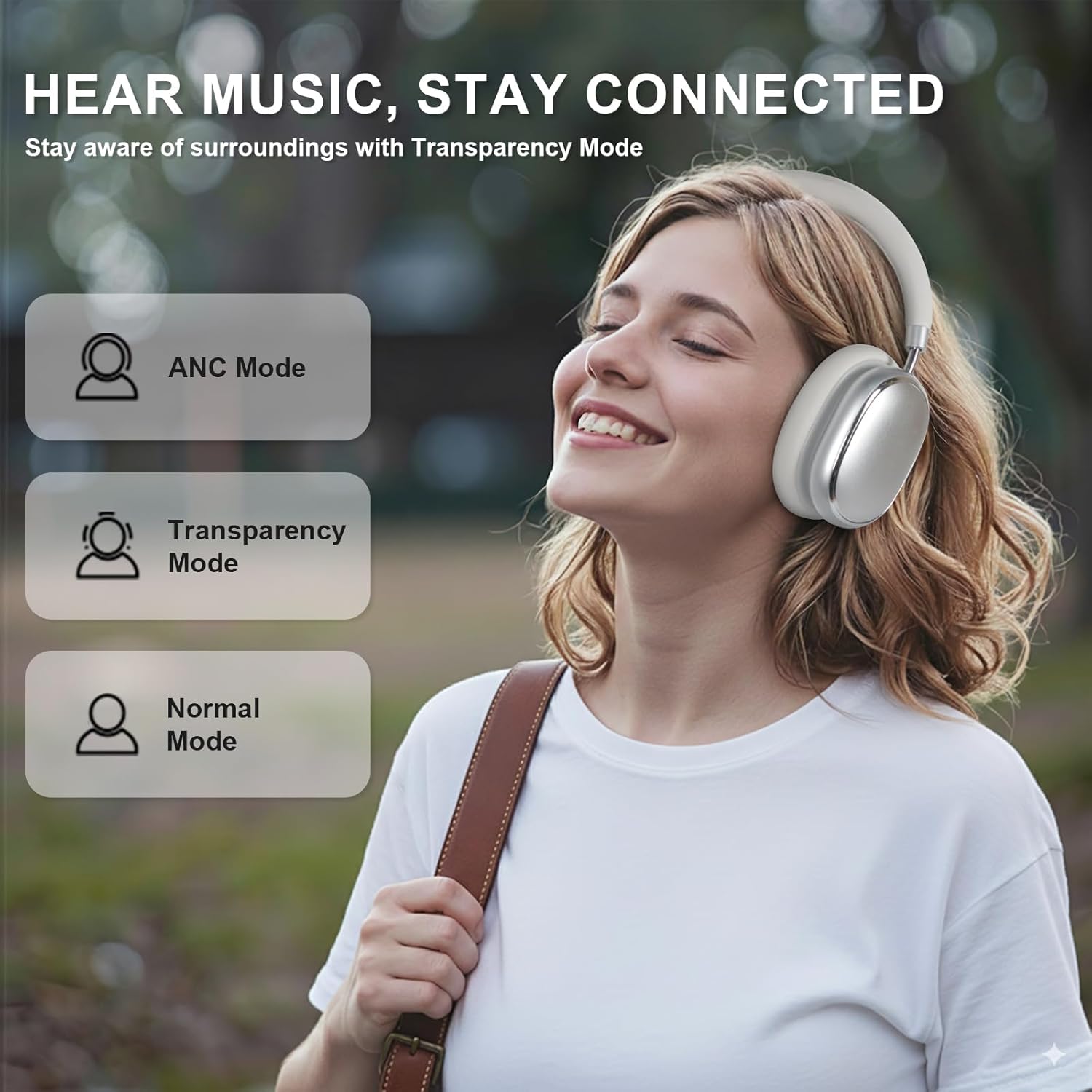
Image 5.3: ANC, Transparency, and Normal modes.

Image 5.4: Noise reduction effectiveness.
- ANC موڈ: Press the ANC button once to activate Hybrid Active Noise Cancellation, reducing ambient noise by up to 35dB.
- شفافیت موڈ: Press the ANC button again to switch to Transparency Mode, allowing you to hear your surroundings without removing the headphones.
- نارمل موڈ: Press the ANC button a third time to return to Normal Mode, with ANC and Transparency off.
Note: ANC mode is only available in wireless connection mode.
5.4 وائرڈ کنکشن
For a wired audio experience or when battery is low, use the 3.5mm audio cable.
- 3.5mm آڈیو کیبل کے ایک سرے کو ہیڈ فون پر آڈیو جیک سے جوڑیں۔
- دوسرے سرے کو اپنے آلے کے 3.5mm آڈیو آؤٹ پٹ سے جوڑیں۔
- In wired mode, the knob control functions for volume, playback, and calls are not available.
Image 5.5: Wired connection with 3.5mm audio cable.
5.5 کال مینجمنٹ
When connected via Bluetooth, you can manage calls using the knob control.
- جواب / کال ختم کریں: Press the knob once.
- کال مسترد کریں: 2 سیکنڈ تک نوب کو دبائیں اور پکڑیں۔

Image 5.6: Clear hands-free calls with built-in microphones.
6 دیکھ بھال
6.1 صفائی
- ہیڈ فون کو نرم، خشک کپڑے سے صاف کریں۔
- سخت کیمیکل یا کھرچنے والے مواد کا استعمال نہ کریں۔
- کسی بھی سوراخ میں نمی حاصل کرنے سے گریز کریں۔
6.2 اسٹوریج
- Store the headphones in the provided PU bag when not in use to protect them from dust and scratches.
- انتہائی درجہ حرارت یا زیادہ نمی میں ذخیرہ کرنے سے گریز کریں۔
6.3 Detachable Ear Cushions
The ear cushions are detachable for easy cleaning and replacement, ensuring long-term use.

Image 6.1: Detachable ear cushions for easy care.
7 خرابیوں کا سراغ لگانا
If you encounter issues with your NC95 headphones, refer to the following common solutions:
| مسئلہ | ممکنہ وجہ | حل |
|---|---|---|
| ہیڈ فون آن نہیں ہوتے | کم بیٹری | ہیڈ فون کو مکمل چارج کریں۔ |
| بلوٹوتھ کے ذریعے جوڑا نہیں بنایا جا سکتا | ہیڈ فون پیئرنگ موڈ میں نہیں ہیں۔ ڈیوائس بلوٹوتھ آف؛ مداخلت | Ensure headphones are in pairing mode (flashing LED). Turn device Bluetooth off and on. Move closer to the device. |
| کوئی آواز نہیں۔ | Volume too low; Incorrect audio source; Loose wired connection | Increase volume on headphones and device. Check audio output settings on your device. Re-insert 3.5mm cable firmly. |
| ANC مؤثر طریقے سے کام نہیں کر رہا ہے۔ | ANC not activated; Environmental noise too high | Press the ANC button to cycle through modes. ANC is most effective against low-frequency noise. |
| ایپ کنکشن کے مسائل | Bluetooth not connected; App glitch | Ensure headphones are connected via Bluetooth. Restart the app or your phone. |
اگر مسئلہ برقرار رہتا ہے، تو براہ کرم کسٹمر سپورٹ سے رابطہ کریں۔
8. وضاحتیں
| فیچر | تفصیل |
|---|---|
| ماڈل کا نام | NC95 |
| شور کنٹرول | ہائبرڈ شور منسوخی |
| تعدد رسپانس | 20 Hz - 20 KHz |
| حساسیت | 105 ڈی بی |
| رکاوٹ | 32 اوہم |
| ہیڈ فون جیک | 3.5 ملی میٹر جیک |
| کنیکٹوٹی ٹیکنالوجی | Wireless (Bluetooth), Wired |
| وائرلیس کمیونیکیشن ٹیکنالوجی | بلوٹوتھ 5.3 |
| بلوٹوتھ رینج | 15 میٹر |
| آڈیو دیر | 50 ملی سیکنڈز |
| آڈیو ڈرائیور کا سائز | 40 ملی میٹر |
| کنٹرول کی قسم | App Control, Push Button, Knob |
| بیٹری کی زندگی | Up to 65 Hours (ANC playback) |
| چارج کرنے کا وقت | 2.5 گھنٹے |
| پانی کی مزاحمت کی سطح | پانی مزاحم نہیں |
| شے کا وزن | 1.28 پاؤنڈ |
| کارخانہ دار | FOFUN |
9. وارنٹی اور سپورٹ
9.1 وارنٹی کی معلومات
For detailed warranty information, please refer to the documentation included with your purchase or contact FOFUN customer service directly. Warranty terms may vary by region and retailer.
9.2 کسٹمر سپورٹ
If you require further assistance or have questions not covered in this manual, please contact FOFUN customer support through their official channels. You can also visit the T-Fun Store on Amazon اضافی وسائل کے ل.