
1. پروڈکٹ ختمview
The MOBAPAD N1 HD is a versatile wireless controller designed for an enhanced gaming experience across multiple platforms. It features advanced technologies such as Hall Effect Joysticks for precise control, ALPS Dual-Axis Motors for immersive HD vibration, and six-axis motion control. This controller is compatible with Nintendo Switch, PC, iOS, and Android devices, offering seamless connectivity and responsive performance.

تصویر: سامنے view of the MOBAPAD N1 HD Wireless Controller, showcasing اس کا ایرگونومک ڈیزائن اور بٹن لے آؤٹ۔
2. کلیدی خصوصیات
- ملٹی پلیٹ فارم مطابقت: Fully compatible with Nintendo Switch, PC, iOS, and Android devices, ensuring broad usability.
- Hall Effect Joysticks: Provides smooth, precise, and durable control with minimal wear, ideal for accurate gaming.
- ALPS Dual-Axis Motors with HD Vibration: Delivers realistic and immersive haptic feedback for enhanced gameplay.
- چھ محور موشن کنٹرول: Built-in gyroscope enables enhanced motion control for compatible games.
- NFC for Amiibo Scanning: Supports NFC technology for scanning Amiibo figures on Nintendo Switch.

Image: The controller illustrating its immersive motion control capabilities with swirling lines around it.

Image: The controller positioned in front of a collection of Amiibo figures, highlighting its NFC scanning function.

Image: The controller shown alongside icons for Switch, Android/iOS, and PC, demonstrating its multi-device compatibility.
3. سیٹ اپ اور کنکشن
Follow these steps to connect your MOBAPAD N1 HD controller to your desired device.
3.1 نائنٹینڈو سوئچ سے منسلک ہو رہا ہے۔
- ہوم مینو سے ، منتخب کریں کنٹرولرز، پھر گرفت / آرڈر کو تبدیل کریں۔.
- While the screen is displaying "Press L + R on the controller", press and hold the ہوم بٹن on the MOBAPAD N1 HD controller for 3-5 seconds until the player LEDs begin to flash.
- Once connected, the player LED(s) corresponding to the controller number will remain lit.
3.2. Connecting to PC (Windows)
- Connect the controller to your PC using a USB-C cable. The controller will be recognized as a wired controller.
- For wireless connection, ensure your PC has Bluetooth enabled. Go to Bluetooth & other devices settings.
- Select "Add Bluetooth or other device" and choose "Bluetooth".
- دبائیں اور تھامیں۔ ہوم بٹن on the controller until the LEDs flash rapidly, indicating pairing mode.
- Select "MOBAPAD N1 HD" from the list of available devices.
3.3. Connecting to iOS/Android Devices
- اپنے iOS یا Android ڈیوائس پر بلوٹوتھ کو فعال کریں۔
- Go to Bluetooth settings and search for new devices.
- دبائیں اور تھامیں۔ ہوم بٹن on the controller until the LEDs flash rapidly.
- Select "MOBAPAD N1 HD" from the list of available devices to pair.
4. کنٹرولر کو چلانا
Familiarize yourself with the controller's layout and functions for optimal gameplay.
4.1. Button Layout
- بائیں اینالاگ اسٹک: For movement and camera control. Features Hall Effect technology.
- دائیں اینالاگ اسٹک: For camera control and aiming. Features Hall Effect technology.
- ڈی پیڈ: Directional input for menu navigation and specific game actions.
- A/B/X/Y بٹن: معیاری ایکشن بٹن۔
- L/R بٹن: کندھے کے بٹن۔
- ZL/ZR بٹن: Trigger buttons.
- مائنس (-) بٹن: Typically for opening in-game menus or specific functions.
- پلس (+) بٹن: Typically for opening in-game menus or specific functions.
- ہوم بٹن: Returns to the system's home screen. Also used for pairing and NFC scanning.
- کیپچر بٹن: Takes screenshots or video clips (Nintendo Switch).
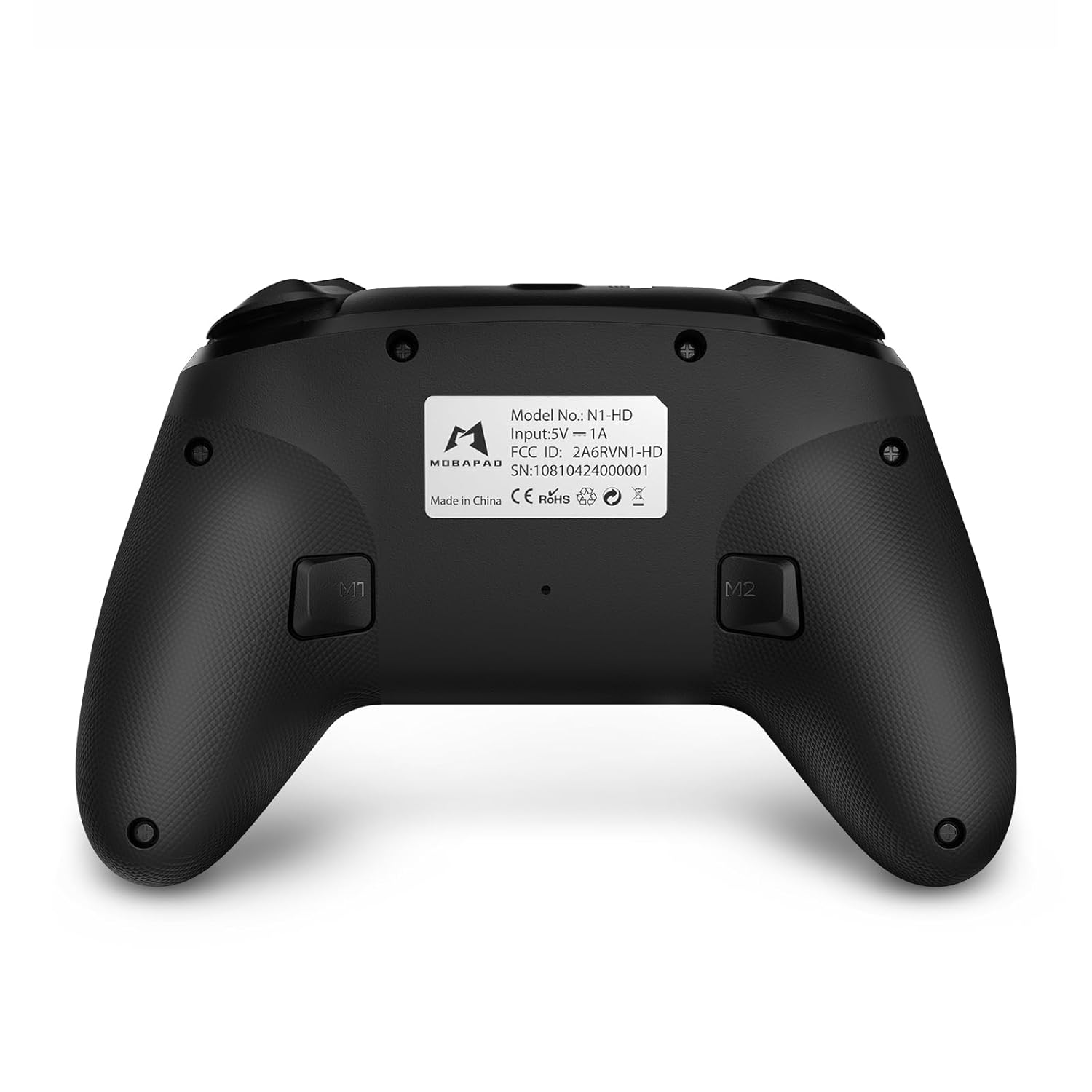
- M1/M2 بٹن: Programmable back buttons for custom macros or remapping.
تصویر: تفصیلی سامنے view of the MOBAPAD N1 HD controller, showing all buttons and joysticks.

تصویر: پیچھے view of the MOBAPAD N1 HD controller, highlighting the M1 and M2 programmable buttons and product label.
4.2. NFC Functionality (Amiibo Scanning)
To use the NFC function for Amiibo scanning on Nintendo Switch:
- Ensure your controller is connected to the Nintendo Switch.
- In a compatible game, when prompted to scan an Amiibo, place the Amiibo figure directly over the ہوم بٹن area on the controller.
- Hold the Amiibo in place until the game registers the scan.
5. دیکھ بھال اور دیکھ بھال
مناسب دیکھ بھال آپ کے کنٹرولر کی لمبی عمر اور بہترین کارکردگی کو یقینی بناتی ہے۔
- صفائی: کنٹرولر کو صاف کرنے کے لیے نرم، خشک کپڑا استعمال کریں۔ ضدی گندگی کے لیے، قدرے ڈیampپانی کے ساتھ کپڑے. سخت کیمیکلز یا کھرچنے والے مواد سے پرہیز کریں۔
- ذخیرہ: کنٹرولر کو کسی ٹھنڈی، خشک جگہ پر براہ راست سورج کی روشنی اور انتہائی درجہ حرارت سے دور رکھیں۔
- بیٹری کی دیکھ بھال: The controller contains a Lithium Ion battery. Avoid fully discharging the battery frequently. If storing for extended periods, charge the battery to about 50% to prolong its lifespan. Do not expose the battery to fire or extreme heat.
- ہینڈلنگ: کنٹرولر کو گرانے یا اسے سخت اثرات سے دوچار کرنے سے گریز کریں، کیونکہ یہ اندرونی اجزاء کو نقصان پہنچا سکتا ہے۔
6 خرابیوں کا سراغ لگانا
If you encounter issues with your MOBAPAD N1 HD controller, refer to the following common solutions.
| مسئلہ | ممکنہ وجہ | حل |
|---|---|---|
| Controller does not connect. | Low battery, out of range, incorrect pairing mode, interference. | Charge the controller fully. Ensure it is within range of the device. Re-enter pairing mode (hold Home button). Move closer to the device or away from other wireless devices. |
| بٹن یا جوائس اسٹک غیر جوابی ہیں۔ | Software glitch, physical obstruction, damage. | Restart the controller and the connected device. Check for any debris around the buttons/joysticks. If issues persist, contact customer support. |
| Vibration is weak or absent. | Vibration setting off, game does not support vibration, motor issue. | Check in-game settings and system settings to ensure vibration is enabled. Verify if the game supports vibration feedback. |
| NFC scanning fails. | Incorrect placement, game not prompting scan, controller not connected. | Ensure the Amiibo is placed directly over the Home button area. Confirm the game is prompting for an Amiibo scan. Verify controller is properly connected to the Switch. |
7. وضاحتیں
| فیچر | تفصیل |
|---|---|
| ماڈل نمبر | Mobapad N1 HD Black |
| طول و عرض (L x W x H) | 5.91 x 2.36 x 3.94 انچ |
| وزن | 7.05 اونس |
| بیٹری کی قسم | 1 لتیم آئن بیٹری (شامل) |
| کنیکٹوٹی | Wireless (Bluetooth), USB-C (wired) |
| مطابقت | Nintendo Switch, PC, iOS, Android |
| خصوصی خصوصیات | Hall Effect Joysticks, ALPS Dual-Axis Motors, HD Vibration, Six-Axis Gyroscope, NFC |
8. وارنٹی اور سپورٹ
For warranty information or technical support, please contact MOBAPAD customer service. Refer to the official MOBAPAD webمخصوص وارنٹی شرائط اور رابطے کی تفصیلات کے لیے سائٹ یا آپ کی خریداری کی دستاویزات۔
You can visit the official MOBAPAD store on Amazon for more information: MOBAPAD Store