
1. تعارف
Welcome to the user manual for your Emerson CKSS7071 Sunrise Smartset Alarm Clock Radio. This device is designed to enhance your daily routine with its unique features, including a sunrise simulation, soothing sound options, Bluetooth connectivity, and an 8-color dimmable LED display. Please read this manual thoroughly to understand the full functionality and ensure proper use and care of your new alarm clock radio.
ویڈیو 1: ختمview of the Emerson CKSS7071 Sunrise Smartset Alarm Clock Radio. This video demonstrates the key features and design of the product.
2. اہم حفاظتی معلومات
- آلات کو چلانے سے پہلے تمام ہدایات پڑھیں۔
- مستقبل کے حوالے کے لیے یہ ہدایات رکھیں۔
- اس آلے کو پانی کے قریب استعمال نہ کریں۔
- صرف خشک کپڑے سے صاف کریں۔
- وینٹیلیشن کے کسی بھی سوراخ کو مسدود نہ کریں۔ کارخانہ دار کی ہدایات کے مطابق انسٹال کریں۔
- گرمی کے کسی بھی ذرائع جیسے ریڈی ایٹرز، ہیٹ رجسٹر، چولہے، یا دیگر آلات (بشمول amplifiers) جو گرمی پیدا کرتی ہے۔
- بجلی کی ہڈی کو چلنے یا چوٹکی ہونے سے بچائیں، خاص طور پر پلگ، سہولت رسیپٹیکلز، اور اس مقام پر جہاں وہ آلات سے باہر نکلتے ہیں۔
- صرف مینوفیکچرر کی طرف سے مخصوص منسلکات/لوازمات استعمال کریں۔
- بجلی کے طوفان کے دوران یا طویل عرصے تک غیر استعمال ہونے پر اس آلات کو ان پلگ کریں۔
- تمام سروسنگ کو اہل سروس اہلکاروں سے رجوع کریں۔ سروسنگ کی ضرورت اس وقت ہوتی ہے جب اپریٹس کو کسی بھی طرح سے نقصان پہنچا ہو، جیسے کہ پاور سپلائی کی ہڈی یا پلگ کو نقصان پہنچا ہو، مائع پھیل گیا ہو یا کوئی چیز اپریٹس میں گر گئی ہو، اپریٹس بارش یا نمی کے سامنے آ گیا ہو، عام طور پر کام نہیں کرتا ہے۔ ، یا گرا دیا گیا ہے۔
3. پیکیج کے مشمولات
تصدیق کریں کہ پیکیج کھولنے پر تمام اشیاء موجود ہیں:
- Emerson CKSS7071 Sunrise Smartset Alarm Clock Radio
- AC پاور اڈاپٹر
- صارف دستی
4. پروڈکٹ ختمview
4.1 محاذ View

تصویر 1: سامنے والا view of the alarm clock, featuring the digital time display and the sunrise simulation light panel.
The front of the unit features the main 1.2-inch LED time display and the large circular light panel for sunrise simulation and ambient lighting. Indicators for AM/PM, Alarm 1/2, and Bluetooth status are also visible.
4.2 طرف View (کنٹرولز)
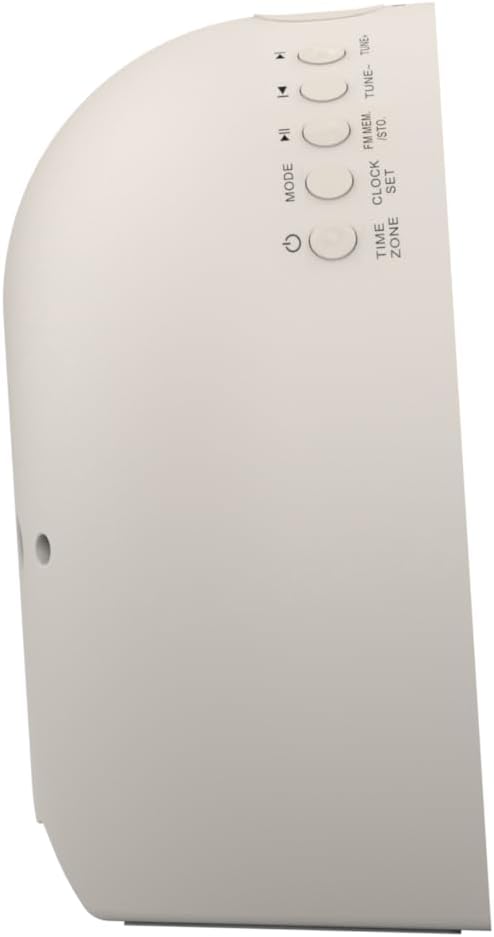
تصویر 2: طرف view of the alarm clock, highlighting the control buttons for various functions.
The side panel houses the primary control buttons, including Power, Mode, Clock Set, Time Zone, Tune/Skip, and Volume controls. These buttons are used for setting time, alarms, and navigating audio functions.
4.3 پیچھے View

تصویر 3: پیچھے view of the alarm clock, showing the speaker grille and power connection port.
The rear of the unit features the main speaker grille and the power input port for connecting the AC adapter.
5. سیٹ اپ
5.1 پاور کنکشن
- Plug the AC power adapter into the DC IN jack located on the back of the unit.
- Plug the other end of the adapter into a standard wall outlet (AC 100-240V, 50/60Hz).
- یونٹ خود بخود آن ہو جائے گا۔
5.2 SmartSet Automatic Time Setting
The SmartSet system automatically sets the correct time and date as soon as you plug in the unit. It also maintains time and alarm settings during power disruptions or outages, provided the button cell battery is installed.
5.3 بیٹری بیک اپ کی تنصیب
A button cell battery (CR2032, included) is required for battery backup. This ensures that time and alarm settings are retained during a power outage.
- یونٹ کے نچلے حصے میں بیٹری کے ٹوکری کو تلاش کریں۔
- بیٹری کے ٹوکری کا احاطہ کھولیں۔
- Insert one CR2032 button cell battery, ensuring the correct polarity (+/-).
- بیٹری کے کمپارٹمنٹ کور کو محفوظ طریقے سے بند کریں۔
6. آپریٹنگ ہدایات
6.1 گھڑی کو دستی طور پر ترتیب دینا
- دبائیں اور تھامیں۔ کلاک سیٹ بٹن گھنٹے کے ہندسے چمکیں گے۔
- استعمال کریں۔ ٹیون -/+ گھنٹے کو ایڈجسٹ کرنے کے لیے بٹن۔ دبائیں کلاک سیٹ تصدیق کرنے کے لیے
- منٹ کے ہندسے چمک اٹھیں گے۔ استعمال کریں۔ ٹیون -/+ منٹ کو ایڈجسٹ کرنے کے لئے بٹن. دبائیں کلاک سیٹ تصدیق کرنے کے لیے
- سال، مہینہ اور دن مقرر کرنے کے لیے اس عمل کو جاری رکھیں۔
- دبائیں کلاک سیٹ ٹائم سیٹنگ موڈ سے باہر نکلنے کے لیے دوبارہ۔
6.2 الارم سیٹ کرنا (الارم 1 اور الارم 2)
The unit features dual alarms. Follow these steps for each alarm:
- دبائیں اور تھامیں۔ الارم 1 or الارم 2 بٹن الارم گھنٹے کے ہندسے چمکیں گے۔
- استعمال کریں۔ ٹیون -/+ الارم گھنٹے کو ایڈجسٹ کرنے کے بٹن۔ متعلقہ کو دبائیں۔ الارم تصدیق کے لیے بٹن۔
- The alarm minute digits will flash. Use the ٹیون -/+ الارم منٹ کو ایڈجسٹ کرنے کے لیے بٹن۔ متعلقہ کو دبائیں۔ الارم تصدیق کے لیے بٹن۔
- Select the alarm source (Buzzer, FM Radio, or Soothing Sound). Press the respective الارم تصدیق کے لیے بٹن۔
- کا استعمال کرتے ہوئے الارم والیوم کو ایڈجسٹ کریں۔ VOL -/+۔ buttons. Press the respective الارم تصدیق کے لیے بٹن۔
- The alarm is now set. The alarm indicator (AL1 or AL2) will appear on the display.
6.3 طلوع آفتاب کا تخروپن
The sunrise simulation feature gradually brightens the light panel before your set alarm time, mimicking a natural sunrise to gently wake you.
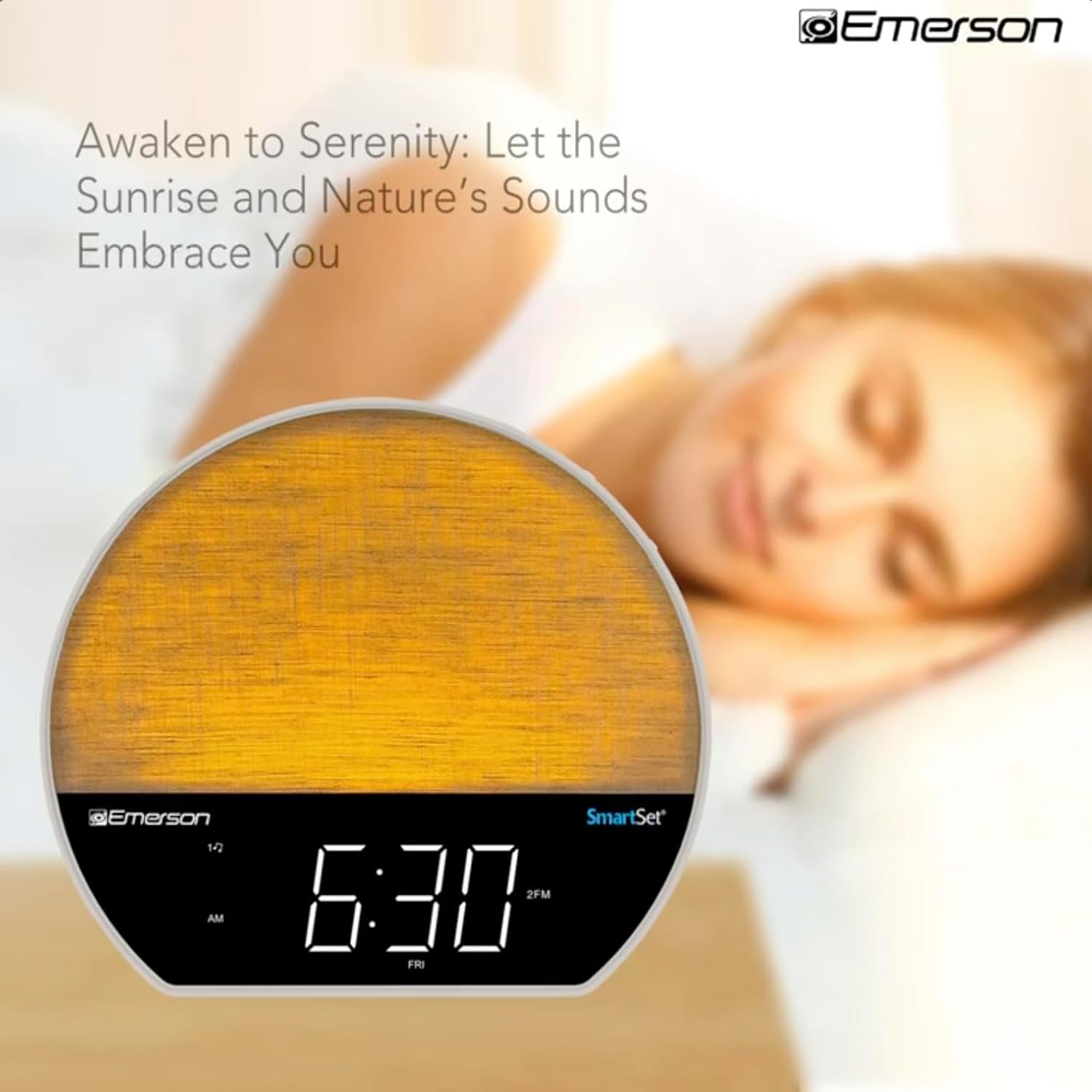
تصویر 4: The alarm clock simulating a sunrise with a warm, increasinجی روشنی کی شدت
To activate, ensure the sunrise option is selected during alarm setup. The light will begin to brighten 30 minutes before the alarm sounds.
6.4 Soothing Sounds and White Noise
The unit includes 6 soothing sounds and white noise to help with relaxation or waking up.
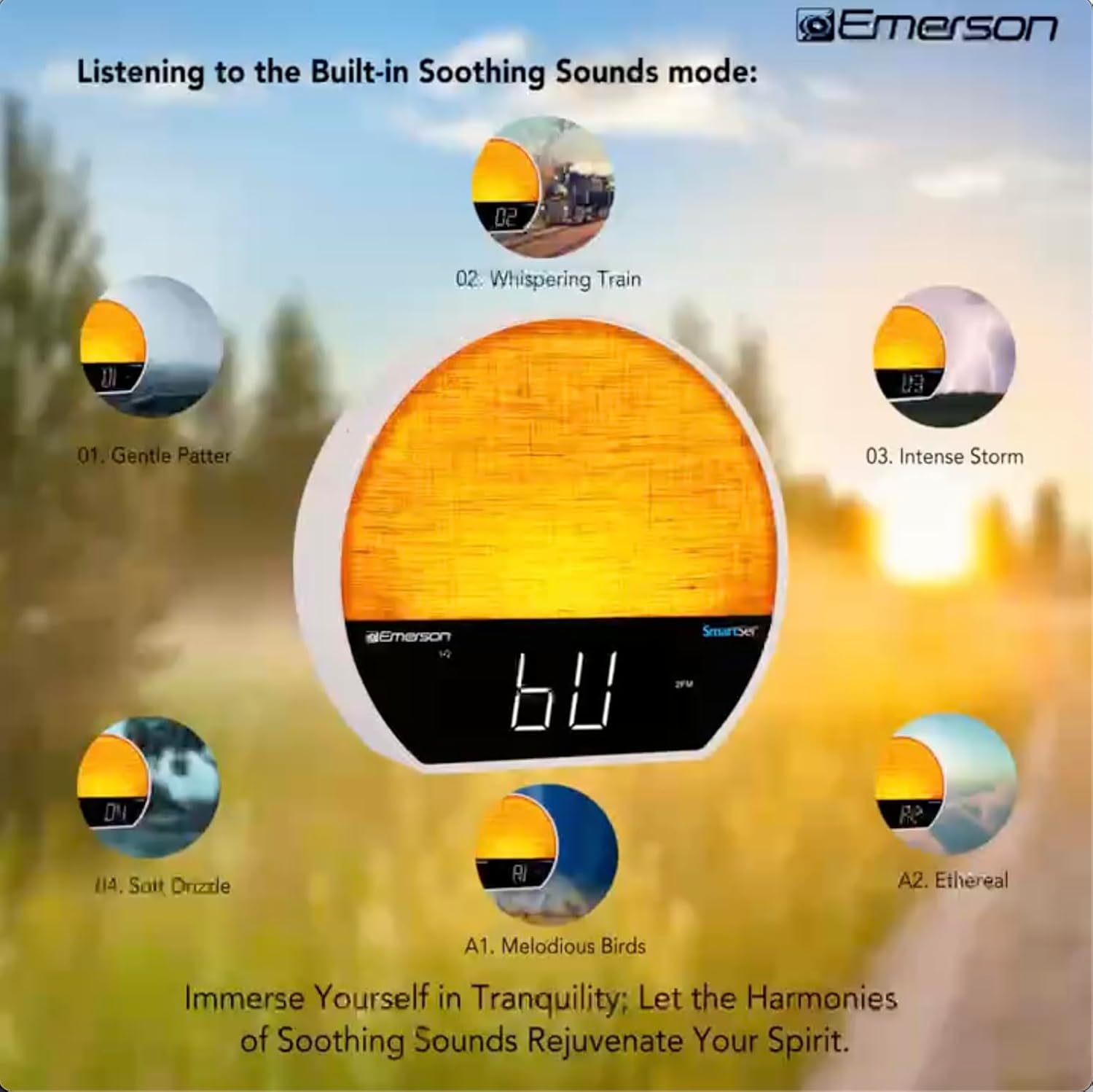
تصویر 5: Visual representation of the six soothing sound modes available on the alarm clock.
- دبائیں موڈ button repeatedly until the Soothing Sound mode is selected.
- استعمال کریں۔ ٹیون -/+ buttons to cycle through the available sounds (e.g., Gentle Patter, Whispering Train, Intense Storm, Soft Drizzle, Melodious Birds, Ethereal, White Noise).
- کا استعمال کرتے ہوئے حجم کو ایڈجسٹ کریں VOL -/+۔ بٹن
6.5 بلوٹوتھ اسپیکر فنکشن
Connect your smartphone or other Bluetooth-enabled device to stream audio wirelessly.

تصویر 6: The alarm clock in Bluetooth mode, paired with a mobile device for audio streaming.
- دبائیں موڈ بٹن جب تک کہ 'BT' ڈسپلے پر ظاہر نہ ہو، بلوٹوتھ موڈ کی نشاندہی کرتا ہے۔
- On your device, enable Bluetooth and search for 'Emerson CKSS7071'.
- Select the device to pair. A confirmation tone will sound upon successful pairing.
- You can now play audio from your device through the alarm clock's speaker.
6.6 ایف ایم ریڈیو آپریشن
اپنے پسندیدہ ایف ایم ریڈیو اسٹیشنوں میں ٹیون کریں۔
- دبائیں موڈ اس وقت تک بٹن دبائیں جب تک کہ 'ایف ایم' ڈسپلے پر ظاہر نہ ہو۔
- دبائیں ٹیون -/+ buttons briefly to manually tune to a station.
- دبائیں اور تھامیں۔ ٹیون -/+ اگلے دستیاب اسٹیشن کے لیے خود بخود اسکین کرنے کے لیے بٹن۔
- اسٹیشن کو بچانے کے لیے، دبائیں اور دبائے رکھیں FM MEM بٹن جب تک کہ پہلے سے سیٹ نمبر چمک نہ جائے۔ استعمال کریں۔ ٹیون -/+ پہلے سے سیٹ نمبر کو منتخب کرنے کے لیے، پھر دبائیں۔ FM MEM دوبارہ بچانے کے لئے.
6.7 LED Decor and Dimmer Control
Customize the ambient light with 8 different colors and adjust the brightness.

تصویر 7: The alarm clock demonstrating its 8-color dimmable LED decor options.
- دبائیں روشنی button to cycle through the 8 available colors or turn the light off.
- To adjust the brightness of the LED decor light, press and hold the روشنی button. The brightness will cycle through 5 levels. Release the button at your desired brightness.
6.8 ڈِمر کنٹرول ڈسپلے کریں۔
Adjust the brightness of the 1.2-inch LED time display.

تصویر 8: The alarm clock illustrating the five distinct levels of display luminescence.
دبائیں ڈیمر button (often combined with another function, refer to button labels) to cycle through 4 levels of display brightness (Bright, Moderate, Dim, Faint).
6.9 سلیپ ٹائمر
Set a timer for the audio to automatically turn off after a specified duration.

تصویر 9: The alarm clock set for a sunset sleep timer, providing a harmonious end to the day.
- While audio is playing (FM or Soothing Sound), press the سونا بٹن
- بار بار دبائیں سونا button to cycle through available sleep timer durations (e.g., 15, 30, 60, 90 minutes, or OFF).
- The audio will automatically turn off after the selected time.
6.10 اسنوز فنکشن۔
جب الارم بجتا ہے تو دبائیں اسنوز کریں button (usually a large button on top) to temporarily silence the alarm for a few minutes. The alarm will sound again after the snooze period.
7 دیکھ بھال
7.1 صفائی
- صفائی سے پہلے ہمیشہ یونٹ کو پاور آؤٹ لیٹ سے الگ کریں۔
- بیرونی سطحوں کو صاف کرنے کے لیے نرم، خشک کپڑا استعمال کریں۔
- Do not use liquid cleaners, abrasive cleaners, or chemical sprays, as these may damage the finish.
7.2 بیٹری کی تبدیلی
If the time and alarm settings are not retained during a power outage, the button cell backup battery may need to be replaced. Follow the instructions in section 5.3 to replace the CR2032 battery.
8 خرابیوں کا سراغ لگانا
| مسئلہ | ممکنہ وجہ | حل |
|---|---|---|
| یونٹ آن نہیں ہوتا۔ | پاور اڈاپٹر منسلک نہیں ہے یا خراب ہے۔ | یقینی بنائیں کہ AC اڈاپٹر محفوظ طریقے سے یونٹ اور ایک ورکنگ وال آؤٹ لیٹ میں لگا ہوا ہے۔ |
| پاور OU کے بعد وقت / الارم کی ترتیبات ختم ہوگئیں۔tage. | بیک اپ بیٹری مر چکی ہے یا انسٹال نہیں ہے۔ | Install or replace the CR2032 button cell battery (see section 5.3). |
| الارم نہیں بجتا ہے۔ | الارم چالو نہیں ہے یا والیوم بہت کم ہے۔ | Ensure the alarm is set and activated (AL1/AL2 indicator on). Increase alarm volume. |
| بلوٹوتھ آلہ جوڑا نہیں بن سکتا۔ | Unit not in Bluetooth mode or device too far. | Ensure the unit is in Bluetooth mode ('BT' displayed). Move your device closer to the unit. Try unpairing and re-pairing. |
| ناقص ایف ایم ریڈیو کا استقبال۔ | اینٹینا توسیع یا مداخلت نہیں ہے. | Extend the FM wire antenna fully and reposition it for better reception. Avoid placing near other electronic devices. |
| ڈسپلے بہت روشن/دھیما ہے۔ | Display dimmer setting needs adjustment. | دبائیں ڈیمر button to cycle through brightness levels (see section 6.8). |
9. وضاحتیں
| فیچر | تفصیل |
|---|---|
| ماڈل نمبر | CKSS7071 |
| طاقت کا منبع | AC 100-240V, 50/60Hz (via AC adapter) |
| بیٹری بیک اپ | 1 x CR2032 Button Cell Battery (included) |
| ڈسپلے کی قسم | 1.2-inch LED Display |
| بلوٹوتھ ورژن | V5.4 |
| سکون بخش آوازیں۔ | 6 Nature Sounds + White Noise |
| LED Decor Colors | 8 Dimmable Colors |
| مصنوعات کے طول و عرض (W x D x H) | 7.09" x 3.15" x 6.37" |
| وزن | متعین نہیں ہے۔ |
10. وارنٹی کی معلومات
Emerson products are manufactured to the highest quality standards. This product is covered by a limited warranty against defects in materials and workmanship for a period of one (1) year from the original date of purchase. This warranty does not cover damage caused by misuse, accident, unauthorized modification, or normal wear and tear. Proof of purchase is required for all warranty claims. Please retain your receipt.
11. کسٹمر سپورٹ
If you have any questions, require assistance, or experience issues with your Emerson CKSS7071 Sunrise Smartset Alarm Clock Radio, please contact our customer support team.
- Webسائٹ: Visit the official Emerson webاکثر پوچھے گئے سوالات اور معاون وسائل کے لیے سائٹ۔
- ای میل: اپنی مصنوعات کی پیکیجنگ یا اہلکار سے رجوع کریں۔ website for customer service email contact.
- فون: اپنی مصنوعات کی پیکیجنگ یا اہلکار سے رجوع کریں۔ webکسٹمر سروس فون نمبرز کے لیے سائٹ۔
Please have your model number (CKSS7071) and proof of purchase ready when contacting support.