
1. پروڈکٹ ختمview
The CINETREAK Stream-1 is a versatile HDMI Super Source Camera Video Switcher Mixer designed for professional live streaming and video production. It integrates multiple video inputs, advanced mixing capabilities, and direct streaming functionalities, making it an ideal solution for creators and broadcasters.
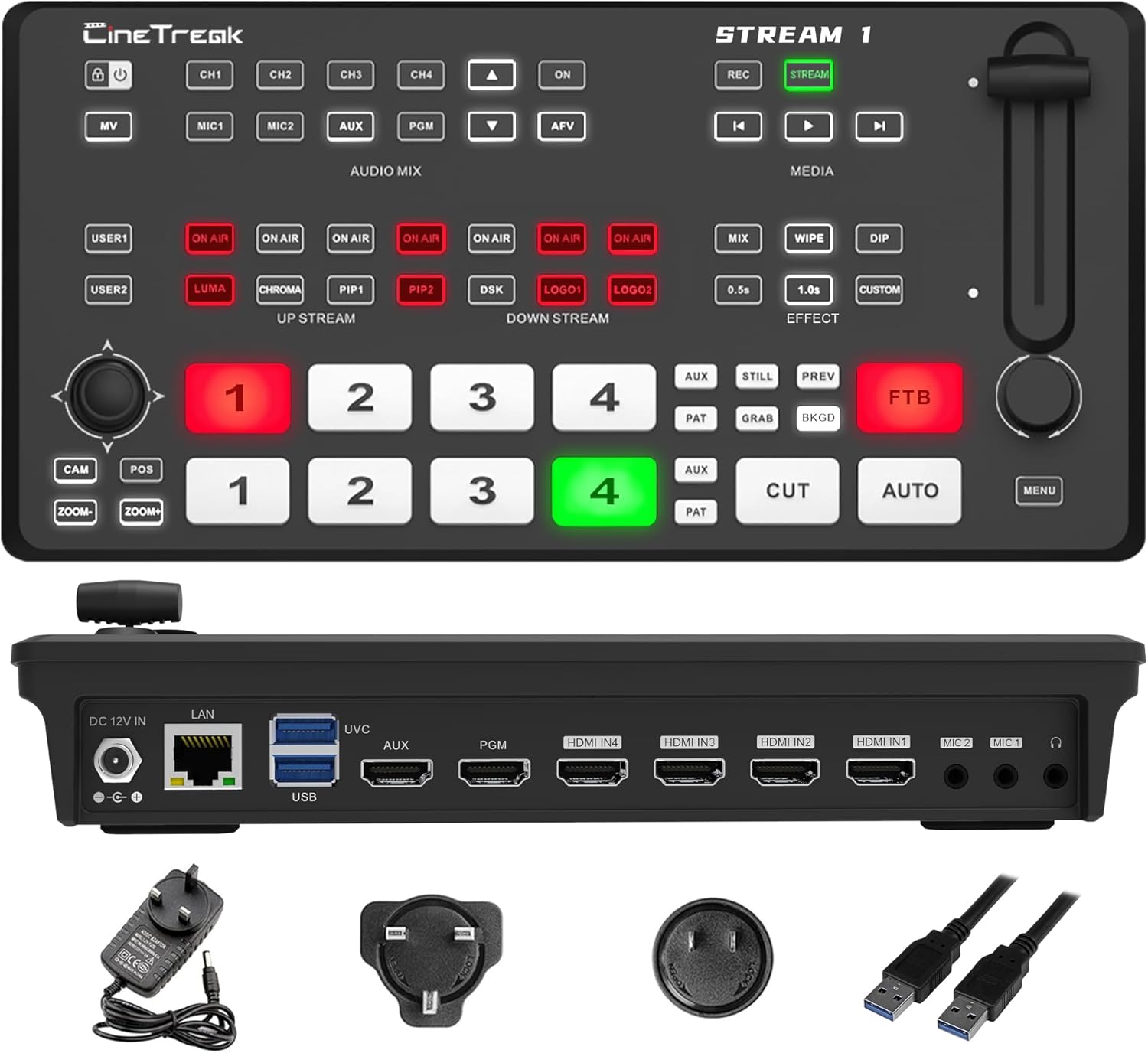
Figure 1: CINETREAK Stream-1 Video Switcher with power adapter and USB cables.
2. کلیدی خصوصیات
- Rich Connection Ports: Features 4 HDMI inputs and one AUX channel for media library access. Includes one PGM output and one AUX output, both configurable to output any video channel or a clean PGM source. Equipped with 2 USB ports, a UVC 3.0 port, an RJ45 port, and HDMI 1 and HDMI 2 supporting 4K input for superior visual quality.
- Down & Pull Stream: Seamlessly integrate unencrypted video sources into the stream switcher for real-time output. The RTMPS protocol enables simultaneous live broadcasting to two destinations, ensuring efficient and versatile streaming.
- PTZ Camera Control & Advanced Host System: Built-in PTZ control for up to 4 cameras via the VISCA protocol, with support for wireless IP control from a PC or smartphone. Access the host system through the device's IP address to remotely manage the mixer in real time, including enabling the tally function for streamlined production control.
- REC, Playback & Customizable PIP: Enables recording of high-bitrate Full HD video files with instant playback functionality. Supports two Picture-in-Picture (PIP) layouts, featuring adjustable cropping and resizing options to accommodate diverse creative and production requirements.
- Professional Studio Features: Equipped with chroma and luma keying for advanced virtual studio effects, over 30 transition effects, and seamless switching between landscape and 9:16 portrait orientations. Supports live streaming in both formats for versatile broadcasting.
3. سیٹ اپ گائیڈ
3.1 پیکیج کے مشمولات
شروع کرنے سے پہلے، یقینی بنائیں کہ تمام اشیاء موجود ہیں:
- CINETREAK Stream-1 Video Switcher
- پاور اڈاپٹر
- USB کیبلز۔
- صارف دستی (یہ دستاویز)
3.2 ڈیوائس کو جوڑنا

Figure 2: Rear panel connections of the Stream-1, showing DC 12V IN, LAN, USB/UVC, AUX, PGM, HDMI IN (1-4), MIC (1-2), and Headphone ports.
- پاور کنکشن: Connect the provided power adapter to the DC 12V IN port on the rear panel and plug it into a power outlet.
- HDMI ان پٹ: Connect your video sources (cameras, computers, gaming consoles) to the HDMI IN 1-4 ports. HDMI 1 and HDMI 2 support 4K resolution.
- HDMI آؤٹ پٹ: Connect your program monitor to the PGM HDMI output and your auxiliary monitor to the AUX HDMI output.
- USB کنکشنز:
- جڑنا a webcam to the UVC USB port for direct webcam input.
- Connect a USB storage device to the USB port for recording or media playback.
- نیٹ ورک کنکشن: Connect an Ethernet cable to the LAN port for IP control and network streaming.
- آڈیو آدانوں: Connect microphones to the MIC 1 and MIC 2 ports. Connect headphones to the headphone jack for audio monitoring.
4. آپریٹنگ ہدایات
4.1 Basic Switching
The Stream-1 features a clear control panel for intuitive operation. The top row of buttons (1-4) represents the Preview (PVW) inputs, and the bottom row (1-4) represents the Program (PGM) outputs. To switch sources:
- Press a button in the پی وی ڈبلیو row to select the next source for preview.
- Press a button in the پی جی ایم row to immediately switch that source to the live output (Cut transition).
- استعمال کریں۔ آٹو button for a smooth transition between PVW and PGM, or the کٹ button for an instant switch.
- Adjust the T-bar fader for manual transitions.
4.2 Audio Mixing
The AUDIO MIX section allows control over audio inputs. Use the dedicated buttons for MIC1, MIC2, AUX, and PGM to enable or disable audio sources. Adjust audio levels using the on-screen menu and rotary knob.
4.3 Media Playback and Management
The Stream-1 supports media playback from connected USB storage devices or internal memory. Access the MEDIA menu to manage and play video files, images, and logos.

Figure 3: Illustration of the Stream-1's down-stream and up-stream capabilities, including IP control for professional and easy operation.
4.4 Picture-in-Picture (PIP) and Picture-on-Picture (POP)
Create dynamic layouts with PIP and POP functions. The Stream-1 supports two customizable PIP layouts with adjustable cropping and resizing. Access these features via the PIP1 and PIP2 buttons in the UP STREAM section.

شکل 4: بصری سابقamples of Picture-on-Picture (POP) and Picture-in-Picture (PIP) configurations.
4.5 Keying Effects (Chroma & Luma)
Utilize chroma key (green screen) and luma key for advanced virtual studio effects. Select the desired keying type using the CHROMA and LUMA buttons in the UP STREAM section and configure settings via the menu.

شکل 5: سابقamples of Downstream Key (DSK) functionality, showing chroma keying and graphic overlays.
4.6 منتقلی کے اثرات
Choose from over 30 transition effects to enhance your production. Use the MIX, WIPE, and DIP buttons in the EFFECT section, and adjust parameters like transition speed (e.g., 0.5s) or select custom effects.
4.7 PTZ Camera Control
Control up to 4 PTZ cameras directly from the Stream-1 using the VISCA protocol. Use the CAM, POS, and ZOOM buttons along with the joystick to pan, tilt, and zoom your cameras. Wireless IP control is also available via PC or smartphone.
4.8 ریکارڈنگ اور پلے بیک
Record your live program in Full HD to a connected USB storage device. Use the REC button to start/stop recording. Recorded files can be instantly played back through the device.
4.9 لائیو سٹریمنگ
The Stream-1 supports RTMPS protocol for direct live streaming to platforms like YouTube, Facebook, Twitch, and OBS. You can stream to two destinations simultaneously. Configure streaming settings via the menu.

Figure 6: The Stream-1 supports simultaneous RTMPS live streaming to two destinations, including popular platforms.
4.10 Landscape and Portrait Livestreaming
The Stream-1 allows seamless switching between traditional landscape (16:9) and vertical (9:16) orientations, catering to various social media platforms and content formats.

شکل 7: سابقamples of video layouts optimized for Portrait Mode livestreaming.

شکل 8: سابقamples of video layouts optimized for Landscape Mode livestreaming.
4.11 Webcam Input Operation
The Stream-1 can accept a webcam as an input source via its UVC USB port. This video demonstrates connecting a DJI Pocket 3 as a webکیمرے کا ذریعہ
Video 1: Demonstrates connecting a DJI Pocket 3 camera as a webcam input to the CINETREAK Stream-1, showing the process of plugging in the USB cable, powering on the camera, selecting webcam mode, and viewing the input on the switcher's multiview.
5 دیکھ بھال
To ensure the longevity and optimal performance of your CINETREAK Stream-1, follow these maintenance guidelines:
- صفائی: آلے کے بیرونی حصے کو صاف کرنے کے لیے نرم، خشک کپڑا استعمال کریں۔ یونٹ پر براہ راست مائع کلینر یا ایروسول استعمال کرنے سے گریز کریں۔
- وینٹیلیشن: آلہ کے ارد گرد مناسب ہوا کے بہاؤ کو یقینی بنائیں۔ وینٹیلیشن کے سوراخوں کو مسدود نہ کریں۔
- فرم ویئر اپ ڈیٹس: Periodically check the official CINETREAK website for firmware updates to access new features and improvements. Follow the provided instructions carefully for any update process.
- ذخیرہ: جب لمبے عرصے تک استعمال میں نہ ہو تو، آلہ کو براہ راست سورج کی روشنی اور انتہائی درجہ حرارت سے دور ٹھنڈی، خشک جگہ پر اسٹور کریں۔
6 خرابیوں کا سراغ لگانا
If you encounter issues with your Stream-1, refer to the common problems and solutions below:
| مسئلہ | ممکنہ وجہ | حل |
|---|---|---|
| No video signal on output. | Incorrect input selection, loose HDMI cables, incompatible resolution. |
|
| کوئی آڈیو آؤٹ پٹ نہیں ہے۔ | Audio input not enabled, incorrect audio levels, faulty cables. |
|
| Streaming issues (buffering, disconnection). | Weak internet connection, incorrect streaming settings, server issues. |
|
| PTZ camera not responding. | Incorrect protocol, network issues, camera power. |
|
7. وضاحتیں
| فیچر | تفصیل |
|---|---|
| مصنوعات کے طول و عرض | 86 x 30 x 10 انچ |
| شے کا وزن | 2.23 پاؤنڈ |
| ماڈل نمبر | 4 HDMI |
| رنگ | سیاہ |
| کنیکٹر کی قسم | HDMI |
| ہم آہنگ آلات | ڈیسک ٹاپ |
| کیبل کی قسم | HDMI |
| HDMI آدانوں | 4 (HDMI 1 & 2 support 4K) |
| USB پورٹس | 2 (including 1 UVC 3.0) |
| نیٹ ورک پورٹ | آر جے 45 (LAN) |
| پی ٹی زیڈ کنٹرول | Up to 4 cameras via VISCA protocol |
| اسٹریمنگ پروٹوکول | RTMPS (dual destination support) |
| ریکارڈنگ | Full HD, high-bitrate to USB storage |
| کلینگ | Chroma Key, Luma Key |
| ٹرانزیشنز | Over 30 effects |
| واقفیت | Landscape (16:9) & Portrait (9:16) |
8. وارنٹی اور سپورٹ
CINETREAK products are designed for reliability and performance. This product comes with a manufacturer's warranty. For specific warranty terms and conditions, please refer to the warranty card included with your product or visit the official CINETREAK webسائٹ
For technical support, troubleshooting assistance, or any inquiries regarding your Stream-1, please contact CINETREAK customer service. Contact information can typically be found on the official product webسائٹ یا آپ کی خریداری کی دستاویزات کے اندر۔
Please note that only products purchased from the official CINETREAK store or authorized resellers are eligible for warranty service.