
1. تعارف
This manual provides essential information for the safe and efficient use of your MESWAO 15.6 Inch Pro Android 14 Tablet. Please read this manual thoroughly before operating the device and retain it for future reference.
2. حفاظتی معلومات
- گولی کو انتہائی درجہ حرارت، براہ راست سورج کی روشنی، یا زیادہ نمی کے سامنے نہ رکھیں۔
- گولی کو شدید اثر کے لیے گرانے یا اس کے تابع کرنے سے گریز کریں۔
- Use only the provided power adapter and Type-C cable for charging.
- گولی کو پانی اور دیگر مائعات سے دور رکھیں۔
- Do not attempt to disassemble or repair the tablet yourself. Contact customer support for assistance.
- Ensure proper ventilation when using the tablet for extended periods.
3. پیکیج کے مشمولات
تصدیق کریں کہ تمام اشیاء پیکیج میں موجود ہیں:
- 1 x MESWAO 15.6 inch Android Tablet
- 1 ایکس پاور اڈاپٹر
- 1 ایکس ٹائپ سی کیبل
- 1 ایکس صارف دستی
- 1 x ٹائپ-C سے USB اڈاپٹر
- 1 x Stuck pin
4. آلہ ختمview
Familiarize yourself with the physical components of your MESWAO tablet.
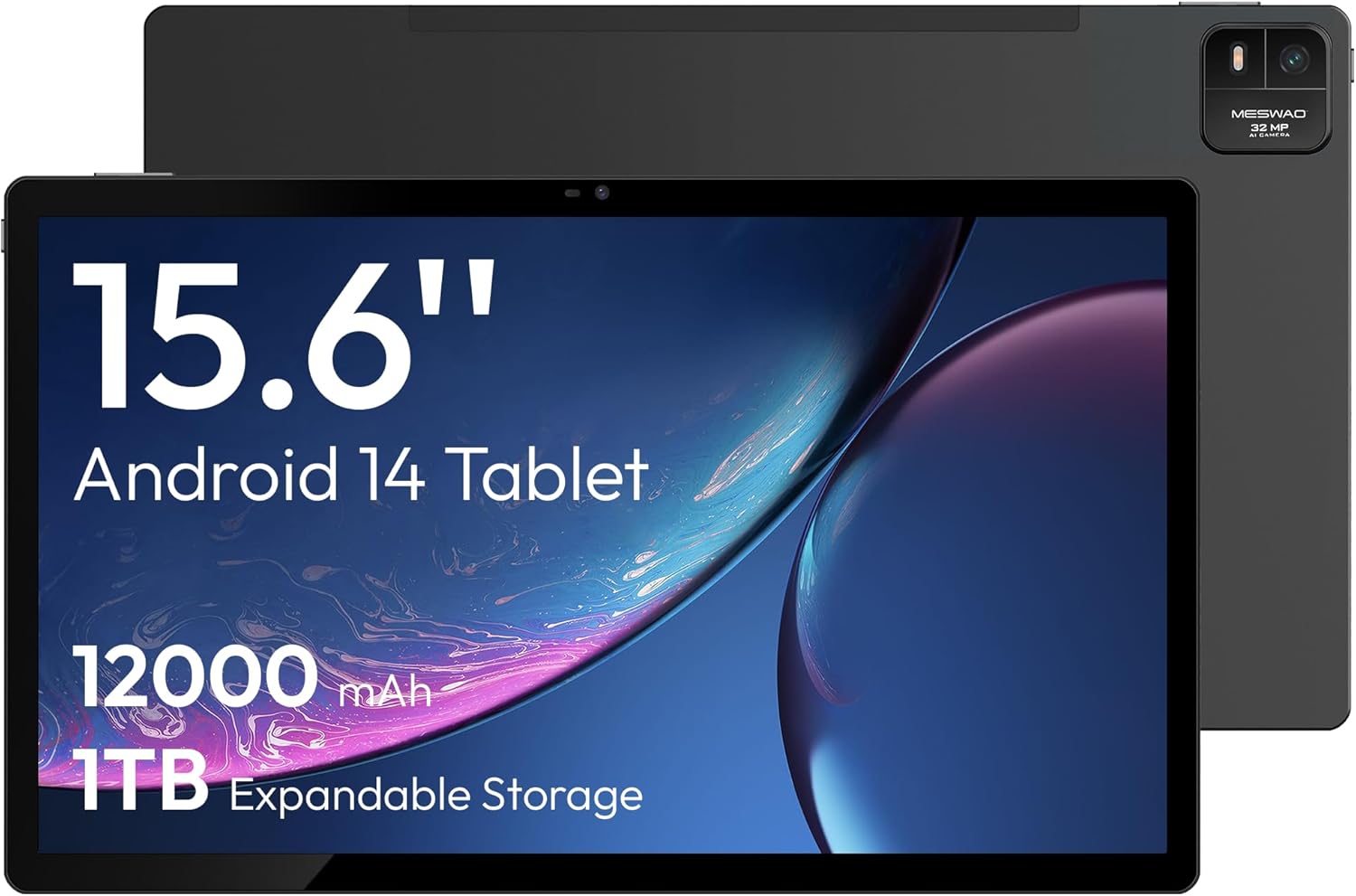
تصویر 4.1: سامنے والا view of the MESWAO 15.6-inch Android 14 Tablet, highlighting the large display and key specifications such as 12000mAh battery and 1TB expandable storage.
تصویر 4.2: سائیڈ اور پیچھے view of the tablet, indicating the location of the quad speakers, Type-C port, TF card slot, power button, volume controls, and front/rear cameras.
کلیدی اجزاء:
- 15.6-inch FHD IPS Display: عمیق کے لیے بڑی اسکرین viewing
- فرنٹ کیمرہ: ویڈیو کالز اور سیلفیز کے لیے۔
- پیچھے والا کیمرہ (32MP): تصاویر اور ویڈیوز کیپچر کرنے کے لیے۔
- پاور بٹن: ٹیبلیٹ کو آن/آف کرنے یا اسے سونے کے لیے رکھ دیں۔
- والیوم بٹن: To adjust audio levels.
- قسم سی پورٹ: چارج کرنے اور ڈیٹا کی منتقلی کے لیے۔
- TF کارڈ سلاٹ: For expandable storage (MicroSD card).
- کواڈ اسپیکرز: آڈیو آؤٹ پٹ کے لیے۔
5. سیٹ اپ
5.1 ابتدائی چارجنگ
Before first use, fully charge the tablet. Connect the provided Type-C cable to the tablet's Type-C port and the power adapter to a wall outlet. The tablet supports 30W fast charging.

تصویر 5.1: The tablet connected to its charger, showing the charging indicator on the screen.
5.2 پاور آن/آف
- پاور آن کرنے کے لیے: اسکرین لائٹ ہونے تک پاور بٹن دبائیں اور تھامیں۔
- پاور آف کرنا: پاور بٹن کو دبائیں اور تھامیں، پھر اسکرین پر موجود اختیارات میں سے 'پاور آف' کو منتخب کریں۔
- سونا/جاگنا: مختصر طور پر پاور بٹن دبائیں۔
5.3 ابتدائی کنفیگریشن
Upon first power-on, follow the on-screen prompts to set up your Android 14 operating system. This includes selecting your language, connecting to Wi-Fi, and signing in with your Google account.
5.4 وائی فائی کنکشن
- پر جائیں۔ ترتیبات > نیٹ ورک اور انٹرنیٹ > وائی فائی.
- Wi-Fi ٹوگل کریں۔ On.
- فہرست سے اپنا مطلوبہ نیٹ ورک منتخب کریں۔
- اگر اشارہ کیا جائے تو پاس ورڈ درج کریں اور ٹیپ کریں۔ جڑیں۔. The tablet supports dual-band Wi-Fi (2.4GHz and 5GHz).
5.5 مائیکرو ایس ڈی کارڈ داخل کرنا
To expand storage up to 1TB, insert a MicroSD card:
- Locate the TF card slot on the side of the tablet.
- Use the provided stuck pin to gently press into the small hole next to the slot to eject the tray.
- Place the MicroSD card into the tray with the gold contacts facing down.
- ٹرے کو احتیاط سے گولی میں دوبارہ داخل کریں۔

تصویر 5.2: Illustration of the tablet's internal storage and the option for expandable storage via MicroSD card.
6. گولی چلانا
6.1 بنیادی نیویگیشن
The Android 14 operating system uses touch gestures for navigation:
- تھپتھپائیں: کوئی آئٹم منتخب کریں یا ایپ کھولیں۔
- سوائپ: اسکرینوں یا فہرستوں کے ذریعے سکرول کریں۔
- چوٹکی: تصاویر کو زوم ان یا آؤٹ کریں۔ web صفحات
- لانگ پریس: سیاق و سباق کے مینو تک رسائی حاصل کریں یا آئیکنز کو منتقل کریں۔
6.2 ڈسپلے کی خصوصیات
The 15.6-inch FHD IPS display offers a resolution of 1920 x 1080 pixels, providing clear and vibrant visuals for various applications.

تصویر 6.1: Comparison of the MESWAO 15.6-inch display size to an A4 sheet of paper and a smaller tablet, emphasizing its expansive viewing علاقے.
6.3 کارکردگی
Powered by the Helio G99 octa-core processor and 8GB RAM, the tablet delivers efficient performance for multitasking, gaming, and media consumption.

تصویر 6.2: An illustration of the Helio G99 Octa-Core chipset, detailing its technical specifications and performance benefits.
6.4 کیمرے کا استعمال
The tablet features a 32MP rear camera and a 5MP front camera. Open the Camera app to capture photos and videos.
6.5 آڈیو
The quad speakers provide clear audio. You can connect Bluetooth headphones or use the Type-C port for audio output with a suitable adapter.
6.6 اینڈرائیڈ 14 کی خصوصیات
The tablet runs on Android 14, offering features such as:
- Smooth Multitasking: Efficiently switch between applications.
- والدین کا کنٹرول: Manage content and usage for children.
- Enhanced Privacy & UI: Improved security and user interface experience.

تصویر 6.3: The Android 14 operating system interface, showcasing various applications and system features.
7 دیکھ بھال
7.1 ڈیوائس کی صفائی
ٹیبلٹ کی سکرین اور باڈی کو صاف کرنے کے لیے نرم، لنٹ سے پاک کپڑا استعمال کریں۔ سخت کیمیکلز یا کھرچنے والے مواد کے استعمال سے پرہیز کریں۔
7.2 سافٹ ویئر اپ ڈیٹس
زیادہ سے زیادہ کارکردگی اور سیکورٹی کو یقینی بنانے کے لیے باقاعدگی سے سسٹم اپ ڈیٹس کی جانچ کریں۔ پر جائیں۔ ترتیبات > سسٹم > سسٹم اپ ڈیٹ.
7.3 بیٹری کی دیکھ بھال
بیٹری کی زندگی کو طول دینے کے لیے:
- بیٹری کو بار بار مکمل طور پر خارج کرنے سے گریز کریں۔
- Do not expose the tablet to high temperatures.
- بیٹری بھر جانے کے بعد چارجر کو ان پلگ کریں۔
8 خرابیوں کا سراغ لگانا
8.1 ٹیبلیٹ آن نہیں ہو رہا ہے۔
- یقینی بنائیں کہ بیٹری چارج ہے۔ چارجر کو جوڑیں اور پاور آن کرنے کی کوشش کرنے سے پہلے چند منٹ انتظار کریں۔
- زبردستی دوبارہ شروع کرنے کے لیے پاور بٹن کو کم از کم 10-15 سیکنڈ تک دبائے رکھیں۔
8.2 وائی فائی کنکشن کے مسائل
- اپنا Wi-Fi روٹر دوبارہ شروع کریں۔
- ٹیبلیٹ کی ترتیبات میں نیٹ ورک کو بھول جائیں اور دوبارہ جڑیں۔
- یقینی بنائیں کہ ٹیبلیٹ Wi-Fi سگنل کی حد کے اندر ہے۔
8.3 سست کارکردگی
- غیر ضروری پس منظر کی ایپلی کیشنز کو بند کریں۔
- ایپس کے لیے کیش ڈیٹا صاف کریں۔
- کافی مفت اسٹوریج کی جگہ کو یقینی بنائیں۔
8.4 غیر جوابی اسکرین
- ٹیبلٹ کو دوبارہ شروع کریں۔
- یقینی بنائیں کہ اسکرین صاف اور ملبے سے پاک ہے۔
9. وضاحتیں
| فیچر | تفصیلات |
|---|---|
| ماڈل کا نام | MES-B3 |
| آپریٹنگ سسٹم | اینڈرائیڈ 14 |
| ڈسپلے سائز | 15.6 انچ |
| اسکرین ریزولوشن | 1920 x 1080 پکسلز (FHD) |
| پروسیسر | میڈیا ٹیک ہیلیو جی 99 اوکٹا کور |
| گرافکس کا پروسیسر | مالی جی 75 |
| رام | 8 جی بی |
| اندرونی اسٹوریج (ROM) | 256 جی بی |
| قابل توسیع اسٹوریج | مائیکرو ایس ڈی کارڈ کے ذریعے 1TB تک |
| پیچھے والا کیمرہ | 32MP |
| سامنے والا کیمرہ | 5MP |
| بیٹری کی صلاحیت | 12000mAh |
| چارج ہو رہا ہے۔ | 30W فاسٹ چارجنگ |
| وائرلیس کنیکٹیویٹی | Dual-Band Wi-Fi (802.11a/b/ac/ad/ax), Bluetooth |
| شے کا وزن | 4.55 پاؤنڈ |
| مصنوعات کے طول و عرض | 14.49 x 8.66 x 0.39 انچ |
10. وارنٹی اور سپورٹ
10.1 وارنٹی کی معلومات
Your MESWAO tablet comes with a 12 ماہ کی وارنٹی مینوفیکچرنگ نقائص کا احاطہ. وارنٹی کے دعووں کے لیے براہ کرم اپنی خریداری کا ثبوت اپنے پاس رکھیں۔
10.2 کسٹمر سپورٹ
For technical assistance, troubleshooting, or warranty inquiries, please contact MESWAO customer support. Our support team is available to assist you.
- 24 گھنٹے کسٹمر سپورٹ: مدد چوبیس گھنٹے دستیاب ہے۔
- Local After-sales Centers: Service centers are available in regions including the US, Germany, Japan, and more.
- Quick Response Flow: Issues reported receive a team response within 24 hours, aiming for prompt problem resolution or replacement.