
1. اہم حفاظتی معلومات
Please read this entire manual before installation and assembly. If you have any questions regarding any of the instructions or warnings, please contact your local distributor for assistance.
- We accept no responsibility for incorrect or faulty installation.
- Follow the enclosed installation instructions carefully.
- Check the condition and completeness of all items before beginning.
- The fastening materials supplied for wall mounting are intended exclusively for fastening to solid masonry or concrete. For other wall types, such as hollow bricks, plasterboard, or lightweight construction, please contact a specialist retailer for information on suitable fastening elements.
- Under no circumstances should you exceed the limit values specified for the product.
2. پیکیج کے مشمولات
Verify that all components are present and undamaged before installation. If any parts are missing or damaged, do not attempt to install. Contact customer support for replacement parts.

Figure 2.1: XTRARM TiTon Double TV Wall Mount and included hardware components, including various screws, anchors, washers, and a drilling template.
پیکیج میں عام طور پر شامل ہیں:
- XTRARM TiTon Double TV Wall Mount assembly
- Standard mounting hardware for TV and wall (various screws, anchors, washers)
- ڈرلنگ ٹیمپلیٹ
- Small spirit level
- Multiple hook-and-loop straps for cable management
3. وضاحتیں
| فیچر | تفصیلات |
|---|---|
| چڑھنے کی قسم | وال ماؤنٹ |
| حرکت کی قسم | Articulated, Swivel, Tilt, Rotate |
| مواد | دھات |
| رنگ | سیاہ |
| وال فاصلہ | 12.9 cm (retracted) to 120 cm (extended) |
| گردش | Up to 90° (portrait/landscape) |
| کنڈا | 180° (90° بائیں/دائیں) تک |
| جھکاؤ | -5° سے +12° |
| تجویز کردہ ٹی وی کا سائز | Approximately 52 – 110 inches |
| وزن کی صلاحیت | زیادہ سے زیادہ 80 کلوگرام |
| VESA مطابقت | 100x100mm, 100x200mm, 200x100mm, 200x200mm, 200x300mm, 300x200mm, 300x300mm, 400x200mm, 400x300mm, 400x400mm, 500x300mm, 600x200mm, 600x400mm |

Figure 3.1: VESA compatibility and maximum weight capacity.

Figure 3.2: Key dimensions and movement capabilities of the mount.
Figure 3.3: Comprehensive technical drawing with detailed dimensions and adjustment ranges.
4. سیٹ اپ اور انسٹالیشن
Proper installation is crucial for the safety and stability of your TV. Ensure you have the necessary tools and assistance before proceeding.
4.1 ٹولز درکار ہیں (شامل نہیں)
- ڈرل
- سٹڈ فائنڈر (اگر لکڑی کے جڑوں پر چڑھ رہے ہیں)
- پنسل
- پیمائش کرنے والا ٹیپ
- ساکٹ رنچ یا سایڈست رنچ
- فلپس سر سکریو ڈرایور
4.2 بڑھتے ہوئے مقام کا انتخاب
Select a wall location that can safely support the weight of the mount and your TV. For solid concrete or masonry walls, use the provided anchors. For wood stud walls, ensure the mount is centered on a stud. Avoid mounting to drywall alone.
4.3 Attaching the Wall Plate
- Position the drilling template at the desired height on the wall and mark the drill holes with a pencil. Use the included spirit level to ensure it is perfectly horizontal.
- Drill pilot holes at the marked locations. The drill bit size will depend on your wall type and the chosen anchors/screws.
- Insert wall anchors (if required for your wall type) into the pilot holes.
- Align the wall plate with the drilled holes and secure it to the wall using the appropriate screws and washers. Ensure it is firmly attached.
4.4 Attaching TV Brackets to TV
- اسکرین کو پہنچنے والے نقصان کو روکنے کے لیے احتیاط سے اپنے ٹی وی کے چہرے کو نرم، صاف سطح پر رکھیں۔
- اپنے TV کے پچھلے حصے میں VESA بڑھتے ہوئے سوراخوں کی شناخت کریں۔
- Select the correct size screws and spacers (if needed) from the provided hardware that fit your TV's VESA pattern.
- Attach the two vertical TV brackets to the back of your TV, ensuring they are level and securely fastened. Do not overtighten.
4.5 Mounting TV to Wall Plate
- With assistance, carefully lift the TV and hook the attached TV brackets onto the wall plate.
- Ensure the TV is securely seated on the wall plate.
- حادثاتی طور پر بے گھر ہونے سے بچنے کے لیے بریکٹ پر کسی بھی حفاظتی تالے لگانے کے طریقہ کار کو شامل کریں۔

شکل 4.1: سابقample of the XTRARM TiTon Double TV Wall Mount installed with a television.
5. آپریٹنگ ہدایات
The XTRARM TiTon Double mount offers full motion capabilities for optimal viewزاویہ
5.1 Adjusting Wall Distance
Gently pull or push the TV to extend or retract the mount. The mount allows for a wall distance ranging from 12.9 cm to 120 cm.

Figure 5.1: Adjustable wall distance of the mount.
5.2 کنڈا ایڈجسٹمنٹ
The mount can swivel up to 180 degrees (90 degrees left or right) to direct the screen towards different viewعلاقوں میں.

Figure 5.2: Swivel capability of the mount.
5.3 جھکاؤ ایڈجسٹمنٹ
Adjust the vertical tilt of your TV from -5 degrees to +12 degrees to reduce glare and optimize viewing comfort. Loosen the tilt adjustment knobs, set the desired angle, and then retighten the knobs.
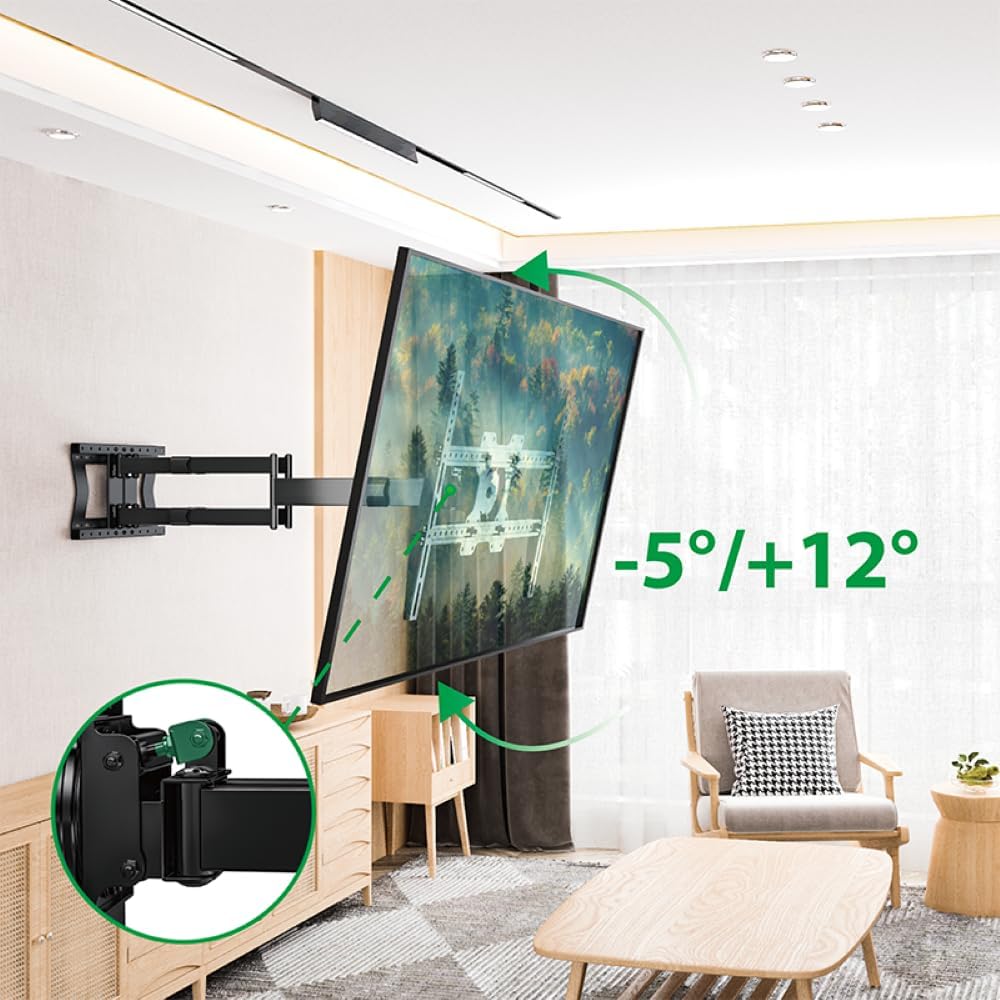
Figure 5.3: Tilt adjustment range and mechanism.
5.4 Rotation Adjustment
The mount allows for a 90-degree rotation, enabling you to switch between landscape and portrait orientation for your TV.

Figure 5.4: 90-degree rotation capability.
5.5 کیبل مینجمنٹ
Use the provided hook-and-loop straps to bundle and organize cables along the mount arms for a tidy appearance and to prevent snagging during adjustments.
6 دیکھ بھال
باقاعدگی سے دیکھ بھال آپ کے TV وال ماؤنٹ کی لمبی عمر اور محفوظ آپریشن کو یقینی بناتی ہے۔
- صفائی: نرم، خشک کپڑے سے پہاڑ کو صاف کریں۔ کھرچنے والے کلینر یا سالوینٹس سے پرہیز کریں جو ختم کو نقصان پہنچا سکتے ہیں۔
- کنکشن چیک کریں: وقتاً فوقتاً تمام پیچ اور بولٹ چیک کریں تاکہ یہ یقینی بنایا جا سکے کہ وہ سخت ہیں۔ اگر ضروری ہو تو دوبارہ سخت کریں، لیکن زیادہ سخت نہ کریں۔
- پہننے کا معائنہ کریں: Regularly inspect the mount for any signs of wear, damage, or corrosion. If any issues are found, discontinue use and contact customer support.
7 خرابیوں کا سراغ لگانا
If you encounter any issues with your XTRARM TiTon Double TV Wall Mount, refer to the following common problems and solutions:
| مسئلہ | ممکنہ وجہ | حل |
|---|---|---|
| ٹی وی لیول نہیں ہے۔ | Wall plate or TV brackets not level during installation. | Carefully remove the TV, adjust the wall plate or TV brackets using a spirit level, and re-mount. |
| Difficulty moving the mount | جوڑ بہت تنگ ہوسکتے ہیں یا پھسلن کی ضرورت ہوتی ہے۔ | Check for any overtightened bolts. Apply a small amount of silicone-based lubricant to moving joints if necessary. |
| ماؤنٹ غیر مستحکم محسوس ہوتا ہے۔ | Loose wall plate, incorrect anchors, or exceeding weight capacity. | Immediately remove the TV. Re-check all wall plate fasteners. Ensure correct anchors were used for your wall type. Verify TV weight does not exceed 80 kg. If issues persist, consult a professional installer. |
8. وارنٹی اور سپورٹ
For information regarding warranty coverage, technical support, or replacement parts, please refer to the documentation provided at the time of purchase or visit the official XTRARM webسائٹ خریداری کے ثبوت کے طور پر اپنی خریداری کی رسید اپنے پاس رکھیں۔