
تعارف
Thank you for choosing the Phomemo M221 Bluetooth Thermal Label Printer. This manual provides essential information for the safe and efficient operation of your device. Please read it thoroughly before use and retain it for future reference. The Phomemo M221 is designed for fast, clear, and smart label printing, supporting various label types and applications for small businesses, home, and school use.
حفاظتی معلومات
محفوظ آپریشن کو یقینی بنانے اور نقصان کو روکنے کے لیے، درج ذیل احتیاطی تدابیر پر عمل کریں:
- Do not disassemble, repair, or modify the printer.
- Keep the printer away from water, moisture, and direct sunlight.
- Use only Phomemo-approved power adapters and accessories.
- پرنٹنگ کے فوراً بعد پرنٹ ہیڈ کو چھونے سے گریز کریں، کیونکہ یہ گرم ہوسکتا ہے۔
- Store the printer and labels in a cool, dry place.
پیکیج کے مشمولات
تصدیق کریں کہ تمام اشیاء آپ کے پیکیج میں موجود ہیں:
- Phomemo M221 لیبل پرنٹر
- USB ٹائپ سی چارجنگ کیبل
- 1 roll of 40 x 30 mm thermal labels
- 1 roll of 50 x 80 mm thermal labels
- 1 roll of 70 x 80 mm thermal labels
- پورٹیبل لے جانے والا کیس
- صارف دستی (یہ دستاویز)
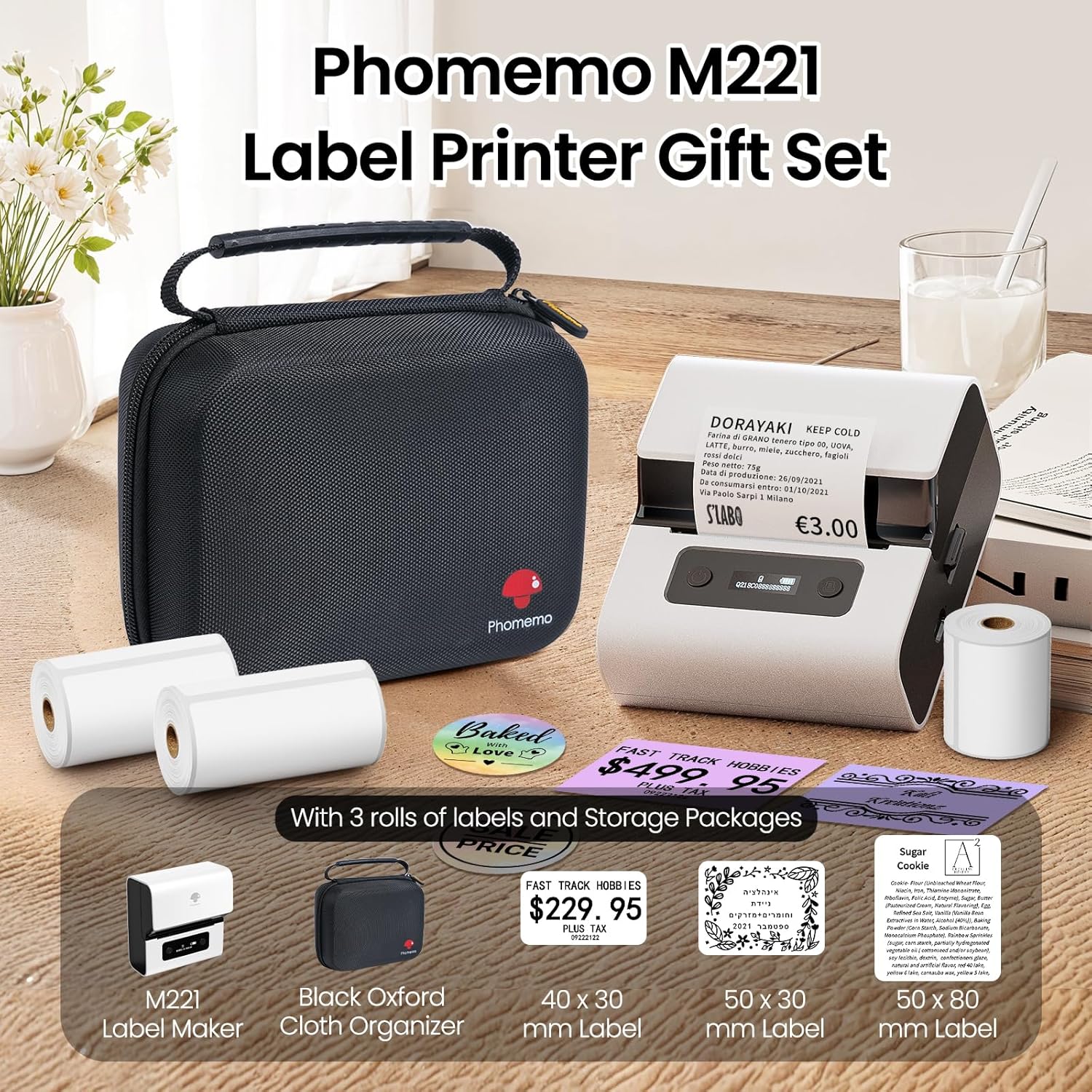
Image: Phomemo M221 Label Printer Gift Set, showing the printer, a black carrying case, and three rolls of white thermal labels.
پروڈکٹ ختمview
The Phomemo M221 is a compact and efficient thermal label printer. Key features include:
- تھرمل پرنٹنگ ٹیکنالوجی: No ink or toner required.
- وسیع لیبل مطابقت: Supports labels from 20mm to 80mm (0.78" to 3.14") wide, including rectangular, round, transparent, and colored types.
- کنیکٹوٹی: Bluetooth for iOS/Android smartphones and tablets, USB for Windows PCs.
- اعلی صلاحیت کی بیٹری: 2200 mAh battery with Type-C fast charging.
- Fast and Quiet Operation: Prints at 50 mm/s with reduced noise.
- صارف دوست ڈیزائن: Easy label loading and automatic gap detection.

Image: Phomemo M221 Label Maker Set, illustrating its features such as no ink requirement, large battery capacity, Bluetooth wireless printing, and its suitability as a gift.
سیٹ اپ
1. پرنٹر چارج کرنا
Before first use, fully charge the Phomemo M221 printer.
- Connect the provided USB Type-C cable to the printer's charging port.
- Connect the other end of the cable to a 5V USB power adapter (not included) or a computer's USB port.
- The indicator light will show charging status. A full charge typically takes several hours. The 2200 mAh battery supports extended use.
2. لیبل لوڈ ہو رہا ہے۔
The M221 features an integrated label fixing structure for easy loading.
- پرنٹر کا احاطہ کھولیں۔
- Insert the label roll into the compartment, ensuring the printing side faces upwards and the labels feed smoothly.
- Adjust the side guide plates to secure the label roll in place.
- Close the printer cover. The printer will automatically detect and calibrate the label gap.
3. اپنے آلے سے جڑنا
The Phomemo M221 supports both Bluetooth and USB connections.
Bluetooth Connection (Smartphones/Tablets)
- یقینی بنائیں کہ آپ کے iOS یا Android ڈیوائس پر بلوٹوتھ فعال ہے۔
- Download and install the "Print Master" application from your device's app store.
- Open the "Print Master" app and follow the on-screen instructions to search for and connect to your M221 printer.

Image: Phomemo M221 printer demonstrating Bluetooth wireless connection with a tablet and a smartphone.
USB Connection (Windows PC)
- Connect the USB Type-C cable from the printer to an available USB port on your Windows PC.
- Download and install the "Labelife" software and printer drivers from the official Phomemo webسائٹ
- Follow the software installation prompts. Once installed, you can select the M221 as your printer.

Image: Phomemo M221 printer connected to a laptop using a USB cable, indicating wired connectivity.
آپریٹنگ ہدایات
1. Basic Printing with "Print Master" App (Mobile)
- Ensure your M221 printer is connected via Bluetooth to your mobile device.
- Open the "Print Master" app.
- Select a template or create a new label design. The app offers various templates for text, images, barcodes, QR codes, and more.
- Customize your label content.
- Tap the print icon. Confirm print settings such as quantity.
- The printer will begin printing your labels.
2. Printing with "Labelife" Software (PC)
- Ensure your M221 printer is connected via USB to your Windows PC.
- Open the "Labelife" software.
- Design your label using the software's features, including text, images, barcodes, and QR codes.
- جائیں"File" > "Print" or click the print icon.
- Select the Phomemo M221 from the list of available printers and adjust any necessary print settings.
- Click "Print" to start printing.
3. Batch Printing
Both "Print Master" and "Labelife" support batch printing for efficiency.
- In the print dialogue, specify the desired number of copies.
- The printer will automatically print multiple labels consecutively.

Image: Phomemo M221 printer demonstrating its versatility with examples of address labels, price tags, ingredient labels, and gift tags.

Image: Phomemo M221 printer showcasing its compatibility with over 50 types of thermal labels, including various shapes and designs.
دیکھ بھال
1. پرنٹ ہیڈ کو صاف کرنا
Regular cleaning of the print head ensures optimal print quality.
- پرنٹر کو بند کریں اور پاور کیبل کو منقطع کریں۔
- پرنٹر کا احاطہ کھولیں۔
- پرنٹ ہیڈ کو روئی کے جھاڑو سے ہلکے سے صاف کریں۔ampisopropyl الکحل کے ساتھ ختم.
- Allow the print head to dry completely before closing the cover and turning on the printer.
2. ذخیرہ
Store the printer in a clean, dry environment, away from extreme temperatures and direct sunlight. When not in use for extended periods, ensure the printer is fully charged and then powered off.

Image: A man holding the Phomemo M221 printer's carrying case, illustrating its portable design.
خرابی کا سراغ لگانا
Printer Does Not Turn On or Charge
- پاور کنکشن چیک کریں: Ensure the USB Type-C cable is securely connected to both the printer and a working power source (5V adapter or PC USB port).
- پاور اڈاپٹر کی تصدیق کریں: Use a reliable 5V USB power adapter.
- چارج کا دورانیہ: Allow sufficient time for charging. The battery indicator should show charging status.
No Printing or Blank Output
- Check Label Orientation: Ensure the thermal labels are loaded correctly with the printing side facing upwards.
- لیبل کی قسم: Confirm you are using thermal labels. The M221 does not use ink.
- Print Head Cleanliness: A dirty print head can cause blank lines or poor print quality. Refer to the Maintenance section for cleaning instructions.
- لیبل کی سیدھ: Ensure the label roll is properly seated and aligned by the side guide plates to prevent misalignment errors.
بلوٹوتھ کنکشن کے مسائل
- Printer On: Ensure the printer is powered on and within Bluetooth range of your device.
- بلوٹوتھ فعال: Verify Bluetooth is active on your smartphone or tablet.
- ایپ کنکشن: Connect through the "Print Master" app, not directly through your device's Bluetooth settings.
- آلات کو دوبارہ شروع کریں: Try restarting both the printer and your mobile device.
ناقص پرنٹ کوالٹی
- Print Head Cleanliness: پرنٹ ہیڈ کو صاف کریں جیسا کہ مینٹیننس سیکشن میں بیان کیا گیا ہے۔
- لیبل کا معیار: Use high-quality thermal labels.
- Print Density Settings: Adjust print density settings within the "Print Master" app or "Labelife" software if available.
وضاحتیں
| فیچر | تفصیل |
|---|---|
| ماڈل نمبر | ایم 221 |
| برانڈ | فومیمو |
| کنیکٹوٹی ٹیکنالوجی | Bluetooth, USB Type C |
| پرنٹنگ ٹیکنالوجی | تھرمل |
| پرنٹ آؤٹ پٹ | مونوکروم |
| زیادہ سے زیادہ پرنٹ کی رفتار (مونوکروم) | 15.0 pages per minute (50 mm/s) |
| زیادہ سے زیادہ پرنٹ ریزولوشن (مونوکروم) | 203 ڈی پی آئی |
| تائید شدہ لیبل چوڑائی | 20mm - 80mm (0.78" - 3.14") |
| بیٹری | 2200 mAh (1 D - included) |
| شے کا وزن | 820 گرام |
| پروڈکٹ کے طول و عرض (L x W x H) | 12.9 x 6.7 x 11.9 سینٹی میٹر |
| Control Device Type | Smartphone/PC |
| میڈیا کی قسم | لیبلز |
وارنٹی اور سپورٹ
For warranty information and technical support, please refer to the official Phomemo webسائٹ یا ان کی کسٹمر سروس سے براہ راست رابطہ کریں۔ خریداری کے ثبوت کے طور پر اپنی خریداری کی رسید اپنے پاس رکھیں۔
آن لائن وسائل: کا دورہ کریں۔ Phomemo Store on Amazon for product updates and FAQs.