
1. تعارف
Thank you for choosing the Bennett Read Alphabot Ultra Robotic Vacuum. This cutting-edge cleaning solution combines powerful performance with smart functionality, designed to handle sweeping, vacuuming, and wet-mopping. Equipped with advanced laser navigation and anti-fall sensors, it ensures precise tracking and smooth obstacle avoidance. This manual provides essential information for the safe and efficient operation, maintenance, and troubleshooting of your device.
براہ کرم پروڈکٹ استعمال کرنے سے پہلے اس دستی کو اچھی طرح پڑھیں اور اسے مستقبل کے حوالے کے لیے اپنے پاس رکھیں۔
2. حفاظتی ہدایات
چوٹ یا نقصان کے خطرے کو کم کرنے کے لیے، درج ذیل حفاظتی احتیاطی تدابیر پر عمل کریں:
- اس آلے کو 8 سال یا اس سے زیادہ عمر کے بچے اور جسمانی، حسی یا ذہنی صلاحیتوں میں کمی یا تجربے اور علم کی کمی والے افراد استعمال کر سکتے ہیں اگر انہیں آلات کے محفوظ طریقے سے استعمال کے بارے میں نگرانی یا ہدایات دی گئی ہوں اور وہ اس میں شامل خطرات کو سمجھتے ہوں۔ .
- بچوں کو آلات سے نہیں کھیلنا چاہیے۔ صفائی اور صارف کی دیکھ بھال بچوں کے ذریعہ نگرانی کے بغیر نہیں کی جائے گی۔
- مینوفیکچرر کی طرف سے فراہم کردہ اصل پاور اڈاپٹر ہی استعمال کریں۔
- پروڈکٹ کو کھلی آگ یا نازک اشیاء والے ماحول میں استعمال نہ کریں۔
- پروڈکٹ کو مائعات، جلنے والی چیزوں یا تیز چیزوں کو صاف کرنے کے لیے استعمال نہ کریں۔
- اس بات کو یقینی بنائیں کہ چارجنگ ڈاک دیوار کے خلاف سطح کی سطح پر رکھی گئی ہے، اس کے ارد گرد صاف جگہ ہے۔
- بالوں، ڈھیلے کپڑے، انگلیوں اور جسم کے تمام حصوں کو کھلنے اور حرکت کرنے والے حصوں سے دور رکھیں۔
- صفائی یا دیکھ بھال کرنے سے پہلے آلے کو ان پلگ کریں۔
3. پیکیج کے مشمولات
تصدیق کریں کہ پیکیج میں تمام اجزاء موجود ہیں:
- 1 x Bennett Read Alphabot Ultra Robotic Vacuum with Sweep and Wet-Mop
- چارجنگ ڈاک
- پاور اڈاپٹر
- سائیڈ برش
- صفائی کا آلہ
- صارف دستی
4. پروڈکٹ ختمview
Familiarize yourself with the main components of your Alphabot Ultra Robotic Vacuum.

تصویر 4.1: اوپر view of the Bennett Read Alphabot Ultra Robotic Vacuum, showing its sleek black design and control indicators.
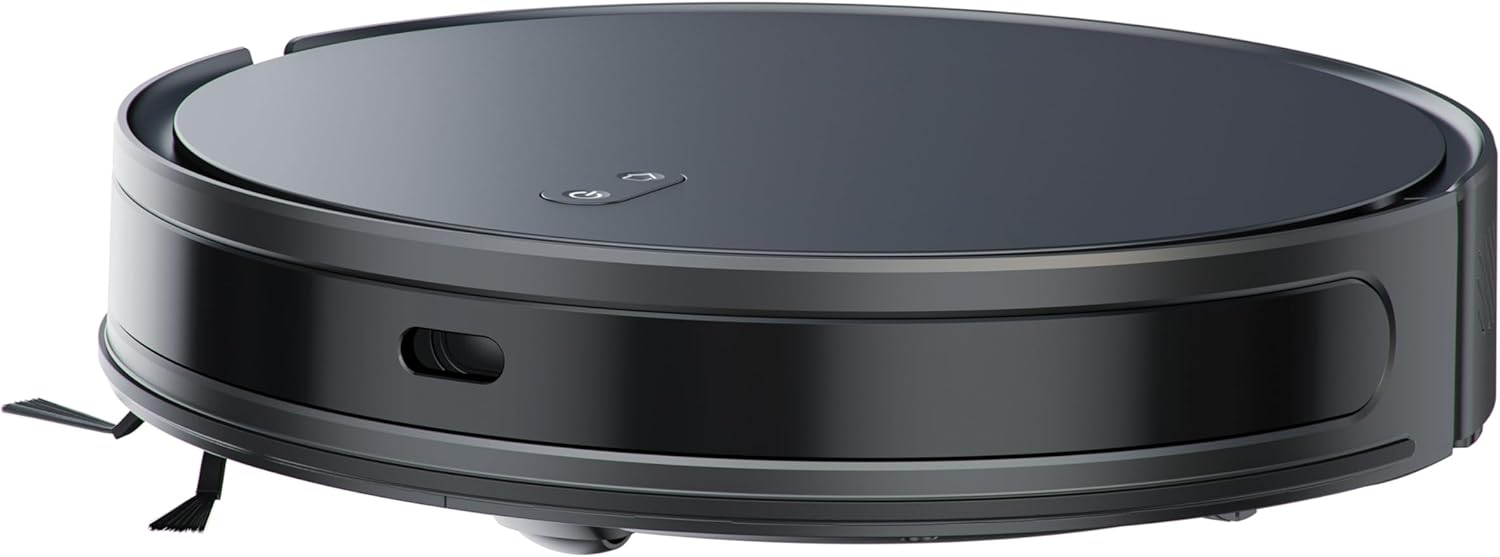
تصویر 4.2: طرف view of the Alphabot Ultra, highlighting its low profile and side brushes.

تصویر 4.3: Diagram illustrating the powerful suction path and internal components of the Alphabot Ultra.

تصویر 4.4: زیریں view of the Alphabot Ultra, showing the main brush, side brushes, and mopping pad attachment.
5. سیٹ اپ
5.1 پیک کھولنا
- Remove the robotic vacuum and all accessories from the packaging.
- Remove any protective films or stickers from the device and charging dock.
5.2 چارجنگ ڈاک پلیسمنٹ
- چارجنگ ڈاک کو دیوار کے خلاف سخت، سطح کی سطح پر رکھیں۔
- Ensure there is at least 1 meter (3 feet) of clear space on both sides of the dock and 2 meters (6 feet) in front of it for optimal navigation.
- پاور اڈاپٹر کو چارجنگ ڈاک سے جوڑیں اور اسے وال آؤٹ لیٹ میں لگائیں۔

تصویر 5.1: The Alphabot Ultra robotic vacuum docked at its self-charging station, illustrating the automatic charging feature.
5.3 ابتدائی چارج
- Place the robotic vacuum onto the charging dock, ensuring the charging contacts align.
- Allow the vacuum to charge completely before its first use. The indicator lights will show charging status. A full charge can take several hours.
5.4 ایپ کنکشن (سمارٹ لائف ایپ)
- Download the 'Smart Life' app from your mobile device's app store.
- اپنے اسمارٹ لائف اکاؤنٹ میں رجسٹر یا لاگ ان ہوں۔
- Follow the in-app instructions to add your Bennett Read Alphabot Ultra. Ensure your Wi-Fi network is 2.4GHz, as 5GHz networks are not supported.
- The app allows for scheduling, mapping, and customization of cleaning preferences.

تصویر 5.2: Screenshot of the Smart Life app interface, demonstrating cleaning preference settings for water volume and suction.
6. آپریٹنگ ہدایات
6.1 پاور آن/آف
- To power on, press and hold the power button on the vacuum or use the app.
- To power off, press and hold the power button until the indicators turn off, or use the app.
6.2 صفائی کے طریقے
The Alphabot Ultra supports multiple cleaning modes:
- Sweep & Vacuum: Utilizes the side brushes, main brush, and 5000Pa suction power for dry debris removal.
- Wet-Mop: For light wet cleaning of hard floors. Ensure the water tank is filled and the mopping pad is attached.
- مشترکہ موڈ: Sweeps, vacuums, and mops simultaneously for comprehensive cleaning.
6.3 شیڈولنگ
Use the Smart Life app to set up cleaning schedules. You can customize cleaning times, days, and specific areas for the vacuum to clean automatically.
6.4 نیویگیشن اور سینسر
The Alphabot Ultra uses advanced laser navigation for precise mapping and efficient cleaning paths. Anti-fall sensors prevent the vacuum from falling down stairs or ledges, while anti-collision sensors help it avoid obstacles.

تصویر 6.1: The Alphabot Ultra demonstrating its anti-fall sensors, preventing it from falling down stairs or ledges.
7 دیکھ بھال
Regular maintenance ensures optimal performance and extends the lifespan of your robotic vacuum.
7.1 کوڑے دان اور فلٹر کی صفائی
- ڈسٹ بن ریلیز بٹن کو دبائیں اور کوڑے دان کو ہٹا دیں۔
- Open the dustbin cover and empty its contents into a waste bin.
- Remove the filter assembly and tap it gently to dislodge dust. Do not wash the HEPA filter with water.
- اگر ضروری ہو تو کوڑے دان کو پانی سے دھولیں، اس بات کو یقینی بناتے ہوئے کہ دوبارہ انسٹال کرنے سے پہلے یہ مکمل طور پر خشک ہو۔
- Reassemble the filter and dustbin, then reinsert into the vacuum.
7.2 برش کی صفائی
- مین برش: Remove the main brush cover and lift out the brush. Use the provided cleaning tool to cut and remove any tangled hair or debris.
- سائیڈ برش: Gently pull the side brushes to remove them. Clean off any hair or debris. If brushes are damaged, replace them.
7.3 Mopping Pad Care
- After each mopping session, remove the mopping pad from the water tank.
- Wash the mopping pad with water and mild detergent.
- Allow the mopping pad to air dry completely before reattaching or storing.

تصویر 7.1: The Alphabot Ultra with its 2-in-1 tank, designed for both sweeping/vacuuming and wet-mopping functionalities.
7.4 سینسر کی صفائی
- Periodically wipe the cliff sensors, wall sensors, and charging contacts with a clean, dry cloth to ensure proper function.
8 خرابیوں کا سراغ لگانا
If you encounter issues with your Alphabot Ultra, refer to the following common problems and solutions:
| مسئلہ | ممکنہ وجہ | حل |
|---|---|---|
| ویکیوم پاور آن نہیں ہوتا ہے۔ | کم بیٹری؛ پاور بٹن درست طریقے سے نہیں دبایا گیا۔ | Charge the vacuum; Press and hold the power button for a few seconds. |
| Vacuum does not charge | رابطوں کو چارج کرنا گندا؛ چارجنگ ڈاک پاور نہیں ہے۔ | Clean charging contacts on both vacuum and dock; Ensure dock is plugged in and powered. |
| ناقص سکشن کارکردگی | کوڑے دان بھرا ہوا؛ فلٹر بھرا ہوا؛ مین برش الجھ گیا۔ | خالی کوڑے دان؛ فلٹر کو صاف یا تبدیل کریں؛ مین برش کو صاف کریں۔ |
| Vacuum gets stuck frequently | فرش پر رکاوٹیں؛ کلف کے سینسر گندے ہیں۔ | Clear cables, rugs, and small objects; Clean cliff sensors. |
| ایپ کنکشن کے مسائل | غلط وائی فائی بینڈ؛ راؤٹر بہت دور ہے۔ | Ensure 2.4GHz Wi-Fi; Move vacuum closer to router; Restart router and vacuum. |
اگر مسئلہ برقرار رہتا ہے، تو براہ کرم کسٹمر سپورٹ سے رابطہ کریں۔
9. وضاحتیں
| فیچر | تفصیلات |
|---|---|
| برانڈ | بینیٹ ریڈ |
| ماڈل کا نام | Alphabot Ultra |
| ماڈل نمبر | ایچ وی سی 403۔ |
| رنگ | سیاہ |
| مصنوعات کے طول و عرض | 30L x 8W x 35H سینٹی میٹر |
| شے کا وزن | 1.8 کلوگرام |
| سکشن پاور | 5000Pa |
| بیٹری کی قسم | 3200mAh لیتھیم آئن |
| رن ٹائم | 180 منٹ تک |
| نیویگیشن | Advanced Laser Navigation |
| کنیکٹوٹی | Wi-Fi (صرف 2.4GHz) |
| موٹر کی قسم | پائیدار برش لیس موٹر |
| صفائی کے افعال | Sweep, Vacuum, Wet-Mop |
| طاقت کا منبع | Corded Electric (for charging dock) |
10. وارنٹی اور سپورٹ
Your Bennett Read Alphabot Ultra Robotic Vacuum is covered by a manufacturer's warranty. Please refer to the warranty card included in your package for specific terms and conditions.
For technical support, troubleshooting assistance beyond this manual, or to inquire about spare parts, please contact Bennett Read customer service. Contact details can typically be found on the official Bennett Read webسائٹ یا آپ کی مصنوعات کی پیکیجنگ پر۔