
1. تعارف
Thank you for choosing the suevery AMD Ryzen5 5600GT Gaming PC. This high-performance desktop computer is designed to provide a seamless experience for gaming, e-learning, video and audio streaming, home entertainment, business office tasks, video conferencing, photo and video editing, and daily trading. This manual provides essential information for setting up, operating, maintaining, and troubleshooting your new PC to ensure optimal performance and longevity.

تصویر 1: سامنے view of the suevery AMD Ryzen5 5600GT Gaming PC, showcasing اس کا شفاف سائیڈ پینل اور متحرک RGB پرستار۔
2. حفاظتی معلومات
Please read and follow these safety guidelines carefully to prevent damage to your PC and ensure personal safety:
- بجلی کی فراہمی: Use only the power supply unit provided with your PC. Ensure the power outlet is properly grounded.
- وینٹیلیشن: Do not block any ventilation openings. Maintain adequate space around the PC for proper airflow to prevent overheating.
- مائع اور نمی: Keep the PC away from liquids, moisture, and extreme temperatures. Do not operate the PC with wet hands.
- جگہ کا تعین: پی سی کو ایک مستحکم، چپٹی سطح پر رکھیں۔ اسے گرمی کے ذرائع کے قریب یا براہ راست سورج کی روشنی میں رکھنے سے گریز کریں۔
- سروسنگ: Do not attempt to service the PC yourself. Refer all servicing to qualified service personnel. Opening the PC case may void your warranty.
- صفائی: صفائی سے پہلے بجلی کی تار منقطع کریں۔ نرم، خشک کپڑا استعمال کریں۔ مائع یا ایروسول کلینر استعمال نہ کریں۔
3. پیکیج کے مشمولات
پیک کھولنے پر، براہ کرم تصدیق کریں کہ درج ذیل تمام اشیاء شامل ہیں:
- suevery AMD Ryzen5 5600GT Gaming PC (Model: SUSU-V900W)
- پاور کیبل
- دستاویزات (کوئیک سٹارٹ گائیڈ، وارنٹی کارڈ)
- RGB Lighting (Integrated feature)
If any items are missing or damaged, please contact your retailer or suevery customer support immediately.
4. سیٹ اپ گائیڈ
Follow these steps to set up your suevery Gaming PC:
- پی سی کو کھولیں: Carefully remove the PC from its packaging. Retain all packaging materials for future transport or servicing.
- پیری فیرلز کو جوڑیں:
- مانیٹر: Connect your monitor to the PC using an HDMI or VGA cable. The PC features one HDMI port and one VGA port.
- کی بورڈ اور ماؤس: Connect your keyboard and mouse to the available USB ports. The PC has 4 USB 2.0 ports and 2 USB 3.0 ports.
- دوسرے آلات: سپیکر، ہیڈ فون، یا بیرونی ڈرائیوز جیسے کسی بھی دوسرے پیری فیرلز کو جوڑیں۔
- پاور سے جڑیں: Plug the power cable into the PC's power input and then into a grounded electrical outlet.
- نیٹ ورک کنکشن: The PC supports Wi-Fi 802.11ax for wireless internet connectivity. An Ethernet port is also available for a wired connection.

Image 2: Rear panel of the PC, illustrating the available USB, HDMI, VGA, and audio ports for connecting peripherals.

Image 3: Diagram detailing the PC's dimensions and the location of front and rear USB ports, along with signal interfaces.
5. آپریٹنگ ہدایات
This section outlines the basic operation of your suevery Gaming PC.
5.1 پاور آن/آف۔
- پاور آن کرنے کے لیے: Press the power button located on the front of the PC. The system will boot up, and the operating system (Windows) will load.
- پاور آف کرنا: It is recommended to shut down the PC through the operating system's shutdown procedure (Start Menu > Power > Shut down). Avoid direct power disconnection unless absolutely necessary.
5.2 سسٹم کی خصوصیات
- پروسیسر: Equipped with an AMD Ryzen5-5600GT 6-core, 12-thread processor (3.6GHz base, up to 4.6GHz Turbo) for efficient multitasking and gaming.
- یادداشت: 16GB of high-speed DDR4 RAM at 3200MHz ensures smooth performance across multiple applications and demanding games.
- ذخیرہ: A 512GB NVMe SSD provides ultra-fast boot times, rapid application loading, and ampآپ کے لئے اسٹوریج files اور کھیل.
- گرافکس: Integrated AMD Radeon RX Vega7 Graphics (1.9G) supports popular games and provides clear visuals for 1080P gaming and 4K content streaming.
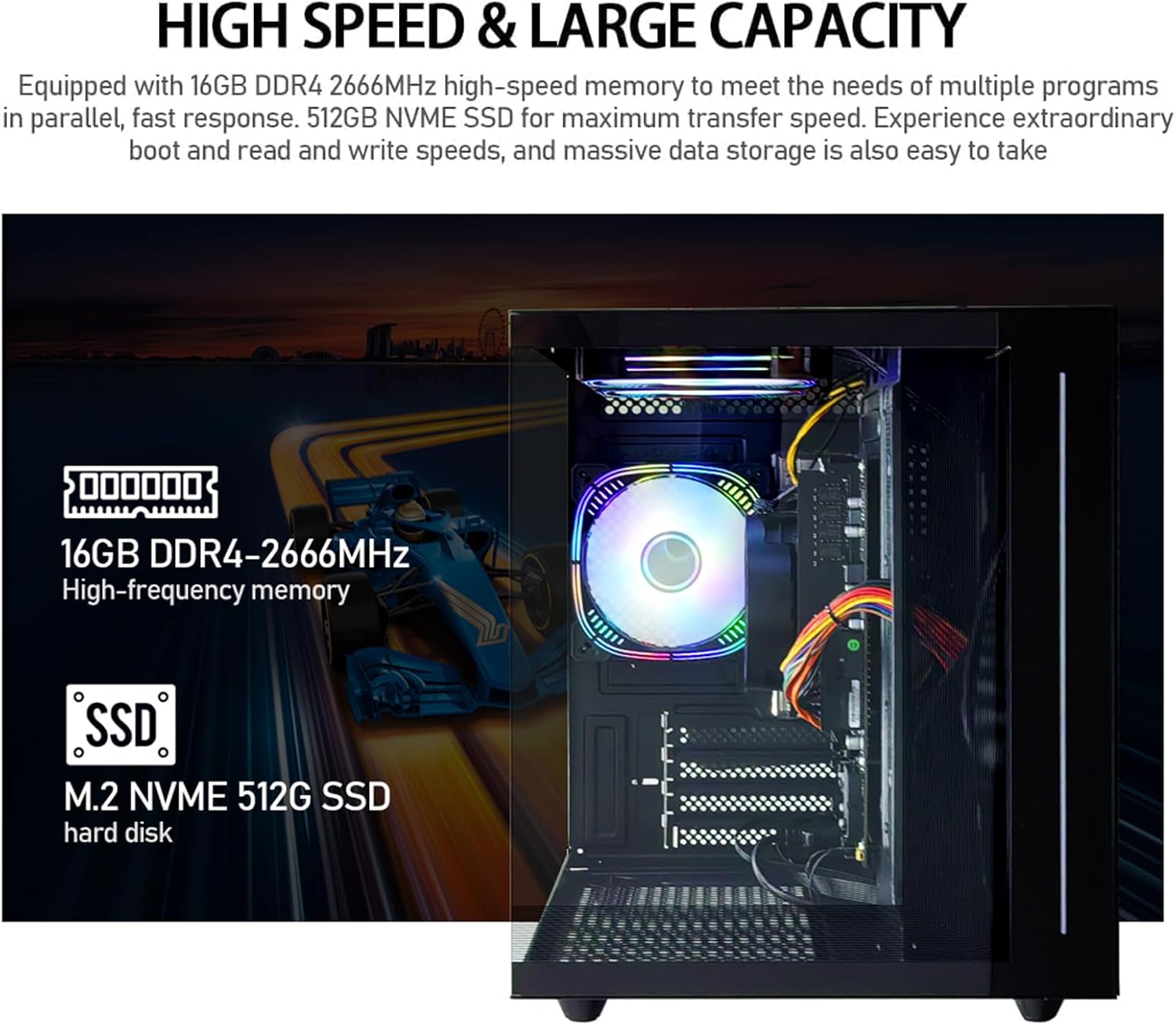
تصویر 4: اندرونی view of the PC, emphasizing the 16GB DDR4 high-frequency memory and the M.2 NVMe 512GB SSD for high-speed data transfer.

Image 5: Visual representation of the AMD Radeon Vega Graphics 7 capabilities, suitable for esports games, video clips, graphic design, and corporate office tasks.
6 دیکھ بھال
Proper maintenance ensures the longevity and performance of your PC.
6.1 صفائی
- بیرونی: Use a soft, lint-free cloth to wipe the exterior surfaces. For stubborn marks, slightly dampپانی کے ساتھ کپڑے.
- وینٹیلیشن: Regularly check and clean the ventilation grilles to prevent dust buildup, which can impede airflow and cause overheating. Use compressed air to gently clear dust from fan blades and vents.
6.2 وینٹیلیشن اور کولنگ
The PC is equipped with three built-in 120mm chassis fans for rapid heat dissipation and cooling, ensuring stable performance during intensive use. Ensure these fans are not obstructed.

Image 6: Illustration of the PC's cooling system, highlighting the RGB-enabled fans designed for rapid and silent heat dissipation.
6.3 سافٹ ویئر اپ ڈیٹس
Keep your operating system, drivers, and applications updated to ensure security, stability, and optimal performance. Windows updates are managed through the operating system settings.
7 خرابیوں کا سراغ لگانا
یہ سیکشن عام مسائل کا حل فراہم کرتا ہے جن کا آپ کو سامنا ہو سکتا ہے۔
- کوئی طاقت نہیں:
- اس بات کو یقینی بنائیں کہ پاور کیبل پی سی اور الیکٹریکل آؤٹ لیٹ دونوں سے محفوظ طریقے سے منسلک ہے۔
- دوسرے آلے میں پلگ لگا کر تصدیق کریں کہ پاور آؤٹ لیٹ فعال ہے۔
- Check the power switch on the back of the PC (if present) is in the 'On' position.
- مانیٹر پر کوئی ڈسپلے نہیں:
- Confirm the monitor is powered on and correctly connected to the PC's HDMI or VGA port.
- یقینی بنائیں کہ آپ کے مانیٹر پر صحیح ان پٹ سورس کا انتخاب کیا گیا ہے۔
- Try connecting the monitor to a different port if available, or test with another monitor.
- System is Slow or Unresponsive:
- پس منظر میں چلنے والی غیر ضروری ایپلی کیشنز کو بند کریں۔
- اپنے SSD پر کافی خالی جگہ کی جانچ کریں۔
- میلویئر کو چیک کرنے کے لیے ایک وائرس اسکین چلائیں۔
- یقینی بنائیں کہ آپ کا آپریٹنگ سسٹم اور ڈرائیور اپ ٹو ڈیٹ ہیں۔
- کوئی انٹرنیٹ کنکشن نہیں:
- For Wi-Fi, ensure the Wi-Fi adapter is enabled and you are connected to the correct network with the correct password.
- For wired connection, ensure the Ethernet cable is securely connected to both the PC and the router/modem.
- اپنا راؤٹر/موڈیم دوبارہ شروع کریں۔
If you encounter issues not covered here, or if the problem persists, please contact suevery customer support.
8. وضاحتیں
| جزو | تفصیلات |
|---|---|
| ماڈل نمبر | SUSU-V900W |
| پروسیسر | AMD Ryzen5-5600GT (6 Cores, 12 Threads, 3.6GHz up to 4.6GHz Turbo) |
| پروسیسر ساکٹ | ساکٹ AM4 |
| رام | 16GB DDR4 3200MHz (Max. 32GB) |
| ذخیرہ | 512GB NVMe SSD (PCIE x 4 interface) |
| گرافکس | Integrated AMD Radeon RX Vega 7 Graphics (1.9G) |
| آپریٹنگ سسٹم | ونڈوز |
| وائرلیس کنیکٹیویٹی | Wi-Fi 802.11ax |
| USB 2.0 پورٹس | 4 |
| USB 3.0 پورٹس | 2 |
| HDMI پورٹس | 1 |
| وی جی اے پورٹس | 1 |
| Chassis Fans | 3 x 120mm (Built-in) |
| طول و عرض (L x W x H) | 39.62 x 35.81 x 33.27 سینٹی میٹر |
| وزن | 6.89 کلوگرام |
9. وارنٹی اور سپورٹ
Your suevery AMD Ryzen5 5600GT Gaming PC comes with a standard manufacturer's warranty. Please refer to the warranty card included in your package for specific terms and conditions, including warranty duration and coverage details.
For technical support, service inquiries, or to report any issues, please contact suevery customer support through the contact information provided on your warranty card or the official suevery website. Please have your model number (SUSU-V900W) and purchase details ready when contacting support.