
1. تعارف
This manual provides detailed instructions for the LinYuvo KS10 Wireless Controller. It covers setup, operation, and maintenance to ensure optimal performance and an enhanced gaming experience across various platforms, including Nintendo Switch, Windows, SteamOS, and iOS devices.
2. پروڈکٹ ختمview
The LinYuvo KS10 is a versatile wireless controller designed for a comfortable and responsive gaming experience. It features a transparent design showcasing internal components, enhanced joysticks, and customizable functions.

شکل 2.1: سامنے view of the LinYuvo KS10 Wireless Controller, showing its transparent casing and button layout.
اہم خصوصیات:
- Metal Mushroom Head & Honeycomb Design Joysticks: Provides improved operational feedback and anti-slip functionality for precise control.
- Three-Speed Continuous Firing (Turbo): Offers flexible operation for rapid input in games.
- Integrated Six-Axis Gyroscope: Enables immersive motion sensing for compatible games.
- Adjustable Vibration Level: Dual motors provide haptic feedback that can be customized.
- رنگین روشنی کے اثرات: Features RGB lighting with various patterns to enhance the gaming atmosphere.
- Back-Key Macro Programming: Allows for personalized macro programming and multi-step combined key output.
- ایرگونومک ڈیزائن: Shaped for comfortable grip during extended gaming sessions.
- جاگنے کا فنکشن: Ability to wake up the connected console.

Figure 2.2: Close-up of the metal rocker and honeycomb joystick design, highlighting enhanced detection and anti-slip features.
3. سیٹ اپ
3.1. کنٹرولر کو چارج کرنا
Before initial use, fully charge the controller using the provided USB-C cable. Connect the cable to the controller's charging port and a compatible USB power source (e.g., a computer USB port or a USB wall adapter). The charging indicator will show the charging status and turn off when fully charged.
3.2. نائنٹینڈو سوئچ کے ساتھ جوڑا بنانا
- On your Nintendo Switch console, go to the HOME Menu.
- منتخب کریں۔ "کنٹرولرز"، پھر "گرفت / ترتیب کو تبدیل کریں".
- دبائیں اور تھامیں۔ جوڑا بنانے کا بٹن on the top of the LinYuvo KS10 controller for a few seconds until the indicator lights start flashing rapidly.
- Once paired, the controller will appear on the Switch screen, and the indicator light(s) on the controller will remain solid.
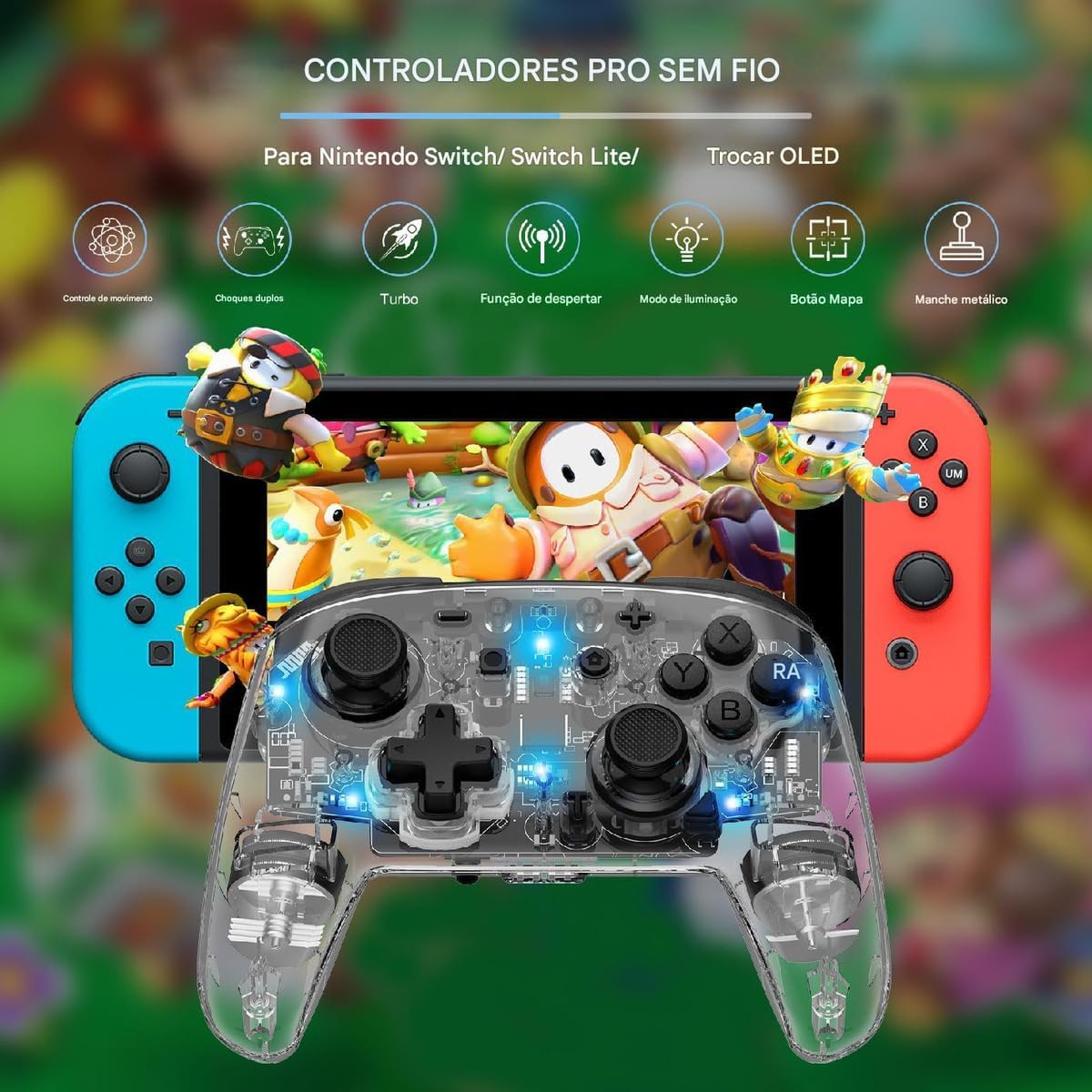
Figure 3.1: The LinYuvo KS10 controller shown alongside a Nintendo Switch console, illustrating its compatibility.
3.3. Pairing with Windows/SteamOS
- Ensure your Windows PC or SteamOS device has Bluetooth enabled.
- اپنے آلے پر بلوٹوتھ کی ترتیبات پر جائیں اور منتخب کریں۔ "Add Bluetooth or other device".
- دبائیں اور تھامیں۔ جوڑا بنانے کا بٹن on the LinYuvo KS10 controller until the indicator lights flash rapidly.
- Select the controller from the list of available devices to complete pairing.
3.4. Pairing with iOS Devices
- On your iOS device, go to ترتیبات > بلوٹوتھ اور یقینی بنائیں کہ بلوٹوتھ آن ہے۔
- دبائیں اور تھامیں۔ جوڑا بنانے کا بٹن on the LinYuvo KS10 controller until the indicator lights flash rapidly.
- Look for the controller in the "Other Devices" list and tap to connect.
3.5. Wake-up Function
To activate a connected Switch console from sleep mode, simply press and hold the "HOME" button on the controller for approximately 3 seconds.

Figure 3.2: The controller's ergonomic design and the instruction to hold the HOME button for 3 seconds to wake up the Switch console.
4. آپریٹنگ ہدایات
4.1۔ بنیادی کنٹرولز
The LinYuvo KS10 controller features standard button layouts including A, B, X, Y buttons, D-pad, Left/Right joysticks, L/R and ZL/ZR shoulder buttons, HOME, SELECT, START, and screenshot buttons. Refer to in-game instructions for specific button functions.
4.2. ٹربو فنکشن
The Turbo function allows for rapid, continuous input of a selected button. It has three adjustable speeds: 5 shots/second, 12 shots/second, and 20 shots/second.
- ٹربو کو چالو کرنے کے لیے: دبائیں اور تھامیں۔ ٹربو بٹن (T), then press the desired action button (e.g., A, B, X, Y, L, R, ZL, ZR). The button will now continuously fire when held down.
- ٹربو کی رفتار کو ایڈجسٹ کرنے کے لیے: منعقد کرتے ہوئے ٹربو بٹن (T)، دبائیں تفریق (-) button to decrease speed or the پلس (+) button to increase speed. The corresponding light will flash slowly, medium, or fast to indicate the speed level.
- To deactivate Turbo: دبائیں اور تھامیں۔ ٹربو بٹن (T), then press the action button again.

Figure 4.1: Visual representation of the adjustable Turbo function with three speed settings (5/s, 12/s, 20/s) and instructions for adjustment.
4.3. Gyroscope Motion Control
The integrated six-axis gyroscope provides motion control capabilities for games that support it. This allows for immersive gameplay where tilting and moving the controller translates into in-game actions.

Figure 4.2: A user demonstrating gyroscope motion control with the LinYuvo KS10 controller in a racing game scenario.
4.4. Adjustable Vibration Feedback
The controller features dual motors for haptic feedback. The vibration intensity can be adjusted to suit personal preference.
- To adjust vibration: دبائیں اور تھامیں۔ Vibration button (UM)، پھر استعمال کریں۔ اوپر/نیچے directional buttons on the D-pad to increase or decrease intensity.
- Available levels typically include 0%, 30%, 50%, 75%, and 100%.

Figure 4.3: Illustration of the adjustable vibration feedback levels (0%, 30%, 50%, 75%, 100%) provided by the integrated dual motors.
4.5. رنگین روشنی کے اثرات
The controller includes customizable RGB lighting to enhance the gaming ambiance. There are various lighting modes and colors.
- To change lighting mode/color: دبائیں Lighting button (often represented by a lightbulb icon or a specific combination) to cycle through different colors (Blue, Red, Yellow, Green, Orange, Purple, Pink) or breathing patterns (e.g., rainbow breathing).
- چمک کو ایڈجسٹ کرنے کے لیے: دبائیں اور تھامیں۔ لائٹنگ بٹن اور استعمال کریں Y بٹن چمک کی سطح کو ایڈجسٹ کرنے کے لئے.
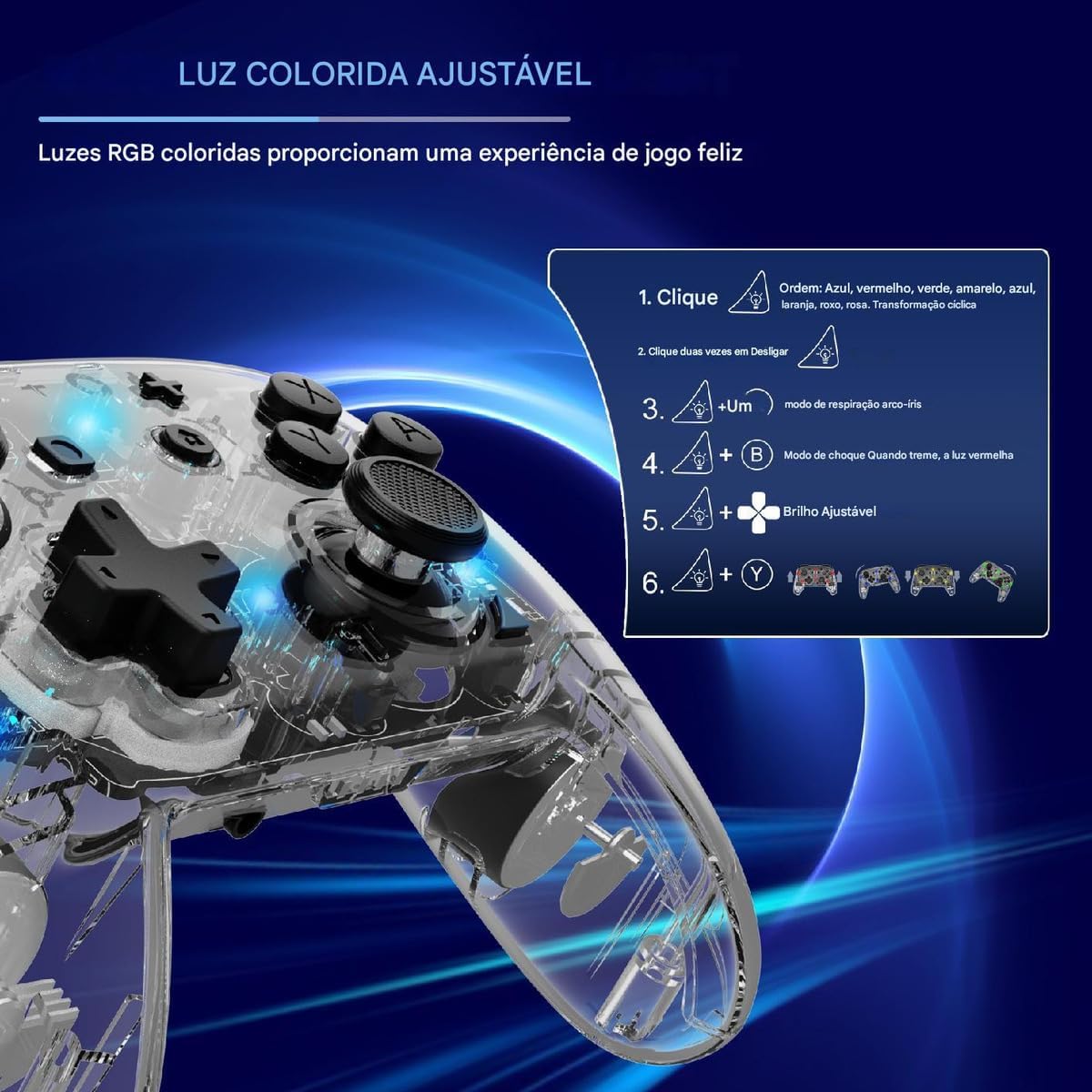
Figure 4.4: Diagram illustrating how to adjust the colorful RGB lighting, including color order and brightness settings.
4.6. Macro Programming (Back-Keys)
The back-keys on the controller can be programmed with custom macros, allowing for complex button sequences to be executed with a single press.
- To enter Macro Programming Mode: Refer to the specific instructions provided with your controller for the exact button combination (e.g., a dedicated Macro button + the back-key you wish to program).
- To record a Macro: While in programming mode, press the sequence of buttons you want to record.
- To save the Macro: Press the Macro button again to save the sequence to the selected back-key.
- To use a Macro: Press the programmed back-key to execute the recorded sequence.
Note: Detailed macro programming steps may vary. Consult the included quick start guide or manufacturer's website for precise instructions.
5 دیکھ بھال
- صفائی: Use a soft, dry cloth to clean the controller. Do not use harsh chemicals or abrasive materials.
- ذخیرہ: کنٹرولر کو کسی ٹھنڈی، خشک جگہ پر براہ راست سورج کی روشنی اور انتہائی درجہ حرارت سے دور رکھیں۔
- بیٹری کی دیکھ بھال: Avoid fully discharging the battery frequently. Charge the controller regularly, even if not in use for extended periods, to maintain battery health.
- قطروں سے بچیں: Protect the controller from drops and impacts, which can damage internal components.
6 خرابیوں کا سراغ لگانا
| مسئلہ | ممکنہ وجہ | حل |
|---|---|---|
| کنٹرولر آن نہیں ہوتا ہے۔ | کم بیٹری۔ | Charge the controller for at least 30 minutes. |
| Unable to pair with device. | Bluetooth not enabled; controller not in pairing mode; interference. | Ensure Bluetooth is on. Put controller in pairing mode (flashing lights). Move closer to the device. Restart both devices. |
| Input lag or disconnection. | Low battery; too far from device; wireless interference. | Charge controller. Move closer to device. Reduce other wireless activity. |
| Buttons or joysticks unresponsive. | سافٹ ویئر کی خرابی؛ جسمانی نقصان. | Restart the controller and the connected device. If problem persists, contact support. |
| Vibration not working. | Vibration level set to 0%; game does not support vibration. | Adjust vibration intensity (Section 4.4). Check game settings. |
7. وضاحتیں
- ماڈل: KS10
- کنیکٹوٹی: وائرلیس (بلوٹوتھ)
- مطابقت: Nintendo Switch, Windows, SteamOS, iOS
- خصوصی خصوصیات: Six-axis gyroscope, adjustable vibration, customizable RGB lighting, Turbo function, macro programming back-keys, metal joysticks.
- طاقت کا منبع: ریچارج ایبل اندرونی بیٹری
- چارجنگ پورٹ: USB-C
- اصل ملک: چین
- ASIN: B0F18PLLLF
8. وارنٹی اور سپورٹ
For warranty information and technical support, please refer to the documentation included with your purchase or contact the retailer. Keep your proof of purchase for any warranty claims.
This product is not an official Nintendo product but is compatible with the Nintendo Switch console.