
1. تعارف
This manual provides essential information for the safe and efficient installation, operation, and maintenance of your Tbest 63A 4P Automatic Transfer Switch (ATS). This device is designed to automatically switch between a normal power source and a backup power source, ensuring continuous power supply to critical loads. Please read this manual thoroughly before installation and use.
2. حفاظتی معلومات
WARNING: Risk of Electric Shock. Installation and servicing must be performed by qualified personnel only.
- Always disconnect all power sources before installing or servicing the switch.
- برقی خطرات کو روکنے کے لیے مناسب گراؤنڈنگ کو یقینی بنائیں۔
- Verify all connections are secure and correctly wired according to local electrical codes.
- Do not operate the switch if it appears damaged or malfunctioning.
- تنصیب اور دیکھ بھال کے دوران مناسب ذاتی حفاظتی سامان (PPE) پہنیں۔
3. پروڈکٹ ختمview
The Tbest 63A 4P Automatic Transfer Switch is a robust device designed for reliable power management. Key features include:
- سنگل موٹر ڈرائیو: Ensures simple structure and stable conversion with minimal noise and impact.
- Enhanced Mechanism: Features an improved inhibition mechanism for quick closing and breaking, extending mechanical life.
- پائیدار تعمیر: Made from flame-retardant plastic, offering good insulation, high-temperature resistance, and protection against overload, undervoltage, short circuit, and phase failure.
- Electrical Interlock Protection: Guarantees reliable and non-interfering automatic switching.
- وسیع درخواست: Suitable for critical power supply needs in fire protection systems, ports, hospitals, shopping malls, banks, and industrial facilities.
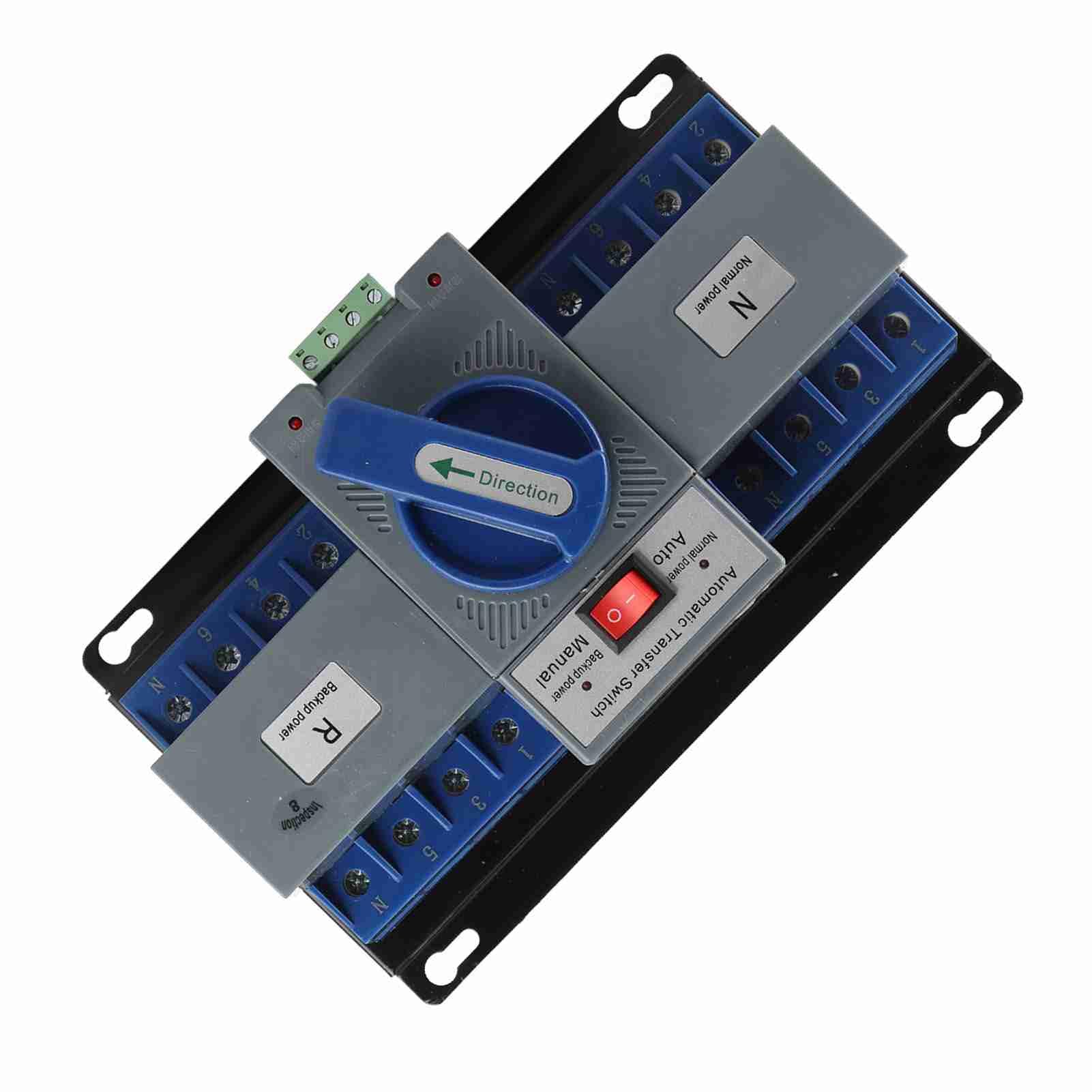
شکل 1: سامنے view of the Tbest 63A 4P Automatic Transfer Switch, showing the main controls and terminal blocks.
4. سیٹ اپ اور انسٹالیشن
Follow these general steps for installing the automatic transfer switch. Consult a qualified electrician for specific wiring diagrams and local code compliance.
- چڑھنا: Securely mount the ATS in a suitable enclosure or panel, ensuring adequate ventilation and clearance for wiring.
- بجلی کا کنکشن: Ensure all power sources (normal and backup) are completely disconnected and locked out before proceeding with wiring.
- Normal Power Connection: Connect the normal power source (utility) to the designated 'Normal Power' terminals (labeled 'N' on the device). Ensure correct phase and neutral connections.
- Backup Power Connection: Connect the backup power source (e.g., generator) to the designated 'Backup Power' terminals (labeled 'R' on the device). Ensure correct phase and neutral connections.
- لوڈ کنکشن: Connect the electrical load (circuits to be powered) to the 'Load' terminals of the ATS.
- کنٹرول وائرنگ: Connect any necessary control wiring for automatic operation, if applicable.
- تصدیق: سختی اور درستگی کے لیے تمام وائرنگ کنکشنز کو دو بار چیک کریں۔

شکل 2: زاویہ دار view of the ATS, highlighting the 'Normal Power' and 'Backup Power' terminal blocks for wiring connections.
5. آپریٹنگ ہدایات
The Tbest Automatic Transfer Switch offers both automatic and manual operation modes.
5.1 موڈ کا انتخاب
The switch features a selector for operating mode:
- آٹو موڈ: When the selector is set to 'Auto', the switch will automatically transfer the load between the normal and backup power sources based on power availability. If normal power fails, it will switch to backup. When normal power returns, it will switch back.
- دستی موڈ: When the selector is set to 'Manual', the transfer switch will remain in its current position until manually operated.
5.2 Manual Transfer
In 'Manual' mode, or for testing purposes, the large blue 'Direction' handle can be used to manually switch between power sources:
- Rotate the handle towards 'N' (Normal power) to connect the load to the normal power source.
- Rotate the handle towards 'R' (Backup power) to connect the load to the backup power source.

تصویر 3: کلوز اپ view of the 'Automatic Transfer Switch' selector (Auto/Manual) and the 'Direction' handle for manual operation.
6 دیکھ بھال
Regular maintenance ensures the longevity and reliable operation of your ATS.
- بصری معائنہ: Periodically inspect the switch for any signs of damage, loose connections, or overheating.
- صفائی: Keep the switch free from dust and debris. Use a dry, non-conductive cloth for cleaning.
- کنکشن چیک: Annually, or as needed, verify that all electrical connections are tight and secure.
- فنکشنل ٹیسٹ: Periodically test the automatic transfer function by simulating a normal power outage (if safe to do so) to ensure it switches correctly to backup power and back.
7 خرابیوں کا سراغ لگانا
If you encounter issues with your ATS, refer to the following common troubleshooting steps:
| مسئلہ | ممکنہ وجہ | حل |
|---|---|---|
| Switch does not transfer automatically. | Selector in 'Manual' mode; no power from backup source; control wiring issue. | Set selector to 'Auto'. Check backup power source. Inspect control wiring. |
| No power to load. | No power from normal or backup source; tripped breaker; loose connections. | Check both power sources. Reset breakers. Verify all wiring connections. |
| Overheating or unusual noises. | Overload; loose connections; internal fault. | Reduce load. Tighten connections. Disconnect power and contact qualified personnel. |
If the problem persists after attempting these solutions, contact a qualified electrician or Tbest customer support.
8. وضاحتیں
| فیچر | تفصیلات |
|---|---|
| ماڈل نمبر | Tbest946gkyex3c |
| ASIN | B0F1D97DQB |
| کارخانہ دار | ٹی بیسٹ |
| پیکیج کے طول و عرض | 9.06 x 5.91 x 5.12 انچ |
| شے کا وزن | 3.67 پاؤنڈ |
9. وارنٹی اور سپورٹ
For warranty information or technical support, please contact Tbest customer service through their official channels. Keep your purchase receipt and model number (Tbest946gkyex3c) handy for faster service.
آپ اکثر مینوفیکچررز پر سپورٹ رابطہ کی تفصیلات حاصل کر سکتے ہیں۔ webسائٹ یا خوردہ فروش کے ذریعے جہاں پروڈکٹ خریدی گئی تھی۔