
1. تعارف
This manual provides detailed instructions for the Symcode Wearable Glove Barcode Scanner. This device is designed for efficient, hands-free barcode scanning, featuring dual wireless connectivity (Bluetooth 6.0 & 2.4G) and a long-lasting battery. It is suitable for various applications including warehouses, retail, and logistics, offering fast decoding of 1D, 2D, and QR codes.
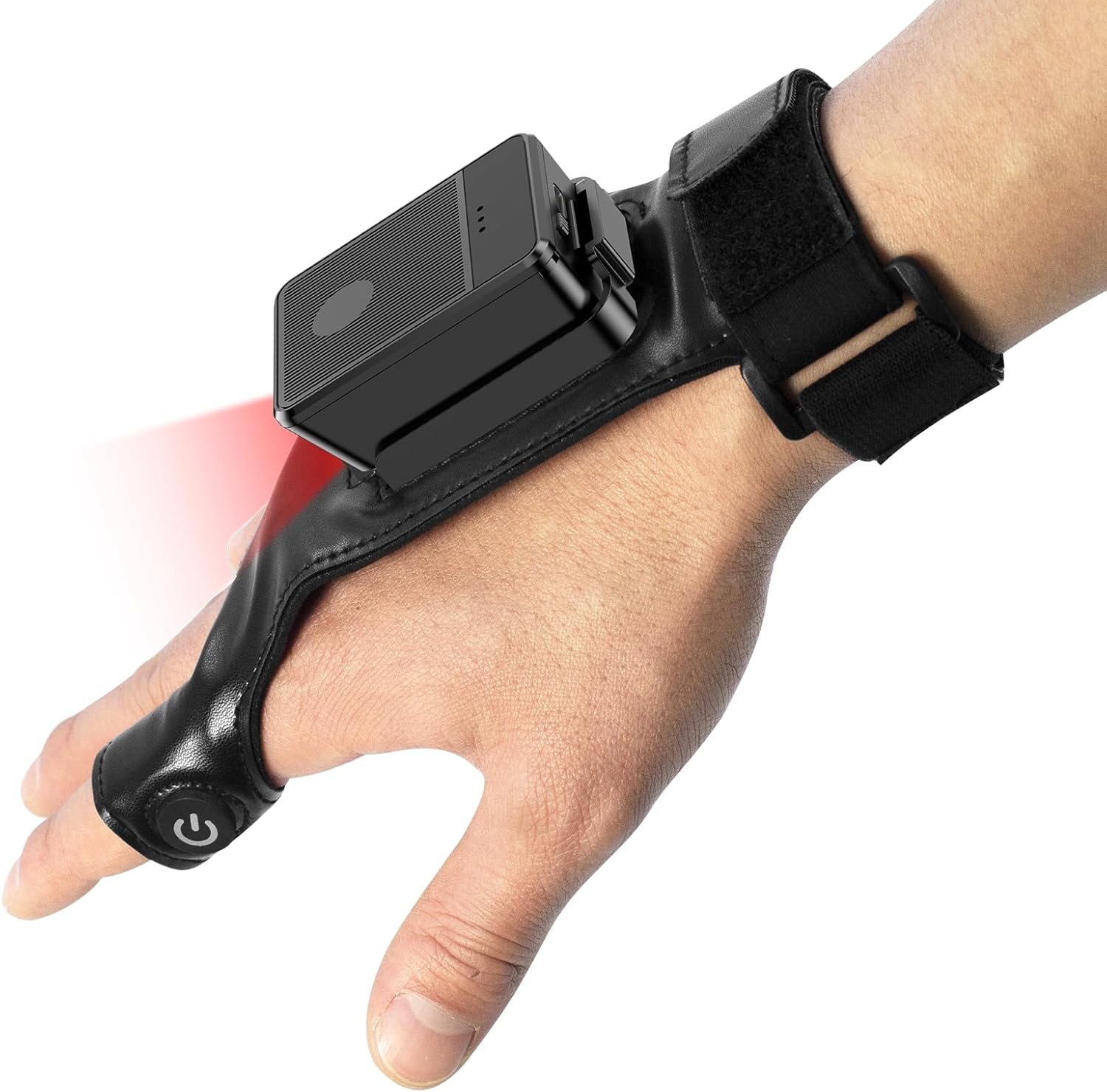
This image shows the Symcode Wearable Glove Barcode Scanner attached to a user's hand, demonstrating its ergonomic, hands-free design. The scanner unit is positioned on the back of the hand, with the scanning beam visible.
2. حفاظتی معلومات
- Do not expose the device to extreme temperatures, moisture, or corrosive substances.
- اسکیننگ لائٹ سے براہ راست آنکھ کی نمائش سے گریز کریں۔
- آلہ کو خود سے جدا کرنے یا مرمت کرنے کی کوشش نہ کریں۔ خدمت کے لیے اہل افراد سے رابطہ کریں۔
- نقصان سے بچنے کے لیے صرف فراہم کردہ چارجنگ کیبل اور اڈاپٹر استعمال کریں۔
3. پیکیج کے مشمولات
Please check the package contents upon receipt. If any items are missing or damaged, contact your vendor.
- Symcode Wearable Glove Barcode Scanner
- USB چارجنگ کیبل
- 2.4G وائرلیس ڈونگل
- صارف دستی
4. پروڈکٹ ختمview
The Symcode Wearable Glove Barcode Scanner consists of a compact scanning unit and an adjustable glove-style strap. The scanning unit features a durable trigger button, indicator lights, and a charging port. The glove is designed for comfort and secure fit, allowing for hands-free operation.

ایک قریبی اپ view of the scanner on a hand, highlighting the red scanning beam and the durable resin material of the trigger button located on the index finger. The image also shows a roll of barcode labels, indicating its primary function.
5. سیٹ اپ
5.1 ڈیوائس کو چارج کرنا
Before first use, fully charge the scanner. Connect the USB charging cable to the scanner's charging port and to a power source (e.g., computer USB port or USB wall adapter). The charging indicator light will show charging status. A full charge takes approximately 5 hours.
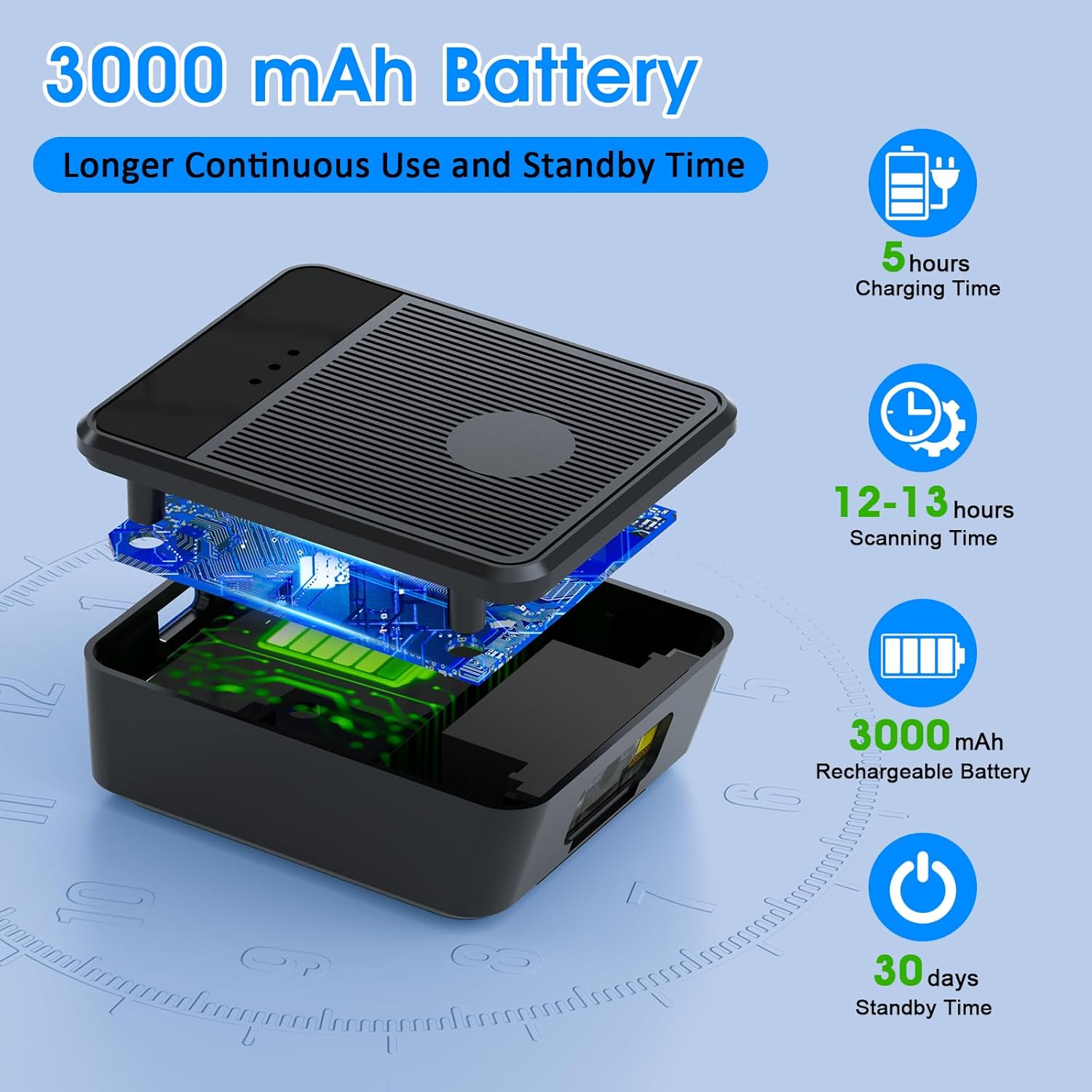
ایک دھماکہ ہوا۔ view diagram of the scanner unit, emphasizing its 3000 mAh rechargeable battery. Accompanying text indicates a 5-hour charging time, 12-13 hours of continuous scanning, and 30 days of standby time.
5.2 Wearing the Scanner
Slide your hand into the glove, ensuring the scanner unit is positioned comfortably on the back of your hand. Adjust the strap for a secure fit. The trigger button should align with your index finger for easy access.

Two workers are shown in a warehouse environment, handling boxes. One worker is actively using the wearable barcode scanner on their hand to scan a package, demonstrating the hands-free benefit of the device during logistics operations.
5.3 ڈیوائس سے جڑنا
The scanner supports two wireless connection methods:
5.3.1 2.4G Wireless Dongle Connection
- Plug the 2.4G wireless dongle into a USB port on your computer or compatible device.
- اسکینر آن کریں۔ اسے خود بخود ڈونگل کے ساتھ جوڑنا چاہیے۔
- A successful connection is indicated by a specific light pattern or sound (refer to device indicators).
5.3.2 بلوٹوتھ 6.0 کنکشن
- اسکینر آن کریں۔
- Activate Bluetooth on your host device (e.g., smartphone, tablet, computer).
- تلاش کریں۔ available Bluetooth devices and select the Symcode scanner from the list.
- Pairing may require a confirmation or a default PIN (check device documentation for specific PIN if required).
6. آپریٹنگ ہدایات
6.1 بنیادی اسکیننگ
To scan a barcode, point the scanner's beam at the barcode and press the trigger button located on your index finger. A successful scan will typically be indicated by a beep, a vibration, or a change in the indicator light.
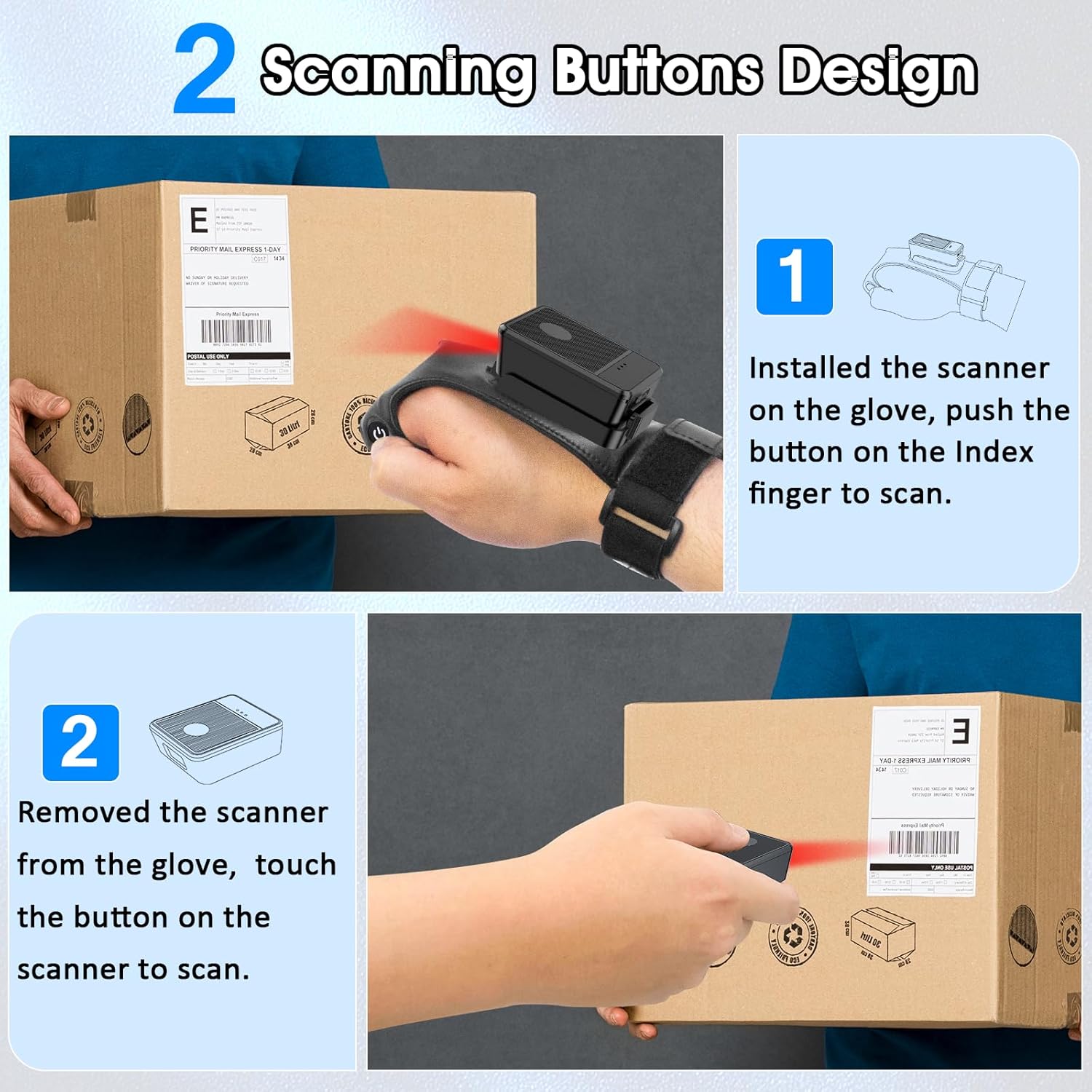
This diagram illustrates two ways to use the scanner: 1) installed on the glove, scanning with the index finger button, and 2) removed from the glove, scanning by touching the button directly on the scanner unit. Both methods are shown with the scanner pointed at a package.
6.2 ورکنگ موڈز
The scanner supports two operational modes:
6.2.1 Instant Upload Mode
In this mode, scanned barcode data is immediately transmitted to the connected host device. This is ideal for real-time inventory updates or point-of-sale transactions.
6.2.2 Offline Storage Mode
This mode allows the scanner to store up to 50,000 barcodes internally when not connected to a host device or when connectivity is intermittent. Data can then be uploaded to a computer or POS system at a later time.
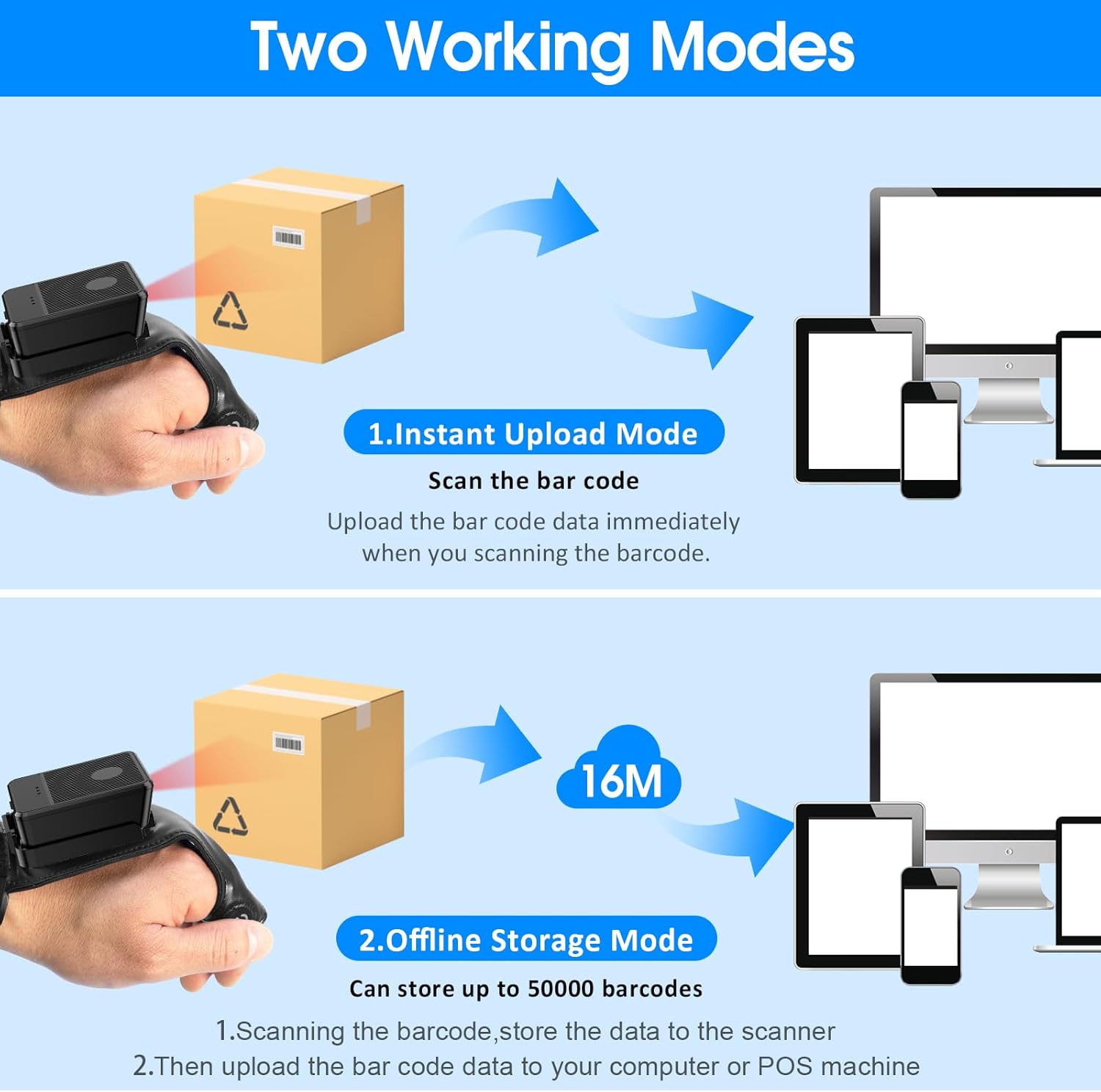
This image explains the two operational modes: Instant Upload Mode, where scanned data is immediately sent to a connected device, and Offline Storage Mode, which allows storing up to 50,000 barcodes internally before uploading them to a computer or POS system.
6.3 ترتیبات کو حسب ضرورت بنانا
The scanner allows for customization of various settings, including:
- آواز: Enable or disable the audible beep for successful scans.
- کمپن: Enable or disable vibration alerts for successful scans, useful in quiet environments.
- کی بورڈ کے افعال: Add keyboard functions such as TAB or Enter after each scan for seamless data entry into applications.
Refer to the quick setup guide or manufacturer's website for specific programming barcodes to adjust these settings.
7 دیکھ بھال
- صفائی: Use a soft, dry cloth to clean the scanner's exterior. For stubborn dirt, slightly dampپانی کے ساتھ کپڑے. سخت کیمیکل یا کھرچنے والے کلینر کا استعمال نہ کریں۔
- ذخیرہ: اسکینر کو ٹھنڈی، خشک جگہ پر براہ راست سورج کی روشنی اور انتہائی درجہ حرارت سے دور رکھیں جب استعمال میں نہ ہوں۔
- بیٹری کی دیکھ بھال: بیٹری کی زندگی کو طول دینے کے لیے، بار بار بیٹری کو مکمل طور پر خارج کرنے سے گریز کریں۔ آلہ کو باقاعدگی سے چارج کریں، چاہے مسلسل استعمال میں نہ ہوں۔
8 خرابیوں کا سراغ لگانا
8.1 Scanner Not Turning On
- Ensure the battery is charged. Connect the scanner to a power source and allow it to charge for at least 30 minutes before attempting to turn it on again.
8.2 Unable to Connect Wirelessly
- 2.4G کنکشن: Verify the 2.4G dongle is securely plugged into the host device. Try plugging it into a different USB port. Ensure the scanner is within range of the dongle.
- بلوٹوت کنکشن: Ensure Bluetooth is enabled on your host device. Delete any previous pairings for the scanner and attempt to pair again. Ensure the scanner is in pairing mode (refer to device indicators).
- Restart both the scanner and the host device.
8.3 Scanner Not Reading Barcodes
- Ensure the barcode is clean, undamaged, and clearly printed.
- سکینر اور بارکوڈ کے درمیان فاصلے اور زاویہ کو ایڈجسٹ کریں۔
- Check if the scanner is in the correct working mode (Instant Upload or Offline Storage).
- Verify that the barcode type is supported by the scanner (1D, 2D, QR codes are supported).
9. وضاحتیں
| برانڈ | symcode |
| ماڈل | Wearable Glove Barcode Scanner (B0F1FSMWCD) |
| کنیکٹوٹی ٹیکنالوجی | 2.4G, Bluetooth 6.0 |
| ہم آہنگ آلات | Desktop, Laptop, Tablet, Smartphone (Windows XP/7/8/10, Android, iOS) |
| طاقت کا منبع | بیٹری سے چلنے والا |
| بیٹری کی قسم | 1 لتیم پولیمر بیٹری (شامل) |
| بیٹری کی صلاحیت | 1100mAh (Product Description) / 3000mAh (Image) - Note: Discrepancy in source data, refer to product packaging for accurate capacity. |
| مسلسل آپریشن کا وقت | Up to 10 hours (Product Description) / 12-13 hours (Image) - Note: Discrepancy in source data, refer to product packaging for accurate time. |
| چارج کرنے کا وقت | تقریبا 5 گھنٹے |
| اسٹینڈ بائی ٹائم | 30 دن تک |
| اسکیننگ کی رفتار | 300 اسکین فی سیکنڈ تک |
| اسکیننگ کی حد | 2 سے 4.9 فٹ |
| Offline Storage Capacity | Up to 50,000 barcodes |
| شے کا وزن | 5 اونس |
| پیکیج کے طول و عرض | 7.48 x 3.74 x 2.44 انچ |
10. وارنٹی کی معلومات
This Symcode product is covered by a manufacturer's warranty. For specific warranty terms, duration, and conditions, please refer to the warranty card included with your product or visit the official Symcode webسائٹ وارنٹی کے دعووں کے لیے اپنی خریداری کا ثبوت رکھیں۔
11. کسٹمر سپورٹ
If you encounter any issues or have questions regarding your Symcode Wearable Glove Barcode Scanner, please contact Symcode customer support. Contact details can typically be found on the product packaging, the official Symcode webسائٹ، یا اپنے خوردہ فروش کے ذریعے۔