
1. پروڈکٹ ختمview
The Hisense 65E7Q QLED Smart TV offers a premium viewing experience with its 65-inch QLED display. This television integrates advanced technologies such as Dolby Vision and Dolby Atmos for immersive audio-visuals, AI Smooth Motion for fluid images, and dedicated modes for gaming and sports. Powered by the VIDAA operating system, it provides easy access to a wide range of streaming content and smart features, including voice control.

سامنے والا view of the Hisense 65E7Q QLED Smart TV.
اہم خصوصیات:
- QLED Colour: Experience rich, vibrant, and realistic colors.
- AI ہموار حرکت: Advanced MEMC and 3D Noise Reduction for fluid, blur-free images.
- Dolby Vision اور Dolby Atmos: Cinematic picture and immersive sound for an enhanced entertainment experience.
- گیم موڈ پلس: Reduces input lag to 16ms, with 60Hz VRR and ALLM for ultra-fluid gaming.
- AI اسپورٹس موڈ: Optimizes picture and sound for sports content, reducing motion blur and enhancing stadium-like audio.
- AI 4K Upscaler: Enhances blurry images to near-4K quality.
- VIDAA Smart TV OS: Fast, secure, and intuitive operating system with access to popular streaming applications.
- وائس کنٹرول: Integrated Alexa and VIDAA Voice for convenient operation.
2. حفاظتی معلومات
Please read all safety instructions carefully before using your TV. Keep this manual for future reference. Always ensure the TV is placed on a stable surface to prevent tipping. Do not expose the TV to rain or moisture. Refer to the full safety guidelines in the included safety manual.
3. پیکیج کے مشمولات
تصدیق کریں کہ تمام آئٹمز باکس میں موجود ہیں:
- Hisense 65E7Q QLED Smart TV
- پاور کیبل
- Remote Control (with 1 AAAA battery included)
- ٹی وی اسٹینڈ (2 ٹکڑے)
- اسٹینڈ اسمبلی کے لئے پیچ
- صارف دستی (یہ دستاویز)
- وارنٹی کارڈ
4. سیٹ اپ
4.1 اسٹینڈ کو جمع کرنا
- نقصان سے بچنے کے لیے ٹی وی اسکرین کو نرم، چپٹی سطح پر احتیاط سے رکھیں۔
- ٹی وی کے نچلے حصے پر متعلقہ سلاٹ کے ساتھ اسٹینڈ کے ٹکڑوں کو سیدھ میں رکھیں۔
- فراہم کردہ پیچ کا استعمال کرتے ہوئے اسٹینڈ کے ٹکڑوں کو محفوظ کریں۔ یقینی بنائیں کہ وہ مضبوطی سے سخت ہیں۔

Diagram illustrating TV dimensions and stand installation points.
4.2 وال ماونٹنگ
If you plan to wall mount your TV, ensure you use a VESA-compatible wall mount kit (not included). The Hisense 65E7Q supports a VESA mounting standard of 600 x 400 mm. Follow the instructions provided with your wall mount kit for safe installation.
4.3 کنیکٹنگ پیری فیرلز
Connect your external devices to the TV's ports as needed. Refer to the port diagram below:

پیچھے view showing available ports and connections.
- HDMI پورٹس (x3): Connect Blu-ray players, game consoles, and other HDMI devices. One port supports eARC for enhanced audio return.
- USB پورٹس (x2): Connect USB flash drives for media playback. (1x USB 3.0, 1x USB 2.0)
- Antenna Inputs (x2): اپنا ٹیریسٹریل یا کیبل اینٹینا جوڑیں۔
- ایتھرنیٹ (LAN): وائرڈ نیٹ ورک کنکشن کے لیے۔
- آپٹیکل آڈیو آؤٹ: ڈیجیٹل آڈیو کے لیے ساؤنڈ بار یا آڈیو ریسیور سے جڑیں۔
- ہیڈ فون جیک: نجی سننے کے لیے۔
- اے وی ان پٹ: جامع ویڈیو اور سٹیریو آڈیو کیبلز کا استعمال کرتے ہوئے پرانے آلات کو جوڑنے کے لیے۔
4.4 ابتدائی پاور آن
- پاور کیبل کو ٹی وی سے اور پھر پاور آؤٹ لیٹ سے جوڑیں۔
- ریموٹ کنٹرول یا ٹی وی پر پاور بٹن دبائیں۔
- ابتدائی سیٹ اپ مکمل کرنے کے لیے آن اسکرین ہدایات پر عمل کریں، بشمول زبان کا انتخاب، نیٹ ورک کنکشن، اور چینل اسکیننگ۔
آپ کا ٹی وی چلانا
5.1 ریموٹ کنٹرول
The included remote control allows you to navigate the TV's features. Insert the provided AAAA battery into the remote. The remote supports voice control for convenient operation.
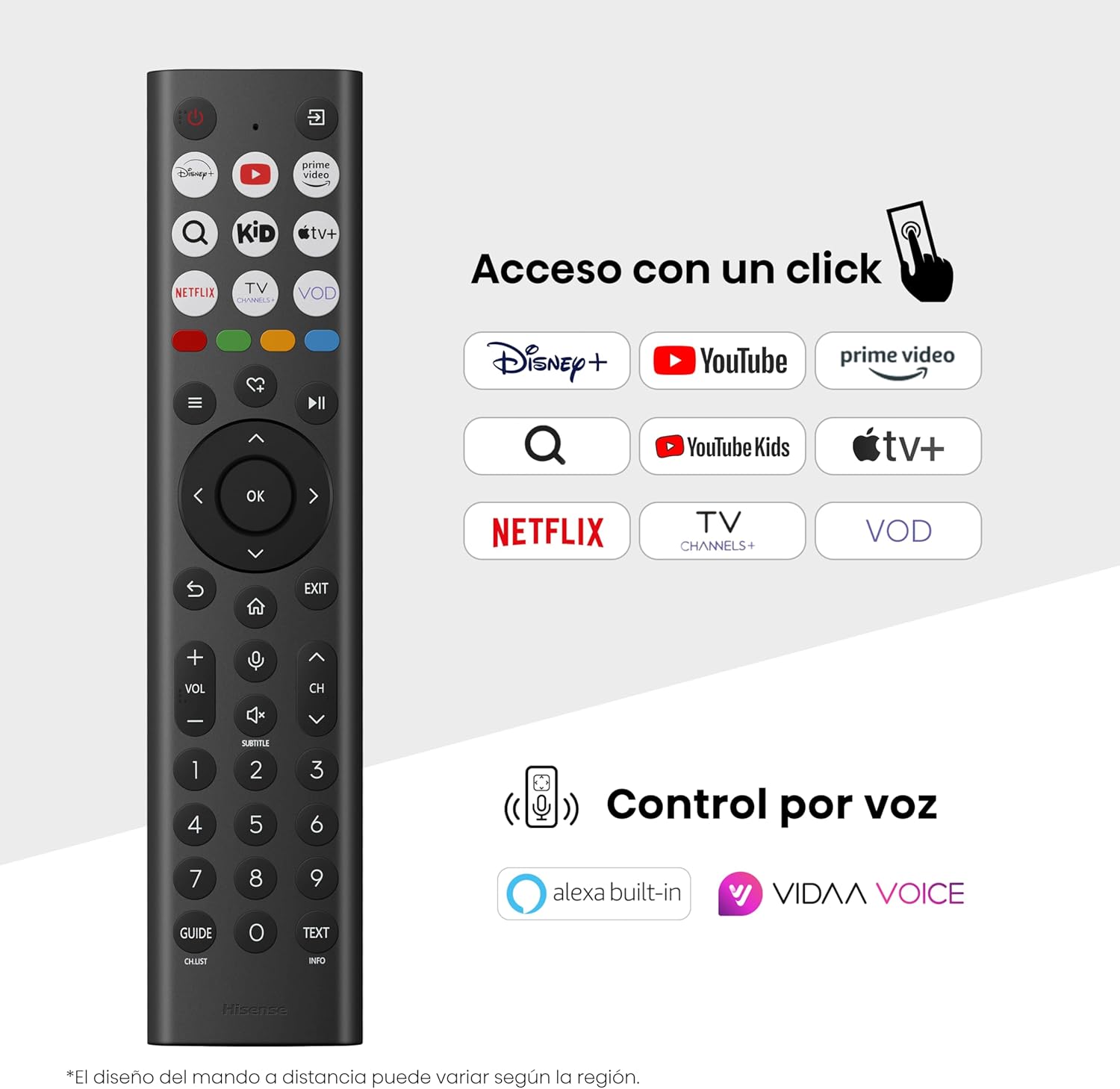
Hisense Smart TV remote control with dedicated app buttons and voice control.
5.2 اسمارٹ ٹی وی کی خصوصیات (VIDAA OS)
Your Hisense TV runs on the VIDAA operating system, offering a user-friendly interface for accessing various applications and services.

The VIDAA Smart TV interface with popular streaming applications.
- درخواستیں: Access pre-installed apps like Netflix, YouTube, Prime Video, and more.
- وائس کنٹرول: Use the remote's voice function to search for content, adjust settings, or interact with Alexa built-in and VIDAA Voice.
- Screen Mirroring (AirPlay): Share content from your Apple devices directly to the TV.
- TV پر اشتراک کریں: Easily send content from your mobile devices to the TV.
5.3 تصویر کی ترتیبات
اپنی اصلاح کریں۔ viewing experience with various picture enhancement technologies:
- QLED Colour: Delivers over a billion shades of vibrant, lifelike colors.
- AI 4K Upscaler: Automatically enhances lower-resolution content to near-4K quality.
- AI ہموار حرکت: Reduces motion blur in fast-paced scenes, ensuring clear and fluid visuals.
- ڈولبی ویژن: Provides stunning brightness, contrast, and color for a dramatic visual experience.
- فلم ساز موڈ: Preserves the original aspect ratio, colors, and frame rates to display movies as intended by the director.
- AI لائٹ سینسر: Intelligently adjusts screen brightness based on ambient light for optimal viewing اور توانائی کی کارکردگی.
- آنکھوں کی دیکھ بھال کا طریقہ: Reduces blue light emission to minimize eye strain.
- توانائی کی بچت کے موڈ: Optimizes power consumption without significantly compromising picture quality.

QLED technology delivers over a billion vibrant color tones.

AI 4K Upscaler enhances lower resolution content to near 4K clarity.

AI Smooth Motion ensures fluid images without blur, especially in fast-moving scenes.

Filmmaker Mode presents content exactly as the director intended.
5.4 آواز کی ترتیبات
Enhance your audio experience with:
- Dolby Atmos: Immersive, multi-dimensional sound that fills your room.
- مربوط اسپیکر: Built-in speakers with a maximum output of 1 Watt per channel.
- EzPlay: Seamlessly control compatible Hisense soundbars directly from your TV screen.

Dolby Vision and Dolby Atmos combine for a spectacular audio-visual experience.
5.5 گیمنگ کی خصوصیات
For gamers, the TV offers:
- گیم موڈ پلس: Reduces input lag to 16ms, ensuring responsive gameplay.
- 60Hz VRR (متغیر ریفریش ریٹ): Synchronizes the TV's refresh rate with the game console's output to prevent screen tearing.
- ALLM (آٹو لو لیٹینسی موڈ): Automatically switches the TV to low-latency mode when a game is detected.
- گیم بار: An integrated control center for quick access to game settings and real-time performance monitoring.

Game Mode Plus provides ultra-fluid, lag-free gaming.

The Game Bar offers centralized control for game settings.
5.6 Sports Features
- AI اسپورٹس موڈ: Automatically detects sports content and optimizes picture and sound settings for a stadium-like experience, enhancing clarity and audio effects.
6 دیکھ بھال
6.1 ٹی وی کی صفائی
- صاف کرنے سے پہلے ہمیشہ ٹی وی کو ان پلگ کریں۔
- اسکرین اور ٹی وی کی باڈی کو آہستہ سے صاف کرنے کے لیے نرم، خشک، لنٹ سے پاک کپڑا استعمال کریں۔
- ضدی نشانات کے لیے، ہلکے سے ڈیampur کپڑے میں پانی یا خصوصی سکرین کلینر (براہ راست سکرین پر اسپرے نہ کریں)۔
- Avoid using abrasive cleaners, alcohol, benzene, or thinners, as these can damage the TV's surface.
6.2 سافٹ ویئر اپ ڈیٹس
Your TV may receive software updates periodically to improve performance and add new features. Ensure your TV is connected to the internet to receive these updates. You can usually check for updates manually in the TV's settings menu.
7 خرابیوں کا سراغ لگانا
اگر آپ کو اپنے ٹی وی کے ساتھ مسائل درپیش ہیں، تو درج ذیل عام حل سے رجوع کریں:
- کوئی طاقت نہیں: Check if the power cable is securely connected and the power outlet is working. Try a different outlet.
- کوئی تصویر/آواز نہیں: Ensure the correct input source is selected. Check all cable connections (HDMI, antenna).
- ریموٹ کنٹرول کام نہیں کر رہا: Check the battery (1 AAAA battery). Ensure there are no obstructions between the remote and the TV.
- نیٹ ورک کنکشن کے مسائل: اپنے Wi-Fi پاس ورڈ یا ایتھرنیٹ کیبل کنکشن کی تصدیق کریں۔ اپنا راؤٹر دوبارہ شروع کریں۔
- ناقص تصویر کا معیار: تصویر کی ترتیبات کو ایڈجسٹ کریں (چمک، کنٹراسٹ، نفاست)۔ یقینی بنائیں کہ ان پٹ کا ذریعہ اعلی معیار کا سگنل فراہم کر رہا ہے۔
- آواز کی تحریف: Check audio settings. If using external speakers, ensure they are connected correctly.
For more detailed troubleshooting, consult the full electronic user manual or contact Hisense customer support.
8. وضاحتیں
Detailed technical specifications for the Hisense 65E7Q QLED Smart TV:
| فیچر | تفصیلات |
|---|---|
| ماڈل نمبر | 65E7Q |
| اسکرین کا سائز | 65 انچ |
| ڈسپلے ٹیکنالوجی | کیو ایل ای ڈی |
| قرارداد | 4K (3840 x 2160) |
| ریفریش ریٹ | 60 Hz |
| ایچ ڈی آر فارمیٹ سپورٹ | ڈولبی ویژن |
| Motion Enhancement Technology | AI ہموار حرکت |
| تصویر کے معیار میں اضافہ | AI 4K Upscaler, AI Smooth Motion, QLED Colour |
| رسپانس ٹائم | 100 ملی سیکنڈز |
| بیک لائٹ کنفیگریشن | Direct Illumination, Dimming |
| اسپیکر کی تفصیل | Integrated speaker with Dolby Atmos |
| میکس اسپیکر آؤٹ پٹ پاور | 1 واٹ |
| آڈیو چینلز | ملٹی چینل |
| Surround Sound Format | ڈولبی ایٹموس |
| آپریٹنگ سسٹم | VIDAA |
| میموری ذخیرہ کرنے کی صلاحیت | 1 جی بی |
| کنٹرول کا طریقہ | آواز |
| کنیکٹوٹی ٹیکنالوجی | بلوٹوتھ، HDMI، Wi-Fi |
| Internet Applications | Netflix, YouTube, Prime Video, AirPlay 2 |
| HDMI پورٹس | 3 (including HDMI 2.1 with eARC) |
| USB پورٹس | 2 (1x USB 3.0, 1x USB 2.0) |
| وائرلیس ٹیکنالوجی | وائی فائی |
| Screen Mirroring Technology | ایئر پلے |
| VESA بڑھتے ہوئے معیاری | 600 x 400 ملی میٹر |
| پروڈکٹ کے طول و عرض (DxWxH) | 7.6 x 145.3 x 83.8 سینٹی میٹر |
| پروڈکٹ کا وزن | 15.2 کلوگرام (اسٹینڈ کے ساتھ) |
| توانائی کی کارکردگی کی کلاس | E |
| سالانہ توانائی کی کھپت | 84 kWh/1000h (SDR), 160 kWh/1000h (HDR) |
| طاقت | 1 واٹ (اسٹینڈ بائی) |
| والیومtage | 100-240 VCA 50-60 Hz |
| شامل اجزاء | پاور کیبل، ریموٹ کنٹرول، اسٹینڈ |
| ماڈل سال | 2025 |
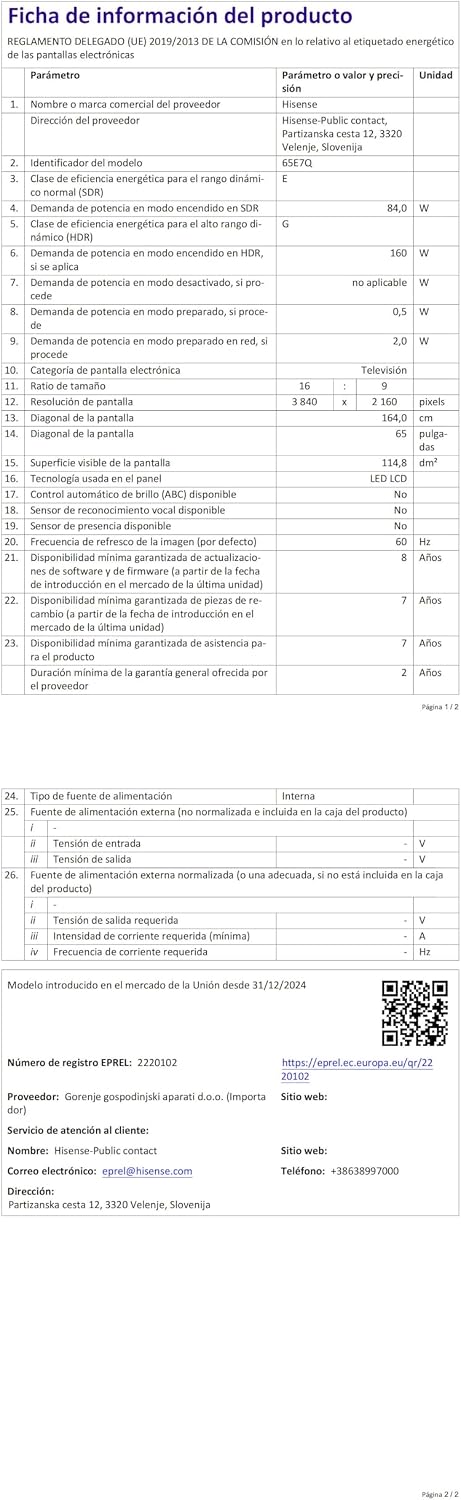
Energy label for the Hisense 65E7Q TV.
مصنوعات کی مزید تفصیلی معلومات کے لیے، براہ کرم EPREL ڈیٹا بیس سے رجوع کریں: https://eprel.ec.europa.eu/qr/2220102
9. وارنٹی اور سپورٹ
9.1 پروڈکٹ وارنٹی
یہ ہائی سینس ٹی وی ایک کے ساتھ آتا ہے۔ 3 سال کی مصنوعات کی وارنٹی. وارنٹی کے دعووں کے لیے براہ کرم اپنی خریداری کا ثبوت اپنے پاس رکھیں۔
9.2 اسپیئر پارٹس کی دستیابی
Spare parts for this model are guaranteed to be available in the EU for a duration of 10 سال from the product's market introduction.
9.3 کسٹمر سپورٹ
For technical assistance, troubleshooting, or warranty service, please contact Hisense customer support. Refer to the contact information provided in your warranty card or visit the official Hisense webآپ کے علاقے کے لیے سائٹ۔