
1. تعارف
This manual provides essential information for the safe and efficient operation of your ZDSSY ZD-L018AQ Smart Projector. This device offers 1080P native resolution with 4K support, 600 ANSI lumens brightness, electric focus, and auto keystone correction. It features integrated WiFi 6 and Bluetooth 5.2 for seamless connectivity and a built-in Smart TV OS with access to various applications.

Image 1.1: ZDSSY ZD-L018AQ Smart Projector, a compact device with a lens on the front and a stand for adjustable positioning.
2. باکس میں کیا ہے۔
تصدیق کریں کہ تمام آئٹمز ان باکسنگ پر موجود ہیں:
- منی پروجیکٹر
- ریموٹ کنٹرول
- پاور کی ہڈی
- صارف دستی (یہ دستاویز)
3. پروڈکٹ ختمview
پروجیکٹر کے اجزاء اور بندرگاہوں سے اپنے آپ کو واقف کرو۔
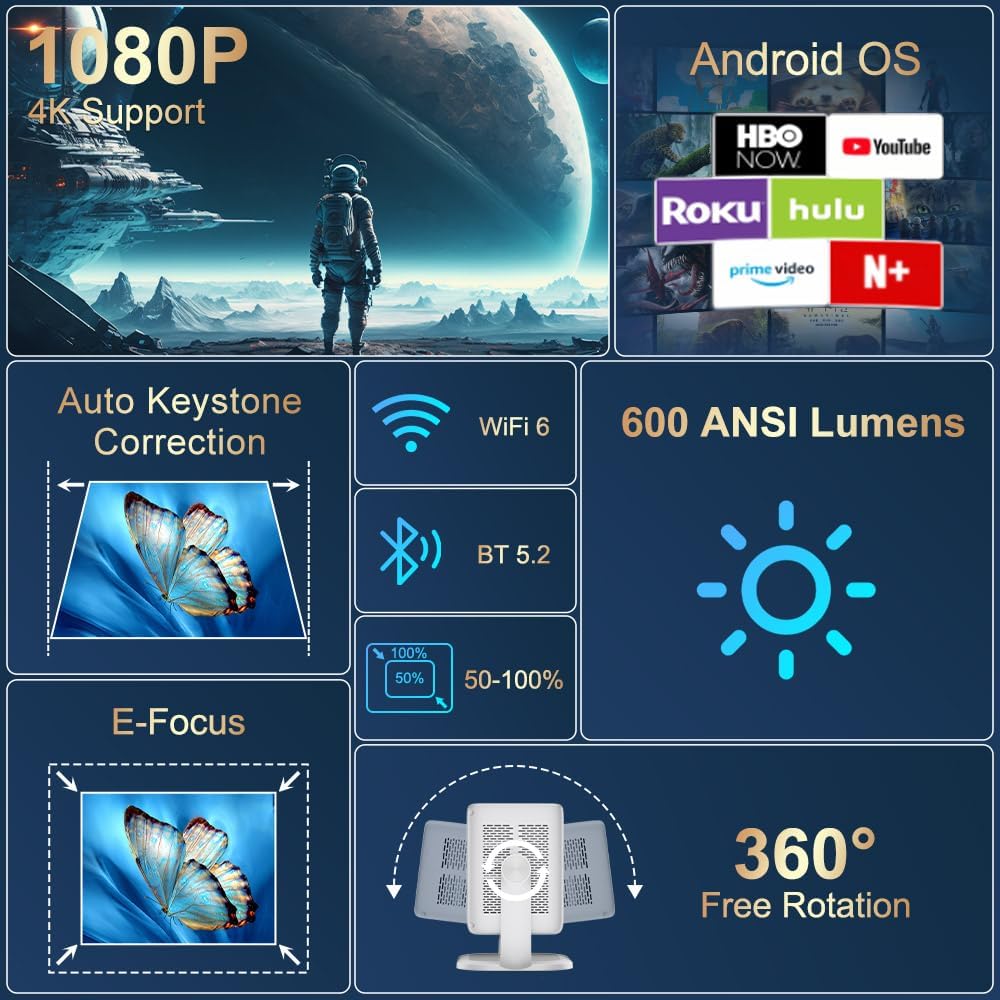
تصویر 3.1: ختمview of the projector's key features including 1080P 4K support, Auto Keystone, WiFi 6, Bluetooth 5.2, E-Focus, 600 ANSI Lumens, and 360° Free Rotation.
3.1 فرنٹ پینل
- پروجیکشن لینس: Emits the image onto the screen or surface.
- فوکس رنگ: Manual adjustment for image sharpness (though electric focus is primary).
3.2 پیچھے والا پینل
- پاور پورٹ: Connects to the included power cord.
- HDMI پورٹ: Connects to external devices like laptops, gaming consoles, or DVD players.
- USB پورٹ: USB سٹوریج کے آلات یا دیگر پیری فیرلز کو جوڑنے کے لیے۔
- آڈیو آؤٹ (3.5 ملی میٹر جیک): بیرونی ہیڈ فون یا اسپیکر کو جوڑنے کے لیے۔
- پاور بٹن: پروجیکٹر کو آن/آف کرتا ہے۔
4. سیٹ اپ
4.1 پاور کنکشن
- Connect the included power cord to the projector's power port.
- پاور کورڈ کے دوسرے سرے کو معیاری برقی آؤٹ لیٹ میں لگائیں۔
4.2 جگہ کا تعین اور ایڈجسٹمنٹ
Position the projector on a stable, flat surface. The integrated 360° rotatable and adjustable stand allows for flexible projection angles, including ceilings and walls.
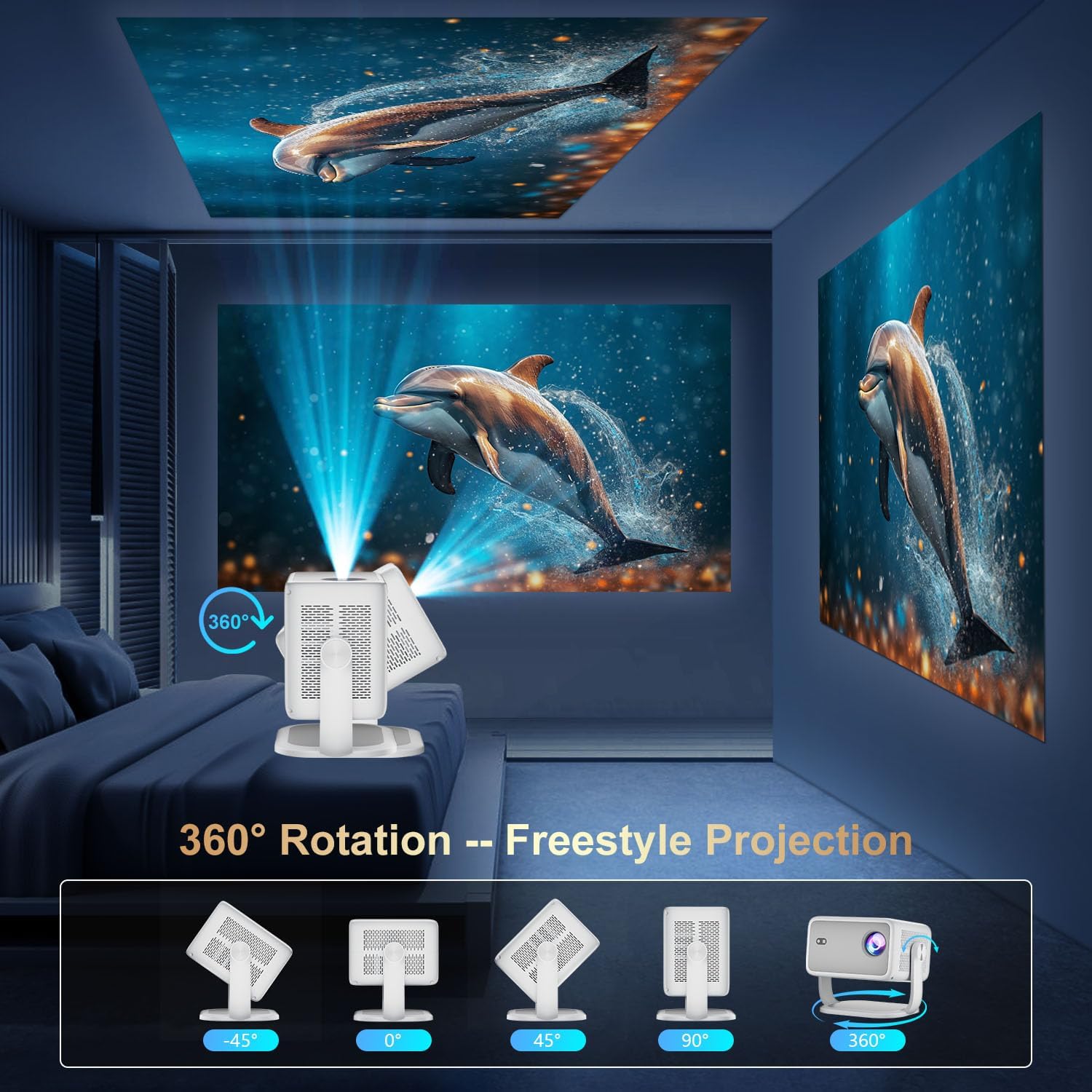
Image 4.1: The projector demonstrating its 360-degree rotation capability for versatile projection angles.
4.3 فوکس اور کی اسٹون کی تصحیح
The projector features automatic keystone correction and electric focus for quick image alignment and sharpness. Digital zoom (50%-100%) allows for image resizing without moving the unit.

Image 4.2: The projector automatically adjusting focus and keystone correction for a perfectly aligned and sharp image.
4.4 ابتدائی نیٹ ورک سیٹ اپ
- Power on the projector using the power button on the rear panel or the remote control.
- Navigate to 'Networking Setting' on the home screen using the remote.
- Select your WiFi network and enter the password to connect.
5. آپریٹنگ
5.1 ریموٹ کنٹرول کا استعمال
The included remote control is the primary interface for navigating the projector's Smart TV OS. It requires two AAA batteries (not included).
- پاور بٹن: پروجیکٹر کو آن/آف کرتا ہے۔
- نیویگیشن بٹن: Use the directional arrows to move between menu options.
- ٹھیک ہے بٹن: انتخاب کی تصدیق کرتا ہے۔
- پیچھے کا بٹن: پچھلی اسکرین پر واپس آجاتا ہے۔
- والیوم بٹن: آڈیو آؤٹ پٹ کو ایڈجسٹ کرتا ہے۔
5.2 Smart TV OS and Applications
The projector runs on a Smart TV OS, providing access to various streaming applications.

Image 5.1: The projector's home screen displaying various built-in applications such as Netflix, YouTube, Prime Video, and Hulu.
- From the home screen, select the desired application (e.g., Netflix, YouTube, Hulu, Prime Video).
- اگر ضرورت ہو تو اپنے اکاؤنٹ کی اسناد کے ساتھ لاگ ان کریں۔
- Browse and enjoy content.
- Additional apps can be downloaded from the App Store.
5.3 External Device Connectivity
Connect external devices via HDMI or USB:
- HDMI: Connect an HDMI cable from your external device to the projector's HDMI port. Select 'HDMI' input from the projector's home screen.
- USB: Insert a USB drive into the USB port. Navigate to 'Files' on the home screen to access content.
5.4 Wireless Screen Mirroring (Miracast/AirPlay)
The projector supports Miracast and AirPlay for wireless screen mirroring from compatible devices (Windows, iOS, Android).

Image 5.2: A smartphone wirelessly mirroring its screen content to the ZDSSY ZD-L018AQ Smart Projector via WiFi.
- یقینی بنائیں کہ آپ کا آلہ اور پروجیکٹر ایک ہی WiFi نیٹ ورک سے جڑے ہوئے ہیں۔
- On the projector, select the 'AirPin' or 'ScreenCast' option (may vary by firmware version).
- اپنے موبائل ڈیوائس پر، اسکرین مررنگ/کاسٹنگ کو فعال کریں اور دستیاب آلات کی فہرست سے پروجیکٹر کو منتخب کریں۔
5.5 بلوٹوتھ آڈیو
بہتر آڈیو کے لیے بیرونی بلوٹوتھ اسپیکر یا ہیڈ فون کو مربوط کریں۔

Image 5.3: The projector wirelessly connected to a soundbar via Bluetooth 5.2, enhancing the audio experience.
- Navigate to 'Bluetooth Setting' on the projector's home screen.
- بلوٹوتھ کو فعال کریں اور دستیاب آلات تلاش کریں۔
- Select your Bluetooth audio device to pair.
6 دیکھ بھال
Regular maintenance ensures optimal performance and longevity of your projector.
- لینس کی صفائی: Use a soft, lint-free cloth specifically designed for optical lenses to gently wipe the projection lens. Avoid abrasive materials or harsh chemicals.
- وینٹیلیشن: Ensure the projector's ventilation openings are clear of dust and obstructions to prevent overheating. Do not block the vents during operation.
- ذخیرہ: When not in use, store the projector in a cool, dry place, away from direct sunlight and extreme temperatures. Use the original packaging or a protective case if available.
- بجلی بند: Always power off the projector properly before unplugging it.
7 خرابیوں کا سراغ لگانا
عام مسائل کے حل کے لیے اس سیکشن کو دیکھیں۔
| مسئلہ | ممکنہ وجہ | حل |
|---|---|---|
| کوئی طاقت نہیں۔ | پاور کی ہڈی منسلک نہیں ہے؛ پاور آؤٹ لیٹ کا مسئلہ | بجلی کی ہڈی کا کنکشن چیک کریں؛ ایک مختلف دکان کی کوشش کریں. |
| کوئی تصویر نہیں۔ | Input source not selected; external device not connected. | Select correct input source (HDMI, USB); ensure external device is on and connected. |
| دھندلی تصویر | فوکس ایڈجسٹ نہیں ہوا؛ پروجیکٹر بہت قریب/دور۔ | Use electric focus or manual focus ring; adjust projector distance. |
| کوئی آواز نہیں۔ | حجم بہت کم؛ بیرونی آڈیو ڈیوائس منسلک/جوڑا نہیں ہے۔ | Increase volume; check Bluetooth pairing or 3.5mm audio cable connection. |
| وائی فائی/بلوٹوتھ کنیکٹیویٹی کے مسائل | Incorrect password; device out of range; interference. | Re-enter password; move closer to router/device; reduce interference. |
8. وضاحتیں
| فیچر | تفصیل |
|---|---|
| برانڈ | ZDSSY |
| ماڈل نمبر | ZD-L018AQ |
| ڈسپلے ریزولوشن | 1920 x 1080 (مقامی) |
| 4K سپورٹ | جی ہاں |
| چمک | 600 اے این ایس آئی لیمنس |
| کنیکٹوٹی ٹیکنالوجی | Bluetooth 5.2, HDMI, USB, Wi-Fi 6 |
| خصوصی خصوصیات | Auto Screen Alignment, Built-In Speaker, Built-In Wi-Fi, Portable, Electric Focus |
| تجویز کردہ استعمال | انڈور/ آؤٹ ڈور |
| مصنوعات کے طول و عرض | 6.69 x 5.9 x 9.05 انچ |
| شے کا وزن | 2.97 پاؤنڈ |
9. وارنٹی اور سپورٹ
ZDSSY is committed to providing high-quality products and customer satisfaction.
- کسٹمر سروس: 24/7 Professional Service is available for any inquiries or assistance.
- واپسی/تبادلے: A 30-day return or exchange policy is offered.
- تکنیکی معاونت: Lifetime technical support is provided for your product.
For further assistance, please refer to the contact information provided with your purchase or visit the official ZDSSY webسائٹ