
1. تعارف
This manual provides detailed instructions for the installation, operation, and maintenance of your ESX Vision VMX900DAB Universal 1-DIN Multimedia Receiver. Please read this manual thoroughly before using the device to ensure proper functionality and to maximize your user experience.
The ESX Vision VMX900DAB is a versatile 1-DIN multimedia receiver featuring a 9-inch multi-angle touchscreen display. It integrates advanced connectivity options including wireless Apple CarPlay and Android Auto, DAB+ digital radio, Bluetooth hands-free calling and audio streaming, and a comprehensive media player. The unit is designed for universal compatibility and offers a removable monitor for enhanced security.
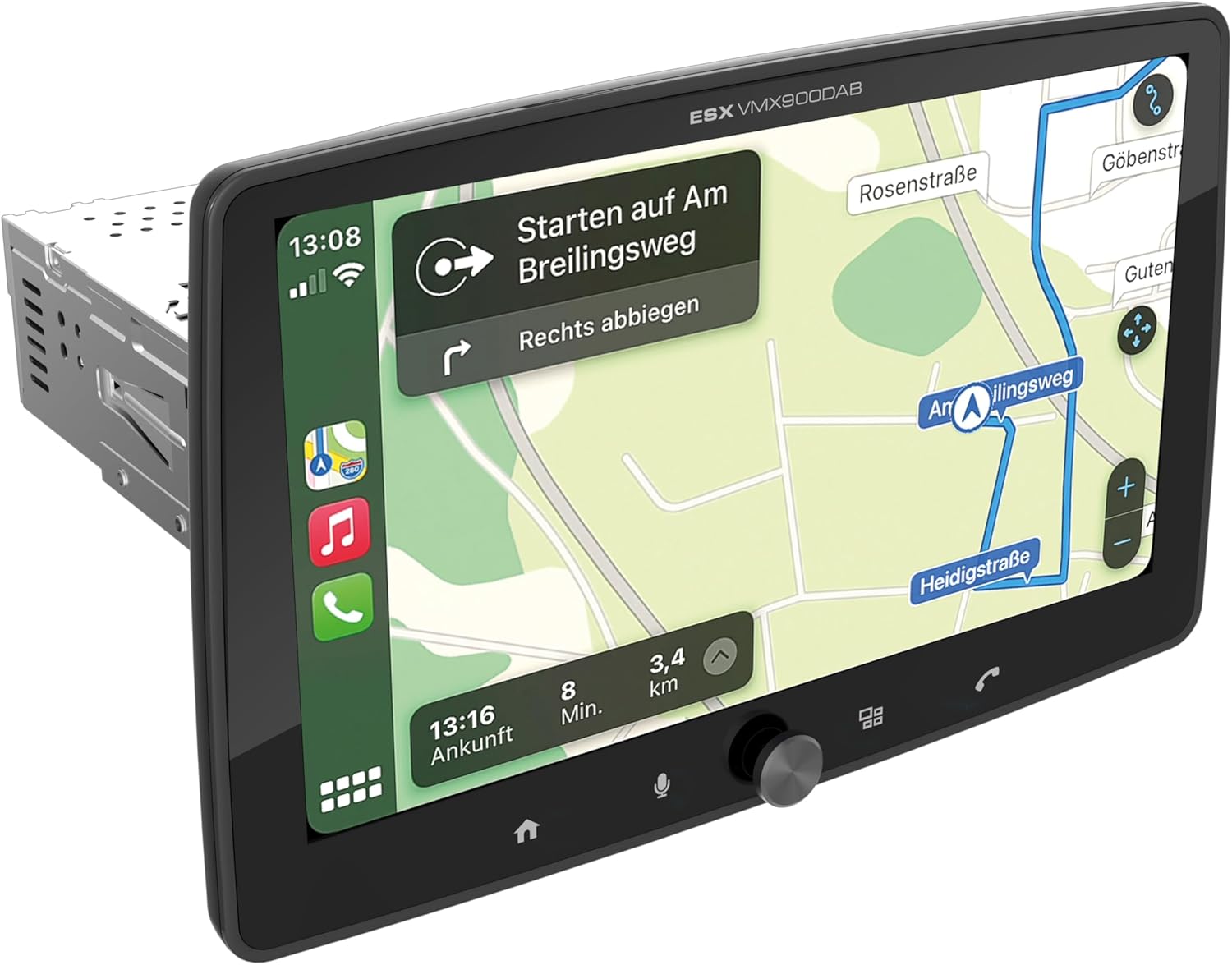
Figure 1.1: ESX Vision VMX900DAB with navigation interface.
2. سیٹ اپ اور انسٹالیشن
2.1 پیکیج کے مشمولات
تنصیب سے پہلے، تصدیق کریں کہ تمام اجزاء موجود ہیں:
- ESX Vision VMX900DAB Main Unit
- Detachable 9-inch Touchscreen Monitor
- Power/Speaker Wiring Harness
- بیرونی مائیکروفون
- GPS اینٹینا
- DAB+ اینٹینا
- USB Extension Cables
- بڑھتے ہوئے ہارڈ ویئر (بریکٹ، پیچ)
- صارف دستی (یہ دستاویز)

تصویر 2.1: شامل لوازمات اور اجزاء۔
2.2 مین یونٹ کو لگانا
- تنصیب شروع کرنے سے پہلے یقینی بنائیں کہ گاڑی کی بیٹری منقطع ہے۔
- Insert the 1-DIN main unit into the vehicle's dashboard opening.
- Secure the main unit using the provided mounting brackets and screws.
2.3 مانیٹر کو جوڑنا
The 9-inch monitor is detachable and connects to the main unit via a click system.
- Align the monitor's connector with the slot on the main unit.
- Gently push the monitor until it clicks securely into place.
- To remove, press the release button (if applicable) and pull the monitor away.

Figure 2.2: Detachable monitor with click system.
2.4 وائرنگ رابطے
Refer to the wiring diagram provided with the unit for specific connections. Key connections include:
- Power and Speakers: Connect the main wiring harness to the vehicle's power supply and speakers.
- بیرونی مائکروفون: Plug the external microphone into its dedicated input for optimal hands-free call quality.
- GPS اینٹینا: GPS اینٹینا کو جوڑیں اور اسے صاف جگہ پر لگائیں۔ view درست پوزیشننگ کے لیے آسمان کا۔
- DAB+ Antenna: Connect the DAB+ antenna for digital radio reception.
- USB پورٹس: Two USB-A ports are available. One for media playback and charging (1.5A), and another specifically for Apple CarPlay/Android Auto and charging (1.5A).
- آر سی اے پریampلائفائیڈ آؤٹ پٹ: Six 4V RCA outputs (FL/FR/RL/RR/SUB1/SUB2) are available for connecting external ampجان بچانے والے
- AUX RCA Inputs: Stereo audio and video inputs (L/R/VIDEO) for external audio/video sources.
- Camera RCA Inputs: Dedicated inputs for front and rear cameras.
- اسٹیئرنگ وہیل کنٹرول: Analog steering wheel remote control input (learnable) for integration with vehicle controls.
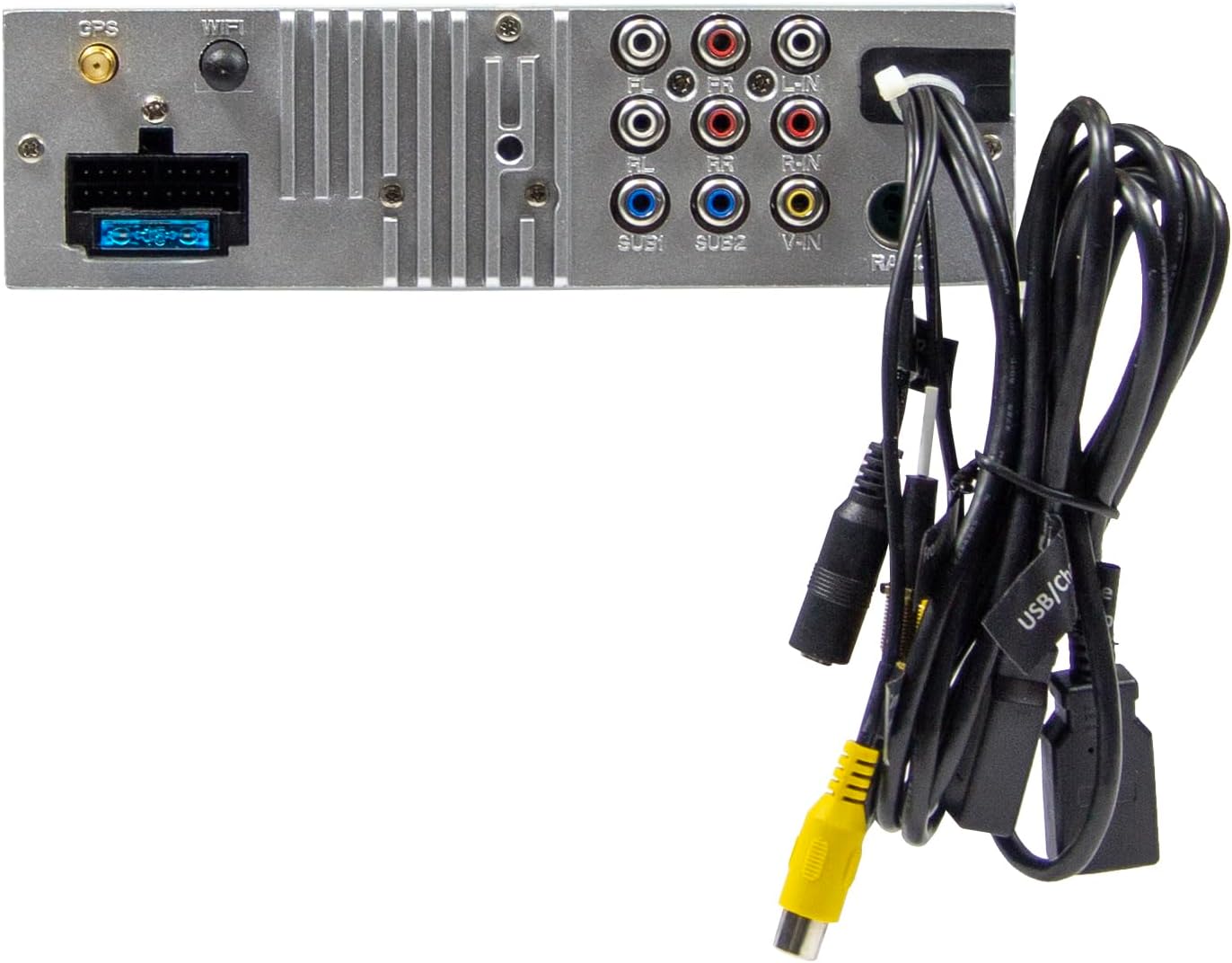
Figure 2.3: Rear connections of the main unit.
3. آپریٹنگ ہدایات
3.1 پاور آن/آف اور بنیادی کنٹرولز
- پاور آن: The unit will power on automatically with the vehicle's ignition.
- بجلی بند: The unit will power off automatically with the vehicle's ignition.
- حجم کنٹرول: Use the large rotary knob on the front panel to adjust the volume.
- فنکشن کیز: Four function keys on the front panel provide quick access to common features.
- ٹچ اسکرین: All primary functions are controlled via the 9-inch touchscreen.
3.2 ہوم اسکرین اور نیویگیشن
The home screen provides access to all main functions and applications.

Figure 3.1: Main menu/home screen.
3.3 Apple CarPlay اور Android Auto
The VMX900DAB supports both wireless and wired (via USB) Apple CarPlay and Android Auto.
- وائرلیس کنکشن: Enable Bluetooth and Wi-Fi on your smartphone and follow the on-screen prompts to connect.
- وائرڈ کنکشن: Connect your smartphone to the dedicated USB-A port using a compatible USB cable.
- Once connected, your smartphone's compatible apps (navigation, music, calls, messages) will be mirrored on the receiver's display.

Figure 3.2: Apple CarPlay interface.
3.4 Radio Functions (DAB+/FM/AM)
- ڈی اے بی + ریڈیو: Select the DAB+ icon from the home screen. The unit will scan for available digital radio stations.
- FM/AM ریڈیو: Select the Radio icon. Use the touchscreen to tune to stations, save presets, and access RDS functions.
3.5 Bluetooth Hands-Free and Audio Streaming
- جوڑا بنانا: Enable Bluetooth on your smartphone and search for the VMX900DAB. Select the device and confirm pairing.
- ہینڈز فری کالنگ: Once paired, you can make and receive calls directly through the receiver. The external microphone ensures clear voice transmission. Your phonebook can be synchronized.
- آڈیو سٹریمنگ: Stream music wirelessly from your smartphone to the receiver.
3.6 میڈیا پلے بیک
The unit supports various audio, video, and photo formats via USB.
- حمایت کی File فارمیٹس: AVI, FLV, MOV, MKV, WMV, WMA, MP3, FLAC, JPEG, PNG, BMP.
- Insert a USB drive into the media USB-A port. Select the USB icon from the home screen to browse and play media files.
3.7 مانیٹر ایڈجسٹمنٹ
The monitor can be tilted and adjusted in height to achieve the optimal viewing angle and prevent obstruction of vehicle controls.

Figure 3.3: Adjustable monitor mechanism.
3.8 حسب ضرورت
- Startup Logo: Customize the startup logo in the settings menu.
- RGB Key Illumination: Select from various RGB colors and animation effects for the key illumination.
- مینو زبانیں: Supported languages include DEU, ENG, SWE, ITA.
4 دیکھ بھال
4.1 یونٹ کی صفائی
- Use a soft, dry cloth to wipe the display and unit surfaces.
- For stubborn marks on the screen, use a screen cleaner specifically designed for electronic displays and a microfiber cloth.
- Do not use abrasive cleaners, solvents, or harsh chemicals, as these can damage the finish or screen.
4.2 عمومی نگہداشت
- یونٹ کو انتہائی درجہ حرارت، لمبے عرصے تک براہ راست سورج کی روشنی، یا زیادہ نمی کے سامنے آنے سے گریز کریں۔
- زیادہ گرمی سے بچنے کے لیے یونٹ کے ارد گرد مناسب وینٹیلیشن کو یقینی بنائیں۔
- When removing the monitor, handle it carefully to avoid damage to the connectors.
5 خرابیوں کا سراغ لگانا
If you encounter issues with your VMX900DAB, refer to the following common problems and solutions:
| مسئلہ | ممکنہ وجہ | حل |
|---|---|---|
| کوئی طاقت نہیں۔ | غلط وائرنگ؛ اڑا ہوا فیوز؛ گاڑی کی اگنیشن بند | Check power connections; Replace fuse; Turn on vehicle ignition |
| کوئی آواز نہیں۔ | حجم بہت کم؛ خاموش کر دیا گیا اسپیکر وائرنگ کا مسئلہ | Increase volume; Deactivate mute; Check speaker connections |
| بلوٹوتھ کنیکٹ نہیں ہو رہا ہے۔ | Bluetooth off on phone/unit; Incorrect pairing process | Ensure Bluetooth is on; Re-attempt pairing process |
| Apple CarPlay/Android Auto not starting | Incorrect USB port; Faulty USB cable; Phone not compatible/configured | Use the dedicated USB port; Try a different USB cable; Check phone settings for CarPlay/Android Auto |
| ریڈیو کا ناقص استقبال | Antenna not connected; Poor antenna placement; Weak signal area | Check antenna connection; Adjust antenna position; Try in a different location |
| مانیٹر ظاہر نہیں ہو رہا ہے۔ | Monitor not securely attached; Connector issue | Ensure monitor is fully clicked into place; Check for debris in connector |
If the problem persists after attempting these solutions, please contact ESX customer support or your authorized dealer.
6. وضاحتیں
| فیچر | تفصیلات |
|---|---|
| ماڈل نمبر | VMX900DAB |
| ڈسپلے | 9-inch Multi-angle Touchscreen |
| فارم فیکٹر | 1-DIN Universal |
| کنیکٹوٹی | USB, Bluetooth, Auxiliary |
| خصوصی خصوصیات | Wireless Apple CarPlay, Wireless Android Auto, Detachable Monitor with Click System |
| ریڈیو ٹونر | DAB+ (Digital Radio), FM/AM with RDS |
| بلوٹوتھ | Hands-free function, Audio Streaming |
| USB پورٹس | 2x USB-A (1.5A charging, one dedicated for CarPlay/Android Auto) |
| Max Music Power | 4 x 80 W |
| قبل ازampلائفائیڈ آؤٹ پٹس | 6x RCA (4V) (FL/FR/RL/RR/SUB1/SUB2) |
| AUX ان پٹ | RCA (L/R/VIDEO) |
| کیمرہ ان پٹ | RCA (Front/Rear) |
| حمایت کی File فارمیٹس | AVI, FLV, MOV, MKV, WMV, WMA, MP3, FLAC, JPEG, PNG, BMP |
| بیرونی مائیکروفون | شامل |
| اسٹیئرنگ وہیل کنٹرول | Analog (learnable) |
| GPS وصول کنندہ | شامل |
| مینو زبانیں | DEU, ENG, SWE, ITA |
| کل آؤٹ پٹ پاور | 320 واٹ |
| سراؤنڈ ساؤنڈ چینل کنفیگریشن | 4.2 |
| آڈیو آؤٹ پٹ وضع | سٹیریو |
7. وارنٹی اور سپورٹ
For warranty information, please refer to the documentation provided at the time of purchase or contact your authorized ESX dealer. Warranty terms and conditions may vary by region and retailer.
For technical support or further assistance, please contact ESX customer service or visit the official ESX webسپورٹ وسائل کے لیے سائٹ۔