
تعارف
Thank you for choosing the Billboard Soul Advance True Wireless Stereo (TWS) Earbuds. These earbuds are designed to provide a superior audio experience with Active Noise Cancellation (ANC), Environmental Noise Cancellation (ENC), and a comfortable, splash-resistant design. This manual will guide you through the setup, operation, and maintenance of your new earbuds.
حفاظتی معلومات
- Do not expose the earbuds or charging case to extreme temperatures or direct sunlight for extended periods.
- ڈیوائس کو گرانے یا ضرورت سے زیادہ طاقت لگانے سے گریز کریں۔
- Keep the earbuds and charging case away from water and liquids, except for light splashes as per IPX4 rating. Do not submerge.
- مصنوعات کو جدا کرنے یا اس میں ترمیم کرنے کی کوشش نہ کریں۔ اس سے وارنٹی ختم ہو جائے گی۔
- صرف فراہم کردہ چارجنگ کیبل یا تصدیق شدہ مساوی استعمال کریں۔
- Listening at high volumes for prolonged periods can cause hearing damage. Adjust volume to a safe level.
پیکیج کے مشمولات
- Billboard Soul Advance TWS Earbuds (Left and Right)
- چارجنگ کیس
- USB چارجنگ کیبل
- صارف دستی
پروڈکٹ ختمview
Familiarize yourself with the components of your Billboard Soul Advance TWS Earbuds and charging case.
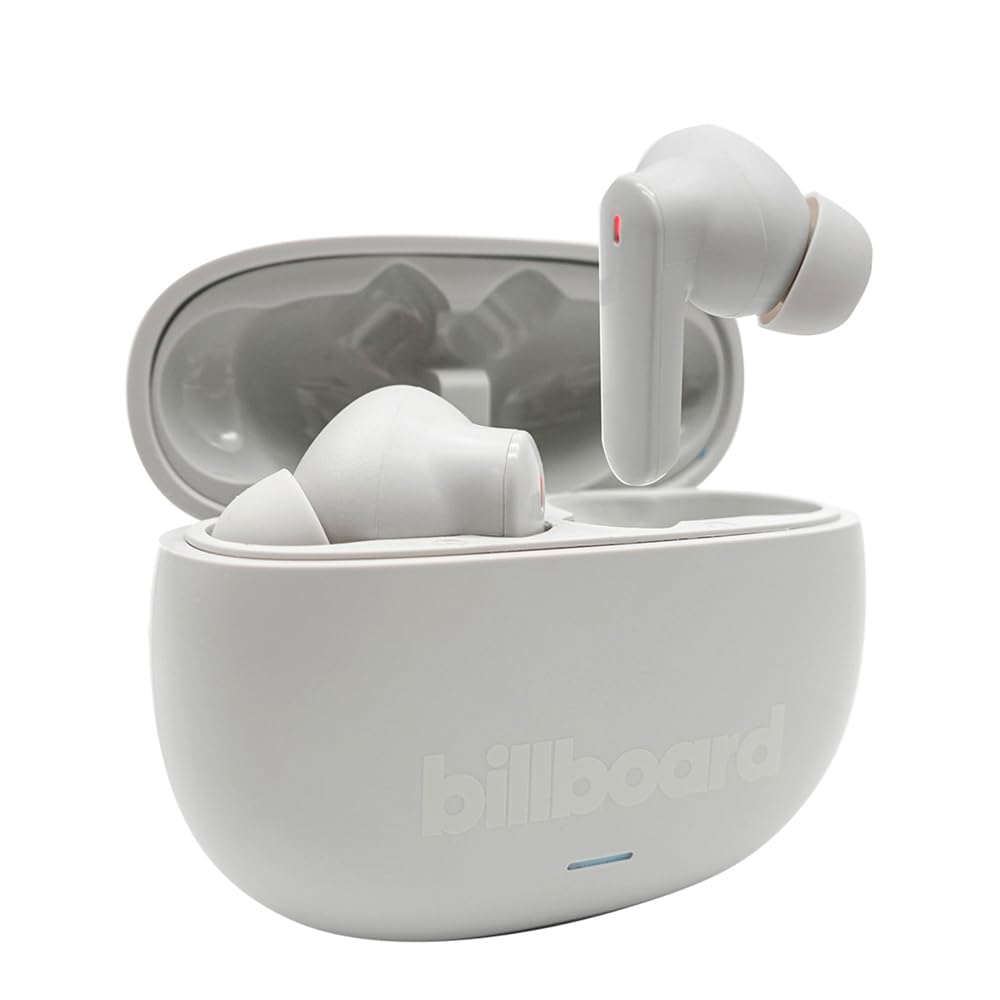
Image: The Billboard Soul Advance TWS Earbuds resting inside their open charging case. The earbuds are grey with red indicator lights visible, and the case is also grey with the 'billboard' logo embossed on the front.

Image: The Billboard Soul Advance TWS Earbuds charging case in a closed position. The case is grey with the 'billboard' logo embossed on the front and a small indicator light at the bottom.
Image: A person holding a single Billboard Soul Advance TWS earbud and the open charging case, demonstrating the compact size and design.
سیٹ اپ
1. ایئربڈز اور کیس کو چارج کرنا
پہلے استعمال سے پہلے، ایئربڈز اور چارجنگ کیس کو پوری طرح سے چارج کریں۔
- ایئربڈز کو چارجنگ کیس میں رکھیں۔ یقینی بنائیں کہ وہ اپنے متعلقہ سلاٹ میں صحیح طریقے سے بیٹھے ہیں۔
- USB چارجنگ کیبل کو کیس پر چارجنگ پورٹ سے اور USB پاور سورس (مثلاً، کمپیوٹر، وال اڈاپٹر) سے جوڑیں۔
- The indicator light on the case will show charging status. Once fully charged, the indicator will change or turn off. A full charge takes approximately 5 hours for the case and earbuds.
2. آلے کے ساتھ جوڑا بنانا
اپنے ایئربڈز کو اسمارٹ فون یا بلوٹوتھ سے چلنے والے دوسرے آلے سے منسلک کرنے کے لیے:
- چارجنگ کیس کھولیں۔ ایئربڈز خود بخود پیئرنگ موڈ میں داخل ہو جائیں گے، جس کی نشاندہی ایئربڈز پر چمکتی ہوئی لائٹس سے ہوتی ہے۔
- اپنے آلے پر، بلوٹوتھ کی ترتیبات پر جائیں اور یقینی بنائیں کہ بلوٹوتھ فعال ہے۔
- تلاش کریں۔ available devices and select "Billboard Soul Advance" from the list.
- Once connected, the earbud indicator lights will stop flashing.
- کیس سے ہٹائے جانے پر ایئربڈز خود بخود آخری جوڑی والے آلے سے دوبارہ جڑ جائیں گے، اگر ڈیوائس پر بلوٹوتھ فعال ہے۔
آپریٹنگ
ٹچ کنٹرولز
The earbuds feature touch-sensitive controls on their outer surface. Specific functions may vary slightly by device or app.
| ایکشن | فنکشن |
|---|---|
| سنگل ٹیپ (بائیں/دائیں) | موسیقی چلائیں/روکیں، کال کا جواب دیں/ختم کریں۔ |
| ڈبل تھپتھپائیں (دائیں) | اگلا ٹریک |
| دو بار تھپتھپائیں (بائیں) | پچھلا ٹریک |
| تین بار تھپتھپائیں (بائیں/دائیں) | وائس اسسٹنٹ کو فعال کریں۔ |
| دیر تک دبائیں (بائیں/دائیں) | ANC/ٹرانسپیرنسی موڈ ٹوگل کریں۔ |
| آنے والی کال لانگ پریس کریں۔ | کال مسترد کریں۔ |
فعال شور منسوخی (ANC) اور ماحولیاتی شور منسوخی (ENC)
The Soul Advance earbuds feature both ANC and ENC for an optimized listening and calling experience.
- فعال شور منسوخی (ANC): Reduces external ambient noise, allowing for a more immersive audio experience. Activate/deactivate by long-pressing an earbud.
- ماحولیاتی شور کی منسوخی (ENC): Utilizes 4 built-in microphones to filter out background noise during calls, ensuring clearer conversations for both you and the listener. This feature is active automatically during calls.

Image: A graphic illustrating the concept of Ultra ANC (Active Noise Cancellation), showing sound waves being blocked by headphones, emphasizing a quiet listening experience.
دیکھ بھال
صفائی
- نرم، خشک، لنٹ سے پاک کپڑے سے ایئر بڈز اور چارجنگ کیس کو آہستہ سے صاف کریں۔
- کھرچنے والے کلینر، الکحل یا کیمیائی سالوینٹس کا استعمال نہ کریں۔
- یقینی بنائیں کہ زیادہ سے زیادہ چارج کرنے کے لیے ایئربڈز اور کیس دونوں پر چارج کرنے والے رابطے صاف اور خشک ہوں۔
ذخیرہ
استعمال میں نہ ہونے پر، ایئربڈز کو ان کے چارجنگ کیس میں محفوظ کریں تاکہ ان کی حفاظت ہو اور انہیں چارج کیا جا سکے۔
خرابی کا سراغ لگانا
| مسئلہ | حل |
|---|---|
| ایئربڈز جوڑ نہیں رہے ہیں۔ | Ensure earbuds are charged. Turn off and on your device's Bluetooth. Forget the device in Bluetooth settings and re-pair. |
| صرف ایک ایئربڈ کام کر رہا ہے۔ | Place both earbuds back in the case, close it, then open again. Ensure both are charged. |
| کوئی آواز نہیں۔ | ڈیوائس کا حجم چیک کریں۔ یقینی بنائیں کہ ایئربڈز منسلک ہیں۔ مختلف آڈیو چلانے کی کوشش کریں۔ |
| چارجنگ کے مسائل | Ensure charging cable is securely connected. Clean charging contacts. Try a different USB port or cable. |
وضاحتیں
- ماڈل کا نام: Soul Advance
- کنیکٹوٹی ٹیکنالوجی: وائرلیس
- شامل اجزاء: چارجنگ اسٹیشن
- مخصوص استعمال: Outdoor activities, Sports
- چارج کرنے کا وقت: تقریباً 5 گھنٹے
- ہم آہنگ آلات: فونز، گولیاں
- پانی کی مزاحمت کی سطح: IPX4 (سپلیش مزاحم)
- بیٹری کی اوسط زندگی: 27 گھنٹے (چارج کیس کے ساتھ)
- کان کی جگہ کا تعین: کان میں
- فارم فیکٹر: کان میں
- شور کنٹرول: فعال شور منسوخی

Image: A graphic highlighting long battery life, showing headphones with '40H' and earbuds with '42H*' (battery + case), indicating extended usage times.
آفیشل پروڈکٹ ویڈیوز
Video: Product demonstration video (0:49 duration).
Video: Product feature overview (0:44 duration).
Video: Additional product details (0:44 duration).
Video: Short product highlight (0:24 duration).
Video: Product feature showcase (0:24 duration).
Video: Detailed product review/demonstration (1:57 duration).
Video: Quick product overview (0:34 duration).
Video: Comprehensive product guide (2:00 duration).
وارنٹی اور سپورٹ
Your Billboard Soul Advance TWS Earbuds come with a standard manufacturer's warranty. For detailed warranty information, please refer to the warranty card included in your package or visit the official Billboard website. For technical support or customer service, please contact the retailer or manufacturer directly.
For returns, a 30-day free return policy is available from the purchase date.