
تعارف
This manual provides essential information for the setup, operation, and maintenance of your VINABTY replacement remote control. This remote is designed to function as a direct replacement for your original Philips Smart LED TV remote, requiring no programming.
مطابقت
This remote control is compatible with the following Philips Smart LED TV models:
- 398GM10BEPHND000CR
- 398GM10BEPHNE000CR
- 43PUS8389/12
- 48OLED759/12
- 43PUS8909/12
- 50PUS8909/12
It features a lightweight and ergonomic design, providing a comfortable grip and stable performance with a transmission distance of up to 10 meters.
سیٹ اپ
بیٹری کی تنصیب
ریموٹ کنٹرول کو آپریشن کے لیے دو AAA بیٹریاں (شامل نہیں) کی ضرورت ہوتی ہے۔ بیٹریاں انسٹال کرنے کے لیے ان اقدامات پر عمل کریں:
- ریموٹ کنٹرول کے پیچھے بیٹری کے ٹوکری کا احاطہ تلاش کریں۔
- کور کو نیچے کی طرف سلائیڈ کریں یا کمپارٹمنٹ کو کھولنے کے لیے لیچ (اگر موجود ہو) کو دبائیں۔
- دو AAA بیٹریاں ڈالیں، اس بات کو یقینی بناتے ہوئے کہ مثبت (+) اور منفی (-) ٹرمینلز کمپارٹمنٹ کے اندر نشانات کے ساتھ درست طریقے سے سیدھ میں ہوں۔
- بیٹری کے کمپارٹمنٹ کور کو واپس جگہ پر سلائیڈ کرکے اس وقت تک تبدیل کریں جب تک کہ یہ محفوظ طریقے سے کلک نہ کرے۔

Image: Back of the remote control with the battery compartment open, illustrating where to insert two AAA batteries.
Once batteries are installed, the remote is ready for use with your compatible Philips Smart LED TV. No additional programming or pairing is required.
آپریٹنگ ہدایات
This section details the functions of the buttons on your VINABTY replacement remote control.
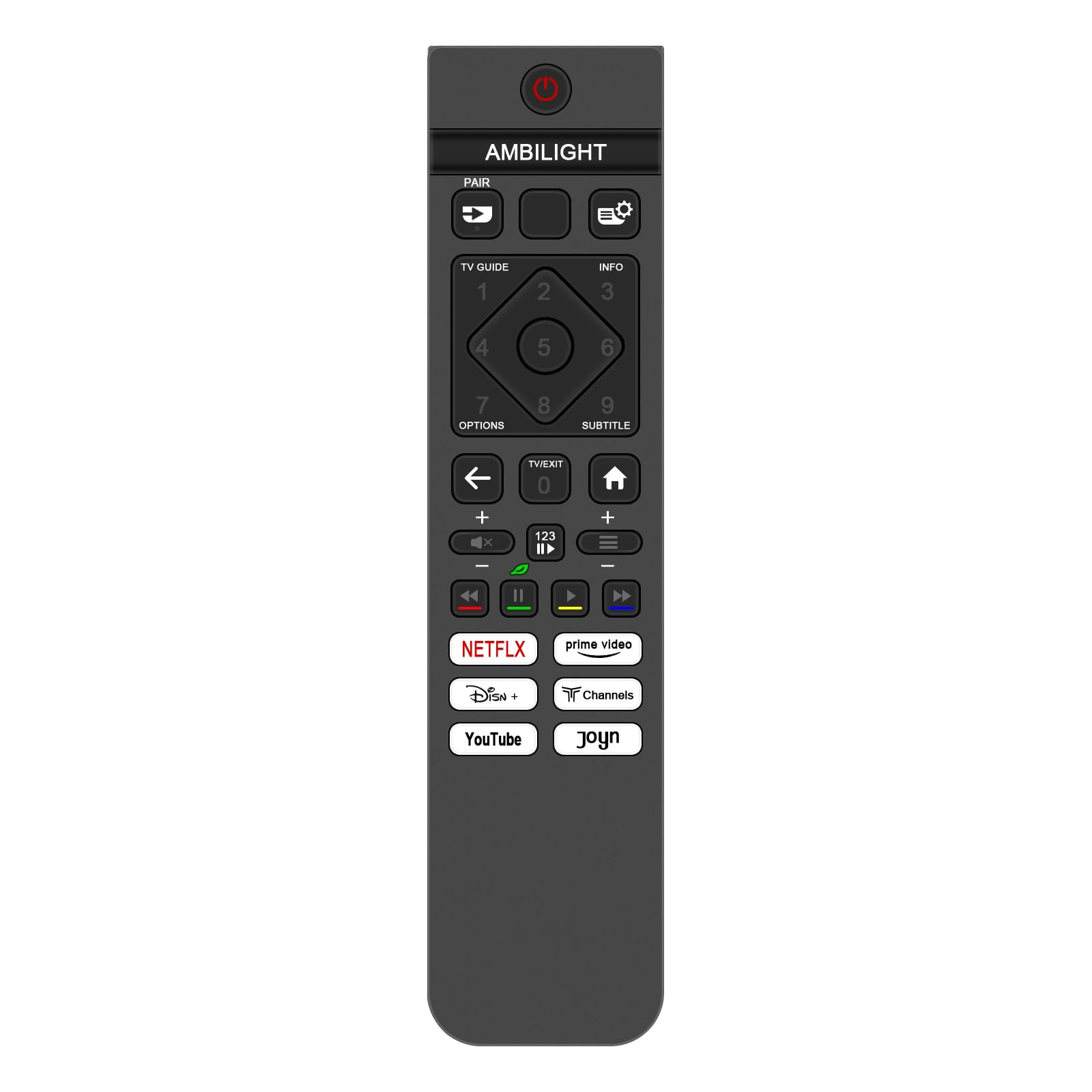
تصویر: سامنے view of the remote control, highlighting the layout and functions of various buttons.
- پاور بٹن (●): TV کو آن یا آف کرتا ہے۔
- Ambilight Button: Controls the Ambilight feature of your Philips TV.
- جوڑا بٹن: Used for pairing the remote if required by specific TV models (though generally not needed for this replacement remote).
- TV GUIDE Button: Accesses the electronic program guide.
- معلومات کا بٹن۔: موجودہ پروگرام یا ان پٹ کے بارے میں معلومات دکھاتا ہے۔
- Settings/Gear Icon Button: Opens the TV's settings menu.
- نمبر پیڈ (0-9): Used for direct channel selection or inputting numbers.
- اختیارات کا بٹن۔: Accesses contextual options or menus.
- SUBTITLE بٹن: Toggles subtitles on or off.
- نیویگیشن پیڈ (اوپر، نیچے، بائیں، دائیں، ٹھیک): Navigates through menus and selects items.
- پیچھے تیر کا بٹن: پچھلی اسکرین یا مینو پر واپس آجاتا ہے۔
- TV/EXIT Button: Switches to TV mode or exits the current menu/app.
- ہوم بٹن: Returns to the TV's home screen or smart hub.
- والیوم اوپر/نیچے (+/-): TV والیوم کو ایڈجسٹ کرتا ہے۔
- Mute Button (X icon): ٹی وی آڈیو کو خاموش یا خاموش کرتا ہے۔
- Channel Up/Down (P+/-): ٹی وی چینلز بدلتا ہے۔
- Media Control Buttons (Rewind, Play/Pause, Fast Forward, Stop): میڈیا پلے بیک کو کنٹرول کرتا ہے۔
- نیٹ فلکس بٹن: Netflix ایپلیکیشن تک براہ راست رسائی۔
- پرائم ویڈیو بٹن: پرائم ویڈیو ایپلیکیشن تک براہ راست رسائی۔
- ڈزنی + بٹن: Disney+ ایپلیکیشن تک براہ راست رسائی۔
- Channels Button: Direct access to the Channels application.
- یوٹیوب بٹن: Direct access to the YouTube application.
- Joyn Button: Direct access to the Joyn application.
Point the remote control directly at the TV's infrared receiver for optimal performance. Ensure there are no obstructions between the remote and the TV.
دیکھ بھال
مناسب دیکھ بھال اور دیکھ بھال آپ کے ریموٹ کنٹرول کی زندگی کو بڑھا دے گی۔
- صفائی: Use a soft, dry cloth to clean the remote control. For stubborn dirt, slightly dampur کپڑے کو پانی یا ہلکے صفائی کے محلول سے، پھر فوری طور پر خشک کریں۔ کھرچنے والے کلینر یا سالوینٹس کا استعمال نہ کریں۔
- بیٹری کی تبدیلی: جب ریموٹ کا ردعمل سست ہو جائے یا کام کرنا بند کردے تو بیٹریاں بدل دیں۔ ہمیشہ ایک ہی وقت میں دونوں بیٹریوں کو ایک ہی قسم کی نئی (AAA) سے تبدیل کریں۔
- ذخیرہ: Store the remote control in a cool, dry place away from direct sunlight and extreme temperatures. If the remote will not be used for an extended period, remove the batteries to prevent leakage.
- قطرے اور اثرات سے بچیں۔: قطروں اور اثرات سے بچ کر ریموٹ کو جسمانی نقصان سے بچائیں۔
خرابی کا سراغ لگانا
اگر آپ کو اپنے ریموٹ کنٹرول کے ساتھ مسائل کا سامنا کرنا پڑتا ہے، تو درج ذیل عام حل سے رجوع کریں:
| مسئلہ | حل |
|---|---|
| ریموٹ جواب نہیں دے رہا ہے۔ |
|
| Buttons are not working or are sticky. |
|
| دور دراز کی حد کم ہو گئی ہے۔ |
|
اگر ان حلوں کو آزمانے کے بعد بھی مسئلہ برقرار رہتا ہے، تو براہ کرم کسٹمر سپورٹ سے رابطہ کریں۔
وضاحتیں
| فیچر | تفصیل |
|---|---|
| برانڈ | ونابٹی |
| ماڈل نمبر | 398GM10BEPHND000CR |
| ہم آہنگ آلات | Philips Smart LED TVs (Specific models listed in Introduction) |
| کنیکٹوٹی ٹیکنالوجی | اورکت (IR) |
| کنٹرولر کی قسم | پش بٹن کنٹرول |
| زیادہ سے زیادہ رینج | 10 میٹر |
| طاقت کا منبع | 2 x AAA بیٹریاں (شامل نہیں) |
| طول و عرض | 12 x 6 x 1 سینٹی میٹر (تقریباً 4.72 x 2.36 x 0.39 انچ) |
| وزن | 80 جی (تقریباً 2.82 اونس) |
| رنگ | سیاہ |
| خصوصی خصوصیت | ایرگونومک ڈیزائن |

Image: Remote control dimensions, showing a length of 19.2 cm (7.56 in) and a width of 4.5 cm (1.77 in).
حمایت
For further assistance or inquiries, please refer to the seller's contact information provided at the point of purchase. If there is an issue with the product or service, contact the seller for a satisfactory response within 24 hours.