
تعارف
Thank you for choosing the Aroepurt Phone Case and Tempered Glass Screen Protector for your Kxd Blue Sea A16 Plus. This manual provides essential information for the proper installation, use, and maintenance of your product to ensure optimal protection and functionality.
باکس میں کیا ہے۔
- 1 x Aroepurt Phone Case (Model IMDH-HS)
- 1 ایکس ٹیمپرڈ گلاس اسکرین پروٹیکٹر
سیٹ اپ اور انسٹالیشن
1 ٹیمپرڈ گلاس اسکرین پروٹیکٹر انسٹال کرنا
Follow these steps to correctly install the tempered glass screen protector:
- سکرین صاف کریں: اپنے فون کی اسکرین کو اچھی طرح صاف کرنے کے لیے مائکرو فائبر کپڑا استعمال کریں، تمام دھول، دھبوں اور فنگر پرنٹس کو ہٹا دیں۔ یقینی بنائیں کہ اسکرین مکمل طور پر خشک ہے۔
- محافظ کو سیدھ میں رکھیں: اپنے فون کی اسکرین کے ساتھ ٹمپرڈ گلاس اسکرین پروٹیکٹر کو احتیاط سے سیدھ میں رکھیں۔ اسپیکر، کیمرہ، اور ہوم بٹن (اگر قابل اطلاق ہو) کے کٹ آؤٹس پر توجہ دیں۔
- درخواست دیں: Once aligned, gently place the protector onto the screen. It will adhere automatically.
- بلبلوں کو ہٹا دیں: اگر کوئی بلبلے نمودار ہوں تو نرم کپڑے یا نچوڑ کے استعمال سے انہیں آہستہ سے اسکرین کے کناروں کی طرف دھکیلیں۔

Image: Key features of the tempered glass screen protector.

Image: Tempered glass screen protector demonstrating scratch resistance.
2 فون کیس انسٹال کرنا
To install the phone case:
- Ensure your phone is clean and free of debris.
- Gently insert your Kxd Blue Sea A16 Plus phone into the soft silicone frame of the case.
- Press firmly around the edges to ensure the phone is securely seated within the case.

Image: Phone case highlighting shockproof features and material composition.
آپریٹنگ ہدایات
Using the Integrated Ring Support
The phone case features an adhesive metal finger ring support for enhanced grip and hands-free viewing. This ring can rotate 360 degrees and pivot 180 degrees.
- انگلی کی گرفت: Slide your finger through the ring for a secure hold, reducing the risk of accidental drops.
- کک اسٹینڈ فنکشن: Rotate the ring to a desired angle to prop up your phone for comfortable horizontal or vertical viewing
- ایک ہاتھ کا آپریشن: The ring support allows for easier one-handed operation, enabling you to reach more areas of your screen.

Image: Demonstrating improved one-hand operation with the ring support.
Magnetic Car Mount Compatibility
The metal plate integrated into the ring support allows for compatibility with magnetic car mounts. Simply attach your phone case to a magnetic car mount (not included) for secure in-car navigation or hands-free use.
نوٹ: This case does نہیں support wireless charging when the metal ring is attached or if the phone is placed on a wireless charger with the case on. Please remove the case for wireless charging.

Image: Phone case demonstrating magnetic car mount compatibility and ring rotation.
دیکھ بھال
To keep your phone case and screen protector in optimal condition:
- کیس کی صفائی: کیس کو باقاعدگی سے نرم سے صاف کریں، ڈیamp کپڑا ضدی گندگی کے لیے، ایک ہلکے صابن کا محلول استعمال کیا جا سکتا ہے، اس کے بعد اسے صاف کر کے صاف کیا جا سکتا ہے۔amp کپڑے اور ہوا خشک کرنا.
- اسکرین پروٹیکٹر کی صفائی: Use a microfiber cloth to gently wipe the screen protector. For smudges, a screen cleaner spray designed for electronics can be used.
- سخت کیمیکلز سے بچیں: Do not use abrasive cleaners, solvents, or harsh chemicals, as these can damage the case material or screen protector coating.
- انتہائی درجہ حرارت سے بچیں: Prolonged exposure to extreme heat or cold can affect the material integrity of the case.
خرابی کا سراغ لگانا
یہ سیکشن عام سوالات یا معمولی مسائل کو حل کرتا ہے جن کا آپ کو سامنا ہو سکتا ہے۔
- Q: My screen protector has bubbles after installation.
- A: Small bubbles can often be pushed out towards the edges using a soft cloth or a credit card wrapped in a cloth. If large bubbles persist, it might indicate dust particles. Carefully lift a corner of the protector, remove any dust with a dust absorber sticker, and reapply.
- Q: The ring support feels loose.
- A: The ring support is designed for 360-degree rotation and 180-degree pivot. If it feels excessively loose or does not hold its position, ensure it is fully extended or retracted. If the adhesive base is loose, it may need to be re-adhered or replaced.
- Q: My phone is not wirelessly charging with the case on.
- A: The integrated metal ring in the case interferes with wireless charging. Please remove the case before placing your phone on a wireless charging pad.
وضاحتیں
| فیچر | تفصیل |
|---|---|
| پروڈکٹ ماڈل | IMDH-HS |
| مطابقت | Kxd Blue Sea A16 Plus |
| کیس کا مواد | Hard PC (Polycarbonate) back panel, Soft Silicone frame |
| کیس کی خصوصیات | Four-corner Shock Airbags, Frosted surface, Colorful Reflect Light, Raised edges for camera and screen protection |
| رِنگ سپورٹ | Adhesive metal, 360° rotation, 180° pivot, Magnetic car mount compatible |
| Screen Protector Type | ٹیمپرڈ گلاس |
| Screen Protector Hardness | 9H |
| Screen Protector Transparency | 99.9% Super Transparency |
| مصنوعات کے طول و عرض | 0.39 x 0.39 x 0.39 inches (Case only, approximate) |
| شے کا وزن | 2.46 ounces (Case only, approximate) |
| کارخانہ دار | GX2503-239 ARO-IMD |
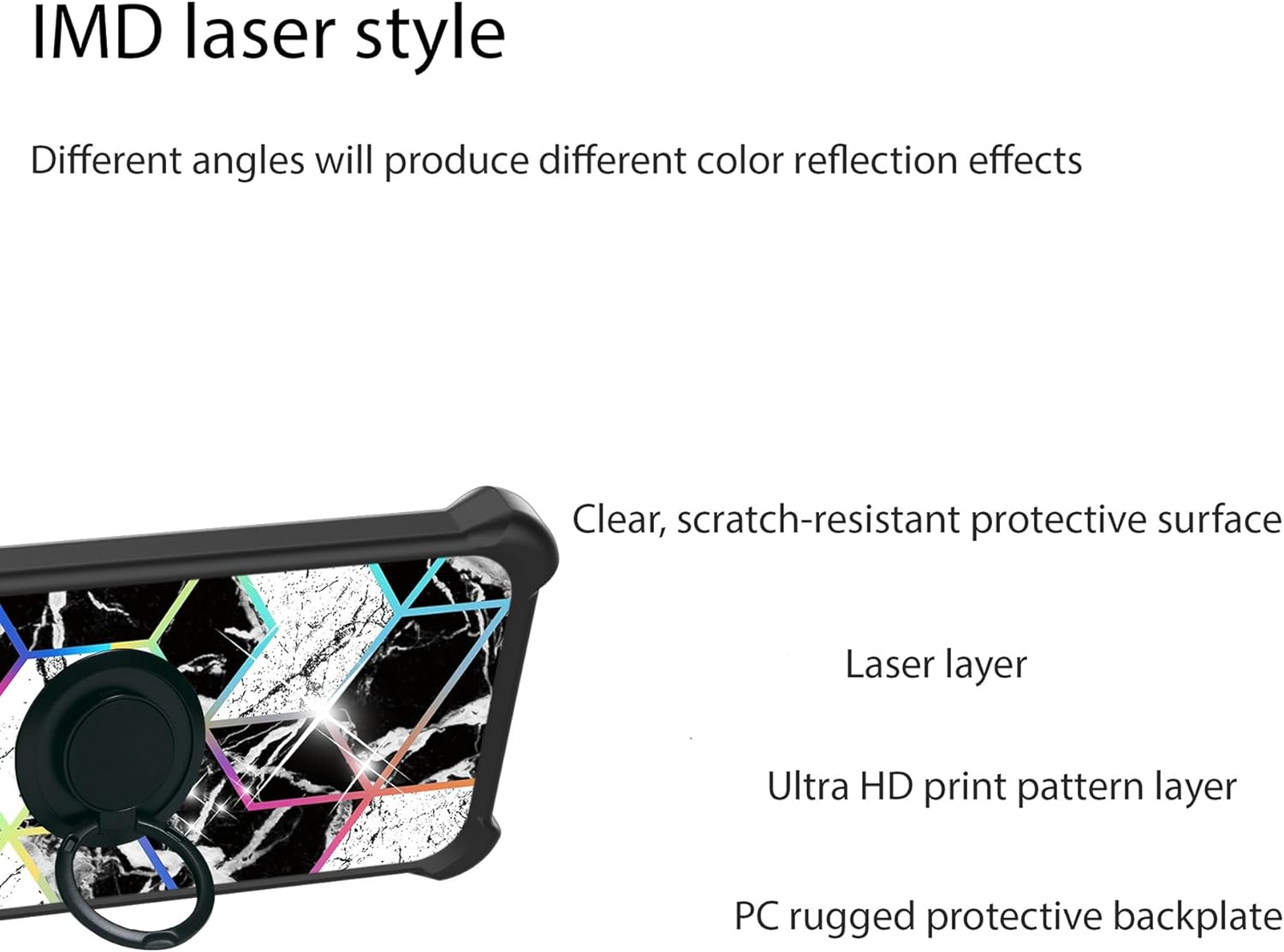
تصویر: پھٹا view of the case's multi-layer back panel construction.
وارنٹی اور سپورٹ
For warranty information or customer support, please refer to the seller's policy on the platform where the product was purchased or contact Aroepurt customer service directly through their official channels. Keep your purchase receipt as proof of purchase.
مینوفیکچرر: GX2503-239 ARO-IMD
تاریخ پہلی دستیابی: 17 اپریل 2025