
تعارف
This manual provides comprehensive instructions for the OMAIC EN2Q36H replacement remote control, designed for Hisense Smart TVs. It covers essential information regarding setup, operation, and maintenance to ensure optimal performance and user experience. This remote offers a direct replacement solution without the need for complex programming.
سیٹ اپ
The OMAIC EN2Q36H remote control is designed for immediate use with compatible Hisense Smart TVs. No programming or pairing is required.
بیٹری کی تنصیب
- ریموٹ کنٹرول کے پیچھے بیٹری کے ٹوکرے کو تلاش کریں۔
- Slide the battery cover downwards or in the direction indicated by the arrow to open it.
- دو AAA الکلائن بیٹریاں ڈالیں (شامل نہیں)، اس بات کو یقینی بناتے ہوئے کہ مثبت (+) اور منفی (-) ٹرمینلز کمپارٹمنٹ کے اندر نشانات کے ساتھ درست طریقے سے سیدھ میں ہوں۔
- بیٹری کور کو اس وقت تک تبدیل کریں جب تک کہ یہ محفوظ طریقے سے کلک نہ کرے۔
Once batteries are installed, the remote is ready to operate your Hisense Smart TV.

آپریٹنگ ہدایات
This remote control utilizes infrared (IR) technology for communication with your Hisense Smart TV. Ensure a clear line of sight between the remote and the TV's IR receiver for optimal performance.
کلیدی خصوصیات
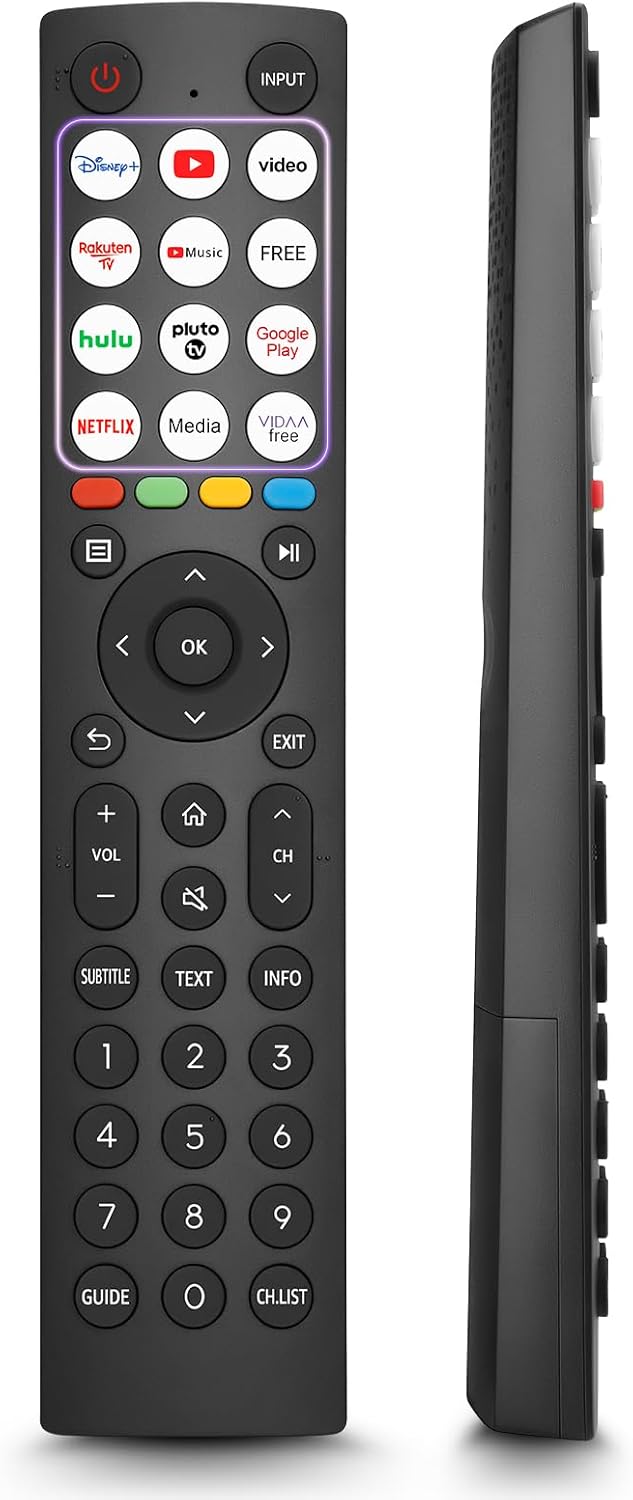
- 12 Shortcut Buttons: Quickly access popular streaming services and applications with dedicated buttons.
- Strong IR Signal: Provides a longer transmission distance and quick response without noticeable delay.
- پائیدار تعمیر: Made from high-quality ABS and silicone materials for extended lifespan.

بٹن کے افعال
Familiarize yourself with the functions of each button on your OMAIC EN2Q36H remote control:
| بٹن | فنکشن |
|---|---|
| پاور | Switches the TV on or into standby mode. |
| ان پٹ | ان پٹ ذرائع (HDMI، AV، وغیرہ) کو منتخب کرتا ہے۔ |
| APP Buttons | Quick access buttons for specific applications (e.g., Disney+, Netflix, YouTube). |
| مینو | Displays the Quick Setup menu. |
| میڈیا کنٹرول | Buttons for Play, Pause, Stop, Fast Forward, Rewind. |
| Navigation (Up/Down/Left/Right) | Navigates on-screen menus and adjusts system settings. |
| OK | Confirms selection in on-screen menus. |
| واپس | پچھلے مینو میں لوٹتا ہے۔ |
| باہر نکلیں | موجودہ مینو سے باہر نکلتا ہے۔ |
| VOL +/- | حجم کی سطح کو ایڈجسٹ کرتا ہے۔ |
| گھر | Enters the Home screen. |
| گونگا | ٹی وی کی آواز کو خاموش یا بحال کرتا ہے۔ |
| CH ^/v | Switches channels. |
| سب ٹائٹل | Activates or deactivates subtitle mode. |
| متن | Turns teletext function on and off. |
| INFO | Displays current program information. |
| NUMBER Buttons (0-9) | Direct channel selection or number input. |
| گائیڈ | Displays the Electronic Programme Guide (DTV input). |
| CH.LST | Displays the Channel List on the screen. |

Compatible Hisense TV Models
The OMAIC EN2Q36H replacement remote control is compatible with the following Hisense VIDAA 4K HDTV Smart TV series:
- 32A4K, 40A4K, 43A4K
- 32A5KQ, 40A5KQ
- 43A6K, 50A6K, 55A6K, 58A6K, 65A6K, 70A6K, 75A6K, 85A6K
- 55U6KQ, 65U6KQ
- 43A7KQ, 50A7KQ, 55A7KQ, 65A7KQ, 75A7KQ
- 43E7KQ, 50E7KQ, 55E7KQ, 65E7KQ, 75E7KQ
دیکھ بھال
اپنے ریموٹ کنٹرول کی لمبی عمر اور مناسب کام کو یقینی بنانے کے لیے، بحالی کے ان رہنما خطوط پر عمل کریں:
- صفائی: Use a soft, dry cloth to clean the remote. Avoid using liquid cleaners or abrasive materials, as they may damage the surface or internal components.
- بیٹری کی تبدیلی: Replace batteries when the remote's response becomes sluggish or stops working. Always replace both batteries at the same time with new ones of the same type (AAA alkaline).
- ذخیرہ: ریموٹ کو براہ راست سورج کی روشنی، انتہائی درجہ حرارت اور زیادہ نمی سے دور ٹھنڈی، خشک جگہ پر اسٹور کریں۔
- قطروں سے بچیں: ریموٹ کو جسمانی اثرات سے بچائیں، کیونکہ قطرے اندرونی سرکٹری کو نقصان پہنچا سکتے ہیں۔
خرابی کا سراغ لگانا
If you encounter issues with your remote control, refer to the following troubleshooting steps:
| مسئلہ | ممکنہ وجہ | حل |
|---|---|---|
| ریموٹ جواب نہیں دے رہا ہے۔ | مردہ یا غلط طریقے سے داخل کی گئی بیٹریاں۔ | بیٹریوں کو نئی AAA الکلائن بیٹریوں سے بدلیں، درست قطبیت کو یقینی بناتے ہوئے۔ |
| ریموٹ جواب نہیں دے رہا ہے۔ | ریموٹ اور ٹی وی کے درمیان رکاوٹ۔ | Ensure a clear line of sight to the TV's IR receiver. Remove any objects blocking the path. |
| ریموٹ جواب نہیں دے رہا ہے۔ | ریموٹ ٹی وی سے بہت دور ہے۔ | Move closer to the TV. The remote has an extended range, but extreme distances may affect performance. |
| بٹن چپچپا یا غیر جوابی ہوتے ہیں۔ | بٹنوں کے نیچے گندگی یا ملبہ۔ | نرم، خشک کپڑے سے بٹنوں کے ارد گرد آہستہ سے صاف کریں۔ مائعات سے پرہیز کریں۔ |
| مخصوص افعال کام نہیں کر رہے ہیں۔ | TV model incompatibility (rare). | Verify your Hisense TV model is listed in the 'Compatible Hisense TV Models' section. |
وضاحتیں
| فیچر | تفصیل |
|---|---|
| ماڈل کا نام | EN2Q36H |
| برانڈ | OMAIC |
| ہم آہنگ آلات | Hisense Smart TVs |
| کنیکٹوٹی ٹیکنالوجی | اورکت (IR) |
| بٹنوں کی تعداد | 48 |
| کنٹرول کی قسم | بٹن کنٹرول |
| خصوصی خصوصیات | Universal, Comfortable |
| رنگ | سیاہ |
| بیٹری کی تفصیل | AAA (Alkaline) |
| Supported Devices (Max) | 1 |
| پروڈکٹ کے طول و عرض (تقریبا) | 34.7 x 24.7 x 2.2 سینٹی میٹر |
| پروڈکٹ کا وزن (تقریباً) | 80 گرام |

وارنٹی اور سپورٹ
OMAIC is committed to the quality and compatibility of its replacement remote controls. We provide professional after-sales support to ensure customer satisfaction.
If you have any questions or concerns regarding your OMAIC EN2Q36H remote control or your order, please contact us directly. Our support team aims to respond to inquiries within 12 working hours.