
1. تعارف
The ALIGATOR AZA930B is a mobile phone designed with ease of use in mind, particularly for seniors. It features a large keypad, a clear 2.8-inch color display, and essential safety functions such as an SOS button and SOS locator. This manual provides detailed instructions on how to set up, operate, maintain, and troubleshoot your device to ensure optimal performance and safety.
2. حفاظتی معلومات
Please read this section carefully before using your phone to ensure safe and proper operation.
- بیٹری کی حفاظت: Use only ALIGATOR approved batteries and chargers. Do not short-circuit, puncture, or expose the battery to extreme temperatures. Dispose of batteries properly.
- چارج کرنا: The phone does not include a charger. Use a compatible USB-C charger (recommended model ALIGATOR CHA0047) with a power output of 2.5-3W. Avoid charging in damp حالات
- سماعت کی حفاظت: سماعت کو پہنچنے والے نقصان کو روکنے کے لیے زیادہ مقدار میں سننے سے گریز کریں۔
- ڈرائیونگ سیفٹی: Always prioritize driving safety. Use hands-free accessories and obey all local laws and regulations regarding mobile phone use while driving.
- طبی آلات: Maintain a safe distance between the phone and medical devices such as pacemakers. Consult your physician and the medical device manufacturer for specific guidelines.
- پانی کی مزاحمت: یہ فون پانی سے بچنے والا نہیں ہے۔ مائعات کی نمائش سے گریز کریں۔
3. پیکیج کے مشمولات
تصدیق کریں کہ تمام اشیاء آپ کے پروڈکٹ پیکج میں موجود ہیں:
- ALIGATOR AZA930B Mobile Phone
- چارجنگ ڈاک
- صارف دستی (یہ دستاویز)
- Note: Charger is not included and must be purchased separately.
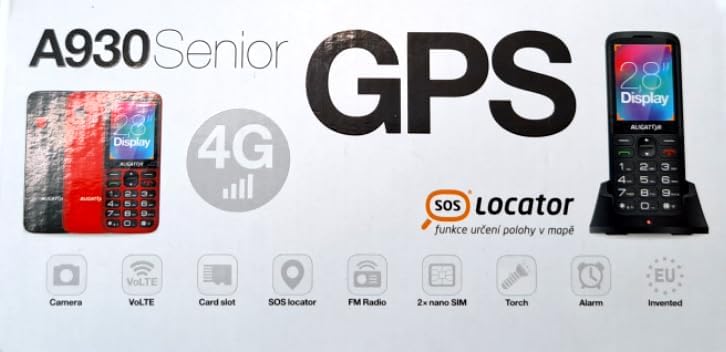
Figure 3.1: Product packaging illustrating the phone, charging dock, and various features such as 4G connectivity, GPS, SOS Locator, camera, VoLTE, card slot, FM radio, torch, and alarm. The box also indicates the 2.8-inch display.
4. سیٹ اپ
4.1 سم کارڈ داخل کرنا
The ALIGATOR AZA930B supports Dual SIM (2 x Nano SIM) functionality. To insert SIM cards:
- فون کو پاور آف کریں۔
- پچھلا کور اور بیٹری ہٹا دیں۔
- Locate the SIM card slots. Insert your Nano SIM cards into the designated slots, ensuring the gold contacts face down and the cut corner aligns correctly.
- بیٹری اور بیک کور کو تبدیل کریں۔
4.2. مائیکرو ایس ڈی کارڈ داخل کرنا
The phone supports a Micro SD memory card up to 256 GB for additional storage.
- Follow steps 1 and 2 from "4.1. Inserting SIM Cards".
- Locate the Micro SD card slot. Insert the Micro SD card with the gold contacts facing down until it clicks into place.
- بیٹری اور بیک کور کو تبدیل کریں۔
4.3. ابتدائی چارجنگ
Before first use, fully charge the phone's 1700 mAh Li-ion battery.
- Connect the USB-C cable (not included) to the phone's USB-C port or place the phone in the charging dock.
- Connect the other end of the cable to a compatible charger (e.g., ALIGATOR CHA0047, 2.5-3W) or a powered USB port.
- The charging indicator will illuminate. A full charge may take several hours.

Figure 4.1: The ALIGATOR AZA930B phone placed in its dedicated charging dock. The phone's screen shows the current time and network signal indicators.

Figure 4.2: Detail from the product box, explicitly showing an icon indicating that a charger is not included and specifying a recommended charger power of 2.5-3W.
5. آپریٹنگ ہدایات
5.1. پاور آن/آف
- پاور آن کرنے کے لیے: Press and hold the Power/End Call button (red button) until the screen lights up.
- پاور آف کرنا: Press and hold the Power/End Call button until the power off options appear, then select "Power off".
5.2۔ بنیادی کال کے افعال
- کال کرنا: Enter the phone number using the large keypad and press the Call button (green button).
- کال کا جواب دینا: When the phone rings, press the Call button (green button).
- کال ختم کرنا: Press the Power/End Call button (red button).
- ہینڈز فری: During a call, activate hands-free mode via the on-screen option or a dedicated button if available.
5.3. SOS Button and SOS Locator
The SOS button is a critical safety feature, allowing quick contact in emergencies.
- SOS بٹن: Located on the back of the phone (often red). Press and hold this button to activate the emergency sequence.
- SOS Presets: You can set up to 5 preset emergency contacts. When the SOS button is pressed, the phone will automatically call these numbers in sequence and send an emergency SMS.
- SOS Locator: This function sends the phone's location via SMS to the emergency contacts after the SOS button is pressed. The recipient can then view the location on a map via a web link provided in the SMS. This feature utilizes both GSM and GPS for location accuracy.

شکل 5.1: پیچھے view of the ALIGATOR AZA930B, showing the prominent red SOS button and the speaker grille for clear audio.

شکل 5.2: زاویہ والا پیچھے view of the ALIGATOR AZA930B, demonstrating the activated flashlight feature.
5.4. "Zachranka" Rescue Application
The "Zachranka" application is a mobile emergency call application pre-installed on the device.
- It provides quick contact with emergency medical services or mountain rescue.
- The application is valid in Austria, Hungary, the Czech Republic, and in the territories of the Slovak mountains.
- For more information, refer to the "Zachranka" app's official resources.

شکل 5.3: سامنے اور پیچھے views of the ALIGATOR AZA930B, accompanied by the "Zachranka" rescue application logo, indicating its integration with the device.
5.5. دیگر خصوصیات
- فون بک: Store up to 500 contacts.
- پیغام رسانی: Send and receive SMS messages (memory for 100 SMS). Supports sending photos via MMS.
- ملٹی میڈیا:
- ایف ایم ریڈیو: Listen to FM radio stations.
- میڈیا پلیئر: آڈیو اور ویڈیو چلائیں۔ files stored on the phone or Micro SD card.
- وائس ریکارڈر: وائس میمو ریکارڈ کریں۔
- ٹارچ: روشنی کے لیے بلٹ ان ٹارچ کو چالو کریں۔
- اوزار: Includes Alarm, Calculator, and SIM toolkit support.
- بلوٹوتھ: Connect to Bluetooth headsets or other devices.
- وائبریشن الارم: Set the phone to vibrate for incoming calls or notifications.
- دھنیں: Choose from 10+1 pre-installed melodies.
- خودکار وقت کی ایڈجسٹمنٹ: The phone can automatically adjust its time.

شکل 5.4: سامنے view of the ALIGATOR AZA930B, highlighting its user-friendly large keypad and vibrant color display.
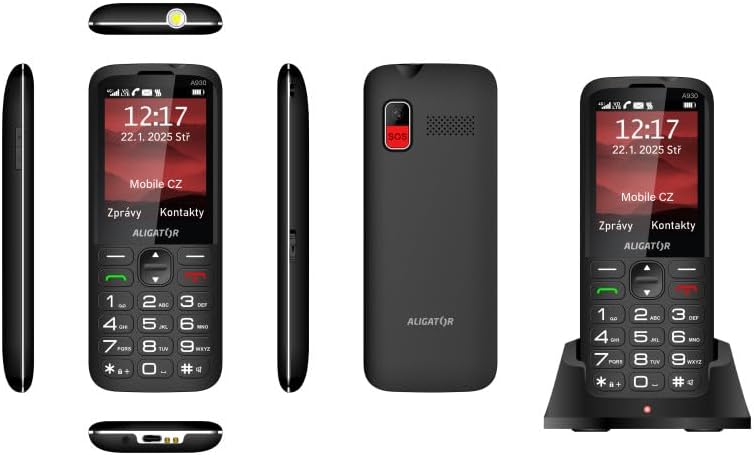
شکل 5.5: جامع views of the ALIGATOR AZA930B, illustrating its design from the top, sides, front, back, and when seated in its charging dock.
6 دیکھ بھال
- صفائی: فون کی سطح کو صاف کرنے کے لیے نرم، خشک کپڑا استعمال کریں۔ سخت کیمیکلز یا کھرچنے والے مواد کے استعمال سے پرہیز کریں۔
- بیٹری کی دیکھ بھال: To prolong battery life, avoid fully discharging the battery frequently. Store the phone in a cool, dry place if not used for extended periods.
- ذخیرہ: فون کو انتہائی درجہ حرارت، براہ راست سورج کی روشنی اور گرد آلود ماحول سے دور رکھیں۔
7 خرابیوں کا سراغ لگانا
| مسئلہ | ممکنہ وجہ | حل |
|---|---|---|
| فون آن نہیں ہوتا۔ | بیٹری ختم ہو گئی ہے یا صحیح طریقے سے نہیں ڈالی گئی ہے۔ | بیٹری چارج کریں۔ یقینی بنائیں کہ بیٹری صحیح طریقے سے ڈالی گئی ہے۔ |
| کوئی نیٹ ورک سگنل نہیں ہے۔ | SIM card not inserted correctly or out of network coverage. | Reinsert SIM card. Move to an area with better network coverage. |
| کالز نہیں کر سکتے یا وصول نہیں کر سکتے۔ | No credit, SIM card issue, or network problem. | Check your account balance. Verify SIM card insertion. Contact your network provider. |
| SOS بٹن کام نہیں کر رہا ہے۔ | SOS numbers not set up or incorrect. | Ensure SOS numbers are correctly configured in settings. Check network signal. |
| بیٹری تیزی سے ختم ہو جاتی ہے۔ | High usage, background apps, or aging battery. | Reduce screen brightness. Close unnecessary applications. Consider replacing the battery if it's old. |
8. وضاحتیں
| فیچر | تفصیل |
|---|---|
| ماڈل نمبر | AZA930B |
| ڈسپلے | 2.8-inch TFT Color Display |
| سم کارڈ سلاٹ | Dual SIM (2 x Nano SIM) |
| میموری کارڈ سپورٹ | مائیکرو ایس ڈی 256 جی بی تک |
| بیٹری | 1700 ایم اے ایچ لی آئن |
| ٹاک ٹائم | 480 منٹ تک |
| اسٹینڈ بائی ٹائم | 10 دن تک |
| کیمرہ | 1.9 MP |
| کنیکٹوٹی | 4G/LTE/VoLTE, Bluetooth |
| چارجنگ پورٹ | USB-C |
| ہیڈ فون جیک | 3.5 ملی میٹر |
| طول و عرض | 14.3 x 5.8 x 1.36 سینٹی میٹر |
| وزن | 95 گرام |
| آپریٹنگ سسٹم | Symbian 9.1 |
| رنگ | سیاہ |
نوٹ: وضاحتیں پیشگی اطلاع کے بغیر تبدیل کی جاسکتی ہیں۔
9. وارنٹی اور سپورٹ
ALIGATOR products are designed and manufactured to the highest quality standards. For detailed warranty information, including terms, conditions, and duration, please refer to the warranty card included with your product or visit the official ALIGATOR webسائٹ
For technical support, service, or inquiries regarding your ALIGATOR AZA930B mobile phone, please contact ALIGATOR customer service or visit their official support channels. Keep your purchase receipt and product serial number (IMEI) handy when seeking support.
- IMEI 1: 357140835088496
- IMEI 2: 357140835088504
- Barcode/UPC: 8596426108267