
1. تعارف
The waveshare ESP32-C6 1.47inch Display Development Board (Model: ESP32-C6 1.47inch Display-M) is a microcontroller development board designed for various applications, particularly in the Internet of Things (IoT) and Human-Machine Interface (HMI) domains. It features a 1.47-inch LCD display with 172x320 resolution and 262K colors, integrated with an ESP32-C6 chip. This board supports Wi-Fi 6 and Bluetooth 5 (LE) connectivity, making it suitable for wireless communication projects. It includes a pre-soldered header for easy integration into existing systems or breadboards.
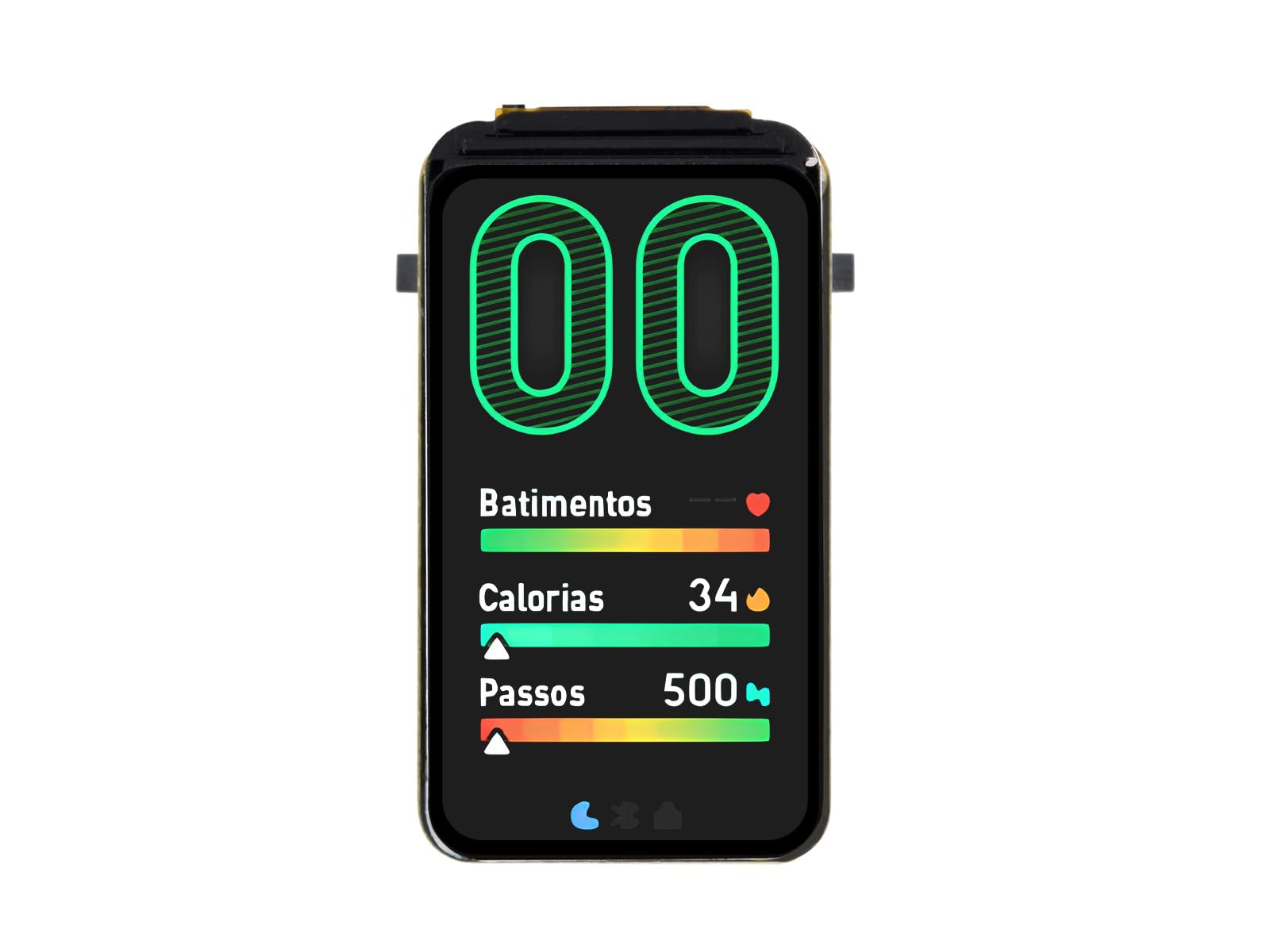
Figure 1: waveshare ESP32-C6 1.47inch Display Development Board.
2. کلیدی خصوصیات
- مائکروکانٹرولر: ESP32-C6, featuring a high-performance 32-bit RISC-V processor (up to 160 MHz) and a low-power 32-bit RISC-V processor (up to 20 MHz).
- ڈسپلے: Onboard 1.47-inch TFT LCD with 172x320 resolution and 262K colors, controlled by the ST7789 chip.
- وائرلیس رابطہ: Supports 2.4GHz Wi-Fi 6 (802.11 b/g/n) and Bluetooth 5 (LE) with an onboard antenna.
- یادداشت: Built-in 320KB ROM, 512KB HP SRAM, 16KB LP SRAM, and 4MB Flash memory.
- پیری فیرلز: Multiple IO interfaces, full-speed USB port, and an onboard TF card slot for external storage.
- پاور مینجمنٹ: Supports flexible clock and multiple power modes for low power consumption.
- ایل ای ڈی: Built-in RGB LED with a clear acrylic sandwich panel for lighting effects.

Figure 2: ESP32-C6 chip architecture suitable for AIoT applications.

Figure 3: Wi-Fi 6 and Bluetooth 5 (LE) connectivity features.
3. سیٹ اپ ہدایات
To begin using your ESP32-C6 1.47inch Display Development Board, follow these general setup steps:
- پاور کنکشن: Connect the board to a power source using the USB Type-C port. A standard USB cable (not included) can be used to connect to a computer or a 5V USB power adapter.
- ڈرائیور کی تنصیب: Depending on your operating system, you may need to install USB-to-serial drivers (e.g., CP210x or CH340 drivers) to allow your computer to communicate with the ESP32-C6 board. Refer to the official Espressif documentation or Waveshare resources for specific driver requirements.
- ترقیاتی ماحول کا سیٹ اپ: Install a suitable Integrated Development Environment (IDE) such as Arduino IDE with ESP32 board support, or Espressif's ESP-IDF. These environments provide the necessary tools for writing, compiling, and uploading code to the board.
- First Program Upload: Connect the board to your computer via USB. Select the correct board model and serial port in your IDE. Upload a simple test program, such as a 'Hello World' example for the serial monitor or a basic display test, to verify communication and functionality.
4. Operating the Board
The ESP32-C6 1.47inch Display Development Board operates by executing firmware uploaded to its flash memory. Interaction typically involves:
- پروگرامنگ: Use your chosen development environment (e.g., Arduino IDE, ESP-IDF) to write C/C++ code. This code defines the board's behavior, including display output, sensor readings, network communication, and peripheral control.
- Uploading Firmware: After compiling your code, upload it to the board via the USB Type-C connection. The board will automatically reset and run the new firmware.
- تعامل ڈسپلے: Utilize libraries like LVGL (Light and Versatile Graphics Library) to create graphical user interfaces on the 1.47-inch LCD. The display can show text, images, and interactive elements.
- نیٹ ورک کمیونیکیشن: Implement Wi-Fi 6 for internet connectivity or local network communication, and Bluetooth 5 (LE) for short-range wireless data exchange with other devices.
- پیریفرل کنٹرول: Access and control external components connected to the GPIO pins, such as sensors, actuators, or other modules.
5. درخواست کے منظرنامے۔
The versatility of the ESP32-C6 1.47inch Display Development Board makes it suitable for a range of applications:
- انسانی مشین انٹرفیس (HMI): Develop interactive user interfaces for control panels, smart home devices, or industrial equipment. The integrated display allows for direct user feedback and input.
- LVGL GUI ترقی: Leverage the LVGL graphics library to create rich, embedded graphical user interfaces with visual effects, optimized for low memory requirements.
- IoT آلات: Build connected devices that require both display capabilities and robust wireless communication (Wi-Fi 6, Bluetooth 5 LE) for data logging, remote control, or sensor monitoring.
- پہننے کے قابل ٹیکنالوجی: Its compact size and display make it a candidate for prototyping small, display-enabled wearable devices.
- Educational Projects: An excellent platform for learning about embedded systems, microcontrollers, wireless communication, and GUI development.

شکل 4: بصری سابقamples of potential application scenarios for the development board.
6. Pinout and Onboard Components
Understanding the pinout and onboard components is crucial for connecting external peripherals and utilizing the board's full capabilities.

Figure 5: Pinout and labeled components of the ESP32-C6 1.47inch Display Development Board.
6.1 Key Onboard Components:
- ESP32-C6FH4: The main microcontroller unit.
- ME6217C33M5G: Low dropout regulator, providing 800mA output (Max.).
- TF کارڈ سلاٹ: For external Micro SD card storage of pictures or files.
- Onboard ceramic antenna: For Wi-Fi and Bluetooth connectivity.
- بوٹ بٹن: Used for entering download mode.
- ری سیٹ بٹن: Resets the ESP32-C6 chip.
6.2 GPIO Pin Functions:
The board provides various General Purpose Input/Output (GPIO) pins, which can be configured for different functions such as UART, I2C, SPI, PWM, and ADC. Refer to the pinout diagram (Figure 5) for specific pin assignments and capabilities. These pins allow for expansion with multiple peripherals via the GPIO header.
7. وضاحتیں
Detailed technical specifications for the ESP32-C6 1.47inch Display Development Board:
| پیرامیٹر کا نام | قدر |
|---|---|
| برانڈ | لہروں کا حصہ |
| ماڈل کا نام | ESP32-C6 1.47inch Display-M |
| ماسٹر چپ | ESP32-C6 |
| سی پی یو کی رفتار | 160 MHz (High-performance RISC-V) |
| کنیکٹوٹی ٹیکنالوجی | Wi-Fi 6 (802.11 b/g/n), Bluetooth 5 (LE) |
| ڈسپلے کی قسم | TFT LCD |
| ڈسپلے سائز | 1.47 انچ |
| ڈسپلے ریزولوشن | 172 × 320 پکسلز |
| رنگ کی گہرائی ڈسپلے کریں۔ | 262K رنگ |
| Display Control Chip | ST7789 |
| رام میموری ٹیکنالوجی | SRAM (512KB HP SRAM, 16KB LP SRAM) |
| فلیش میموری | 4MB |
| آن بورڈ ڈیوائس | مائیکرو ایس ڈی کارڈ سلاٹ |
| انٹرفیس | USB ٹائپ سی |
| ہم آہنگ آلات | Cameras, Computers (PCs, laptops, tablets), Storage devices (TF cards) |
| شے کا وزن | 0.01 کلوگرام |
| یو پی سی | 788046389784 |

Figure 6: Outline dimensions of the development board.
8 خرابیوں کا سراغ لگانا
This section addresses common issues you might encounter during the use of your development board.
8.1 Serial Port Connection or Burning Failure
مسئلہ: The serial port cannot be connected, or the program burning (uploading) fails after re-downloading a module program.
حل: This often occurs when the module is not in download mode. To resolve this:
- Press and Hold BOOT: دیر تک دبائیں بوٹ بورڈ پر بٹن.
- Press RESET: While holding the BOOT button, briefly press the ری سیٹ کریں۔ بٹن
- Release RESET: ری سیٹ بٹن جاری کریں۔
- Release BOOT: Finally, release the BOOT button.
At this point, the module should enter download mode, allowing you to connect via the serial port and successfully upload your program. This procedure can resolve most issues related to inability to download firmware.
9 دیکھ بھال
To ensure the longevity and proper functioning of your ESP32-C6 1.47inch Display Development Board, observe the following maintenance guidelines:
- دیکھ بھال کے ساتھ ہینڈل: Avoid dropping the board or subjecting it to physical shock, which can damage components or solder joints.
- جامد خارج ہونے والا مادہ: Always handle the board in an environment free of static electricity. Use anti-static mats or wrist straps when working with electronic components.
- بجلی کی فراہمی: Use a stable 5V power supply. Over-voltagای بورڈ کو مستقل طور پر نقصان پہنچا سکتا ہے۔
- ماحولیاتی حالات: Store and operate the board in a dry environment, away from extreme temperatures, humidity, and corrosive substances.
- صفائی: اگر ضروری ہو تو، مٹی کو ہٹانے کے لیے بورڈ کو نرم، خشک برش یا کمپریسڈ ہوا سے صاف کریں۔ مائعات یا سخت کیمیکل استعمال کرنے سے گریز کریں۔
- فرم ویئر اپ ڈیٹس: Regularly check for and apply firmware updates for the ESP32-C6 chip and relevant libraries to benefit from bug fixes and new features.
10. وارنٹی اور سپورٹ
For warranty information, technical support, and additional resources, please refer to the official waveshare webسائٹ یا ان کی کسٹمر سروس سے براہ راست رابطہ کریں۔ کسی بھی وارنٹی دعووں کے لیے خریداری کے ثبوت کے طور پر اپنی خریداری کی رسید رکھیں۔
آن لائن وسائل:
- کا دورہ کریں۔ ایمیزون پر ویو شیئر اسٹور for product updates and related items.
- Consult the official Espressif documentation for detailed information on the ESP32-C6 chip.