
1. تعارف
Thank you for choosing the KLIM KLCD-0582 CD Cassette Boombox. This versatile audio system combines classic and modern features, allowing you to enjoy music from various sources including CDs, cassette tapes, AM/FM radio, Bluetooth-enabled devices, USB drives, and auxiliary input. This manual provides detailed instructions for safe operation, setup, and maintenance of your device. Please read it thoroughly before use and retain it for future reference.
2. اہم حفاظتی ہدایات
- یونٹ کو چلانے سے پہلے ان ہدایات کو بغور پڑھیں۔
- مستقبل کے حوالے کے لیے یہ ہدایات رکھیں۔
- مصنوعات اور آپریٹنگ ہدایات میں تمام انتباہات پر دھیان دیں۔
- تمام ہدایات پر عمل کریں۔
- اس آلے کو پانی کے قریب استعمال نہ کریں۔
- صرف خشک کپڑے سے صاف کریں۔
- وینٹیلیشن کے کسی بھی سوراخ کو مسدود نہ کریں۔ کارخانہ دار کی ہدایات کے مطابق انسٹال کریں۔
- گرمی کے کسی بھی ذرائع جیسے ریڈی ایٹرز، ہیٹ رجسٹر، چولہے، یا دیگر آلات (بشمول amplifiers) جو گرمی پیدا کرتی ہے۔
- بجلی کی ہڈی کو چلنے یا چوٹکی ہونے سے بچائیں، خاص طور پر پلگ، سہولت رسیپٹیکلز، اور اس مقام پر جہاں وہ آلات سے باہر نکلتے ہیں۔
- صرف مینوفیکچرر کی طرف سے مخصوص منسلکات/لوازمات استعمال کریں۔
- بجلی کے طوفان کے دوران یا طویل عرصے تک غیر استعمال ہونے پر اس آلات کو ان پلگ کریں۔
- تمام سروسنگ کو اہل سروس اہلکاروں سے رجوع کریں۔ سروسنگ کی ضرورت اس وقت ہوتی ہے جب اپریٹس کو کسی بھی طرح سے نقصان پہنچا ہو، جیسے کہ پاور سپلائی کی ہڈی یا پلگ کو نقصان پہنچا ہو، مائع پھیل گیا ہو یا کوئی چیز اپریٹس میں گر گئی ہو، اپریٹس بارش یا نمی کے سامنے آ گیا ہو، عام طور پر کام نہیں کرتا ہے۔ ، یا گرا دیا گیا ہے۔
3. پیکیج کے مشمولات
براہ کرم درج ذیل اشیاء کے لیے پیکج چیک کریں:
- KLIM CD Cassette Player (KLCD-0582)
- پاور کیبل (AC کیبل)
- AAA alkaline batteries * 2 (for remote control)
- KLIM envelope
- ہدایت نامہ (یہ دستاویز)
4. پروڈکٹ ختمview
Familiarize yourself with the main components and controls of your KLIM KLCD-0582 boombox.
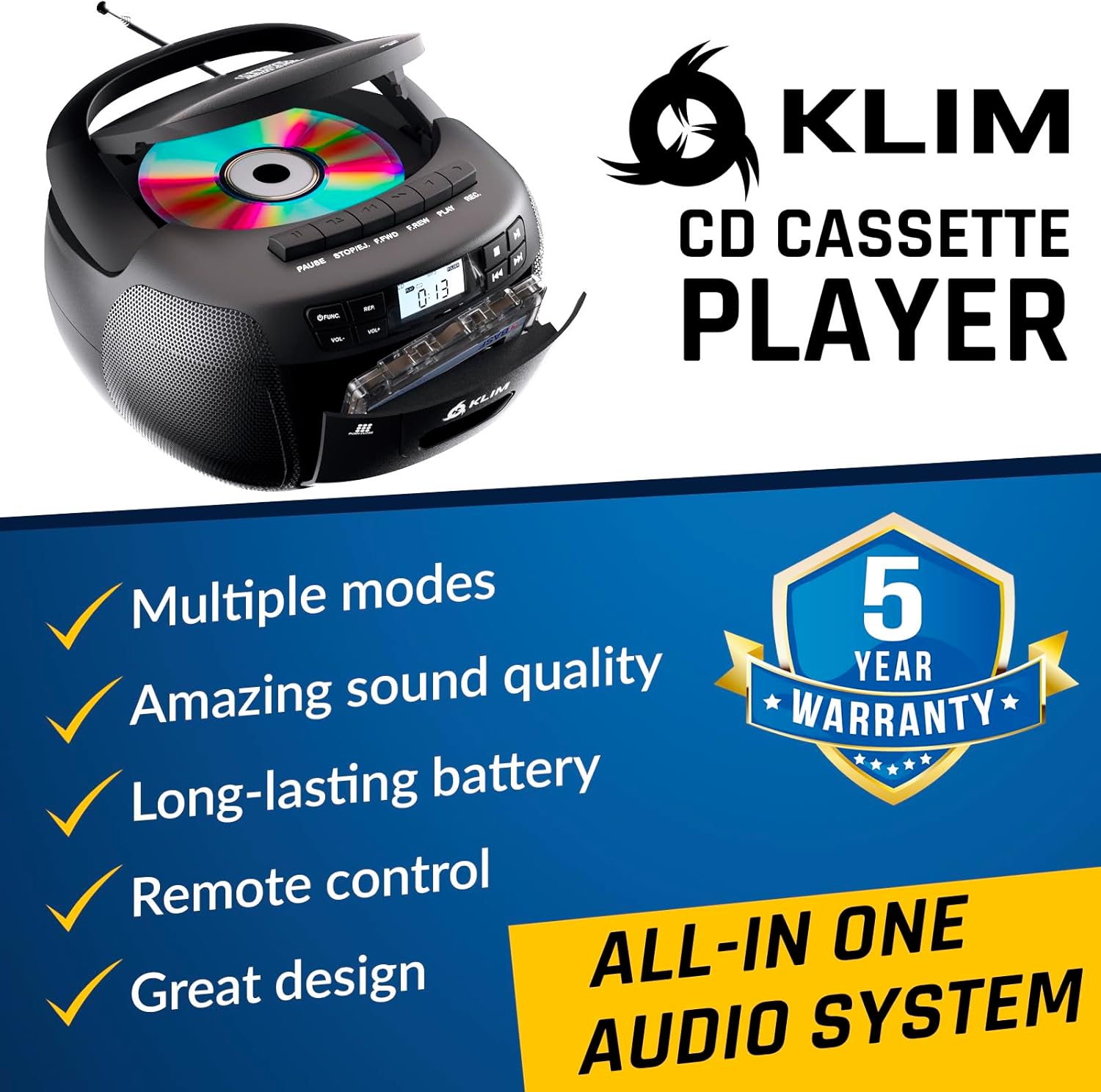
شکل 4.1: سامنے view of the KLIM KLCD-0582 CD Cassette Boombox, showing the CD lid, cassette deck, and control buttons.
فرنٹ پینل کنٹرولز:
- پاور بٹن: یونٹ کو آن یا آف کرتا ہے۔
- فنکشن/موڈ بٹن: Switches between CD, Cassette, Radio, Bluetooth, USB, and AUX modes.
- Volume Control (VOL+/-): پلے بیک والیوم کو ایڈجسٹ کرتا ہے۔
- Play/Pause Button (CD/USB): CD/USB پلے بیک شروع یا روکتا ہے۔
- Stop Button (CD/USB/Cassette): پلے بیک کو روکتا ہے۔
- Skip/Search Buttons (<< / >>): Skips tracks or searches within a track (CD/USB). Tunes radio stations.
- Repeat Button (CD/USB): Repeats current track or all tracks.
- Program Button (CD/USB): Programs track order for CD/USB playback.
- Record Button (Cassette): Initiates recording to cassette tape.
- Eject Button (Cassette): Opens the cassette deck.
- LCD ڈسپلے: موجودہ موڈ، ٹریک نمبر، ریڈیو فریکوئنسی وغیرہ دکھاتا ہے۔

شکل 4.2: تفصیلی view of the LCD display and speaker area, highlighting the digital interface.
Side/Rear Panel Connections:
- AC پاور ان پٹ: AC پاور کورڈ کو جوڑتا ہے۔
- بیٹری ٹوکری: Holds 6 C-size batteries for portable use.
- USB پورٹ: آڈیو چلانے کے لیے files USB ڈرائیو سے۔
- AUX ان پٹ (3.5mm): بیرونی آڈیو آلات کو جوڑتا ہے۔
- ہیڈ فون جیک (3.5 ملی میٹر): نجی سننے کے لیے۔
- دوربین اینٹینا: AM/FM ریڈیو ریسیپشن کے لیے۔

Figure 4.3: Product label on the bottom of the unit, indicating model number and electrical ratings.
5. سیٹ اپ
5.1 یونٹ کو طاقت دینا
آپ کا بوم باکس AC پاور یا بیٹریوں سے چل سکتا ہے۔
AC Power (Indoor Use):
- یقینی بنائیں کہ یونٹ بند ہے۔
- Connect the supplied AC power cord to the AC power input on the rear of the boombox.
- Plug the other end of the AC power cord into a standard wall outlet (110-120V, 60Hz).
DC Power (Battery Operation - Portable Use):
- یقینی بنائیں کہ یونٹ بند ہے اور AC پاور سے منقطع ہے۔
- یونٹ کے نچلے حصے میں بیٹری کے ٹوکری کا احاطہ کھولیں۔
- Insert 6 C-size (UM-2) batteries, ensuring correct polarity (+/-) as indicated inside the compartment.
- بیٹری کے کمپارٹمنٹ کور کو محفوظ طریقے سے بند کریں۔
نوٹ: اگر رساو اور نقصان کو روکنے کے لیے یونٹ کو طویل مدت تک استعمال نہیں کیا جائے گا تو بیٹریاں ہٹا دیں۔
5.2 ریموٹ کنٹرول بیٹری کی تنصیب
- ریموٹ کنٹرول کے پیچھے بیٹری کا ٹوکری کھولیں۔
- Insert 2 AAA alkaline batteries, observing the correct polarity.
- بیٹری کے کمپارٹمنٹ کور کو بند کریں۔

Figure 5.1: The boombox shown with its remote control, which requires AAA batteries.
5.3 اینٹینا سیٹ اپ
بہترین FM ریڈیو ریسیپشن کے لیے، دوربین اینٹینا کو مکمل طور پر بڑھا دیں۔ AM کے استقبال کے لیے، بہترین سگنل کے لیے یونٹ کو گھمائیں۔
6. آپریشن
6.1 بنیادی کنٹرولز
- پاور آن/آف: دبائیں پاور بٹن
- موڈ منتخب کریں: دبائیں فنکشن or موڈ button repeatedly to cycle through CD, Cassette, Radio (AM/FM), Bluetooth, USB, and AUX modes.
- حجم کو ایڈجسٹ کریں: استعمال کریں۔ VOL+ اور والیوم- بٹن
6.2 سی ڈی پلے بیک
- دبائیں فنکشن سی ڈی موڈ منتخب کرنے کے لیے بٹن۔
- سی ڈی کی ٹوکری کا ڈھکن کھولیں۔
- Place a CD (audio CD or MP3/WMA CD) with the label side facing up.
- Close the CD compartment lid. The unit will read the disc and begin playback automatically or display the total number of tracks.
- دبائیں چلائیں/روکیں۔ پلے بیک شروع کرنے یا روکنے کے لیے۔
- دبائیں سٹاپ پلے بیک کو روکنے کے لیے۔
- استعمال کریں۔ چھوڑیں (<< / >>) buttons to skip tracks. Hold to fast forward/rewind within a track.
- پروگرام پلے: اسٹاپ موڈ میں، دبائیں۔ پروگرام. استعمال کریں۔ SKIP to select desired tracks, then press پروگرام ہر ٹریک کی تصدیق کے لیے دوبارہ۔ دبائیں کھیلیں پروگرام شدہ پلے بیک شروع کرنے کے لیے۔
- دوبارہ کھیلیں: دبائیں دہرائیں۔ once for single track repeat, twice for all tracks repeat.
6.3 کیسٹ پلے بیک اور ریکارڈنگ
- دبائیں فنکشن ٹیپ موڈ کو منتخب کرنے کے لیے بٹن۔
- دبائیں EJECT button to open the cassette deck.
- Insert a cassette tape and close the deck.
- دبائیں کھیلیں پلے بیک شروع کرنے کے لیے۔
- استعمال کریں۔ FAST FORWARD (FFWD) or ریوائنڈ (REW) ٹیپ کو نیویگیٹ کرنے کے لیے بٹن۔
- دبائیں سٹاپ پلے بیک کو روکنے کے لیے۔
کیسٹ میں ریکارڈنگ:
- Insert a blank, recordable cassette tape.
- Select the desired source (CD, Radio, AUX, Bluetooth, USB).
- Start playback on the source (e.g., play a CD track, tune to a radio station).
- دبائیں ریکارڈ بوم باکس پر بٹن۔ دی کھیلیں button will also engage. Recording will begin.
- دبائیں سٹاپ ریکارڈنگ ختم کرنے کے لیے
اہم: Ensure the cassette tape has its record-protection tabs intact for recording.
6.4 AM/FM ریڈیو
- دبائیں فنکشن ریڈیو موڈ کو منتخب کرنے کے لیے بٹن۔
- Extend the telescopic antenna for FM reception. For AM, rotate the unit.
- استعمال کریں۔ ٹیوننگ knob یا چھوڑیں (<< / >>) buttons to tune to your desired station. The frequency will be displayed on the LCD.
6.5 بلوٹوتھ کنکشن
- دبائیں فنکشن button to select BLUETOOTH mode. The LCD will display "BT" and the unit will enter pairing mode, indicated by a flashing Bluetooth icon.
- اپنے بلوٹوتھ فعال ڈیوائس پر (مثلاً، اسمارٹ فون، ٹیبلیٹ)، بلوٹوتھ کو فعال کریں اور دستیاب آلات تلاش کریں۔
- Select "KLIM Boombox" from the list of devices.
- Once paired, the Bluetooth icon on the boombox's LCD will stop flashing. You can now play audio from your device through the boombox.
- Control playback (play/pause, skip tracks) either from your connected device or using the boombox's controls.
6.6 USB پلے بیک
- USB پورٹ میں USB فلیش ڈرائیو داخل کریں۔
- دبائیں فنکشن button to select USB mode. The unit will automatically detect and begin playing compatible audio files (MP3/WMA)۔
- استعمال کریں۔ چلائیں/روکیں۔, سٹاپ، اور چھوڑیں (<< / >>) buttons to control playback, similar to CD mode.
- پروگرام پلے: اسٹاپ موڈ میں، دبائیں۔ پروگرام. استعمال کریں۔ SKIP to select desired tracks, then press پروگرام ہر ٹریک کی تصدیق کے لیے دوبارہ۔ دبائیں کھیلیں پروگرام شدہ پلے بیک شروع کرنے کے لیے۔
6.7 AUX ان پٹ
- Connect an external audio device (e.g., MP3 player, smartphone) to the AUX input jack using a 3.5mm audio cable (not included).
- دبائیں فنکشن button to select AUX mode. The LCD will display "AUX".
- Start playback on your external device. The audio will be routed through the boombox speakers.
- Volume can be adjusted on both the boombox and the external device. Playback controls are managed on the external device.
6.8 ریموٹ کنٹرول کا استعمال
The included remote control allows convenient operation from a distance of up to 20 feet. Ensure line of sight to the boombox's front panel.
- پاور (سرخ بٹن): یونٹ کو آن/آف کرتا ہے۔
- خاموش کریں: آڈیو کو خاموش/غیر خاموش کرتا ہے۔
- VOL +/-: حجم کو ایڈجسٹ کرتا ہے۔
- فنک: Cycles through modes (CD, TAPE, FM, AM, BT, USB, AUX).
- نمائندہ: Repeat function for CD/USB.
- پروگ: Program function for CD/USB.
- PLAY/PAUSE, STOP, FFWD, REW: Playback controls for CD/USB/Cassette.
- Number Buttons (0-9, -10, +10): Direct track selection for CD/USB.
7 دیکھ بھال
7.1 یونٹ کی صفائی
- صفائی سے پہلے ہمیشہ یونٹ کو پاور سورس سے الگ کریں۔
- بیرونی سطحوں کو صاف کرنے کے لیے نرم، خشک کپڑا استعمال کریں۔
- کھرچنے والے کلینر، موم یا سالوینٹس کا استعمال نہ کریں کیونکہ وہ ختم کو نقصان پہنچا سکتے ہیں۔
- سی ڈی لینس کے لیے، مخصوص سی ڈی لینس کلینر ڈسک استعمال کریں۔
- کیسٹ ڈیک کے لیے، وقتاً فوقتاً ٹیپ کے سروں اور چٹکیوں کے رولرس کو روئی کے جھاڑو سے ہلکے سے صاف کریں۔ampisopropyl الکحل کے ساتھ ختم.
7.2 اسٹوریج
When not in use for extended periods, store the unit in a cool, dry place away from direct sunlight and extreme temperatures. Remove batteries from both the main unit and the remote control to prevent leakage.
8 خرابیوں کا سراغ لگانا
If you encounter issues with your boombox, please refer to the following common problems and solutions before contacting support.
| مسئلہ | ممکنہ وجہ | حل |
|---|---|---|
| کوئی طاقت نہیں۔ | AC کی ہڈی منسلک نہیں ہے؛ بیٹریاں ختم ہو گئی ہیں یا غلط طریقے سے ڈالی گئی ہیں۔ | AC کی ہڈی کا کنکشن چیک کریں؛ بیٹریاں تبدیل کریں یا درست قطبیت کو یقینی بنائیں۔ |
| کوئی آواز نہیں۔ | Volume too low; Mute function active; Incorrect mode selected; Headphones connected. | Increase volume; Press MUTE on remote; Select correct mode; Disconnect headphones. |
| سی ڈی نہیں چل رہی / "NO DISC" خرابی۔ | سی ڈی غلط داخل کی گئی ہے۔ سی ڈی گندی یا کھرچنے والی؛ سی ڈی کی ٹوکری بند نہیں ہے؛ یونٹ غلط موڈ میں ہے۔ | Insert CD label side up; Clean or replace CD; Close CD lid securely; Select CD mode. |
| کیسٹ ٹیپ نہیں چل رہا/ریکارڈنگ | Tape inserted incorrectly; Tape damaged; Record-protection tab missing (for recording); Unit in wrong mode. | Insert tape correctly; Use a new tape; Cover record-protection tab with tape; Select TAPE mode. |
| ریڈیو کا ناقص استقبال | اینٹینا بڑھا نہیں؛ یونٹ کی پوزیشن۔ | ایف ایم اینٹینا کو مکمل طور پر بڑھانا؛ بہتر AM استقبال کے لیے یونٹ کو گھمائیں۔ |
| بلوٹوتھ جوڑا بنانے میں ناکامی۔ | بوم باکس جوڑا بنانے کے موڈ میں نہیں ہے۔ ڈیوائس بلوٹوتھ آف؛ آلہ بہت دور ہے۔ | Ensure boombox is in BT mode and flashing; Enable Bluetooth on device; Move device closer (within 30 ft). |
| ریموٹ کنٹرول کام نہیں کر رہا ہے۔ | Batteries depleted or incorrectly inserted; Obstruction between remote and unit. | Replace batteries; Ensure clear line of sight to the unit's front panel. |
9. وضاحتیں
| فیچر | تفصیل |
|---|---|
| ماڈل نمبر | KLCD-0582 |
| برانڈ | KLIM |
| کنیکٹوٹی ٹیکنالوجی | معاون، بلوٹوتھ 5.1، USB |
| رنگ | سیاہ |
| آئٹم کے طول و عرض (L x W x H) | 8.5 x 8.39 x 4.92 انچ |
| شے کا وزن | 1.5 کلوگرام |
| طاقت کا منبع | Corded Electric (AC 110-120V/60Hz), 6 x C-size batteries (DC 9V) |
| ہم آہنگ آلات | MP3 Player, Bluetooth-enabled devices |
| تائید شدہ معیارات | CD، MP3، WMA |
| تائید شدہ آڈیو فارمیٹ | CD-DA، MP3، WMA |
| مقررین | 3W Dual Speakers |
| ریڈیو بینڈز | AM/FM |
10. وارنٹی اور سپورٹ
10.1 وارنٹی کی معلومات
The KLIM KLCD-0582 CD Cassette Boombox comes with a 5 سال کی وارنٹی. This warranty covers manufacturing defects and ensures the product meets its specified performance. Please retain your proof of purchase for warranty claims.
10.2 کسٹمر سپورٹ
For any questions, technical assistance, or warranty claims, please contact KLIM customer support. You can typically find contact information on the manufacturer's website or through the retailer where you purchased the product. KLIM offers 24/7 customer support to assist you.
For more information, visit the official KLIM webسائٹ یا آپ کے پروڈکٹ کی پیکیجنگ میں فراہم کردہ رابطے کی تفصیلات سے رجوع کریں۔