
Pisichen 21.5INTS-White-NEW
Pisichen 21.5-Inch Touchscreen Monitor User Manual
Model: 21.5INTS-White-NEW
تعارف
This user manual provides comprehensive instructions for the setup, operation, maintenance, and troubleshooting of your Pisichen 21.5-Inch Touchscreen Monitor. Please read this manual thoroughly before using the product to ensure proper functionality and to prevent damage.
The Pisichen 21.5-inch touch monitor is designed to enhance your work efficiency and provide an interactive experience with its responsive 10-point capacitive touchscreen. It features a Full HD 1920x1080 resolution display, built-in speakers, and versatile connectivity options including HDMI, VGA, and USB for touch functionality.
کلیدی خصوصیات
- Sensitive 10-Point Capacitive Touchscreen: Offers seamless and responsive interaction, allowing direct engagement with content and simultaneous multi-finger input.
- Stunning FHD 1080P Display: A 21.5-inch Full HD (1920x1080) resolution screen with a 1000:1 contrast ratio, 250cd/㎡ brightness, 170° viewing angle, and 60Hz refresh rate for clear and smooth visuals. Includes low-blue-light and eye-care technology.
- وسیع ڈیوائس مطابقت: Equipped with USB2.0 (for touch), HDMI, VGA, and DC ports for easy connection to PCs, laptops, PS3/4, and gaming consoles.
- ورسٹائل ڈسپلے موڈز: Supports duplicate, extend, and second-screen modes to enhance productivity and workspace.
- Built-in Speakers and VESA Mounting: Integrated speakers provide audio, and the 75x75mm VESA mount allows for flexible installation options.
پیکیج کے مشمولات
Please verify that all items are present in the package before proceeding with the setup.

The package includes the Pisichen 21.5-inch touchscreen monitor, a user manual, an HDMI cable, a USB cable, and a power adapter, ensuring it is ready for immediate use.
- Pisichen 21.5-Inch Touchscreen Monitor
- پاور اڈاپٹر
- HDMI کیبل
- USB Cable (for touch function)
- صارف دستی
سیٹ اپ کی ہدایات
1. مانیٹر کو جوڑنا
The monitor offers various connection options to suit your needs. Ensure all connections are secure before powering on the device.

تفصیلی view of the monitor's input/output ports, including HDMI, VGA, headphone, DC power, and USB 2.0 touch ports.
- پاور کنکشن: Connect the provided power adapter to the DC power port on the monitor and then plug it into a wall outlet.
- ویڈیو کنکشن (HDMI): Use the HDMI cable to connect the monitor's HDMI port to the HDMI output port on your computer, laptop, or gaming console.
- ویڈیو کنکشن (VGA): Alternatively, use a VGA cable to connect the monitor's VGA port to the VGA output port on your computer or laptop.
- Touch Function Connection: To enable the touch function, connect the included USB cable from the monitor's USB 2.0 touch port to an available USB port on your computer. This step is crucial for touch signal transmission.
- آڈیو آؤٹ پٹ (اختیاری): If you prefer external audio, you can connect headphones or external speakers to the headphone jack. The monitor also has built-in speakers.
2. بڑھتے ہوئے اختیارات
The Pisichen monitor supports both desktop placement and VESA wall mounting for flexible setup.
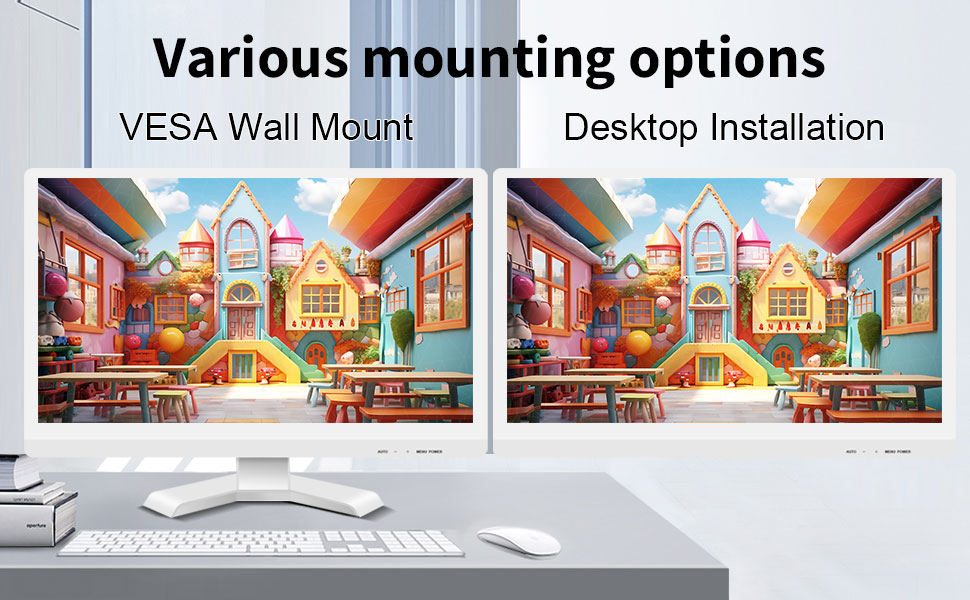
The monitor can be set up on a desktop stand or mounted on a wall using a VESA compatible bracket.
- ڈیسک ٹاپ کی تنصیب: Attach the provided stand to the monitor base and place it on a stable, flat surface.
- VESA وال ماؤنٹ: The monitor features a 75x75mm VESA mounting pattern. Use a compatible VESA bracket (not included) to mount the monitor on a wall or an adjustable arm. Ensure the mount can support the monitor's weight (9.88 pounds).

پیچھے view of the monitor highlighting the VESA 75x75mm mounting pattern and overall dimensions.
آپریٹنگ ہدایات
1. پر / آف پاور
Locate the power button on the monitor. Press it to turn the monitor on or off. The power indicator light will illuminate when the monitor is on.
2. Using the Touchscreen Function
Once the USB cable is connected to your computer, the 10-point capacitive touch function will be active. You can interact with the screen using your fingers or a passive capacitive stylus.

The monitor supports direct touch interaction for intuitive control.
- سنگل ٹچ: ماؤس کلک کے برابر۔
- تھپتھپائیں: دائیں کلک کے برابر۔
- گھسیٹیں: Move items by touching and dragging.
- چوٹکی سے زوم: Use two fingers to zoom in or out on content.
- ملٹی ٹچ: The monitor supports up to 10 simultaneous touch points, enabling collaborative work or complex gestures.

The 10-point multi-touch feature allows for multiple users or complex interactions simultaneously.
اہم نوٹ: The touch functionality is disabled on Mac OS, iPad OS, and iOS. This monitor only supports passive capacitive styluses.
3. ڈسپلے موڈز
کمپیوٹر سے منسلک ہونے پر مانیٹر مختلف ڈسپلے موڈز کو سپورٹ کرتا ہے۔
- ڈپلیکیٹ موڈ: Displays the same content on both your primary screen and the Pisichen monitor.
- توسیع موڈ: آپ کے ڈیسک ٹاپ کو دونوں اسکرینوں پر پھیلاتا ہے، مزید ورک اسپیس فراہم کرتا ہے۔
- صرف دوسرا اسکرین موڈ: Displays content only on the Pisichen monitor, turning off your primary screen.
You can typically switch between these modes through your operating system's display settings (e.g., Windows Display Settings).
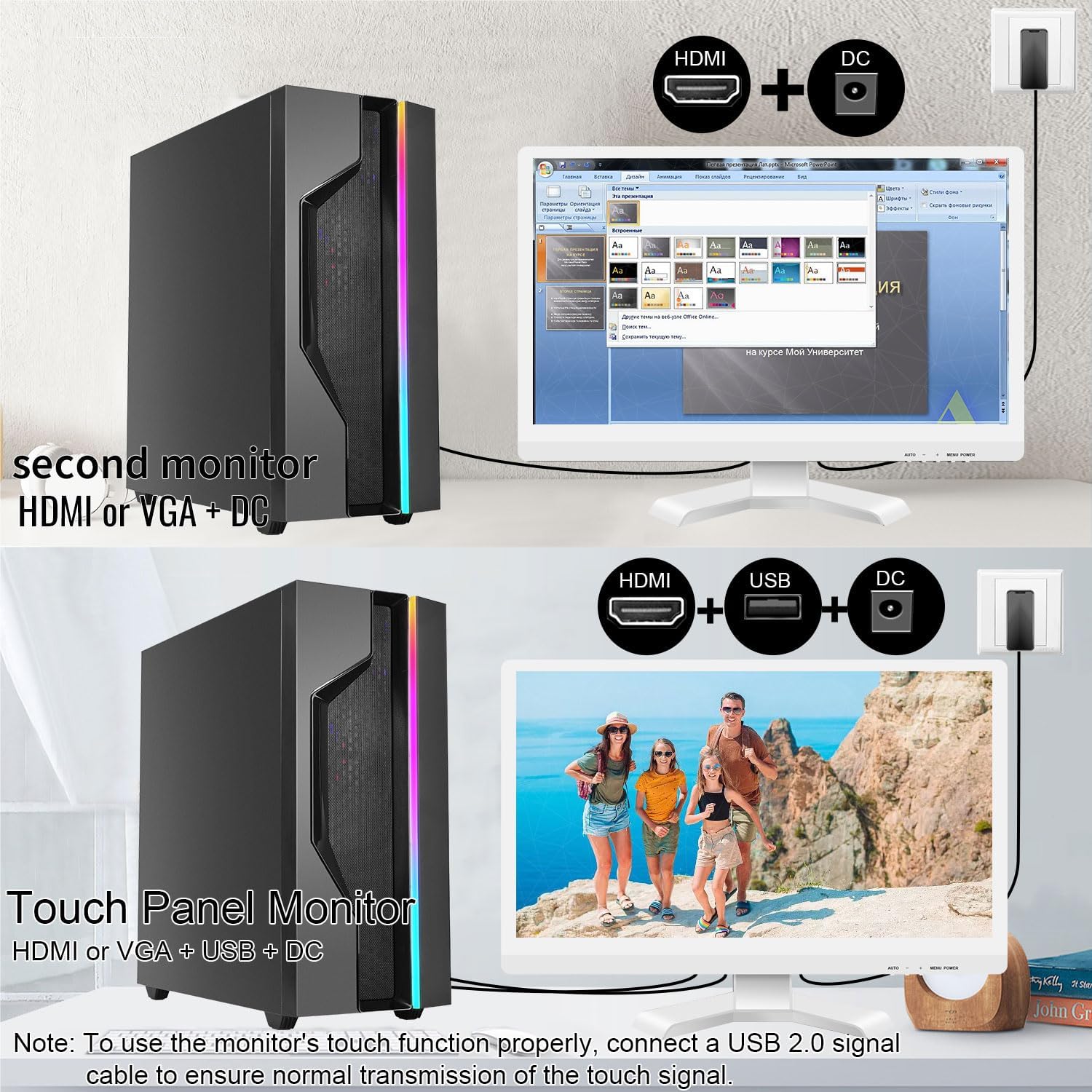
Illustrations of connecting the monitor as a secondary display or as a touch-enabled display.
4. آن اسکرین ڈسپلے (OSD) مینو
The monitor features an OSD menu for adjusting display settings. Use the buttons located on the monitor's frame (usually on the bottom right) to navigate and select options.
- مینو بٹن: OSD مینو کھولتا ہے۔
- اوپر/نیچے بٹن: مینو کے اختیارات کے ذریعے تشریف لے جائیں۔
- درج کریں / منتخب کریں بٹن: انتخاب کی تصدیق کرتا ہے یا ذیلی مینو میں داخل ہوتا ہے۔
- باہر نکلیں بٹن: موجودہ مینو یا OSD سے باہر نکلتا ہے۔
Common OSD settings include brightness, contrast, color temperature, input source selection, and aspect ratio.
دیکھ بھال اور دیکھ بھال
- سکرین کی صفائی:
Always power off the monitor and unplug it before cleaning. Use a soft, lint-free cloth lightly dampened with water or a non-abrasive, monitor-specific cleaning solution. Do not spray liquid directly onto the screen. Avoid using alcohol, ammonia, or abrasive cleaners, as they can damage the screen surface.
- سی کی صفائیasing:
مانیٹر صاف کریں casing with a soft, dry cloth. If necessary, a slightly damp cloth can be used, but ensure no moisture enters the vents or ports.
- ذخیرہ:
When not in use for extended periods, store the monitor in a cool, dry place, away from direct sunlight and extreme temperatures. If possible, use the original packaging for protection.
- وینٹیلیشن:
Ensure the monitor's ventilation openings are not blocked. Proper airflow is essential to prevent overheating.
- ہینڈلنگ:
Handle the monitor with care. Avoid dropping it or subjecting it to strong impacts. Do not place heavy objects on top of the monitor.
خرابی کا سراغ لگانا
| مسئلہ | ممکنہ وجہ | حل |
|---|---|---|
| اسکرین پر کوئی تصویر نہیں ہے |
|
|
| ٹچ اسکرین جواب نہیں دے رہی ہے۔ |
|
|
| تصویر دھندلی یا مسخ شدہ ہے۔ |
|
|
| بلٹ ان اسپیکرز سے کوئی آواز نہیں ہے۔ |
|
|
وضاحتیں
| ماڈل نمبر | 21.5INTS-White-NEW |
| اسکرین کا سائز | 21.5 انچ |
| قرارداد | 1920 x 1080 پکسلز (FHD 1080p) |
| پہلو کا تناسب | 16:9 |
| چمک | 250 Candela (cd/㎡) |
| کنٹراسٹ ریشو | 1000:1 |
| Viewآئی اینگل | 170° |
| ریفریش ریٹ | 60Hz |
| ٹچ ٹکنالوجی | 10 پوائنٹ کیپسیٹو ٹچ |
| ان پٹ پورٹس | HDMI, VGA, USB 2.0 (for touch), DC Power |
| آڈیو | Built-in Speakers, Headphone Jack |
| VESA ماؤنٹ مطابقت | 75x75mm |
| پروڈکٹ کے طول و عرض (L x W x H) | 0.78 x 20.4 x 14.9 انچ |
| شے کا وزن | 9.88 پاؤنڈ |
| کارخانہ دار | Shenzhen Konowa Electronics Co., LTD |
| اصل ملک | چین |
وارنٹی اور سپورٹ
For warranty information and technical support, please refer to the official Pisichen website or contact their customer service directly. Details are typically provided on the product packaging or the manufacturer's official support channels.
آپ ملاحظہ کر سکتے ہیں۔ Pisichen Store on Amazon for more product information and potential support contacts.
Ask a question about this manual
Ask about setup, troubleshooting, compatibility, parts, safety, or missing instructions. Manuals+ will review the question and use this page’s manual context to help answer it.