
تعارف
The Surfans F28 is a high-fidelity portable music player designed to deliver an immersive audio experience. Featuring dual ESS9018 DACs, a 4.4mm balanced output, and comprehensive Bluetooth 5.2 support including LDAC and aptX HD, the F28 supports a wide range of lossless audio formats. This manual provides detailed instructions for setting up, operating, maintaining, and troubleshooting your device to ensure optimal performance and longevity.

شکل 1: سامنے اور پیچھے view of the Surfans F28 HiFi Music Player.
پیکیج کے مشمولات
براہ کرم تصدیق کریں کہ نیچے دی گئی تمام اشیاء آپ کے پیکیج میں موجود ہیں:
- 1x Surfans F28 HiFi Music Player
- 1x USB-C چارجنگ کیبل
- 1x 128GB Micro SD Card (pre-installed or included separately)
- 1x یوزر مینوئل (یہ دستاویز)

شکل 2: عام پیکج کے مشمولات کی مثال۔
پروڈکٹ ختمview
Familiarize yourself with the various components and controls of your F28 music player.
اہم خصوصیات:
- Dual ESS9018 DACs: For high-resolution audio decoding and minimal distortion.
- 4.4 ملی میٹر متوازن آؤٹ پٹ: Provides enhanced audio quality and power for demanding headphones.
- 3.5mm Single-Ended Output: Standard audio output for common headphones.
- Bidirectional Bluetooth 5.2: Supports LDAC and aptX HD for high-quality wireless audio transmission and reception.
- 3.5 انچ آئی پی ایس ٹچ اسکرین: For intuitive navigation and control.
- ALPS Analog Volume Knob: For precise volume adjustments.
- قابل توسیع ذخیرہ: 512GB تک مائیکرو ایس ڈی کارڈز کو سپورٹ کرتا ہے۔
- USB-C پورٹ: چارج کرنے اور ڈیٹا کی منتقلی کے لیے۔

Figure 3: The F28 player showcasing its display and audio capabilities.

Figure 4: The dual ESS9018K2M DAC chips, central to the F28's high-fidelity audio.

Figure 5: Top panel with 4.4mm balanced and 3.5mm single-ended audio outputs, and the ALPS analog volume knob.
سیٹ اپ
1. ڈیوائس کو چارج کرنا
Before first use, fully charge the F28. Connect the included USB-C cable to the player's USB-C port and the other end to a USB power adapter (5V/1A recommended) or a computer's USB port. The charging indicator will show the charging status. A full charge typically takes several hours.
2 مائیکرو ایس ڈی کارڈ داخل کرنا
The F28 supports Micro SD cards up to 512GB. Locate the Micro SD card slot on the bottom of the device. Gently insert the Micro SD card with the gold contacts facing down until it clicks into place. To remove, push the card in slightly until it springs out.

Figure 6: Inserting the Micro SD card and connecting via USB-C for data transfer.
3. Transferring Music Files
Connect the F28 to your computer using the USB-C cable. The player will appear as a removable storage device. You can then drag and drop your music files directly into the Micro SD card's folders. The F28 supports various lossless formats including DSD (DSF/DFF), FLAC/WAV (up to 384kHz), AIFF/APE, as well as MP3/AAC.

Figure 7: Supported audio file formats for the F28 player.
آپریٹنگ ہدایات
1. پاور آن/آف
- پاور آن: Press and hold the power button (located on the side) until the screen illuminates.
- بجلی بند: پاور بٹن کو دبائے رکھیں جب تک کہ پاور آف پرامپٹ ظاہر نہ ہو، پھر تصدیق کریں۔
2. بنیادی نیویگیشن
The F28 features a 3.5-inch IPS touchscreen for primary navigation. Swipe gestures and taps are used to select options and move between menus. Physical buttons on the side provide additional control for playback (play/pause, next/previous track) and menu navigation.
3. میوزک پلے بیک۔
From the main menu, select "My Music" or "Folder" to browse your audio files. Tap on a song to begin playback. The playback screen displays track information, progress, and playback controls.
4. والیوم کنٹرول
Adjust the volume using the gold-colored ALPS analog knob located on the top right of the device. Rotate clockwise to increase volume and counter-clockwise to decrease. The volume level will be displayed on the screen.
5. بلوٹوتھ کنیکٹیویٹی
The F28 supports Bidirectional Bluetooth 5.2 with LDAC and aptX HD codecs for high-quality wireless audio. To pair with Bluetooth headphones or speakers:
- Go to "System Settings" and select "Bluetooth".
- بلوٹوتھ آن کریں۔
- پلیئر دستیاب آلات کے لیے اسکین کرے گا۔ جوڑا بنانے کے لیے فہرست سے اپنا آلہ منتخب کریں۔
The F28 can also act as a Bluetooth receiver, allowing you to stream audio from your phone or PC to the player.

Figure 8: The F28 features a Bluetooth 5.2 chip for stable and high-quality wireless connections.
6. ایکویلائزر سیٹنگز
The F28 includes an equalizer to customize your sound. Navigate to the "Equalizer" option in the settings. You can choose from various presets or create a custom sound profile by adjusting the frequency bands.
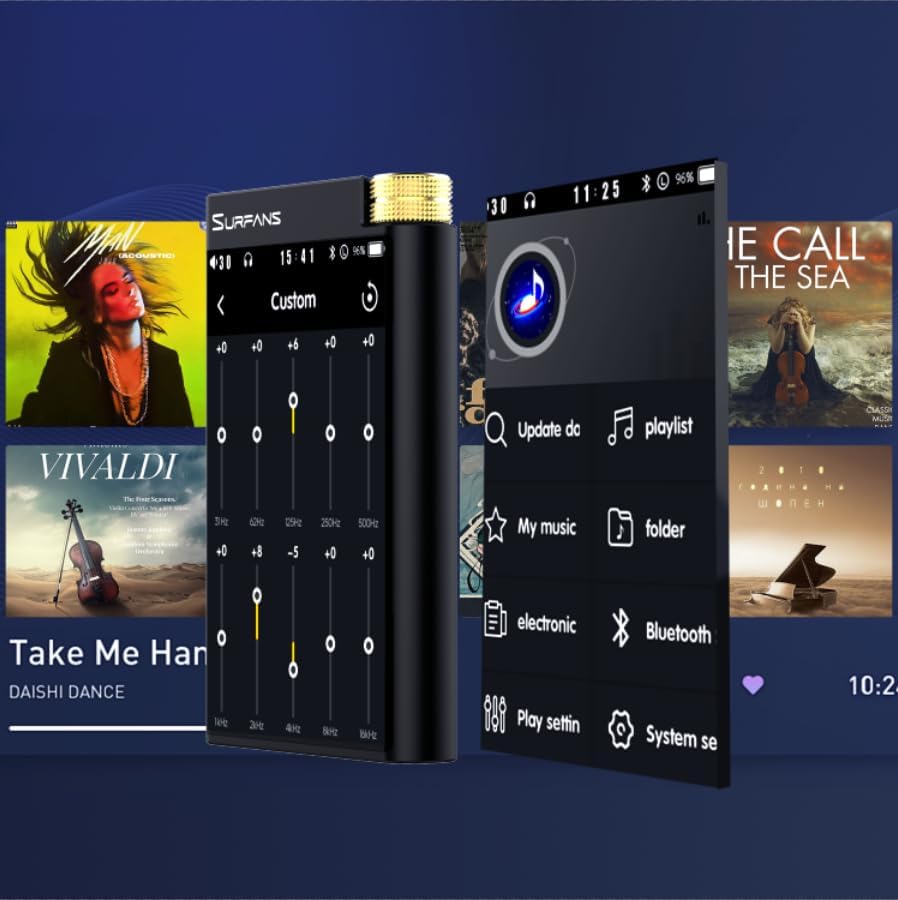
Figure 9: Customizing audio with the built-in equalizer.
7. Connecting to External Devices
Use the 4.4mm balanced or 3.5mm single-ended output to connect to headphones, amplifiers, or speakers. The USB-C port also supports USB DAC functionality, allowing the F28 to act as an external sound card for your computer.

Figure 10: The F28 can be connected to various audio systems, including acting as a USB DAC for computers.
دیکھ بھال
- صفائی: آلے کو صاف کرنے کے لیے نرم، خشک کپڑا استعمال کریں۔ کھرچنے والے کلینر یا سالوینٹس کے استعمال سے پرہیز کریں۔
- ذخیرہ: پلیئر کو براہ راست سورج کی روشنی اور انتہائی درجہ حرارت سے دور ٹھنڈی، خشک جگہ پر اسٹور کریں۔
- بیٹری کی دیکھ بھال: بیٹری کی زندگی کو طول دینے کے لیے، بار بار بیٹری کو مکمل طور پر خارج کرنے سے گریز کریں۔ اگر لمبے عرصے تک ذخیرہ کرتے ہیں، تو ہر چند ماہ بعد بیٹری کو تقریباً 50% چارج کریں۔
خرابی کا سراغ لگانا
| مسئلہ | ممکنہ وجہ | حل |
|---|---|---|
| ڈیوائس آن نہیں ہوتی ہے۔ | کم بیٹری؛ آلہ منجمد. | Charge the device for at least 30 minutes. If still unresponsive, try holding the power button for 10-15 seconds for a hard reset. |
| Touchscreen is unresponsive or slow. | عارضی سافٹ ویئر کی خرابی؛ سکرین محافظ مداخلت. | Restart the device. Ensure the screen is clean and free of debris. If using a screen protector, ensure it is properly applied and not too thick. |
| بلوٹوتھ جوڑا بنانے کے مسائل۔ | Device not in pairing mode; distance; interference. | Ensure both devices are in pairing mode and within range. Turn off and on Bluetooth on both devices. Clear previous pairings if necessary. |
| Low volume via Bluetooth. | Volume settings on both devices; codec compatibility. | Increase volume on both the F28 and the connected Bluetooth device. Ensure optimal codec (LDAC/aptX HD) is selected if supported by the receiving device. |
| موسیقی files not recognized or played in incorrect order. | کرپٹ files; file system indexing issue. | یقینی بنائیں files are in supported formats. Re-scan the music library from the player's settings. If issues persist, try reformatting the Micro SD card (backup data first) and re-transferring files. Note: Some players may sort by filename alphabetically rather than track number metadata. |
وضاحتیں
| فیچر | تفصیل |
|---|---|
| ماڈل کا نام | F28 128G |
| مصنوعات کے طول و عرض | 0.7 x 2.6 x 4.7 انچ |
| شے کا وزن | 9.6 اونس |
| ڈی اے سی چپ | Dual ESS9018K2M |
| سپورٹ شدہ آڈیو فارمیٹس | DSD (DSF/DFF), FLAC/WAV (up to 384kHz/32-bit), AIFF/APE, MP3/AAC, WMA Lossless |
| بلوٹوتھ ورژن | 5.2 (Bidirectional, supports LDAC/aptX HD) |
| اسکرین کا سائز | 3.5 انچ آئی پی ایس ٹچ اسکرین |
| اندرونی اسٹوریج | 128GB (included Micro SD card) |
| قابل توسیع اسٹوریج | Up to 512GB via Micro SD card |
| بیٹری | 1x 12V battery (included), approx. 12-hour playback |
| آؤٹ پٹ پورٹس | 4.4 ملی میٹر متوازن، 3.5 ملی میٹر سنگل اینڈڈ |
| کنیکٹوٹی ٹیکنالوجی | Aux, Bluetooth 5.2, USB-C |
| خصوصی خصوصیت | برابر کرنے والا |
وارنٹی اور سپورٹ
For warranty information and technical support, please refer to the official Surfans webسائٹ یا ان کی کسٹمر سروس سے براہ راست رابطہ کریں۔ وارنٹی دعووں کے لیے خریداری کے ثبوت کے طور پر اپنی خریداری کی رسید رکھیں۔
You can visit the official Surfans Store on Amazon for more information and support: Surfans Audio Store