
1. ختمview
The Roku Select Series HD TV provides a streamlined entertainment experience. This 32-inch 720p HD television integrates the Roku operating system for easy access to streaming content, live TV, and various applications. It features a voice remote for convenient control and includes technologies like Bluetooth Headphone Mode and Dolby Audio for enhanced sound.
کلیدی خصوصیات
- Seamless Streaming: Fast Wi-Fi and quick app launches for immediate entertainment access.
- Extensive Content: Access to thousands of streaming apps, free movies, shows, and live TV channels.
- حسب ضرورت ہوم اسکرین: Organize apps and content for personalized viewing
- Automatic Software Updates: Ensures access to the latest features and applications.
- اسمارٹ ہوم انٹیگریشن: Compatible with Roku Voice, Siri, Alexa, and Google Assistant for voice control. Supports Apple AirPlay for content sharing.
- Clear HD Picture: 720p HD resolution with Roku Smart Picture technology for optimized visuals.
- وائس ریموٹ: Search, play, and control streaming with voice commands.
- بہتر آڈیو: Designed for clear speech and louder sound with Dolby Audio technology.
- Bluetooth Headphone Mode: Private listening with wireless headphones.

Image: Roku 32-inch Select Series HD Smart TV with included remote control.
2. باکس میں کیا ہے۔
سیٹ اپ کے ساتھ آگے بڑھنے سے پہلے تصدیق کریں کہ تمام اجزاء موجود ہیں۔
- Roku Select Series 32" HD TV
- Stands and screws
- Roku Voice Remote with batteries (2 AAA)
- پاور کیبل
- صارف دستی (یہ دستاویز)

Image: Contents of the Roku Select Series TV packaging.
3. سیٹ اپ
3.1 پیک کھولنا
ٹی وی اور تمام لوازمات کو احتیاط سے پیکیجنگ سے ہٹا دیں۔ مستقبل کی نقل و حمل یا خدمات کی ضروریات کے لیے پیکیجنگ کو برقرار رکھیں۔
3.2 اسٹینڈ کو جوڑنا
- ٹی وی اسکرین کو نرم، صاف سطح پر نیچے رکھیں تاکہ خراشوں سے بچا جا سکے۔
- ٹی وی اسٹینڈ کو ٹی وی کے نیچے سکرو ہولز کے ساتھ سیدھ میں رکھیں۔
- فراہم کردہ پیچ کا استعمال کرتے ہوئے اسٹینڈز کو محفوظ کریں۔ یقینی بنائیں کہ وہ مضبوطی سے سخت ہیں۔
3.3 کنیکٹنگ پیری فیرلز
Connect your devices to the appropriate ports on the back of the TV.
- HDMI: Connect up to three HDMI devices (e.g., cable box, gaming console, Blu-ray player) to the HDMI ports.
- USB: Use the USB port for media playback or connecting compatible accessories.
- آپٹیکل (S/PDIF): بیرونی آڈیو سسٹم سے جڑنے کے لیے۔
- بجلی کی تار: پاور کیبل کو ٹی وی سے اور پھر وال آؤٹ لیٹ سے جوڑیں۔
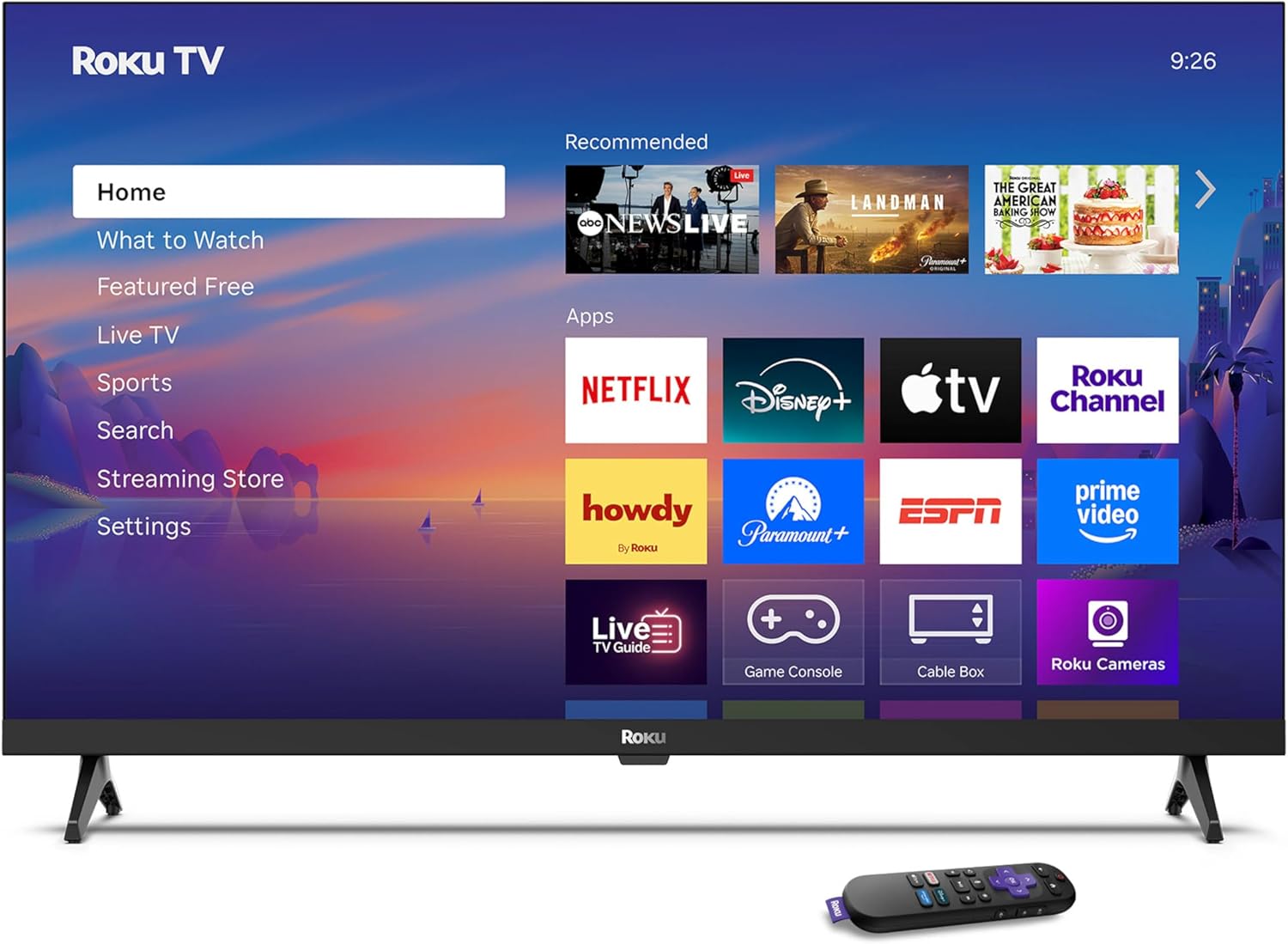
Image: Rear panel connections including HDMI, USB, and optical ports.
3.4 ابتدائی پاور آن اور نیٹ ورک کنکشن
- Plug in the TV and press the power button on the remote or TV.
- Follow the on-screen instructions to select your language and connect to your Wi-Fi network.
- Activate your Roku account or create a new one.
ویڈیو: ایک اوورview of the Roku TV operating system, demonstrating its user interface and features. This video is provided by Roku, Inc.
4. آپریٹنگ ہدایات
4.1 وائس ریموٹ کا استعمال
The Roku Voice Remote allows for intuitive control of your TV and streaming content.
- صوتی تلاش: Press and hold the voice button and speak your command to search for content, launch apps, or control playback.
- نیویگیشن: مینو میں جانے اور آئٹمز کو منتخب کرنے کے لیے دشاتمک پیڈ کا استعمال کریں۔
- ایپ شارٹ کٹس: سرشار بٹن مقبول اسٹریمنگ سروسز تک فوری رسائی فراہم کرتے ہیں۔

Image: Features of the Roku Voice Remote, highlighting voice control and shortcut buttons.
4.2 Navigating the Home Screen
The Roku Home Screen provides access to all your installed apps, inputs, and settings.
- گھر: آپ کو مرکزی ہوم اسکرین پر لوٹاتا ہے۔
- کیا دیکھنا ہے: Discover recommended content.
- لائیو ٹی وی: Access free live television channels.
- اسٹریمنگ اسٹور: Browse and add new streaming channels.
- ترتیبات: Adjust TV and system preferences.

Image: The Roku TV home screen interface.
4.3 تصویر اور آواز کی ترتیبات کو ایڈجسٹ کرنا
اپنی مرضی کے مطابق بنائیں viewing and listening experience through the settings menu.
- تصویر موڈ: Select from predefined modes like Standard, Vivid, Sports, or Movie. Roku Smart Picture automatically optimizes settings.
- صوتی وضع: ساؤنڈ پرو کا انتخاب کریں۔files or enable features like Night Mode for reduced volume fluctuations.
- Bluetooth Headphone Mode: Pair your wireless headphones for private audio.

Image: Picture mode settings on the Roku TV.

Image: Bluetooth Headphone Mode in use.

Image: Dolby Audio technology for clear sound.
5 دیکھ بھال
5.1 اسکرین کی صفائی
To clean the TV screen, gently wipe it with a soft, dry, lint-free cloth. For stubborn marks, lightly dampur کپڑے میں پانی یا سکرین سے محفوظ صفائی کا محلول۔ سخت کیمیکلز یا کھرچنے والے مواد کے استعمال سے پرہیز کریں۔
5.2 سافٹ ویئر اپ ڈیٹس
Your Roku TV automatically receives software updates when connected to the internet. These updates provide new features, performance improvements, and bug fixes. Ensure your TV remains connected to the internet for optimal performance.
6 خرابیوں کا سراغ لگانا
If you encounter issues with your Roku TV, refer to the following common solutions:
- کوئی طاقت نہیں: اس بات کو یقینی بنائیں کہ پاور کیبل محفوظ طریقے سے TV اور کام کرنے والے الیکٹریکل آؤٹ لیٹ دونوں میں لگا ہوا ہے۔ ایک مختلف آؤٹ لیٹ آزمائیں۔
- کوئی تصویر/آواز نہیں: Verify that the correct input source is selected. Check all cable connections (HDMI, audio). Restart the TV by unplugging it for 30 seconds and plugging it back in.
- ریموٹ کام نہیں کر رہا ہے: Replace the AAA batteries in the remote. Ensure there are no obstructions between the remote and the TV. For voice remote issues, re-pair the remote if necessary (refer to Roku support for specific steps).
- نیٹ ورک کنکشن کے مسائل: Restart your Wi-Fi router and modem. Go to the TV's settings menu, then Network, and try reconnecting to your Wi-Fi network.
- App Not Loading/Crashing: Try restarting the app. If the issue persists, remove the app from the home screen, restart the TV, and then re-add the app from the Streaming Store.
7. وضاحتیں
| فیچر | تفصیل |
|---|---|
| اسکرین کا سائز | 32 انچ |
| ڈسپلے ٹیکنالوجی | ایل ای ڈی |
| قرارداد | 720ص |
| ریفریش ریٹ | 60 Hz |
| خصوصی خصوصیات | Bluetooth Headphone Mode, Dolby Audio, Voice Remote |
| کنیکٹوٹی ٹیکنالوجی | بلوٹوتھ ، وائی فائی |
| کل HDMI پورٹس | 3 |
| کل USB پورٹس | 1 |
| آڈیو ان پٹ | HDMI |
| آپریٹنگ سسٹم | روکو OS |
| چڑھنے کی قسم | Table Mount, Wall Mount |
| VESA ماؤنٹ سٹینڈرڈ | 200 x 200 ملی میٹر |
| پروڈکٹ کے طول و عرض (D x W x H) | 7"D x 28.3"W x 18.3"H |
| شے کا وزن | 7.5 پاؤنڈز |
| ماڈل نمبر | 32R2D5 |
| یو پی سی | 829610008974 |
8. وارنٹی کی معلومات
8.1 محدود وارنٹی
Roku warrants the hardware against defects in materials and workmanship under normal use for a period of one (1) year from the date of purchase ("Warranty Period"). If Roku determines that the device’s hardware is defective during the Warranty Period, Roku’s sole obligation, and your exclusive remedy, will be to either repair or replace the unit with either a new or rebuilt device, at its option. This warranty applies if the product is used in accordance with the provided documentation.
8.2 واپسی کی پالیسی
You may return a device for any reason:
- Within thirty (30) days from the date of purchase from Roku.
- Within the applicable return period if purchased from an authorized reseller or distributor.
Additional details regarding product returns can be found on the Roku support site.
9. سپورٹ
For further assistance, troubleshooting guides, and frequently asked questions, please visit the official Roku support webسائٹ: