
1. پروڈکٹ ختمview
The Camtro M6 is a battery-powered wireless outdoor security camera designed for reliable surveillance. It features 1080p video resolution, color night vision, two-way audio, and smart AI motion detection to enhance your home security. This manual provides detailed instructions for setup, operation, and maintenance.

Figure 1.1: Camtro M6 Outdoor Security Camera with key features highlighted.

شکل 1.2: ختمview of Camtro M6 camera features.
2. پیکیج کے مشمولات
براہ کرم درج ذیل اشیاء کے لیے پیکج چیک کریں:
- Camtro M6 Outdoor Security Camera
- بڑھتے ہوئے سکرو کٹ۔
- ہدایات دستی (یہ دستاویز)
3. سیٹ اپ
3.1 ابتدائی چارجنگ
Before first use, fully charge the camera using a standard 5V USB charger (not included). The charging indicator light will turn solid when charging and off when fully charged. A full charge typically takes several hours.
3.2 ایپ انسٹال کرنا اور اکاؤنٹ بنانا
- Download the official Camtro app from your smartphone's app store (iOS or Android).
- ایپ کھولیں اور نیا صارف اکاؤنٹ بنانے کے لیے اسکرین پر دی گئی ہدایات پر عمل کریں۔
3.3 ڈیوائس پیئرنگ اور وائی فائی کنکشن
- Ensure your smartphone is connected to a 2.4GHz Wi-Fi network. The Camtro M6 camera only supports 2.4GHz Wi-Fi.
- In the Camtro app, tap 'Add Device' or the '+' icon.
- Select the Camtro M6 camera model from the list.
- Follow the app's instructions to put the camera into pairing mode (usually by pressing a reset button).
- Scan the QR code displayed on your phone with the camera lens, or follow alternative pairing methods provided by the app.
- ایک بار منسلک ہونے کے بعد، اپنے کیمرے کو نام دیں اور سیٹ اپ کا عمل مکمل کریں۔
3.4 کیمرہ لگانا
The Camtro M6 camera is designed for wall mounting. Choose a location that provides the desired viewing angle اور آپ کے 2.4GHz Wi-Fi نیٹ ورک کی حد میں ہے۔
- Mark the desired drill holes on the wall using the mounting bracket as a template.
- پائلٹ سوراخ ڈرل کریں اور اگر ضروری ہو تو دیوار کے اینکرز ڈالیں۔
- فراہم کردہ پیچ کا استعمال کرتے ہوئے دیوار پر بڑھتے ہوئے بریکٹ کو محفوظ کریں۔
- کیمرے کو بڑھتے ہوئے بریکٹ سے منسلک کریں اور ضرورت کے مطابق زاویہ کو ایڈجسٹ کریں۔
4. کیمرہ چلانا
4.1 لائیو View
Open the Camtro app and select your camera to access the live video feed. You can monitor your property in real-time from anywhere with an internet connection.
4.2 دو طرفہ آڈیو
The camera features a built-in microphone and speaker for two-way communication.
- لائیو میں رہتے ہوئے ۔ view، ایپ میں مائکروفون آئیکن کو تھپتھپائیں۔
- Speak into your smartphone to transmit audio through the camera's speaker.
- کیمرے کے مائیکروفون کے ذریعے سننے کے لیے مائیکروفون آئیکن کو چھوڑ دیں۔

Figure 4.1: Using the two-way audio feature to communicate.

Figure 4.2: Two-way talk functionality for interactive communication.
4.3 اسمارٹ AI موشن کا پتہ لگانا
The Camtro M6 camera utilizes AI to distinguish between human movement and other objects, reducing false alerts.
- ایپ کی ترتیبات میں حرکت کا پتہ لگانے کو فعال کریں۔
- Adjust sensitivity levels to optimize detection for your environment.
- Receive instant notifications on your smartphone when human motion is detected.

Figure 4.3: AI Human Detection distinguishing between a person and an object.

Figure 4.4: AI Human Detection accurately identifying human activity.
4.4 کلر نائٹ ویژن
The camera provides clear color video even in low-light conditions, offering enhanced detail compared to traditional black and white night vision.
- Color night vision activates automatically in low light.
- Ensure the camera's night vision settings are enabled in the app.
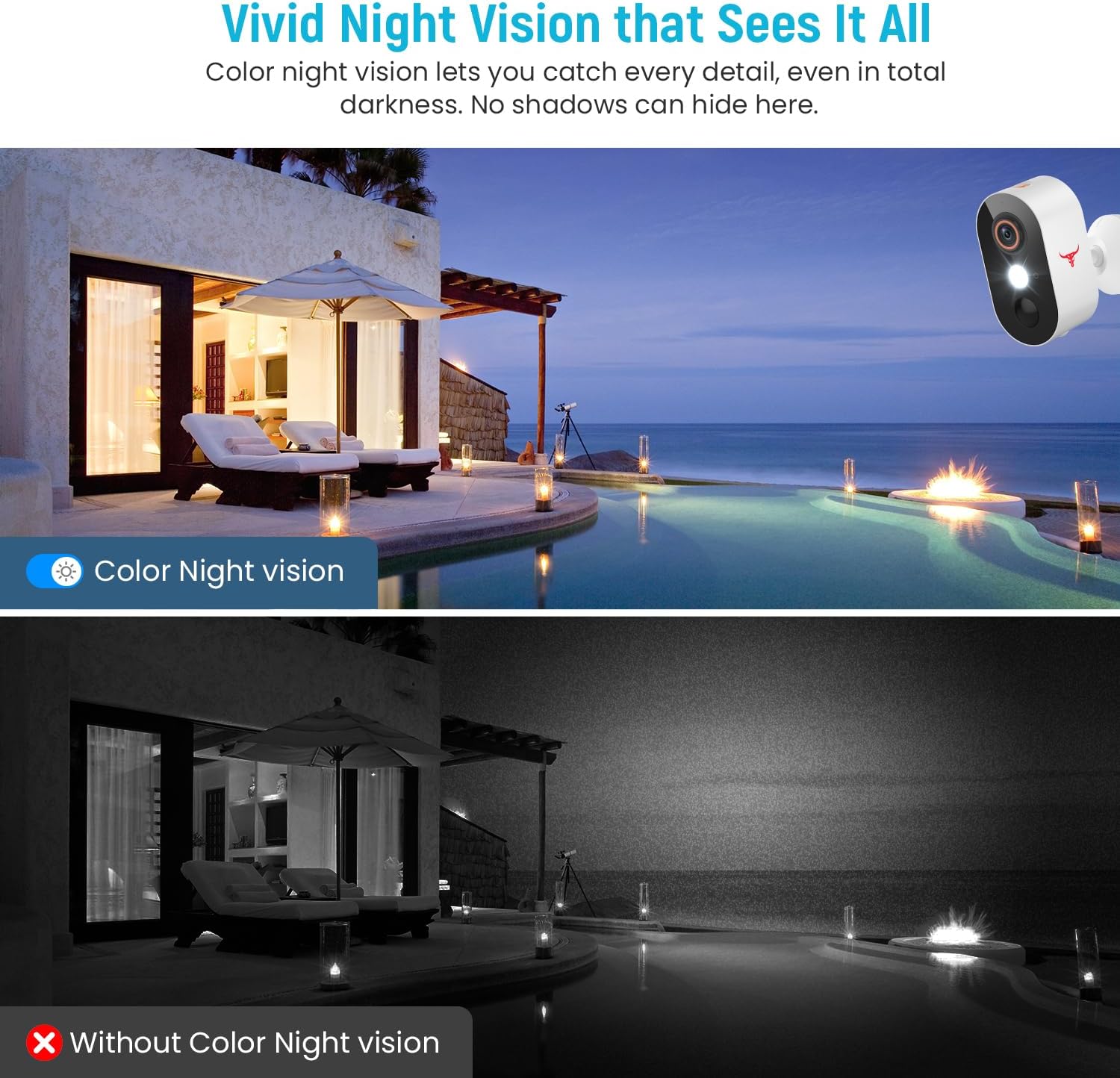
Figure 4.5: Comparison of Color Night Vision versus standard night vision.

Figure 4.6: Visual demonstration of Color Night Vision capability.
4.5 کلاؤڈ اسٹوریج
The Camtro M6 supports cloud storage for recording and reviewing ویڈیو footage. Cloud storage is sold separately and requires a subscription.
- Access recorded videos and playback history through the Camtro app.
- Manage your cloud storage subscription within the app or through the Camtro webسائٹ

Figure 4.7: Cloud Storage functionality for video recording and access.

Figure 4.8: Cloud storage capturing and storing important events.
5 دیکھ بھال
5.1 بیٹری چارجنگ
The Camtro M6 is battery-powered. When the battery level is low, you will receive a notification via the app. Remove the camera from its mount and charge it using a standard 5V USB charger. Battery life varies based on usage and environmental factors.
5.2 کیمرے کی صفائی
To ensure optimal performance, periodically clean the camera lens and housing. Use a soft, damp دھول اور گندگی کو صاف کرنے کے لئے کپڑا۔ سخت کیمیکلز یا کھرچنے والے مواد کے استعمال سے گریز کریں جو عینک یا ختم کو نقصان پہنچا سکتے ہیں۔
5.3 موسم کی مزاحمت
The Camtro M6 camera is designed for outdoor use and is resistant to various weather conditions, operating effectively in temperatures from 14°F to 140°F (-10°C to 60°C).

Figure 5.1: Camtro M6 camera demonstrating weather resistance.
6 خرابیوں کا سراغ لگانا
- کیمرہ وائی فائی سے منسلک نہیں ہے: Ensure your Wi-Fi network is 2.4GHz. Check Wi-Fi signal strength at the camera's location. Restart your router and the camera, then attempt pairing again.
- بار بار غلط حرکت کے انتباہات: Adjust the motion detection sensitivity settings in the app. Ensure AI Human Detection is enabled to filter out non-human movements.
- ویڈیو کا ناقص معیار: اپنے Wi-Fi کنکشن کی رفتار چیک کریں۔ یقینی بنائیں کہ کیمرے کا لینس صاف اور رکاوٹوں سے پاک ہے۔
- بیٹری تیزی سے ختم ہو رہی ہے: High activity areas or frequent live view access can reduce battery life. Ensure the camera is fully charged. Consider reducing motion detection sensitivity if alerts are excessive.
- دو طرفہ آڈیو مسائل: Ensure your phone's microphone and speaker are functioning correctly. Check the app's audio settings and your phone's volume.
7. وضاحتیں
| فیچر | تفصیلات |
|---|---|
| ماڈل کا نام | M6 (1080p Wi-Fi Security Camera) |
| انڈور / آؤٹ ڈور استعمال | آؤٹ ڈور |
| ویڈیو کیپچر ریزولوشن | 1080ص |
| کنیکٹوٹی ٹیکنالوجی | وائرلیس (صرف 2.4GHz Wi-Fi) |
| طاقت کا منبع | Battery Powered (2 Nonstandard Battery batteries included) |
| خصوصی خصوصیت | Motion Sensor, Color Night Vision, 2-Way Audio, AI Human Detection |
| ہم آہنگ آلات | اسمارٹ فون (Android، iOS) |
| چڑھنے کی قسم | وال ماؤنٹ |
| پروڈکٹ کے طول و عرض (L x W x H) | 2.8 x 1.7 x 3.4 انچ |
| شے کا وزن | 6.6 اونس |
| آپریٹنگ درجہ حرارت | 14°F سے 140°F (-10°C سے 60°C) |
| کارخانہ دار | Shenzhen Puge Electronics Co., Ltd |
8. وارنٹی اور سپورٹ
Camtro products are designed for reliability and performance. For warranty information, technical support, or service inquiries, please refer to the warranty card included with your product or visit the official Camtro website. You can also contact customer support through the Camtro app.