
1. اہم حفاظتی ہدایات
- ڈیوائس کو چلانے سے پہلے ان ہدایات کو اچھی طرح پڑھیں۔
- مستقبل کے حوالے کے لیے یہ ہدایات رکھیں۔
- مصنوعات اور آپریٹنگ ہدایات میں تمام انتباہات پر دھیان دیں۔
- تمام ہدایات پر عمل کریں۔
- اس آلے کو پانی کے قریب استعمال نہ کریں۔
- صرف خشک کپڑے سے صاف کریں۔
- وینٹیلیشن کے کسی بھی سوراخ کو مسدود نہ کریں۔ کارخانہ دار کی ہدایات کے مطابق انسٹال کریں۔
- گرمی کے کسی بھی ذرائع جیسے ریڈی ایٹرز، ہیٹ رجسٹر، چولہے، یا دیگر آلات (بشمول amplifiers) جو گرمی پیدا کرتی ہے۔
- بجلی کی ہڈی کو چلنے یا چوٹکی ہونے سے بچائیں، خاص طور پر پلگ، سہولت رسیپٹیکلز، اور اس مقام پر جہاں وہ آلات سے باہر نکلتے ہیں۔
- صرف مینوفیکچرر کی طرف سے مخصوص منسلکات/لوازمات استعمال کریں۔
- بجلی کے طوفان کے دوران یا طویل عرصے تک غیر استعمال ہونے پر اس آلات کو ان پلگ کریں۔
- تمام سروسنگ کو اہل سروس اہلکاروں سے رجوع کریں۔ سروسنگ کی ضرورت اس وقت ہوتی ہے جب اپریٹس کو کسی بھی طرح سے نقصان پہنچا ہو، جیسے کہ پاور سپلائی کی ہڈی یا پلگ کو نقصان پہنچا ہو، مائع پھیل گیا ہو یا کوئی چیز اپریٹس میں گر گئی ہو، اپریٹس بارش یا نمی کے سامنے آ گیا ہو، عام طور پر کام نہیں کرتا ہے۔ ، یا گرا دیا گیا ہے۔
2. پیکیج کے مشمولات
تصدیق کریں کہ نیچے دی گئی تمام اشیاء آپ کے پیکیج میں شامل ہیں:
- GOBOULT X400 Soundbar
- BoomX Subwoofer
- ریموٹ کنٹرول
- صارف دستی (یہ دستاویز)
- وارنٹی کارڈ
- پاور اڈاپٹر/کیبل
- معاون کیبل

تصویر: ختمview of the GOBOULT X400 system components and key features.
3. سیٹ اپ گائیڈ
3.1 جگہ کا تعین
For optimal audio performance, place the soundbar centrally below your television. Position the BoomX subwoofer on the floor near the soundbar, ensuring it has adequate space for bass dispersion. The two satellite speakers should be placed to the left and right of your listening area for a true 5.1 surround sound experience.

Image: Recommended placement of the soundbar and subwoofer in a home environment.
3.2 سب ووفر کو جوڑنا
Connect the wired BoomX subwoofer to the 'SUBWOOFER OUT' port on the soundbar using the provided cable.
3.3 پاور کنکشن
Connect the power cable to the soundbar's power input and then plug it into a wall outlet. Ensure the power switch on the soundbar (if present) is in the 'ON' position.
3.4 آڈیو ان پٹ کنکشنز
The GOBOULT X400 offers multiple connectivity options:
- HDMI ARC: For the best audio quality and control, connect an HDMI cable from your TV's HDMI ARC port to the soundbar's HDMI ARC port. This allows your TV remote to control the soundbar's volume.
- نظری: Connect an optical cable from your TV's optical output to the soundbar's OPTICAL input.
- AUX: Use a 3.5mm auxiliary cable to connect devices with an AUX output to the soundbar's AUX input.
- USB: آڈیو چلانے کے لیے USB پورٹ میں USB ڈرائیو داخل کریں۔ files براہ راست.
تصویر: تفصیلی view of the soundbar's input ports for various audio sources.
3.5 5.1 Channel Surround Sound Configuration
The X400 system includes a soundbar, a subwoofer, and two satellite speakers to deliver a 5.1 channel surround sound experience. Ensure the satellite speakers are connected to the soundbar and positioned appropriately to create an immersive audio field around the listener.

Image: Visual guide for setting up the 5.1 channel surround sound system.
4. آپریٹنگ ہدایات
4.1 پاور آن/آف
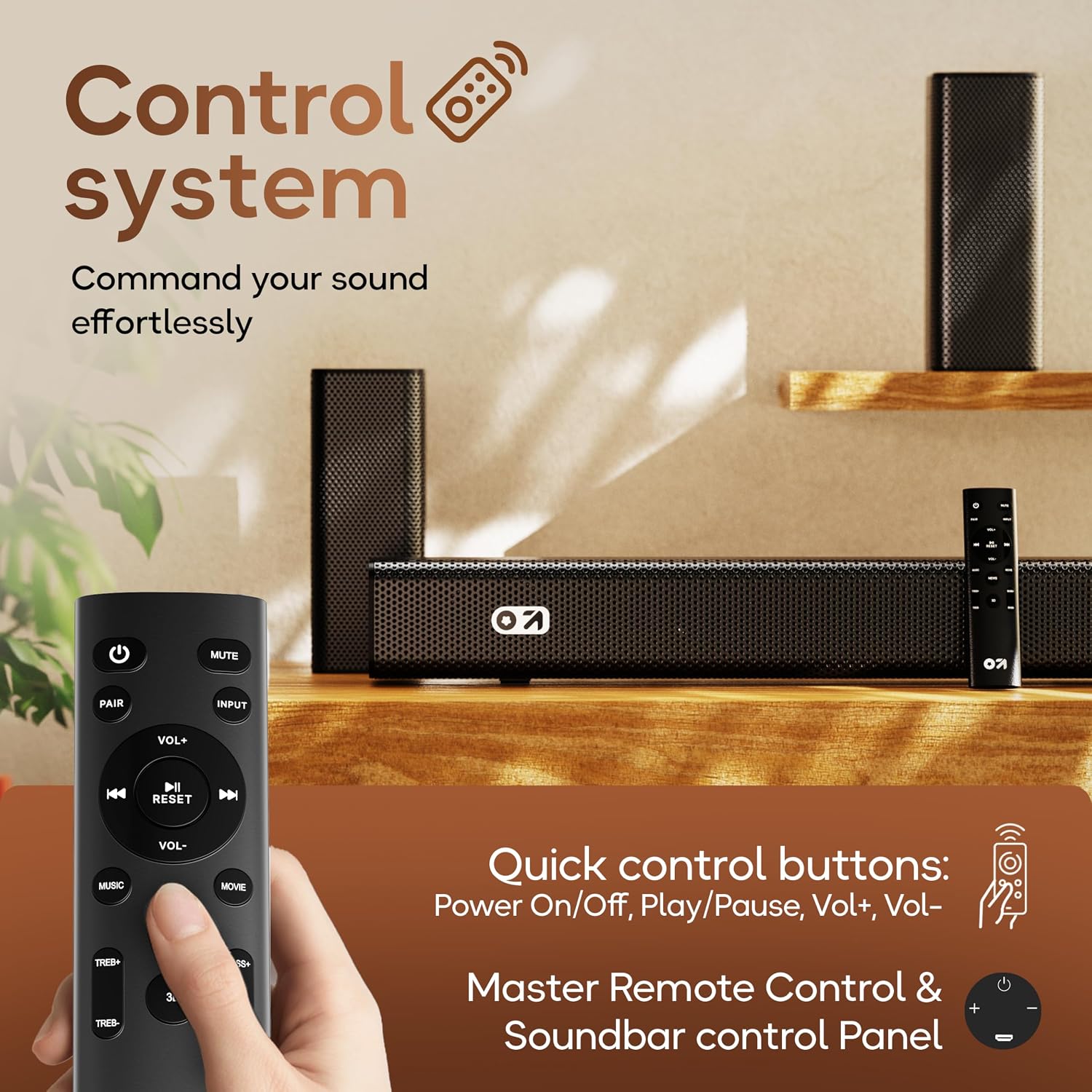
دبائیں طاقت یونٹ کو آن یا آف کرنے کے لیے ریموٹ کنٹرول یا ساؤنڈ بار پر بٹن۔
4.2 ان پٹ ماخذ کا انتخاب
دبائیں ان پٹ button on the remote control to cycle through available input sources: Bluetooth, HDMI ARC, Optical, AUX, USB. The selected input will be displayed on the soundbar's LED panel.
4.3 والیوم کنٹرول
استعمال کریں۔ VOL+ اور والیوم- buttons on the remote control or the soundbar to adjust the volume level.
4.4 بلوٹوتھ جوڑی
- Select Bluetooth input mode on the soundbar. The LED display will show "BT" and flash, indicating it's in pairing mode.
- اپنے موبائل ڈیوائس پر، بلوٹوتھ کو فعال کریں اور دستیاب آلات تلاش کریں۔
- Select "GOBOULT X400" from the list. Once connected, the LED display will show a steady "BT".
4.5 EQ موڈز
The GOBOULT X400 features multiple equalizer (EQ) modes to optimize your listening experience. Press the dedicated فلم, موسیقی، یا خبریں buttons on the remote control to switch between modes.
4.6 ریموٹ کنٹرول کے افعال

Image: Layout and functions of the GOBOULT X400 remote control.
- طاقت: ساؤنڈ بار کو آن یا آف کرتا ہے۔
- خاموش کریں: آواز کو خاموش یا غیر خاموش کرتا ہے۔
- ان پٹ: آڈیو ان پٹ ماخذ کو منتخب کرتا ہے۔
- VOL+/VOL-: ماسٹر والیوم ایڈجسٹ کرتا ہے۔
- چلائیں/روکیں: Controls media playback (Bluetooth/USB modes).
- پچھلا اگلا: Skips tracks (Bluetooth/USB modes).
- EQ Modes (Movie, Music, News): Selects preset sound profiles.
- جوڑا: بلوٹوتھ جوڑا بنانا شروع کرتا ہے۔
- دوبارہ تلاش کریں: آواز کی ترتیبات کو ڈیفالٹ پر دوبارہ ترتیب دیتا ہے۔
- TREB+/TREB-: تگنی سطحوں کو ایڈجسٹ کرتا ہے۔
- BASS+/BASS-: باس کی سطح کو ایڈجسٹ کرتا ہے۔
5 دیکھ بھال
To ensure the longevity and optimal performance of your GOBOULT X400 soundbar system, follow these maintenance guidelines:
- صفائی: Use a soft, dry cloth to clean the surfaces of the soundbar and subwoofer. Do not use liquid cleaners, aerosols, or abrasive materials, as they may damage the finish or internal components.
- وینٹیلیشن: اس بات کو یقینی بنائیں کہ ساؤنڈ بار اور سب ووفر پر وینٹیلیشن کے سوراخوں کو مسدود نہیں کیا گیا ہے۔ مناسب ہوا کا بہاؤ زیادہ گرمی کو روکتا ہے۔
- ذخیرہ: If storing the unit for an extended period, unplug it from the power outlet and store it in a cool, dry place away from direct sunlight and extreme temperatures.
- پانی کی نمائش: While the product is water-resistant, avoid direct exposure to water or high humidity to prevent damage.
6 خرابیوں کا سراغ لگانا
If you encounter issues with your GOBOULT X400, refer to the following common problems and solutions:
| مسئلہ | ممکنہ وجہ | حل |
|---|---|---|
| کوئی طاقت نہیں۔ | پاور کیبل منسلک نہیں ہے؛ پاور آؤٹ لیٹ فعال نہیں ہے۔ | یقینی بنائیں کہ پاور کیبل محفوظ طریقے سے ساؤنڈ بار اور ورکنگ پاور آؤٹ لیٹ سے منسلک ہے۔ |
| کوئی آواز نہیں۔ | Incorrect input source; Volume too low; Mute activated; Incorrect cable connection | Select the correct input source. Increase volume. Deactivate mute. Check audio cable connections. |
| بلوٹوتھ جوڑا ناکام ہو جاتا ہے۔ | ساؤنڈ بار جوڑا بنانے کے موڈ میں نہیں ہے۔ آلہ بہت دور؛ مداخلت | Ensure soundbar is in Bluetooth pairing mode. Move device closer. Clear previous pairings on your device. |
| ریموٹ کنٹرول کام نہیں کر رہا ہے۔ | Batteries depleted; Obstruction; Remote out of range | Replace remote control batteries. Remove any obstructions between remote and soundbar. Ensure remote is within operating range. |
| سب ووفر باس تیار نہیں کر رہا ہے۔ | Subwoofer cable loose; Bass level set too low | Check the connection of the subwoofer cable to the soundbar. Increase bass level using the remote control. |
7. وضاحتیں
Detailed technical specifications for the GOBOULT X400 Soundbar System:

تصویر: اندرونی view of the BoomX Dual Driver, highlighting its design for enhanced bass response.
| فیچر | تفصیلات |
|---|---|
| برانڈ | گوبولٹ |
| ماڈل کا نام | باس باکس ایکس 400 |
| اسپیکر زیادہ سے زیادہ آؤٹ پٹ پاور | 400 واٹ |
| آڈیو چینلز کی تعداد | 5.1 |
| کنیکٹوٹی ٹیکنالوجی | Auxiliary, Bluetooth, USB, HDMI ARC, Optical |
| بلوٹوتھ ورژن | 5.3 |
| بلوٹوتھ رینج | 10 میٹر |
| آڈیو آؤٹ پٹ وضع | گھیراؤ |
| اسپیکر کی قسم | وائرڈ سب ووفر کے ساتھ ساؤنڈ بار |
| کنٹرول کا طریقہ | ریموٹ |
| مصنوعات کی خصوصیات | Bass Boost, LED Light, USB Port, Water Resistant |
| طاقت کا منبع | کورڈڈ الیکٹرک |
| آئٹم کے طول و عرض (D x W x H) | 8D x 9W x 7.5H Centimeters (Soundbar) |
| شے کا وزن | 7.6 کلوگرام |
8. وارنٹی اور سپورٹ
8.1 وارنٹی کی معلومات
The GOBOULT X400 Soundbar System comes with a 1 سالہ صنعت کار کی وارنٹی from the date of purchase. This warranty covers manufacturing defects and ensures reliable operation under normal use. Please retain your purchase receipt and the warranty card for any warranty claims.
8.2 کسٹمر سپورٹ
For technical assistance, troubleshooting, or warranty inquiries, please contact GOBOULT customer support. Refer to the contact information provided on your warranty card or visit the official GOBOULT webسپورٹ کی تفصیلات کے لیے سائٹ۔