
1. تعارف
This manual provides comprehensive instructions for the operation and maintenance of your BAOFENG UV-32 Ham Radio. Please read this manual thoroughly before using the device to ensure proper function and safety.

Image: The BAOFENG UV-32 Ham Radio, showcasing its display and robust design.
2. مصنوعات کی خصوصیات
- Dual GPS/BeiDou Tracking: Share and request location coordinates in real-time, essential for off-grid communication.
- Bluetooth APP Programming: Wirelessly configure up to 1000 channels using a mobile application.
- سایڈست پاور آؤٹ پٹ: Select between 10W, 5W, or 1W to optimize range and battery life.
- One-touch Frequency Scan: Quickly clone channels for efficient setup.
- ایچ ڈی آڈیو: Equipped with a 40mm speaker for clear communication in noisy environments.
- Multi-band Monitoring: Supports AM/FM/VHF/UHF bands, including 108-136MHz for aviation.
- 1000-Channel Storage: Organize channels across 10 zones for various operational needs.
- USB-C چارجنگ: Convenient charging via USB-C ports, power banks, or car adapters.
- Dual Display/Dual Guard: بیک وقت دو تعدد کی نگرانی کریں۔

Image: Visual representation of the BAOFENG UV-32's key functions and features.
3. پیکیج کے مشمولات
تصدیق کریں کہ تمام اشیاء آپ کے پیکیج میں موجود ہیں:
- BAOFENG UV-32 Radio Unit
- اینٹینا
- Battery (Nonstandard Battery)
- Charger (Desktop Dock and AC Adapter)
- لانیارڈ
- صارف دستی (یہ دستاویز)
- Back Clip (for "1 Pack Black+Back Clip" variant)

Image: The BAOFENG UV-32 radio with its back clip, demonstrating portability.
4. سیٹ اپ گائیڈ
4.1 بیٹری کی تنصیب
- بیٹری پیک کو ریڈیو کی پشت پر موجود نالیوں کے ساتھ سیدھ میں رکھیں۔
- بیٹری کو اوپر کی طرف اس وقت تک سلائیڈ کریں جب تک کہ وہ اپنی جگہ پر کلک نہ کرے۔
- ہٹانے کے لیے، بیٹری ریلیز لیچ (اگر موجود ہو) دبائیں اور بیٹری کو نیچے کی طرف سلائیڈ کریں۔
4.2 اینٹینا اٹیچمنٹ
- ریڈیو کے اوپری حصے پر موجود کنیکٹر میں اینٹینا کو گھڑی کی سمت اسکرو جب تک کہ یہ انگلی سے تنگ نہ ہو۔ زیادہ تنگ نہ کریں۔
4.3 بیٹری چارج کرنا
The UV-32 supports two charging methods:
- ڈیسک ٹاپ چارجر: Place the radio (with battery installed) into the charging dock. Ensure the charging contacts align. The indicator light will show charging status.
- USB-C ڈائریکٹ چارجنگ: Connect a USB-C cable to the port on the side of the radio and to a power source (e.g., computer, wall adapter, power bank, car charger).
Charge the battery fully before first use. A full charge typically takes several hours.

Image: Demonstrates the versatility of Type-C charging for the BAOFENG UV-32.
5. آپریٹنگ ہدایات
5.1 پاور آن/آف اور والیوم
- پاور آن: گھمائیں۔ پاور/حجم knob clockwise until you hear a click.
- حجم کو ایڈجسٹ کریں: Continue rotating the knob to increase or decrease the volume.
- بجلی بند: Rotate the knob counter-clockwise until you hear a click.
5.2 چینل کا انتخاب
استعمال کریں۔ اوپر/نیچے arrow keys or the numeric keypad to select a channel. The display will show the current channel number and frequency.
5.3 ترسیل (PTT)
منتقل کرنے کے لیے، دبائیں اور تھامیں پی ٹی ٹی (پش ٹو ٹاک) button on the side of the radio. Speak clearly into the microphone. Release the PTT button to receive.
5.4 Dual Display / Dual Guard
The UV-32 can monitor two frequencies simultaneously. Activate the Dual Guard function through the radio's menu or a dedicated button (refer to the on-screen interface for specific options).

Image: The radio's screen displaying the Dual Watch feature, allowing simultaneous monitoring of two channels.
5.5 APP Programming (Bluetooth)
- Download the "Radio Frequency Programmer" mobile application from your device's app store.
- Enable Bluetooth on your mobile device and the UV-32 radio.
- Open the app and follow the on-screen instructions to connect to your radio.
- You can then wirelessly edit channel information, frequencies, and other settings.

Image: The BAOFENG UV-32 in programming mode, with a smartphone displaying the channel programming application.
5.6 One-touch Frequency Scan / Copy Frequency
This feature allows for quick cloning of frequencies from another radio. Press and hold the designated scan button (e.g., SK1) to initiate the smart scan and copy process. The radio will detect and store the active frequency.

Image: Illustration of the one-key frequency pairing feature between two BAOFENG UV-32 radios.
5.7 Adjustable Power Output
Access the menu to select your desired power output: 10W (High), 5W (Mid), or 1W (Low). Higher power provides greater range but consumes more battery. Lower power conserves battery for shorter distances.
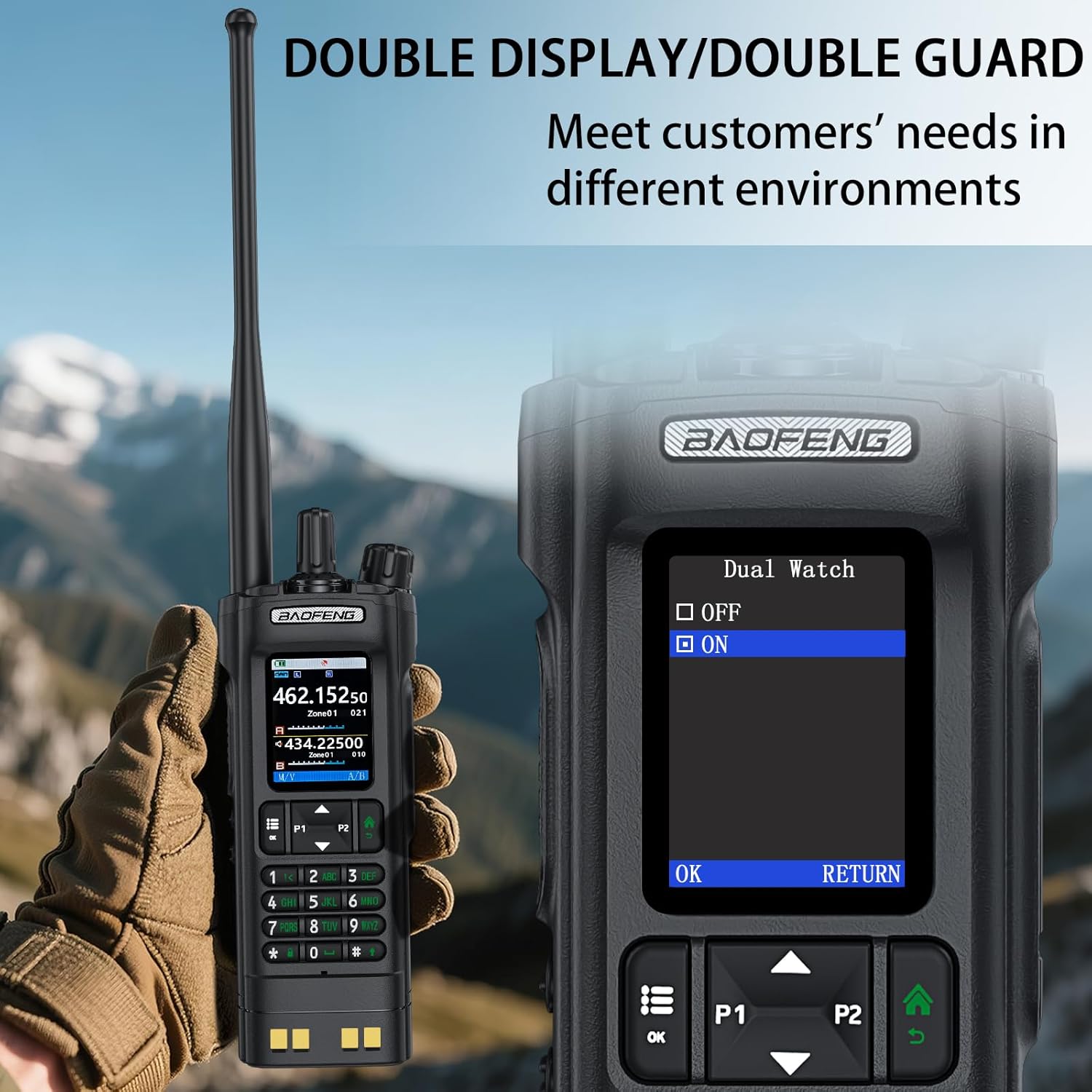
Image: The BAOFENG UV-32's power adjustment menu, showing options for 10W, 5W, and 1W output.
5.8 GPS/BeiDou Tracking
The integrated GPS/BeiDou module allows for real-time location sharing. Refer to the radio's menu for GPS functions, including sending your coordinates and requesting those of other UV-32 users.
6 دیکھ بھال
- صفائی: ایک نرم استعمال کریں، ڈیamp ریڈیو کے بیرونی حصے کو صاف کرنے کے لیے کپڑا۔ سخت کیمیکل یا سالوینٹس کا استعمال نہ کریں۔
- بیٹری کی دیکھ بھال: Avoid fully discharging the battery frequently. Store the radio and battery in a cool, dry place when not in use for extended periods.
- اینٹینا: Ensure the antenna is securely attached but not overtightened. Avoid bending or stressing the antenna.
- پانی کی مزاحمت: یہ آلہ ہے۔ پانی مزاحم نہیں. Protect it from rain, splashes, and immersion in water.
7 خرابیوں کا سراغ لگانا
| مسئلہ | ممکنہ وجہ | حل |
|---|---|---|
| ریڈیو آن نہیں ہے۔ | بیٹری کم ہے یا صحیح طریقے سے انسٹال نہیں ہے۔ | بیٹری کو چارج کریں یا اسے محفوظ طریقے سے دوبارہ انسٹال کریں۔ |
| منتقل یا وصول نہیں کیا جا سکتا۔ | Incorrect frequency/channel, low battery, or antenna issue. | Verify frequency, charge battery, check antenna connection. Ensure you are within range of other radios. |
| خراب آڈیو کوالٹی۔ | Low signal strength, interference, or incorrect squelch setting. | Move to an area with better signal, adjust squelch level, check for sources of interference. |
| APP programming fails to connect. | Bluetooth not enabled, app not updated, or radio not in programming mode. | Ensure Bluetooth is on for both devices, update the app, and follow app instructions to put the radio in programming mode. |
8. وضاحتیں
| برانڈ | باوفینگ |
| ماڈل نمبر | UV-32 |
| چینلز کی تعداد | 1000 |
| تعدد کی حد | UHF350-390/400-520MHz, VHF136-174MHz/220-260MHz |
| بات کرنے کی حد زیادہ سے زیادہ | 10 کلومیٹر (تقریباً 6.2 میل) |
| پاور آؤٹ پٹ | 10W / 5W / 1W (Adjustable) |
| والیومtage | 7.4 وولٹ (DC) |
| پانی کی مزاحمت کی سطح | پانی مزاحم نہیں |
| کنیکٹیویٹی پروٹوکول | بلوٹوتھ |
| چارج کرنے کی قسم | USB-C, Desktop Dock |
| طول و عرض (تقریبا) | Height: 6.26", Width: 2.28", Depth: 1.57" |
| وزن (تقریباً) | 13.58 اوز |

Image: Detailed dimensions and weight of the BAOFENG UV-32 radio.
9. وارنٹی اور سپورٹ
Your BAOFENG UV-32 Ham Radio comes with a 1 سال کی وارنٹی خریداری کی تاریخ سے. یہ وارنٹی عام استعمال کے تحت مینوفیکچرنگ نقائص کا احاطہ کرتی ہے۔
For technical support, warranty claims, or service inquiries, please contact BAOFENG customer service through their official webسائٹ یا خوردہ فروش جہاں پروڈکٹ خریدی گئی تھی۔ وارنٹی کی توثیق کے لیے براہ کرم اپنی خریداری کا ثبوت اپنے پاس رکھیں۔