
تعارف
Thank you for choosing the Vibox IV-584 Gaming PC. This manual provides essential information for setting up, operating, maintaining, and troubleshooting your new computer. The Vibox IV-584 is a high-performance desktop PC designed for gaming and demanding tasks, featuring an AMD Ryzen 7 5700X processor, NVIDIA GeForce RTX 3050 graphics, 16GB of RAM, and a 500GB SSD, pre-installed with Windows 11 Home.
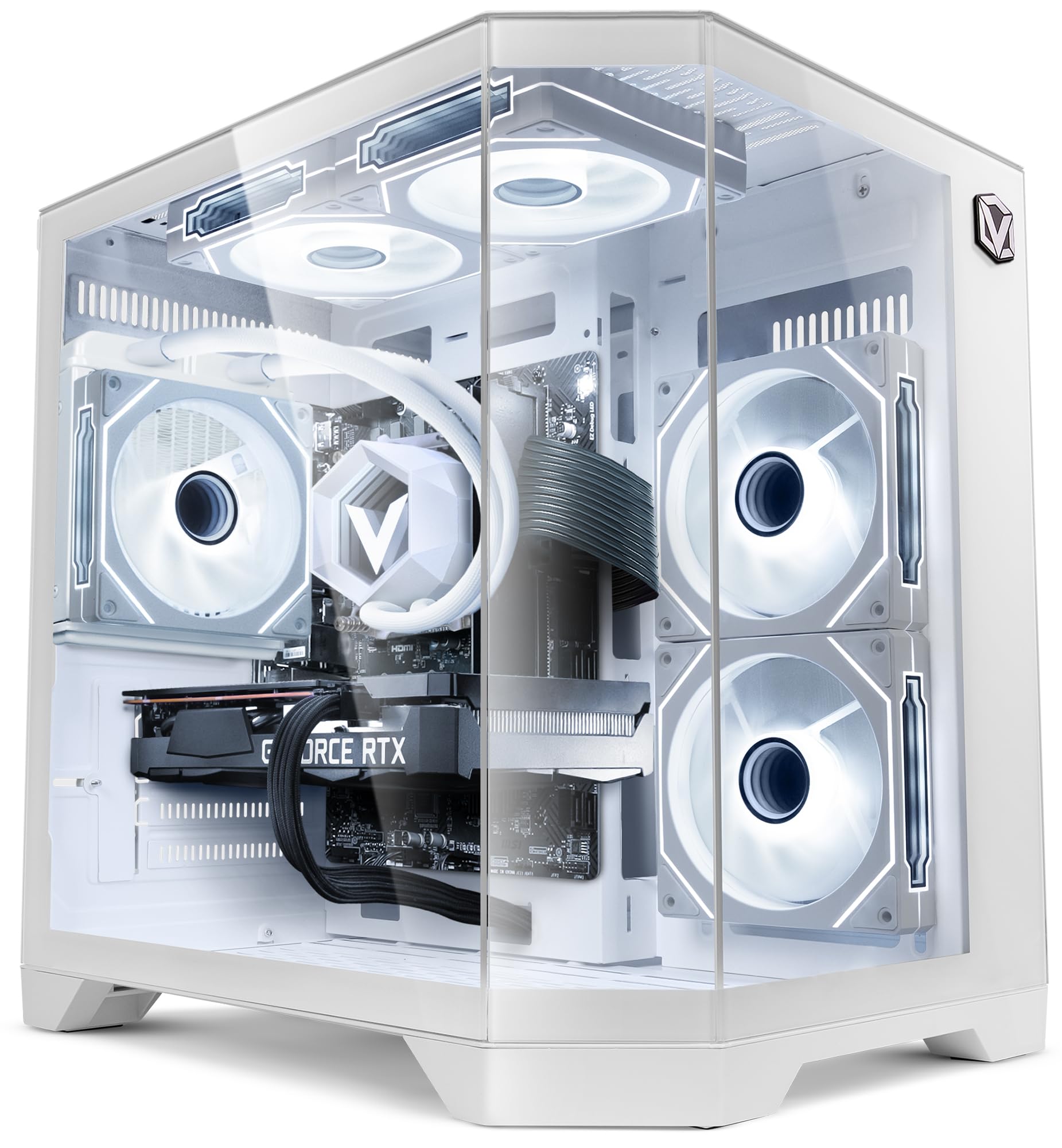
Image: The Vibox IV-584 Gaming PC, showcasing its internal components and sleek design.
1. سیٹ اپ
Follow these steps to set up your Vibox IV-584 Gaming PC:
- پی سی کو کھولیں: Carefully remove the computer and all accessories from the packaging. Retain the packaging for future transport or warranty claims.
- پیری فیرلز کو جوڑیں:
- اپنے مانیٹر کو پی سی کے عقب میں واقع گرافکس کارڈ پورٹس (HDMI یا DisplayPort) سے جوڑیں۔
- اپنے کی بورڈ اور ماؤس کو دستیاب USB پورٹس سے مربوط کریں۔
- سپیکر، ہیڈ فون، یا بیرونی ڈرائیوز جیسے کسی بھی دوسرے پیری فیرلز کو جوڑیں۔
- نیٹ ورک کنکشن:
- For a wired connection, connect an Ethernet cable from your router to the Ethernet port on the PC.
- For a wireless connection, ensure the included Wi-Fi adapter is installed (if not pre-installed) and follow Windows 11 instructions to connect to your network.
- پاور کنکشن: Connect the power cable to the power supply unit (PSU) at the rear of the PC, then plug it into a wall outlet.
- ابتدائی بوٹ: Press the power button on the front of the PC. The system will boot into Windows 11. Follow the on-screen instructions for initial setup, including language, region, and user account creation.

تصویر: ختمview of the versatile connectivity ports, including USB 2.0, USB 3.0, power button, and audio jacks.
2. آپ کے کمپیوٹر کو آپریٹ کرنا
Your Vibox IV-584 comes with Windows 11 Home pre-installed, offering a modern and efficient operating environment.
- Windows 11 Basics: Familiarize yourself with the Windows 11 interface, including the Start Menu, Taskbar, and File Explorer. Microsoft provides extensive online resources for learning Windows 11.
- گیمنگ: This PC is optimized for gaming. Ensure your graphics drivers are up to date for the best performance. You can download the latest drivers from the NVIDIA webسائٹ
- سافٹ ویئر کی تنصیب: Install your preferred games and applications. The 500GB SSD provides fast loading times for your operating system and frequently used software.
- نیٹ ورک کنیکٹیویٹی: Use the integrated Wi-Fi or Ethernet connection to access the internet, download games, and play online.

Image: Key features of Windows 11 Home, highlighting benefits for gaming such as faster loading times with DirectStorage, AutoHDR, and optimized CPU performance.
3 دیکھ بھال
باقاعدگی سے دیکھ بھال آپ کے کمپیوٹر کی لمبی عمر اور بہترین کارکردگی کو یقینی بناتی ہے:
- صفائی:
- Keep the exterior of the PC clean with a soft, dry cloth.
- Periodically clean dust from the air vents and fans using compressed air. Ensure the PC is powered off and unplugged before cleaning.
- سافٹ ویئر اپ ڈیٹس: Regularly check for and install updates for Windows 11, graphics drivers (NVIDIA), and other installed software to ensure security and performance.
- سسٹم بیک اپ: Create regular backups of your important data to an external drive or cloud storage to prevent data loss.
- مائع کولنگ: The PC features a liquid cooling system. This system is generally maintenance-free. Avoid opening the liquid cooling unit. Ensure proper airflow around the PC to aid cooling.

Image: An illustration demonstrating the optimized inverse airflow design for next-generation cooling within the PC chassis.
4 خرابیوں کا سراغ لگانا
Here are solutions to some common issues:
- پی سی آن نہیں ہوتا:
- Check if the power cable is securely connected to both the PC and the wall outlet.
- Ensure the power switch on the PSU (at the back of the PC) is in the 'ON' position.
- ایک مختلف پاور آؤٹ لیٹ آزمائیں۔
- مانیٹر پر کوئی ڈسپلے نہیں:
- Verify that the monitor is powered on and the video cable is securely connected to the graphics card (not the motherboard's integrated video ports).
- یقینی بنائیں کہ آپ کے مانیٹر پر صحیح ان پٹ سورس کا انتخاب کیا گیا ہے۔
- Try connecting the monitor to a different video port on the graphics card if available.
- سست کارکردگی:
- غیر ضروری پس منظر کی ایپلی کیشنز کو بند کریں۔
- Ensure Windows and graphics drivers are up to date.
- میلویئر یا وائرس کی جانچ کریں۔
- Monitor system temperatures to ensure the PC is not overheating.
- نیٹ ورک کنیکٹیویٹی کے مسائل:
- وائرڈ کنکشنز کے لیے، ایتھرنیٹ کیبل اور روٹر کی حیثیت چیک کریں۔
- For Wi-Fi, ensure the adapter is properly installed and drivers are updated. Restart your router and PC.
- Run Windows Network Troubleshooter.
5. وضاحتیں
Detailed technical specifications for your Vibox IV-584 Gaming PC:
| جزو | تفصیلات |
|---|---|
| برانڈ | وائباکس |
| ماڈل نمبر | IV-584 |
| پروسیسر | AMD Ryzen 7 5700X (8 Cores, up to 4.6 GHz) |
| گرافکس کارڈ | NVIDIA GeForce RTX 3050 6GB GDDR6 |
| رام | 16GB DDR4 3200 MHz (Dual-channel) |
| ذخیرہ | 500 جی بی ایس ایس ڈی |
| آپریٹنگ سسٹم | ونڈوز 11 ہوم |
| کنیکٹوٹی | Wi-Fi (300 Mbps adapter included), Ethernet |
| بندرگاہیں | USB (various), HDMI, DisplayPort |
| کولنگ | Liquid Cooling, RGB Fans |
| کیس ڈیزائن | Tempered Glass (3 panels), RGB Lighting |
| طول و عرض (L x W x H) | تقریباً 35 x 28 x 38 سینٹی میٹر |
| پاور پلگ کی قسم | Type C/EF - 2 pin (EU/FR-DE hybrid) |

Image: The Vibox AIO 120mm liquid cooling unit, designed for efficient and compact cooling.

Image: Vibox Hex RGB Infinity 120mm fans, offering multiple colors and RGB modes for customization.

Image: The PC case design featuring three tempered glass panels, showcasing its elegant and high-end look, along with approximate dimensions.
6. وارنٹی اور سپورٹ
Your Vibox IV-584 Gaming PC comes with comprehensive warranty and support:
- مصنوعات کی وارنٹی: The PC includes a 2-year warranty on parts and lifetime labor warranty. Please refer to your purchase documentation for full terms and conditions.
- تکنیکی معاونت: For technical assistance, troubleshooting beyond this manual, or warranty claims, please contact Vibox customer support through their official webسائٹ یا آپ کی خریداری کے ساتھ فراہم کردہ رابطے کی معلومات۔